
How to Use a Micro-USB Cable Splitter with UbiBot Devices
2025-10-29 01:06:34
1. Using a Micro-USB Cable Splitter with WS1 Pro / WS1 Pro-L
A Micro-USB Cable Splitter can be connected to either Micro-USB port on the WS1 Pro or WS1 Pro-L.
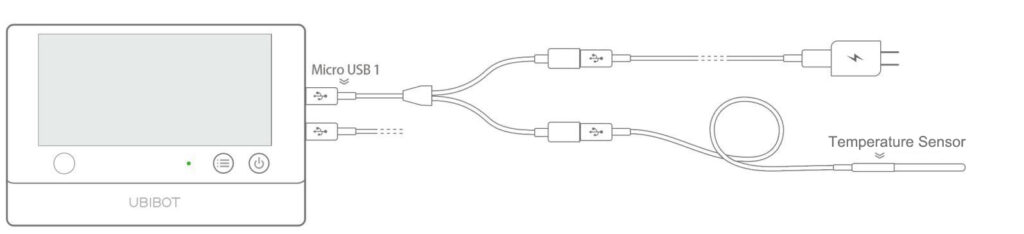
When connected to Micro-USB 1, one end can be used for charging or connecting to PC Tools, while the other end can connect to an external temperature sensor.
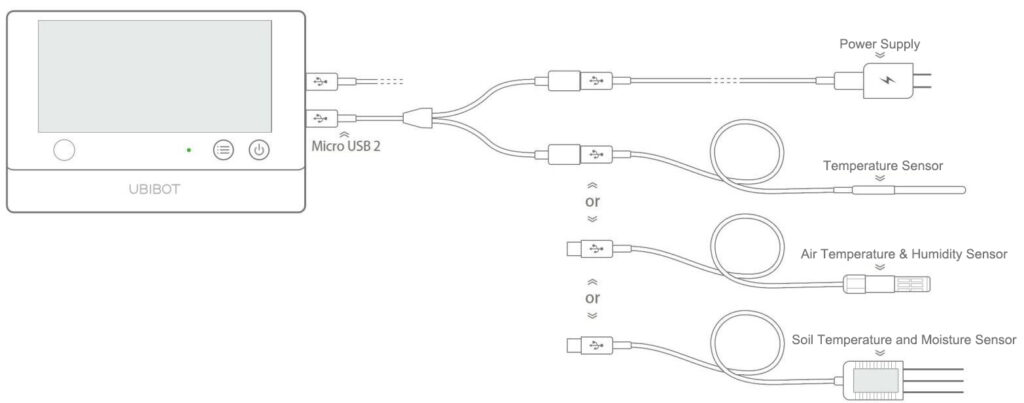
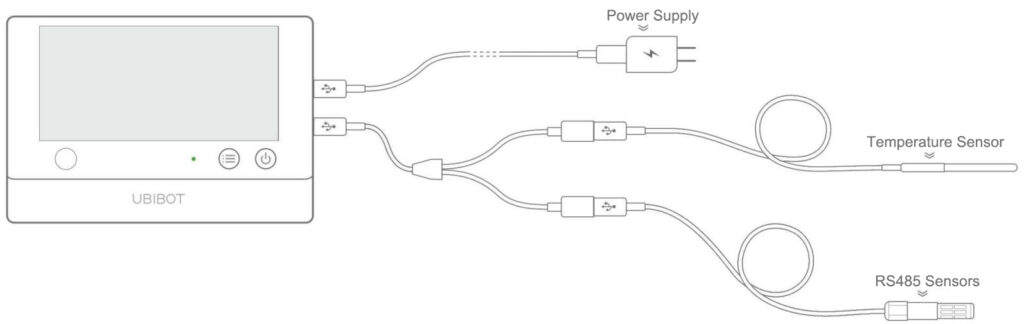
When connected to Micro-USB 2, the splitter can be used in two ways: one end can provide power for charging while the other connects to an external temperature sensor, an RS485 air temperature & humidity sensor, or a soil temperature & humidity sensor; alternatively, one end can connect to an external temperature sensor while the other connects to an RS485 air temperature & humidity sensor or a soil temperature and moisture sensor.
2. Using a Micro-USB Cable Splitter with WS1
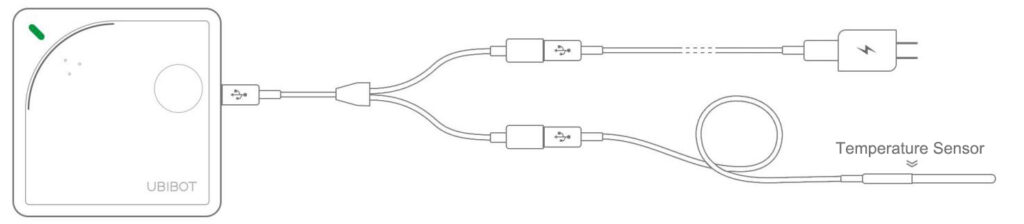
Connect the Micro-USB Cable Splitter to the Micro-USB port on the WS1 device. One end of the splitter should connect to an external temperature sensor, while the other end connects to a DC power cable. This setup allows the device to use an external temperature sensor while simultaneously receiving DC power.
A Micro-USB Cable Splitter can be connected to either Micro-USB port on the WS1 Pro or WS1 Pro-L.
When connected to Micro-USB 1, one end can be used for charging or connecting to PC Tools, while the other end can connect to an external temperature sensor.
When connected to Micro-USB 2, the splitter can be used in two ways: one end can provide power for charging while the other connects to an external temperature sensor, an RS485 air temperature & humidity sensor, or a soil temperature & humidity sensor; alternatively, one end can connect to an external temperature sensor while the other connects to an RS485 air temperature & humidity sensor or a soil temperature and moisture sensor.
2. Using a Micro-USB Cable Splitter with WS1
Connect the Micro-USB Cable Splitter to the Micro-USB port on the WS1 device. One end of the splitter should connect to an external temperature sensor, while the other end connects to a DC power cable. This setup allows the device to use an external temperature sensor while simultaneously receiving DC power.