
Using UbiBot Micro-USB Cable Splitter
2025-10-29 01:53:24
Micro-USB Cable Splitter
1. Product Overview
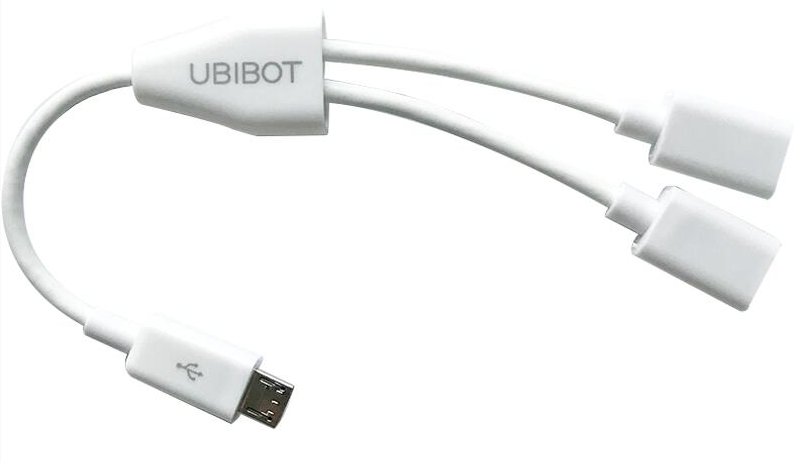
The UbiBot Micro-USB Cable Splitter converts a single Micro-USB port into two Micro-USB female ports. It can be used with UbiBot WS1 and WS1 Pro devices.
2. External Interface Overview of WS1 and WS1 Pro
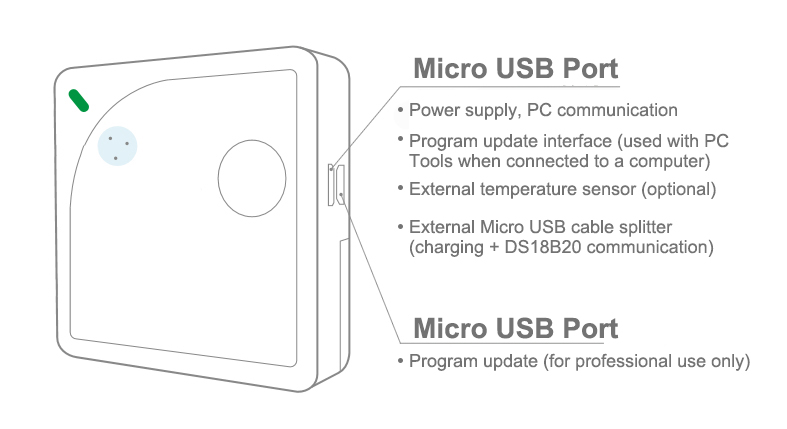
WS1: The WS1 has only one Micro-USB port, so only one splitter can be connected.
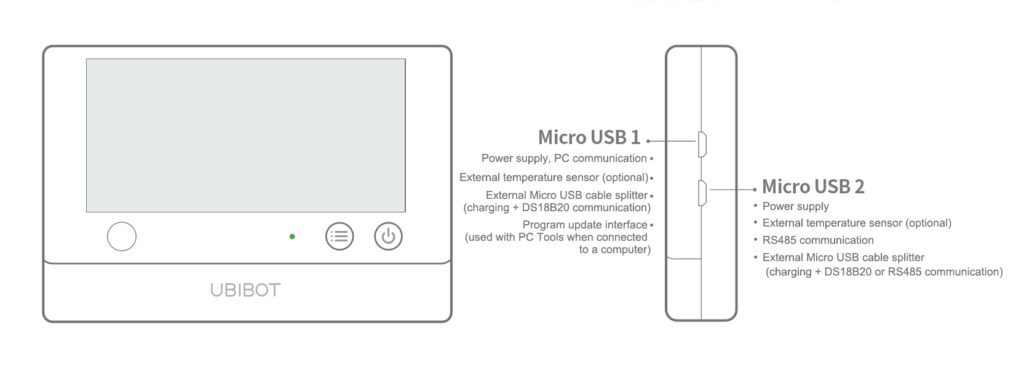
WS1 Pro: The WS1 Pro has two Micro-USB ports, and both ports can be connected to a splitter.
3. Instructions for Use
The Micro-USB Cable Splitter offers multiple connection options when used with WS1 and WS1 Pro devices.
3.1 Using with WS1
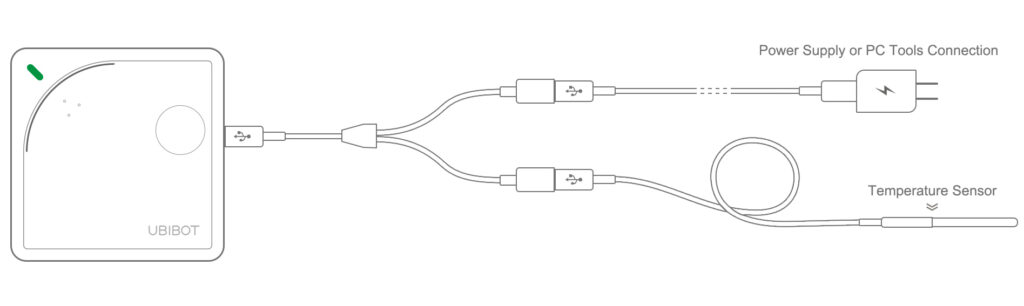
When used with WS1, the splitter connects to the Micro-USB port. One end connects to a power adapter, and the other end connects to an external temperature sensor.
The WS1 can also work without the splitter by directly connecting a temperature sensor and using two AA batteries for power. In this case, please pay attention to the battery level to avoid unexpected shutdown.
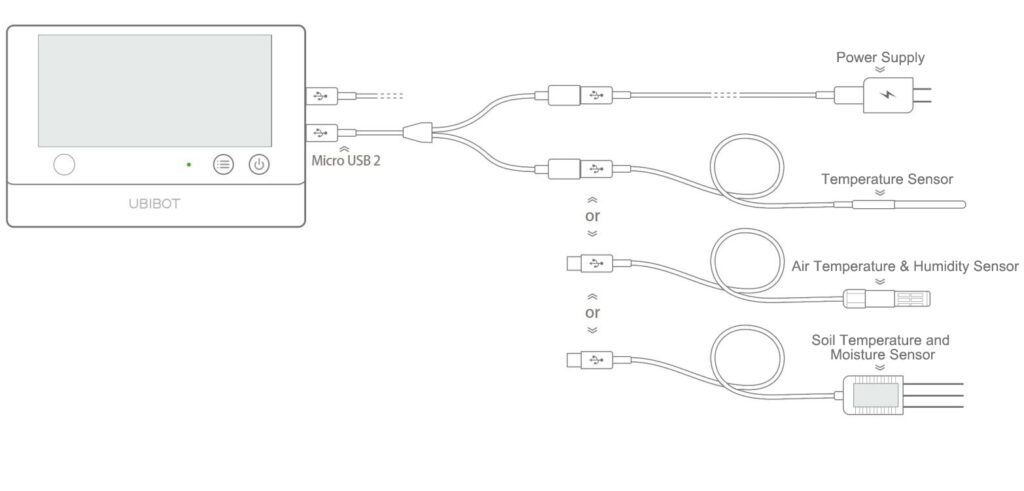
(2) When a splitter is connected to Micro-USB2, one end can be connected to a power adapter, and the other end can be connected to an external temperature sensor, or to an RS485 sensor such as an air temperature & humidity sensor, soil temperature and moisture sensor, wind speed sensor, or light sensor.
(3) The splitter can also connect two different types of sensors at the same time, for example, one external temperature sensor and one RS485 sensor. RS485 sensors can include air temperature & humidity, soil temperature and moisture sensor, or wind speed sensor.
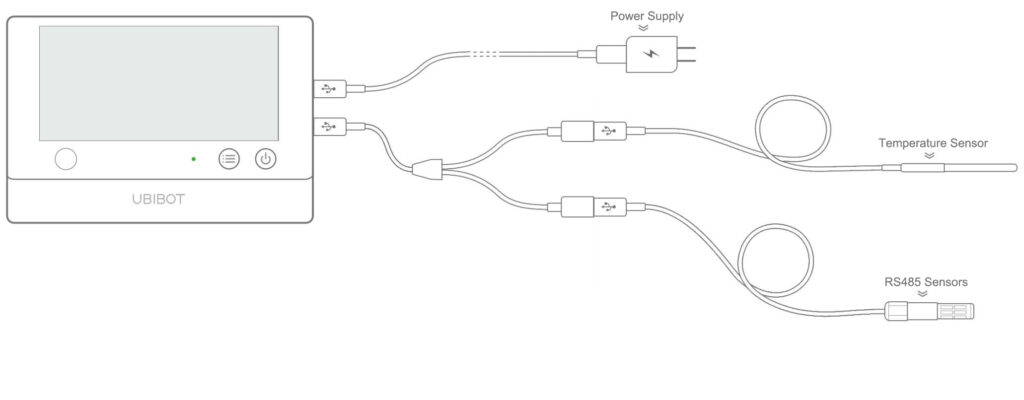
⚠️ Note: The splitter cannot be used to connect two identical external sensors at the same time. For example, do not connect two temperature sensors, or two RS485 sensors simultaneously, as this may cause data errors.
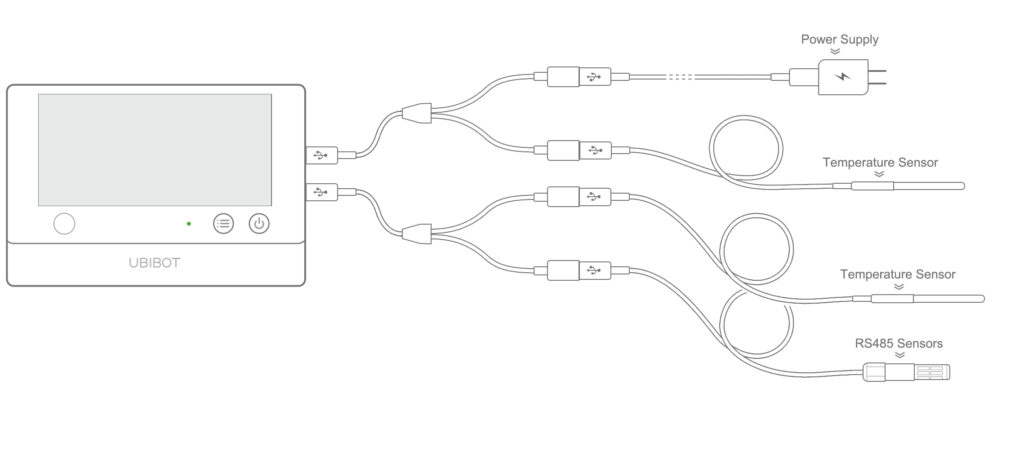
(4) The two Micro-USB ports on the WS1 Pro can also be used in combination with Micro-USB Cable Splitters to maximize the functionality of the device, as shown below.
Alternatively, both Micro-USB ports can be used independently without a splitter. Micro-USB1 can be connected directly to a power adapter, PC Tools, or an external temperature sensor. Micro-USB2 can be connected directly to a power adapter, an external temperature sensor, or an RS485 sensor. The device can be powered either by batteries or through any of the Micro-USB ports.
It is clear that using a Micro-USB Cable Splitter greatly increases the convenience and expandability of the WS1 Pro.
Using a Micro-USB Cable Splitter significantly enhances the convenience and expandability of the WS1 Pro.
1. Product Overview
The UbiBot Micro-USB Cable Splitter converts a single Micro-USB port into two Micro-USB female ports. It can be used with UbiBot WS1 and WS1 Pro devices.
2. External Interface Overview of WS1 and WS1 Pro
WS1: The WS1 has only one Micro-USB port, so only one splitter can be connected.
WS1 Pro: The WS1 Pro has two Micro-USB ports, and both ports can be connected to a splitter.
3. Instructions for Use
The Micro-USB Cable Splitter offers multiple connection options when used with WS1 and WS1 Pro devices.
3.1 Using with WS1
When used with WS1, the splitter connects to the Micro-USB port. One end connects to a power adapter, and the other end connects to an external temperature sensor.
The WS1 can also work without the splitter by directly connecting a temperature sensor and using two AA batteries for power. In this case, please pay attention to the battery level to avoid unexpected shutdown.
(2) When a splitter is connected to Micro-USB2, one end can be connected to a power adapter, and the other end can be connected to an external temperature sensor, or to an RS485 sensor such as an air temperature & humidity sensor, soil temperature and moisture sensor, wind speed sensor, or light sensor.
(3) The splitter can also connect two different types of sensors at the same time, for example, one external temperature sensor and one RS485 sensor. RS485 sensors can include air temperature & humidity, soil temperature and moisture sensor, or wind speed sensor.
⚠️ Note: The splitter cannot be used to connect two identical external sensors at the same time. For example, do not connect two temperature sensors, or two RS485 sensors simultaneously, as this may cause data errors.
(4) The two Micro-USB ports on the WS1 Pro can also be used in combination with Micro-USB Cable Splitters to maximize the functionality of the device, as shown below.
Alternatively, both Micro-USB ports can be used independently without a splitter. Micro-USB1 can be connected directly to a power adapter, PC Tools, or an external temperature sensor. Micro-USB2 can be connected directly to a power adapter, an external temperature sensor, or an RS485 sensor. The device can be powered either by batteries or through any of the Micro-USB ports.
It is clear that using a Micro-USB Cable Splitter greatly increases the convenience and expandability of the WS1 Pro.
Using a Micro-USB Cable Splitter significantly enhances the convenience and expandability of the WS1 Pro.