

UBiBot Logo
UBiBot Logo
  • UBiBot Logo
  • Home
  • Products

    NEW

  • Pricing
  • Support
  • About Us
  • Download
  • magnifying-glass  Search
  • magnifying-glass header-close
  • Sign in Sign in
    Public Web Console Public Web Console
    On-Premises App Center On-Premises App Center
  • Home
  • Products

    NEW

  • Pricing
  • Support
  • About us
  • Download
  •  Public Web Console
  •  On-Premises App Center
  • Where to Buy

Learn Hub

Explore Knowledge Academic Research In-depth Tech

Share

LinkedIn

Facebook

X (Twitter)

Newsletter Signup

Table of contents

    How to Get an Alert Before a Walk-In Cooler Fails?

    Published: September 29, 2026

    Update: September 29, 2026

    By Susan Jones

    Introduction

    A door that does not close, compressor fault, defrost problem or power interruption can push a walk-in cooler outside its intended range after hours. When the first signal is a warm product check the next morning, the response is already late. Manual checks remain useful, but they cannot observe every hour or notify an on-call person.

    This guide is for food-safety, restaurant, grocery, cold-store, facilities and refrigeration teams selecting monitoring for fixed cold rooms and freezers. It explains how to choose a probe location, alert logic, connectivity, records and workflow. It does not cover shipment tracking, vehicle telematics or refrigeration control.
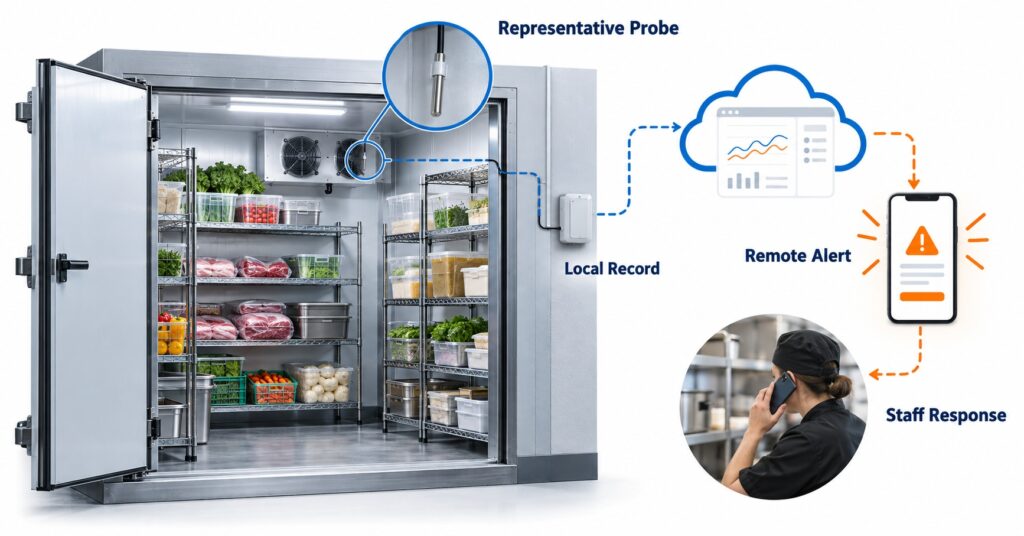
    Restaurant walk-in cooler temperature monitoring system with an external probe, phone alert, and after-hours staff response path.

    A restaurant walk-in cooler after hours with a representative temperature probe, phone alarm, and staff response path.

    Quick Summary

    A practical system combines a temperature probe, logger, communications path, data platform and escalation workflow. Temperature is essential; door, power, humidity or equipment inputs are useful only when they change the response. Place the main probe at a representative risk point, not beside a cold-air discharge or directly in the doorway. Use a short delay for normal loading, then escalate a sustained excursion, sensor fault, power issue or lost connection.

    Wi-Fi is simple where coverage is reliable. Ethernet suits managed networks; cellular can reduce dependence on local internet; LoRa and RS485 suit distributed or industrial architectures. Compare sensing, local data continuity, alarm delivery, acknowledgement, calibration, integration and operating effort. Choose the least-complex route that protects the site’s response window.
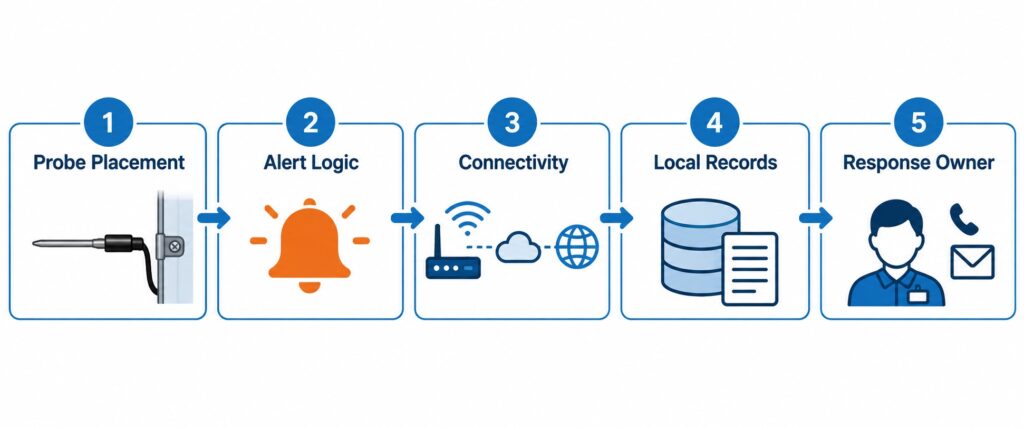
    Five selection factors for walk-in cooler monitoring including probe placement, alert logic, connectivity, records, and response owner.

    A reliable walk-in cooler monitoring system combines probe placement, alert logic, connectivity, records, and a response owner.

    Walk in Cooler Temperature Monitoring Selection Guide Key Takeaway

    The right walk-in cooler alert is not a single temperature threshold. It is a documented workflow that measures a representative point, distinguishes a short door-open event from a sustained risk, retains data during a connection loss, and escalates to a person who can protect food and call refrigeration service.

    Why Environmental Monitoring Matters in Food Cold Storage

    An excursion can trigger product assessment, disposal, resupply and investigation. Continuous records show when drift began, how long it lasted, and whether an alert was acknowledged. That evidence is more useful than one daily reading when a manager must decide what to do next.

    Monitoring also supports continuity. A restaurant may have one cooler; a grocery operator may have many. Both need to see which exception needs attention first. Manual checks remain part of a food-safety plan, but they are periodic snapshots and do not create an after-hours response path.

    The FDA Food Code is a model code that jurisdictions may adopt or modify, not a universal setpoint. Section 4-204.112 addresses temperature-measuring devices. Singapore food rules also require suitable temperature-measuring equipment for chiller, freezer and cold-room use. Limits, records and actions must follow local requirements and the site food-safety process.

    What Environmental Parameters Should Be Monitored

    Temperature is the essential measurement. The decision is usually more complicated than choosing a sensor range. The probe must represent the risk the team is trying to manage: room air, product-adjacent air, or a buffered simulation of product temperature. Add parameters only when they improve diagnosis or change the response. For example, a door contact may explain a short warm event; it should not be used as a substitute for a temperature probe.
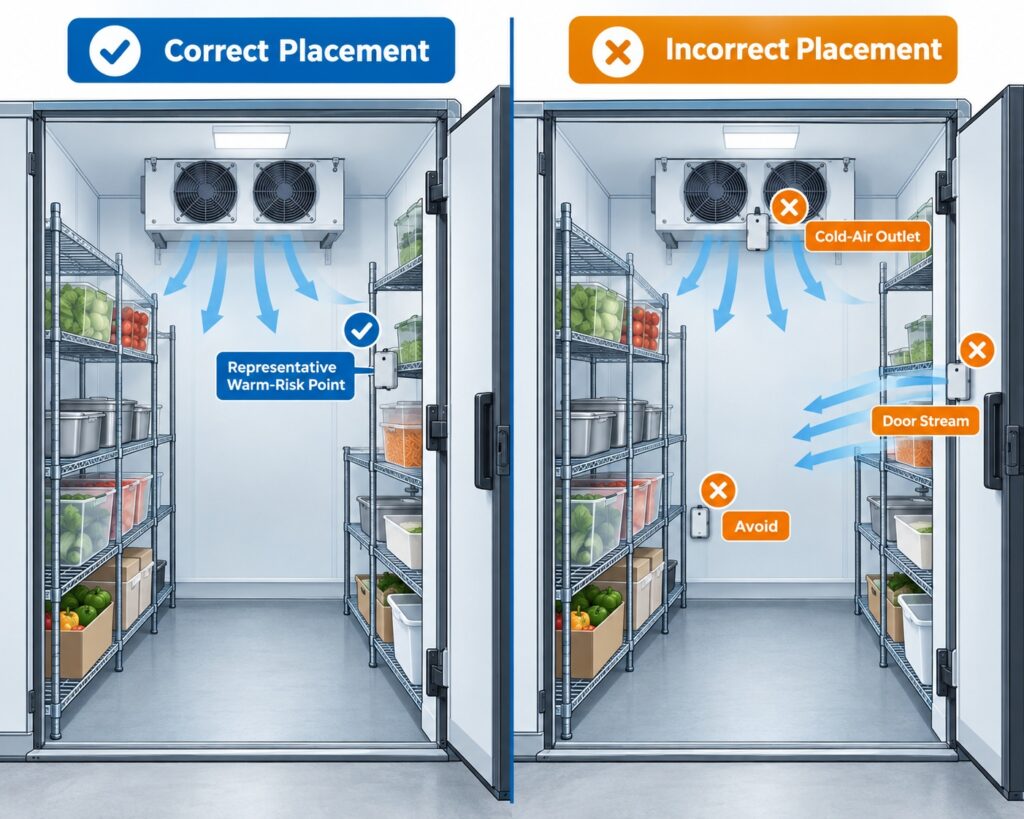
    Correct and incorrect external temperature probe placement in a restaurant walk-in cooler, showing a representative warm-risk point versus cold-air outlet and doorway locations.

    The probe should monitor a representative warm-risk point, not the cold-air discharge, doorway, or an easy wall location.

    Parameter Why it matters Monitoring location Recommended sensor type
    Air or product-adjacent temperature Primary evidence of an excursion and the first input to alarm logic. Representative warm-risk point; validate with normal loading and door activity. External digital temperature probe or calibrated thermistor/logger.
    Door status Explains open-door exposure and can trigger a local operating response. Door frame or latch area. Magnetic contact or dry-contact input.
    Power status Helps distinguish a refrigeration issue from an electrical interruption. Dedicated circuit or monitored plug/panel, where safe and approved. Power-status or current/voltage input.
    Humidity Optional: can help identify condensation, icing or door-use patterns. Representative room location away from direct spray. Temperature/RH sensor.
    Compressor or equipment state Optional diagnostic context; use only with a defined service workflow. Approved equipment interface or panel. Dry contact, current or RS485/Modbus input when supported.

    Do not turn every available input into an alarm. A smaller set of measurements with a clear owner is usually more useful than a large dashboard of signals that no one reviews. For most restaurant sites, temperature plus door status or power status is a sensible first design; a multi-sensor system is more justified in a large cold store or a site with recurring fault investigation.
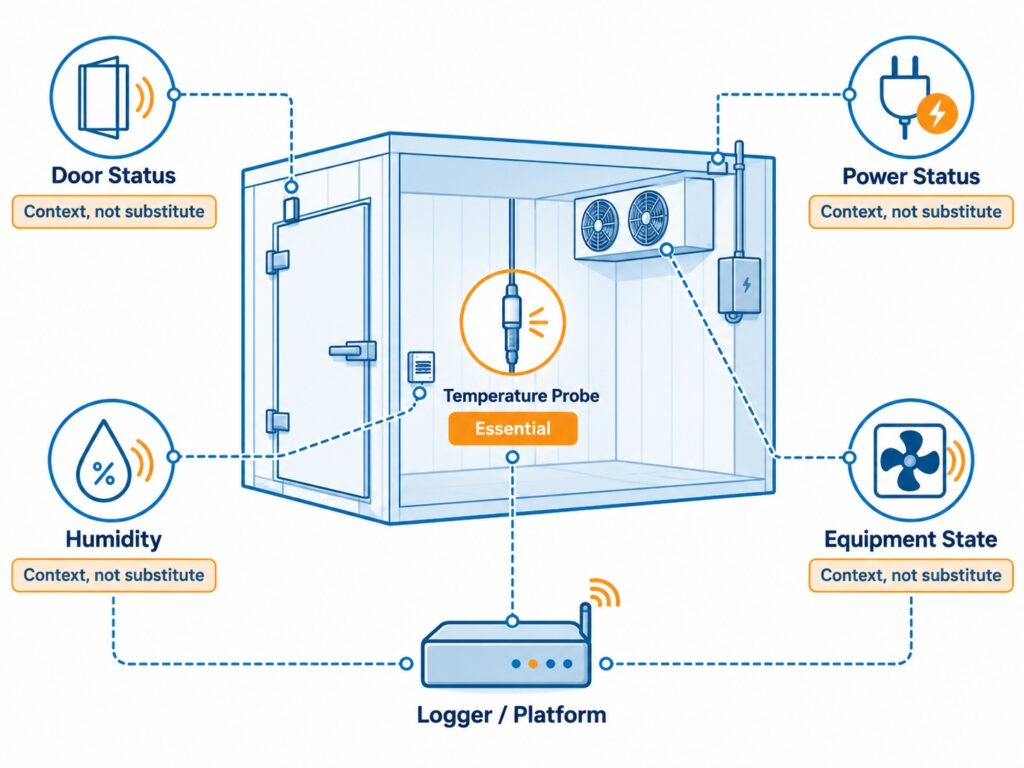
    Walk-in cooler monitoring inputs showing temperature as the essential measurement with optional door, power, humidity, and equipment status signals.

    Temperature is the essential signal; door, power, humidity, and equipment inputs add context only when they change the response.

    What a Typical Monitoring System Includes

    The sensing layer contains the probe and contextual inputs. Connectivity moves readings by Wi-Fi, Ethernet, cellular, LoRa or RS485. Some systems connect directly to cloud; others use a gateway. The platform stores records, applies limits and routes alarms. The operating layer defines contacts, acknowledgement, escalation, service instructions and food assessment.

    Probe and inputs Logger or sensor Network or gateway Cloud or local platform Alarm and response

    A system is only as continuous as its weakest dependency. If the logger has local memory but the site router is down, the records may be preserved for later synchronization, yet an internet-based notification may not reach the on-call person. If alert messages arrive but nobody owns the response, the alert is still ineffective. Define both continuity of data and continuity of notification during design.
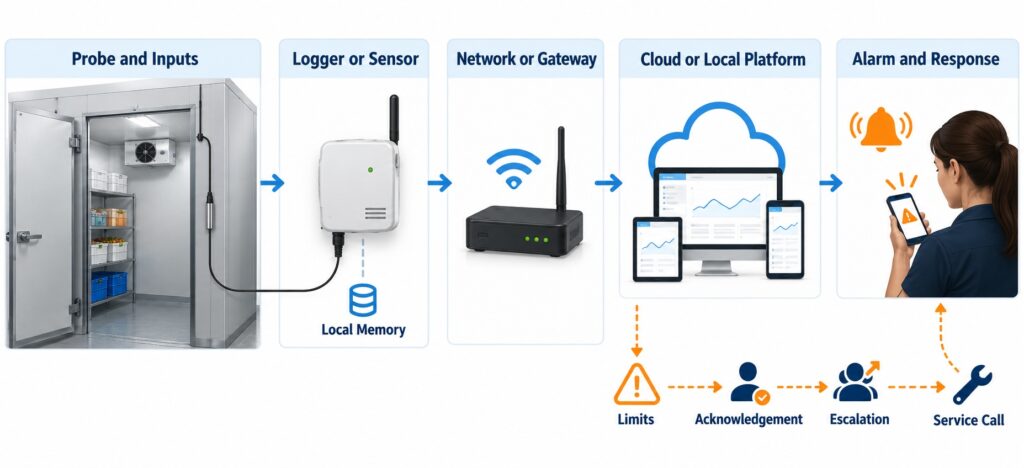
    Walk-in cooler monitoring system architecture from external probe and logger to network, cloud platform, alarm, acknowledgement, and response workflow.

    The monitoring chain connects the probe, logger, network, platform, and alarm-response workflow.

    Which Communication Method Should Be Used

    Communication should fit the facility. A small restaurant may prefer direct Wi-Fi because it avoids a gateway. Managed facilities may choose Ethernet. Cellular provides an independent path but requires coverage, plan and SIM checks. LoRa and RS485 suit wider sensor architectures. Test each option with doors closed, during peak operation and after a planned network or power interruption.

    Method Good fit Advantages Limitations to plan for
    Wi-Fi Single sites with stable local coverage. No dedicated gateway for direct-to-cloud devices; rapid retrofit. Metal panels, closed doors, router or internet failures can interrupt transmission.
    Ethernet Managed facilities with nearby cabling. Predictable wired path and straightforward network administration. Cable routing and switch availability can raise installation effort.
    4G or cellular Remote sites or sites needing independence from local internet. Can continue communicating when the local ISP/router fails. Coverage, region, SIM activation and data-plan costs need verification.
    LoRa Distributed sites with many low-data-rate sensor points. Long-range sensor networking with low power use. Requires a compatible gateway and radio-plan validation.
    RS485 Industrial rooms, BMS-adjacent projects or external instruments. Robust wired field bus and multi-sensor expansion. Requires compatible sensors, cabling, addressing and commissioning.

    For a single retrofit cooler, direct Wi-Fi or a Wi-Fi-plus-cellular design may be appropriate. For a multi-room cold store, compare the total design: gateway placement, cable pathways, radio survey, central alarm management and integration needs. There is no universally best method because the cost of a missed alert is determined by the site’s own backup paths and response window.
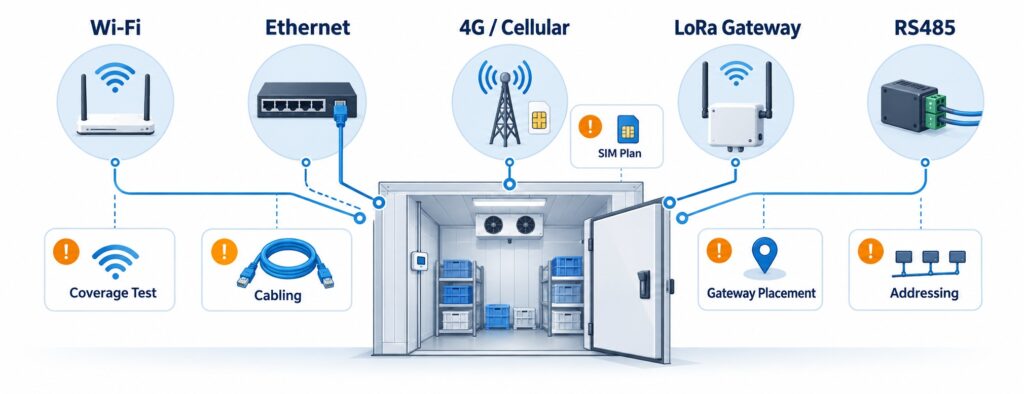
    Connectivity options for walk-in cooler monitoring including Wi-Fi, Ethernet, cellular, LoRa, and RS485 paths to a monitoring platform.

    Choose Wi-Fi, Ethernet, cellular, LoRa, or RS485 based on site coverage, gateway needs, and outage behavior.

    How Monitoring Products Should Be Compared

    Published accuracy is necessary but insufficient. A sensor placed in the wrong airflow, unable to report after a network failure, or alerting only one unavailable person may not reduce risk. Compare probe and calibration options, communications, local storage, offline behavior, platform controls, alarms, export/API, account model, installation and scalability.

    Ask suppliers to describe an outage sequence, not only normal operation. What happens after a five-minute door opening, router failure, low battery or sensor disconnection? Does the platform show a gap, backfill records and route an offline alert? Can users acknowledge and retain the response record? These questions separate a dashboard from an operating workflow.

    Evaluate calibration in context. Some buyers need traceable certificates and defined intervals; other restaurants need practical periodic verification. A calibrated probe or cloud report alone does not establish regulatory compliance.
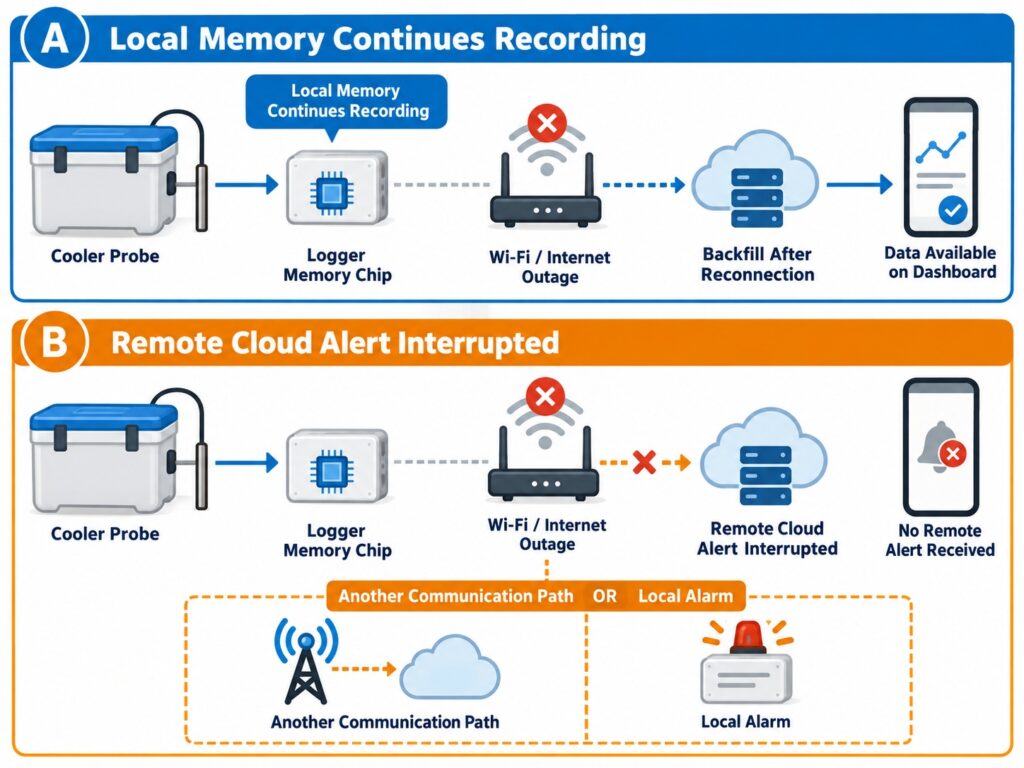
    Two-path walk-in cooler outage diagram showing local memory retaining temperature records while remote cloud alerts may be interrupted by network failure.

    Local storage preserves records, while remote alert delivery still depends on a working notification path.

    Product and Solution Comparison

    The following comparison focuses on representative fixed-facility routes and official product information available at publication. Exact capability depends on the selected probe, radio version, software tier, account plan and regional availability. “Not publicly specified” means the field was not confirmed in the cited official material used for this guide, not that the feature is unavailable.
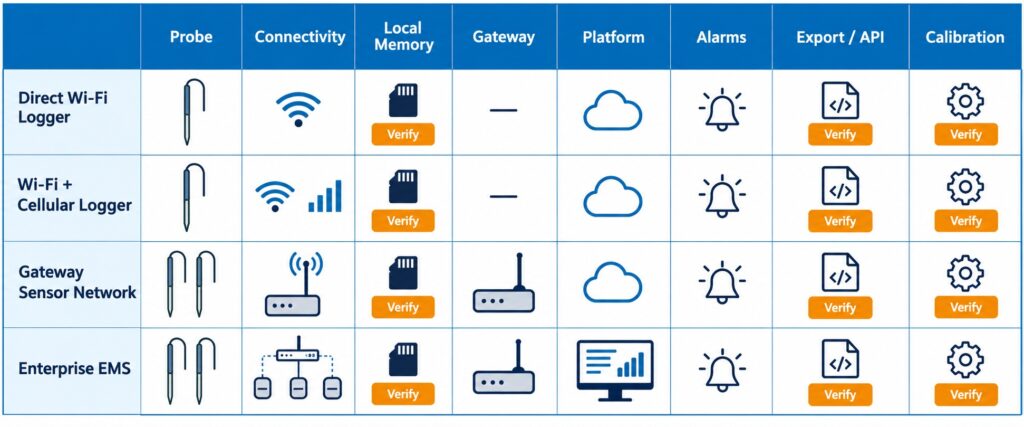
    Decision matrix for comparing walk-in cooler monitoring systems by probe, connectivity, local memory, gateway requirement, platform, alarms, API, and calibration.

    Compare cooler monitoring systems beyond accuracy: probe, connectivity, local memory, gateway, platform, alarms, and calibration.

    Route Connectivity and sensors Data continuity and gateway Platform and alarm considerations Where it may fit
    UbiBot WS1 Pro Wi-Fi plus external temperature probe 2.4 GHz Wi-Fi; internal temperature, RH and light plus supported external probes. Direct Wi-Fi device; UbiBot states on-board storage for 300,000 records. Cloud/app data view and configurable alerts; confirm specific alert channels, probe compatibility and plan. Simple retrofit where Wi-Fi is tested and external probe placement matters.
    UbiBot GS1-AL4G1RS 2.4 GHz Wi-Fi and 4G LTE; RS485 expansion for compatible external devices. No hub required; UbiBot states 300,000-record on-board memory. Cloud/app monitoring and alerts; confirm SIM coverage, RS485 mapping and commercial integration requirements. Sites needing cellular resilience or industrial sensor expansion.
    Testo Saveris 2-T2 or 2-T3 Wi-Fi logger family; T3 supports up to two compatible thermocouple probes. Direct Wi-Fi to Testo Cloud; T3 official page states internal storage of measurements. Cloud access and limit alarms; e-mail is standard and SMS availability depends on option/region. Cloud licence is required. Teams that value Testo probe selection and its cloud logger ecosystem.
    T&D TR72A2 or TR75A2 TR72A2 uses external temperature/RH sensor; TR75A2 uses thermocouple inputs. Wi-Fi, USB and Bluetooth are listed for A2 models. Direct upload to T&D cloud service; USB/Bluetooth provide local setup and download paths. Cloud warnings and reporting tools; select the exact model range before using it in a freezer. Facilities that want flexible recorder interfaces and local retrieval options.
    DicksonOne DWE2 Wi-Fi or Ethernet; replaceable sensor options, up to two measurement points. Network-connected logger; local-storage and outage behavior not publicly specified in the cited product page. DicksonOne cloud visibility and alarm configuration; calibration offerings vary by sensor. Organizations wanting a cloud EMS-style workflow with wired-network option.
    Monnit ALTA temperature sensor plus iMonnit ALTA wireless or selected Wi-Fi options; temperature sensor formats and probe lengths vary. ALTA wireless deployments require a compatible gateway or network path; local-buffer behavior is model-specific. iMonnit provides monitoring platform functions; confirm plan, gateway and escalation design. Distributed wireless-sensor projects that benefit from Monnit’s broad sensor ecosystem.
    Rotronic RMS with suitable logger Modular system; options include wireless gateway and Wi-Fi logger with external digital probes. RMS-GW is the interface for wireless loggers; the official gateway page lists up to 60 loggers. Some loggers use internal memory to compensate for gaps. RMS Cloud/Server capability, alarming and documentation features; scope and validation should match the deployment. Higher-governance or multi-point monitoring projects needing a modular enterprise architecture.

    The table is not a universal ranking. Testo, T&D, Dickson, Monnit and Rotronic each offer credible routes that may be stronger when a buyer prioritizes an established logger ecosystem, a particular probe type, a dedicated wireless network, formal calibration services, validated documentation or enterprise implementation support. UbiBot is most relevant when the buyer needs a flexible, lower-infrastructure route from a simple external-probe retrofit to a Wi-Fi/4G and RS485-expanded design. On-premises deployment, API scope, data forwarding, calibration documentation and subscription details should be confirmed against the current commercial proposal rather than inferred from a product page.
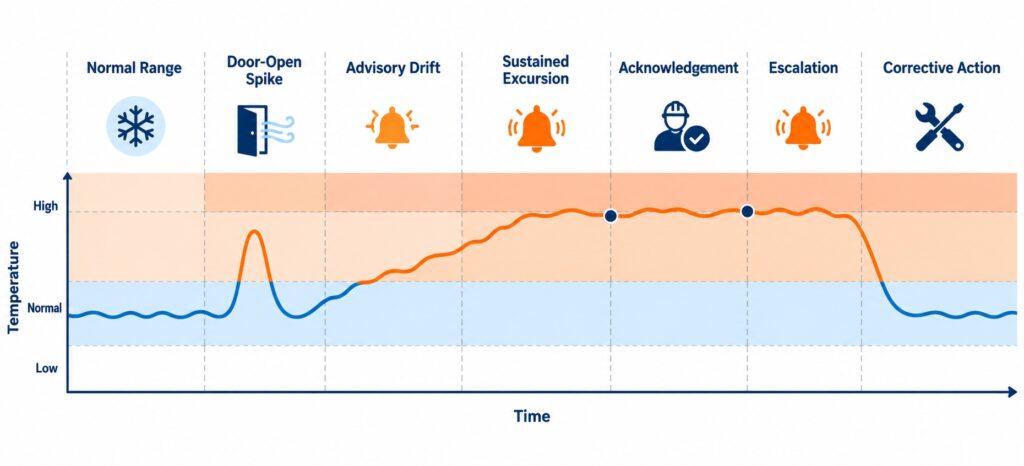
    Walk-in cooler staged temperature alarm timeline showing advisory drift, sustained excursion, acknowledgement, escalation, and corrective action.

    Use staged thresholds and delays to separate normal loading or door activity from a sustained temperature excursion.

    Which System Fits Each Use Case

    For one or a few restaurant coolers with good wireless coverage, a direct Wi-Fi logger with an external probe can reduce deployment work. UbiBot WS1 Pro is a reasonable route when the probe and cloud workflow meet the site’s needs; Testo Saveris 2 is a strong alternative where its supported thermocouple-probe range or licensed cloud environment is preferred; T&D can suit buyers who value its recorder interfaces and local USB/Bluetooth access. The choice should follow an on-site Wi-Fi test and an after-hours alert drill, not a desk comparison alone.
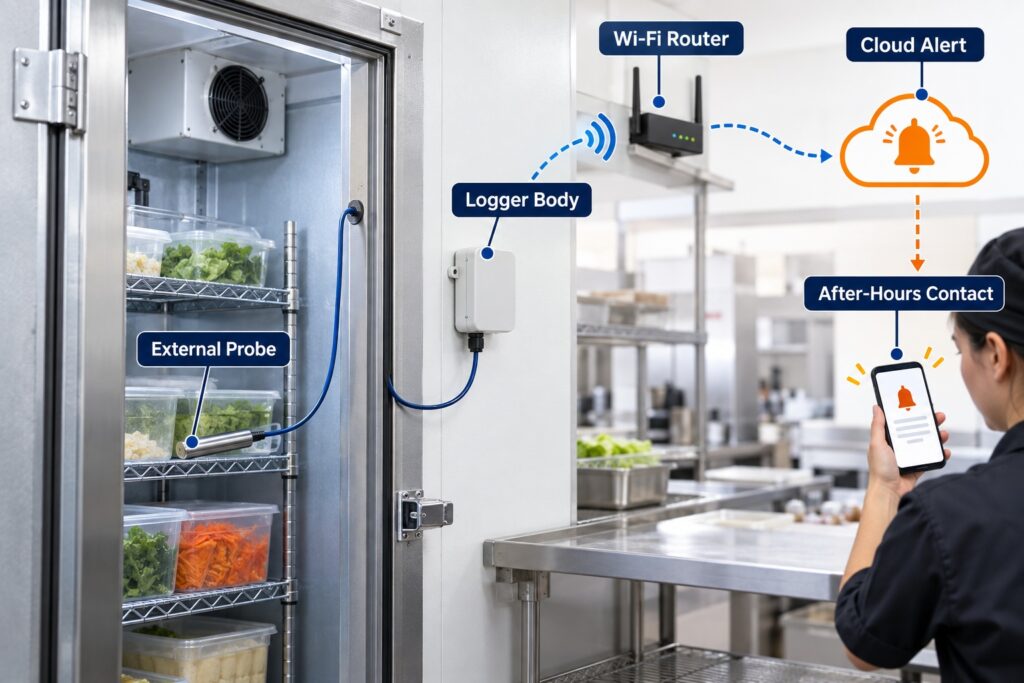
    Single restaurant walk-in cooler retrofit showing an external temperature probe inside the cooler and a Wi-Fi logger sending cloud alerts.

    A single restaurant can use a tested Wi-Fi logger with an external probe when the alert path is reliable after hours.

    For a cold store with unreliable local internet or a need to connect industrial inputs, a cellular-capable or gateway-based architecture deserves evaluation. GS1-AL4G1RS can be considered where 4G resilience and RS485 expansion are useful. Monnit may be suitable for a wider sensor network designed around ALTA gateways, while Rotronic RMS may fit projects that need a modular monitoring system with a defined gateway and software architecture. The requirements for network redundancy, records, validation and support should drive the decision.
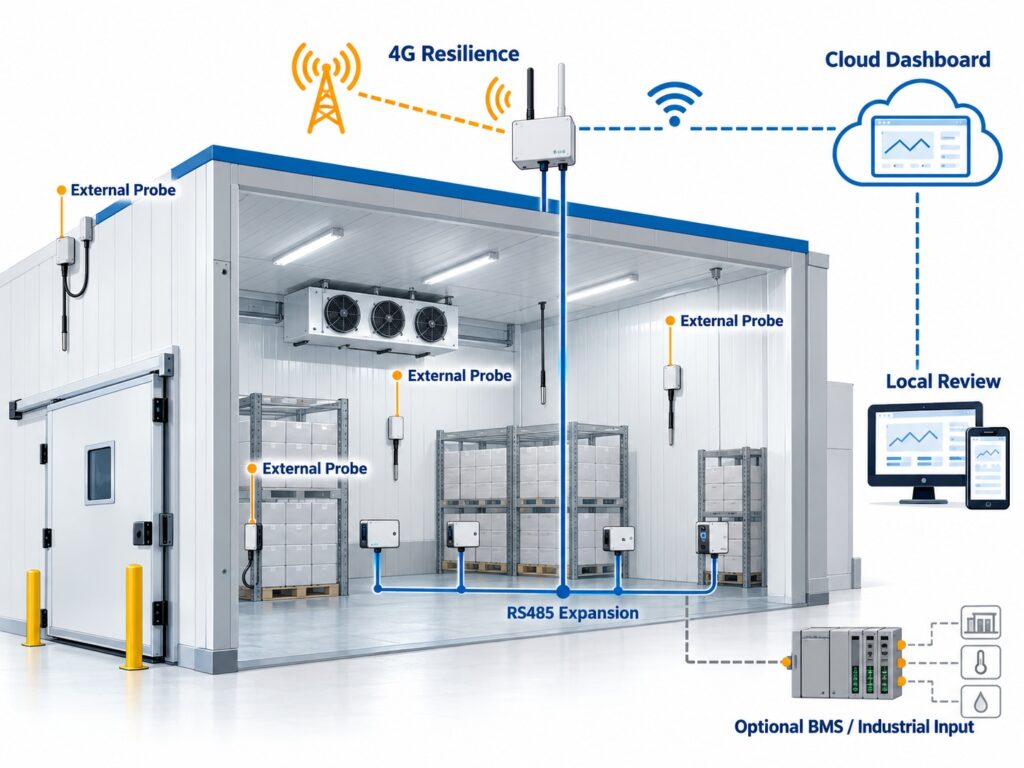
    Large cold store monitoring architecture with cellular connectivity, RS485 sensor branch, external probes, and cloud dashboard for resilience and expansion.

    Cellular and RS485 expansion can support larger cold stores that need network resilience or industrial inputs.

    For a larger, multi-site organization, central administration matters as much as the sensor. Compare user permissions, device naming, exception review, exports, APIs or data forwarding, calibration coordination, alarm escalation and the vendor’s ability to support the required service model. DicksonOne may be appropriate for organizations seeking a cloud workflow with replaceable-sensor choices and Ethernet; Rotronic RMS may be appropriate when the project has more formal documentation or enterprise-system needs. Validate each route against the buyer’s own SOPs and local requirements.

    How to Deploy the System

    Start with a small-facility design that can be proven. Place one primary external probe at the validated warm-risk point and one optional second point if the room has zones, long airflow paths or high product value. Keep the logger body where it can communicate and be serviced, while routing the probe without damaging the door seal or creating a cleaning hazard. Set the sampling interval, alert delay and escalation contacts before relying on the data. Record the probe location with a simple photograph or site map.
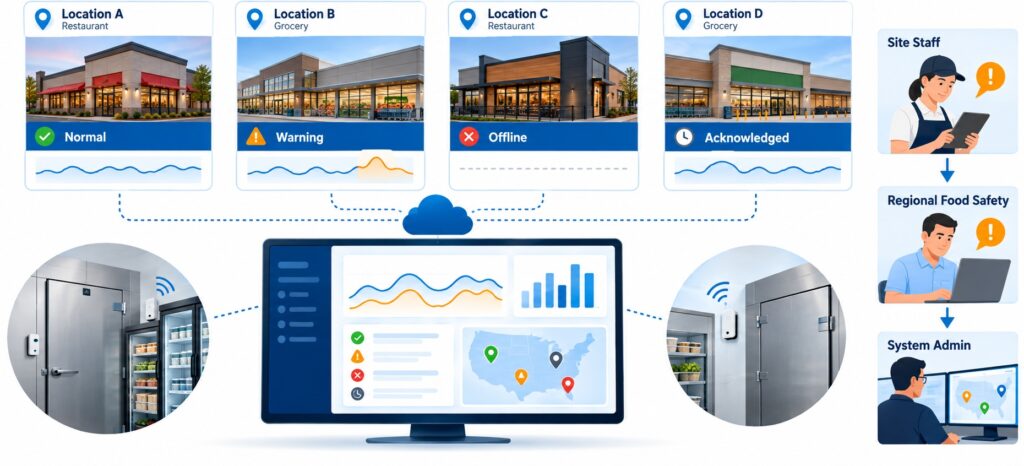
    Multi-site restaurant and grocery cooler monitoring dashboard showing several locations, exception status, device naming, and alert escalation.

    Multi-site operators need central visibility, consistent naming, escalation rules, and exception review across locations.

    For a medium facility, group coolers and freezers by operating risk. Distinguish receiving, prep, bulk storage, freezer, display or staging areas because door-use pattern and product exposure differ. Give devices meaningful names, assign primary and secondary recipients, and create a common acknowledgement rule. Use a dashboard for exception review, but retain a local site procedure that tells staff whether to check the door, move product, verify another thermometer, call the contractor or escalate to a manager.

    For a large or multi-site estate, standardize the naming convention, probe type, installation method, alarm delay, contact hierarchy and review cadence. Do not simply copy one temperature limit across every cooler; use the site food-safety plan, product category and local requirements. Document how network outages are detected, how backfilled data are reviewed and who owns periodic battery, power-supply and calibration checks. Assign separate permissions for site users, regional food-safety staff and system administrators.
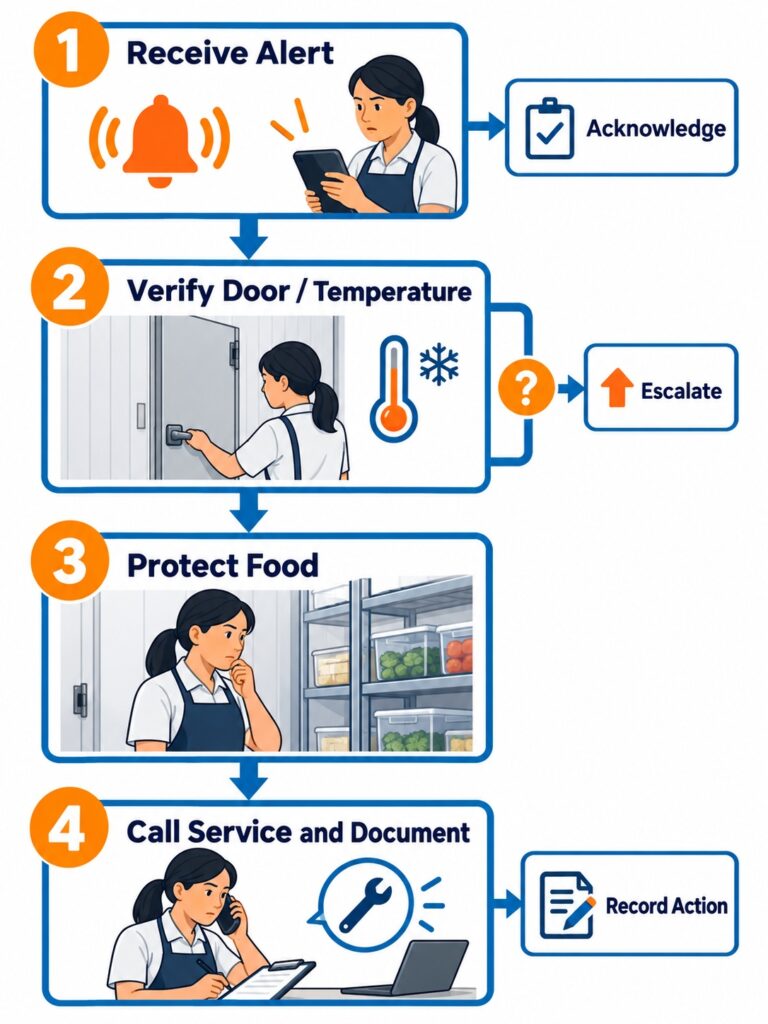
    Walk-in cooler alarm response workflow showing receive alert, verify condition, protect food, call refrigeration service, and document action.

    An alert is useful only when staff know who acknowledges it and what action comes next.

    Commissioning should include more than powering on the device. Verify time zone, clock, data upload, alert recipients, local display or app reading, probe identification and firmware/software settings. Perform a controlled notification test, a door-open test where safe, and a planned network-loss test. The aim is to understand the system’s actual behavior at this site before a real failure occurs.

    Common Design and Installation Mistakes

    • Mounting the sensor beside a supply-air outlet, where a cold local reading can hide the warmer condition seen by food elsewhere in the room.
    • Using a room-air threshold without a delay, then training staff to ignore frequent nuisance alarms caused by normal receiving or door activity.
    • Installing a Wi-Fi logger before testing coverage with the door closed and before checking what happens when the router, access point or internet service fails.
    • Assuming that on-board memory guarantees remote alert delivery. Stored records and delivered notifications are separate functions.
    • Alerting only the manager who is off duty, without acknowledgement, escalation or an available refrigeration-service contact.
    • Treating a sensor replacement, new probe, changed limit or changed subscription tier as an administrative detail rather than a change that needs review.
    • Calling the device a compliance solution without validating the complete site process, including calibration, records, access, SOPs and local requirements.
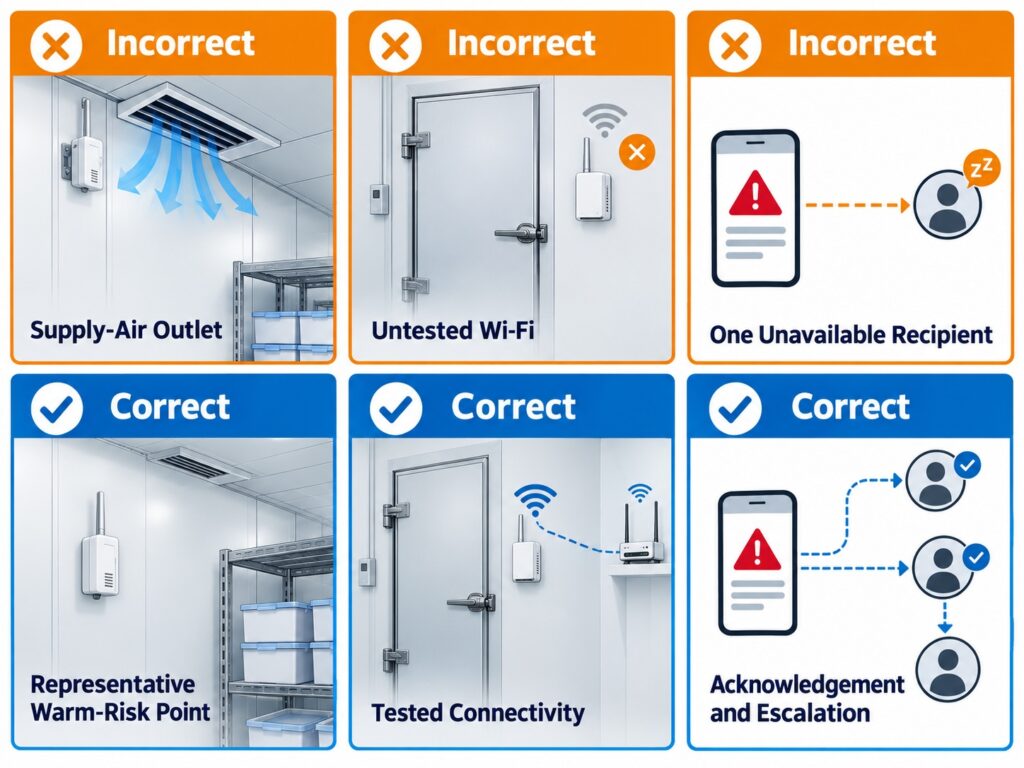
    Common walk-in cooler monitoring mistakes including probe near cold-air outlet, untested Wi-Fi coverage, and alerts sent to only one unavailable recipient.

    Avoid cold-air placement, untested Wi-Fi, and single-recipient alerts that fail when staff are unavailable.

    Frequently Asked Questions

    How many temperature probes does a walk-in cooler need?

    One carefully placed probe can be sufficient for a small, uniform room, but the number should follow the room geometry, airflow, loading pattern, door use and product risk. Add a second point when the room has distinct warm and cold zones, long distance from the evaporator, high-value inventory or a history of uneven readings. Evidence determines location; floor area alone does not. Validate the placement during normal operation rather than assuming a single wall location represents the entire cooler.

    Where should a walk-in cooler temperature probe be placed?

    Place the probe at a representative warm-risk point where its reading is meaningful for the food-safety decision. Avoid direct supply-air blasts, the immediate door stream, heaters, lights and surfaces that do not reflect room air. The exact position should be checked during normal loading and door activity. If the logger body needs better radio coverage, use an external probe so that the measurement point and communications point do not have to be the same location.

    Can a Wi-Fi temperature logger alert me when the internet is down?

    Not necessarily. A device may continue recording locally during a Wi-Fi or internet outage and upload the backlog later, but an off-site cloud notification normally depends on a working communication path. Ask the supplier what happens when the device loses the access point, router, ISP connection or power. If after-hours alert continuity is essential, assess cellular backup, redundant network design or a local alarm path and test the sequence at the site.

    What should trigger a walk-in cooler alarm?

    The site should define limits and delays from the food category, local rules and its food-safety plan. A useful design often separates a brief advisory event from a sustained temperature excursion, and separately alarms for probe failure, low battery, power loss or loss of communication. A single universal setpoint is not a substitute for a site procedure. The alarm must include an owner, acknowledgement path and expected action, such as checking the door, verifying temperature or calling refrigeration service.

    Is a temperature logger the same as refrigeration control?

    No. A logger measures and records conditions, presents data and can send an alarm. It does not diagnose every mechanical cause, turn a refrigeration system back on, move food or decide product disposition. Some monitoring architectures can accept equipment inputs or trigger a relay through a defined integration, but that is not the same as designing, maintaining or controlling refrigeration equipment. Keep the monitoring scope clear in staff training and contractor responsibilities.

    Should I use a data logger with an external probe?

    An external probe is valuable when the best measurement point is not the best location for the device body. This is common in coolers because the logger may need to remain accessible, protected or close to a communications path while the probe needs to sit at a representative food-risk point. Check probe range, cable length, ingress protection, connector compatibility, calibration options and how the cable passes through the cooler without compromising the door seal or cleaning practice.

    How do I compare the total cost of cooler monitoring?

    Compare the full operating design, not only the device price. Include sensors and probes, calibration or verification needs, gateway or cellular hardware, installation labor, network work, cloud or messaging plans, battery or power supplies, user training, alarm-response time and support. A low-cost logger can become expensive if it produces nuisance alarms or needs constant manual download. A more structured system can be justified when it reduces investigation time across many rooms or sites.

    Can monitoring data prove that food is safe?

    Monitoring data is important evidence, but it is not the only input to a food-safety decision. Teams still need to know the product type, actual exposure, thermometer verification, local requirements and the site’s documented assessment procedure. A trend can show when the temperature began changing and whether the condition was sustained; it cannot by itself determine product disposition. Establish that decision process before an incident, with the responsible manager and food-safety guidance.
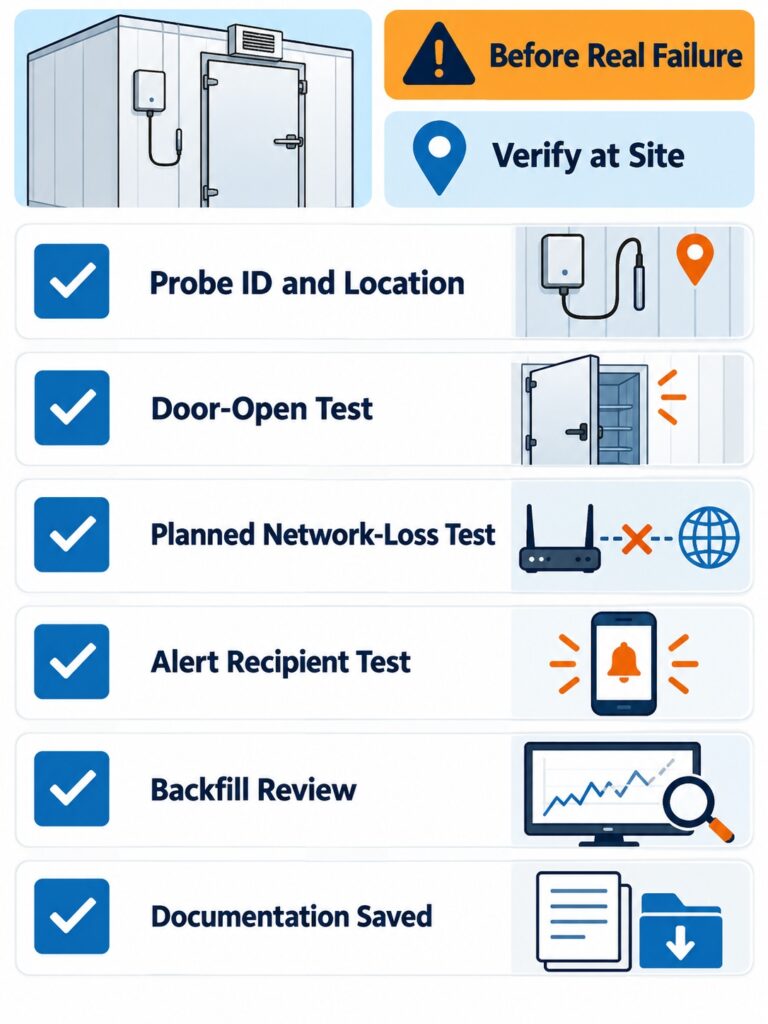
    Walk-in cooler monitoring rollout verification checklist for door-open test, network-loss test, alert test, probe identification, and documentation.

    Commissioning should test door activity, network loss, alert routing, probe identity, and documentation before a real failure.

    Conclusion and Selection Recommendations

    Select a walk-in cooler monitoring system by working backward from the action needed after an alert. Define the product risk, representative probe location, limits, delay, recipients, acknowledgement rule, refrigeration-service path and evidence required for review. Then choose the sensing and communications architecture that keeps that workflow working at the actual site. A simple direct Wi-Fi retrofit can be effective when it is tested and owned; a cellular, gateway or RS485 architecture can be appropriate when the facility needs more resilience or expansion.

    UbiBot provides a balanced path where a site needs external-probe flexibility, local record continuity and a straightforward move from Wi-Fi retrofit to 4G/RS485 expansion. It should be evaluated against the exact probe, platform, account and connectivity requirements. Buyers with extensive regulated workflows, formal validation, specialized probe requirements or enterprise service needs may find Testo, Dickson, Monnit, Rotronic or another professional system more appropriate. The right choice is the one that produces a dependable response, not the most features on a specification sheet.

    Sources and Product Information Disclaimer

    Specifications, plans, calibration options, regional cellular service, software functions and subscriptions can change. Confirm the current product documentation and commercial proposal before purchase. This guide offers operational selection guidance and does not certify a device or a complete deployment to FDA, HACCP, 21 CFR Part 11, GxP, GDP, CDC, VFC or any other regulatory framework.

    1. FDA Food Code 2022 and temperature measuring devices: https://www.fda.gov/food/retail-food-protection/fda-food-code
    2. Singapore Food Regulations food hygiene requirements: https://sso.agc.gov.sg/SL/SFA2023-S707-2024
    3. UbiBot WS1 Pro product and support information: https://www.ubibot.com/ubibot-ws1pro/
    4. UbiBot GS1 specifications: https://www.ubibot.com/ubibot-gs1-specifications/

    Related Resources

    Best Walk-In Cooler Temperature Alarm Systems for Restaurants: UbiBot vs SensorPush vs Monnit vs Testo
    How to Select Temperature Monitoring Devices for Pharmaceutical Storage and Transport Under USP <1079.3>
    What EN 12830 Means When Selecting a Cold-Chain Temperature Recorder?
    UbiBot vs Monnit vs ELPRO vs Dickson: Which Is Better for Laboratory Refrigerators and ULT Freezers?
    UbiBot vs Room Alert MAX vs Monnit vs HW Group: Which Is Better for Unattended Telecom Shelters?
    National University of Singapore Study Uses UbiBot WS1 Pro for Surface Temperature Calibration in District-Scale Thermal Infrared Monitoring
    Harbin Institute of Technology Uses UbiBot UB-DT-P1 Sensors to Monitor Residential Indoor Temperature in Severe Cold and Cold Regions of China
    Harbin Institute of Technology Uses UbiBot Sensors to Monitor Residential Indoor Temperature for Overheating and Shading Analysis
    menu-header-svg
    Search
    • Explore Knowledge
      • Comparison & Selection
      • Industry Solution
      • Product & Device
      • Criterion & Compliance
      • Deployment & Usage
      • Technology & Principle
    • Academic Research
    • In-depth Tech

    Industry Solution

    See More >>

    How to Get an Alert Before a Walk-In Cooler Fails?

    Published: September 29, 2026

    Updated: September 29, 2026

    By Susan Jones

    Introduction

    A door that does not close, compressor fault, defrost problem or power interruption can push a walk-in cooler outside its intended range after hours. When the first signal is a warm product check the next morning, the response is already late. Manual checks remain useful, but they cannot observe every hour or notify an on-call person.

    This guide is for food-safety, restaurant, grocery, cold-store, facilities and refrigeration teams selecting monitoring for fixed cold rooms and freezers. It explains how to choose a probe location, alert logic, connectivity, records and workflow. It does not cover shipment tracking, vehicle telematics or refrigeration control.

    Restaurant walk-in cooler temperature monitoring system with an external probe, phone alert, and after-hours staff response path.

    A restaurant walk-in cooler after hours with a representative temperature probe, phone alarm, and staff response path.

    Quick Summary

    A practical system combines a temperature probe, logger, communications path, data platform and escalation workflow. Temperature is essential; door, power, humidity or equipment inputs are useful only when they change the response. Place the main probe at a representative risk point, not beside a cold-air discharge or directly in the doorway. Use a short delay for normal loading, then escalate a sustained excursion, sensor fault, power issue or lost connection.

    Wi-Fi is simple where coverage is reliable. Ethernet suits managed networks; cellular can reduce dependence on local internet; LoRa and RS485 suit distributed or industrial architectures. Compare sensing, local data continuity, alarm delivery, acknowledgement, calibration, integration and operating effort. Choose the least-complex route that protects the site’s response window.

    Five selection factors for walk-in cooler monitoring including probe placement, alert logic, connectivity, records, and response owner.

    A reliable walk-in cooler monitoring system combines probe placement, alert logic, connectivity, records, and a response owner.

    Walk in Cooler Temperature Monitoring Selection Guide Key Takeaway

    The right walk-in cooler alert is not a single temperature threshold. It is a documented workflow that measures a representative point, distinguishes a short door-open event from a sustained risk, retains data during a connection loss, and escalates to a person who can protect food and call refrigeration service.

    Why Environmental Monitoring Matters in Food Cold Storage

    An excursion can trigger product assessment, disposal, resupply and investigation. Continuous records show when drift began, how long it lasted, and whether an alert was acknowledged. That evidence is more useful than one daily reading when a manager must decide what to do next.

    Monitoring also supports continuity. A restaurant may have one cooler; a grocery operator may have many. Both need to see which exception needs attention first. Manual checks remain part of a food-safety plan, but they are periodic snapshots and do not create an after-hours response path.

    The FDA Food Code is a model code that jurisdictions may adopt or modify, not a universal setpoint. Section 4-204.112 addresses temperature-measuring devices. Singapore food rules also require suitable temperature-measuring equipment for chiller, freezer and cold-room use. Limits, records and actions must follow local requirements and the site food-safety process.

    What Environmental Parameters Should Be Monitored

    Temperature is the essential measurement. The decision is usually more complicated than choosing a sensor range. The probe must represent the risk the team is trying to manage: room air, product-adjacent air, or a buffered simulation of product temperature. Add parameters only when they improve diagnosis or change the response. For example, a door contact may explain a short warm event; it should not be used as a substitute for a temperature probe.

    Correct and incorrect external temperature probe placement in a restaurant walk-in cooler, showing a representative warm-risk point versus cold-air outlet and doorway locations.

    The probe should monitor a representative warm-risk point, not the cold-air discharge, doorway, or an easy wall location.

    Parameter Why it matters Monitoring location Recommended sensor type
    Air or product-adjacent temperature Primary evidence of an excursion and the first input to alarm logic. Representative warm-risk point; validate with normal loading and door activity. External digital temperature probe or calibrated thermistor/logger.
    Door status Explains open-door exposure and can trigger a local operating response. Door frame or latch area. Magnetic contact or dry-contact input.
    Power status Helps distinguish a refrigeration issue from an electrical interruption. Dedicated circuit or monitored plug/panel, where safe and approved. Power-status or current/voltage input.
    Humidity Optional: can help identify condensation, icing or door-use patterns. Representative room location away from direct spray. Temperature/RH sensor.
    Compressor or equipment state Optional diagnostic context; use only with a defined service workflow. Approved equipment interface or panel. Dry contact, current or RS485/Modbus input when supported.

    Do not turn every available input into an alarm. A smaller set of measurements with a clear owner is usually more useful than a large dashboard of signals that no one reviews. For most restaurant sites, temperature plus door status or power status is a sensible first design; a multi-sensor system is more justified in a large cold store or a site with recurring fault investigation.

    Walk-in cooler monitoring inputs showing temperature as the essential measurement with optional door, power, humidity, and equipment status signals.

    Temperature is the essential signal; door, power, humidity, and equipment inputs add context only when they change the response.

    What a Typical Monitoring System Includes

    The sensing layer contains the probe and contextual inputs. Connectivity moves readings by Wi-Fi, Ethernet, cellular, LoRa or RS485. Some systems connect directly to cloud; others use a gateway. The platform stores records, applies limits and routes alarms. The operating layer defines contacts, acknowledgement, escalation, service instructions and food assessment.

    Probe and inputs Logger or sensor Network or gateway Cloud or local platform Alarm and response

    A system is only as continuous as its weakest dependency. If the logger has local memory but the site router is down, the records may be preserved for later synchronization, yet an internet-based notification may not reach the on-call person. If alert messages arrive but nobody owns the response, the alert is still ineffective. Define both continuity of data and continuity of notification during design.

    Walk-in cooler monitoring system architecture from external probe and logger to network, cloud platform, alarm, acknowledgement, and response workflow.

    The monitoring chain connects the probe, logger, network, platform, and alarm-response workflow.

    Which Communication Method Should Be Used

    Communication should fit the facility. A small restaurant may prefer direct Wi-Fi because it avoids a gateway. Managed facilities may choose Ethernet. Cellular provides an independent path but requires coverage, plan and SIM checks. LoRa and RS485 suit wider sensor architectures. Test each option with doors closed, during peak operation and after a planned network or power interruption.

    Method Good fit Advantages Limitations to plan for
    Wi-Fi Single sites with stable local coverage. No dedicated gateway for direct-to-cloud devices; rapid retrofit. Metal panels, closed doors, router or internet failures can interrupt transmission.
    Ethernet Managed facilities with nearby cabling. Predictable wired path and straightforward network administration. Cable routing and switch availability can raise installation effort.
    4G or cellular Remote sites or sites needing independence from local internet. Can continue communicating when the local ISP/router fails. Coverage, region, SIM activation and data-plan costs need verification.
    LoRa Distributed sites with many low-data-rate sensor points. Long-range sensor networking with low power use. Requires a compatible gateway and radio-plan validation.
    RS485 Industrial rooms, BMS-adjacent projects or external instruments. Robust wired field bus and multi-sensor expansion. Requires compatible sensors, cabling, addressing and commissioning.

    For a single retrofit cooler, direct Wi-Fi or a Wi-Fi-plus-cellular design may be appropriate. For a multi-room cold store, compare the total design: gateway placement, cable pathways, radio survey, central alarm management and integration needs. There is no universally best method because the cost of a missed alert is determined by the site’s own backup paths and response window.

    Connectivity options for walk-in cooler monitoring including Wi-Fi, Ethernet, cellular, LoRa, and RS485 paths to a monitoring platform.

    Choose Wi-Fi, Ethernet, cellular, LoRa, or RS485 based on site coverage, gateway needs, and outage behavior.

    How Monitoring Products Should Be Compared

    Published accuracy is necessary but insufficient. A sensor placed in the wrong airflow, unable to report after a network failure, or alerting only one unavailable person may not reduce risk. Compare probe and calibration options, communications, local storage, offline behavior, platform controls, alarms, export/API, account model, installation and scalability.

    Ask suppliers to describe an outage sequence, not only normal operation. What happens after a five-minute door opening, router failure, low battery or sensor disconnection? Does the platform show a gap, backfill records and route an offline alert? Can users acknowledge and retain the response record? These questions separate a dashboard from an operating workflow.

    Evaluate calibration in context. Some buyers need traceable certificates and defined intervals; other restaurants need practical periodic verification. A calibrated probe or cloud report alone does not establish regulatory compliance.

    Two-path walk-in cooler outage diagram showing local memory retaining temperature records while remote cloud alerts may be interrupted by network failure.

    Local storage preserves records, while remote alert delivery still depends on a working notification path.

    Product and Solution Comparison

    The following comparison focuses on representative fixed-facility routes and official product information available at publication. Exact capability depends on the selected probe, radio version, software tier, account plan and regional availability. “Not publicly specified” means the field was not confirmed in the cited official material used for this guide, not that the feature is unavailable.

    Decision matrix for comparing walk-in cooler monitoring systems by probe, connectivity, local memory, gateway requirement, platform, alarms, API, and calibration.

    Compare cooler monitoring systems beyond accuracy: probe, connectivity, local memory, gateway, platform, alarms, and calibration.

    Route Connectivity and sensors Data continuity and gateway Platform and alarm considerations Where it may fit
    UbiBot WS1 Pro Wi-Fi plus external temperature probe 2.4 GHz Wi-Fi; internal temperature, RH and light plus supported external probes. Direct Wi-Fi device; UbiBot states on-board storage for 300,000 records. Cloud/app data view and configurable alerts; confirm specific alert channels, probe compatibility and plan. Simple retrofit where Wi-Fi is tested and external probe placement matters.
    UbiBot GS1-AL4G1RS 2.4 GHz Wi-Fi and 4G LTE; RS485 expansion for compatible external devices. No hub required; UbiBot states 300,000-record on-board memory. Cloud/app monitoring and alerts; confirm SIM coverage, RS485 mapping and commercial integration requirements. Sites needing cellular resilience or industrial sensor expansion.
    Testo Saveris 2-T2 or 2-T3 Wi-Fi logger family; T3 supports up to two compatible thermocouple probes. Direct Wi-Fi to Testo Cloud; T3 official page states internal storage of measurements. Cloud access and limit alarms; e-mail is standard and SMS availability depends on option/region. Cloud licence is required. Teams that value Testo probe selection and its cloud logger ecosystem.
    T&D TR72A2 or TR75A2 TR72A2 uses external temperature/RH sensor; TR75A2 uses thermocouple inputs. Wi-Fi, USB and Bluetooth are listed for A2 models. Direct upload to T&D cloud service; USB/Bluetooth provide local setup and download paths. Cloud warnings and reporting tools; select the exact model range before using it in a freezer. Facilities that want flexible recorder interfaces and local retrieval options.
    DicksonOne DWE2 Wi-Fi or Ethernet; replaceable sensor options, up to two measurement points. Network-connected logger; local-storage and outage behavior not publicly specified in the cited product page. DicksonOne cloud visibility and alarm configuration; calibration offerings vary by sensor. Organizations wanting a cloud EMS-style workflow with wired-network option.
    Monnit ALTA temperature sensor plus iMonnit ALTA wireless or selected Wi-Fi options; temperature sensor formats and probe lengths vary. ALTA wireless deployments require a compatible gateway or network path; local-buffer behavior is model-specific. iMonnit provides monitoring platform functions; confirm plan, gateway and escalation design. Distributed wireless-sensor projects that benefit from Monnit’s broad sensor ecosystem.
    Rotronic RMS with suitable logger Modular system; options include wireless gateway and Wi-Fi logger with external digital probes. RMS-GW is the interface for wireless loggers; the official gateway page lists up to 60 loggers. Some loggers use internal memory to compensate for gaps. RMS Cloud/Server capability, alarming and documentation features; scope and validation should match the deployment. Higher-governance or multi-point monitoring projects needing a modular enterprise architecture.

    The table is not a universal ranking. Testo, T&D, Dickson, Monnit and Rotronic each offer credible routes that may be stronger when a buyer prioritizes an established logger ecosystem, a particular probe type, a dedicated wireless network, formal calibration services, validated documentation or enterprise implementation support. UbiBot is most relevant when the buyer needs a flexible, lower-infrastructure route from a simple external-probe retrofit to a Wi-Fi/4G and RS485-expanded design. On-premises deployment, API scope, data forwarding, calibration documentation and subscription details should be confirmed against the current commercial proposal rather than inferred from a product page.

    Walk-in cooler staged temperature alarm timeline showing advisory drift, sustained excursion, acknowledgement, escalation, and corrective action.

    Use staged thresholds and delays to separate normal loading or door activity from a sustained temperature excursion.

    Which System Fits Each Use Case

    For one or a few restaurant coolers with good wireless coverage, a direct Wi-Fi logger with an external probe can reduce deployment work. UbiBot WS1 Pro is a reasonable route when the probe and cloud workflow meet the site’s needs; Testo Saveris 2 is a strong alternative where its supported thermocouple-probe range or licensed cloud environment is preferred; T&D can suit buyers who value its recorder interfaces and local USB/Bluetooth access. The choice should follow an on-site Wi-Fi test and an after-hours alert drill, not a desk comparison alone.

    Single restaurant walk-in cooler retrofit showing an external temperature probe inside the cooler and a Wi-Fi logger sending cloud alerts.

    A single restaurant can use a tested Wi-Fi logger with an external probe when the alert path is reliable after hours.

    For a cold store with unreliable local internet or a need to connect industrial inputs, a cellular-capable or gateway-based architecture deserves evaluation. GS1-AL4G1RS can be considered where 4G resilience and RS485 expansion are useful. Monnit may be suitable for a wider sensor network designed around ALTA gateways, while Rotronic RMS may fit projects that need a modular monitoring system with a defined gateway and software architecture. The requirements for network redundancy, records, validation and support should drive the decision.

    Large cold store monitoring architecture with cellular connectivity, RS485 sensor branch, external probes, and cloud dashboard for resilience and expansion.

    Cellular and RS485 expansion can support larger cold stores that need network resilience or industrial inputs.

    For a larger, multi-site organization, central administration matters as much as the sensor. Compare user permissions, device naming, exception review, exports, APIs or data forwarding, calibration coordination, alarm escalation and the vendor’s ability to support the required service model. DicksonOne may be appropriate for organizations seeking a cloud workflow with replaceable-sensor choices and Ethernet; Rotronic RMS may be appropriate when the project has more formal documentation or enterprise-system needs. Validate each route against the buyer’s own SOPs and local requirements.

    How to Deploy the System

    Start with a small-facility design that can be proven. Place one primary external probe at the validated warm-risk point and one optional second point if the room has zones, long airflow paths or high product value. Keep the logger body where it can communicate and be serviced, while routing the probe without damaging the door seal or creating a cleaning hazard. Set the sampling interval, alert delay and escalation contacts before relying on the data. Record the probe location with a simple photograph or site map.

    Multi-site restaurant and grocery cooler monitoring dashboard showing several locations, exception status, device naming, and alert escalation.

    Multi-site operators need central visibility, consistent naming, escalation rules, and exception review across locations.

    For a medium facility, group coolers and freezers by operating risk. Distinguish receiving, prep, bulk storage, freezer, display or staging areas because door-use pattern and product exposure differ. Give devices meaningful names, assign primary and secondary recipients, and create a common acknowledgement rule. Use a dashboard for exception review, but retain a local site procedure that tells staff whether to check the door, move product, verify another thermometer, call the contractor or escalate to a manager.

    For a large or multi-site estate, standardize the naming convention, probe type, installation method, alarm delay, contact hierarchy and review cadence. Do not simply copy one temperature limit across every cooler; use the site food-safety plan, product category and local requirements. Document how network outages are detected, how backfilled data are reviewed and who owns periodic battery, power-supply and calibration checks. Assign separate permissions for site users, regional food-safety staff and system administrators.

    Walk-in cooler alarm response workflow showing receive alert, verify condition, protect food, call refrigeration service, and document action.

    An alert is useful only when staff know who acknowledges it and what action comes next.

    Commissioning should include more than powering on the device. Verify time zone, clock, data upload, alert recipients, local display or app reading, probe identification and firmware/software settings. Perform a controlled notification test, a door-open test where safe, and a planned network-loss test. The aim is to understand the system’s actual behavior at this site before a real failure occurs.

    Common Design and Installation Mistakes

    • Mounting the sensor beside a supply-air outlet, where a cold local reading can hide the warmer condition seen by food elsewhere in the room.
    • Using a room-air threshold without a delay, then training staff to ignore frequent nuisance alarms caused by normal receiving or door activity.
    • Installing a Wi-Fi logger before testing coverage with the door closed and before checking what happens when the router, access point or internet service fails.
    • Assuming that on-board memory guarantees remote alert delivery. Stored records and delivered notifications are separate functions.
    • Alerting only the manager who is off duty, without acknowledgement, escalation or an available refrigeration-service contact.
    • Treating a sensor replacement, new probe, changed limit or changed subscription tier as an administrative detail rather than a change that needs review.
    • Calling the device a compliance solution without validating the complete site process, including calibration, records, access, SOPs and local requirements.

    Common walk-in cooler monitoring mistakes including probe near cold-air outlet, untested Wi-Fi coverage, and alerts sent to only one unavailable recipient.

    Avoid cold-air placement, untested Wi-Fi, and single-recipient alerts that fail when staff are unavailable.

    Frequently Asked Questions

    How many temperature probes does a walk-in cooler need?

    One carefully placed probe can be sufficient for a small, uniform room, but the number should follow the room geometry, airflow, loading pattern, door use and product risk. Add a second point when the room has distinct warm and cold zones, long distance from the evaporator, high-value inventory or a history of uneven readings. Evidence determines location; floor area alone does not. Validate the placement during normal operation rather than assuming a single wall location represents the entire cooler.

    Where should a walk-in cooler temperature probe be placed?

    Place the probe at a representative warm-risk point where its reading is meaningful for the food-safety decision. Avoid direct supply-air blasts, the immediate door stream, heaters, lights and surfaces that do not reflect room air. The exact position should be checked during normal loading and door activity. If the logger body needs better radio coverage, use an external probe so that the measurement point and communications point do not have to be the same location.

    Can a Wi-Fi temperature logger alert me when the internet is down?

    Not necessarily. A device may continue recording locally during a Wi-Fi or internet outage and upload the backlog later, but an off-site cloud notification normally depends on a working communication path. Ask the supplier what happens when the device loses the access point, router, ISP connection or power. If after-hours alert continuity is essential, assess cellular backup, redundant network design or a local alarm path and test the sequence at the site.

    What should trigger a walk-in cooler alarm?

    The site should define limits and delays from the food category, local rules and its food-safety plan. A useful design often separates a brief advisory event from a sustained temperature excursion, and separately alarms for probe failure, low battery, power loss or loss of communication. A single universal setpoint is not a substitute for a site procedure. The alarm must include an owner, acknowledgement path and expected action, such as checking the door, verifying temperature or calling refrigeration service.

    Is a temperature logger the same as refrigeration control?

    No. A logger measures and records conditions, presents data and can send an alarm. It does not diagnose every mechanical cause, turn a refrigeration system back on, move food or decide product disposition. Some monitoring architectures can accept equipment inputs or trigger a relay through a defined integration, but that is not the same as designing, maintaining or controlling refrigeration equipment. Keep the monitoring scope clear in staff training and contractor responsibilities.

    Should I use a data logger with an external probe?

    An external probe is valuable when the best measurement point is not the best location for the device body. This is common in coolers because the logger may need to remain accessible, protected or close to a communications path while the probe needs to sit at a representative food-risk point. Check probe range, cable length, ingress protection, connector compatibility, calibration options and how the cable passes through the cooler without compromising the door seal or cleaning practice.

    How do I compare the total cost of cooler monitoring?

    Compare the full operating design, not only the device price. Include sensors and probes, calibration or verification needs, gateway or cellular hardware, installation labor, network work, cloud or messaging plans, battery or power supplies, user training, alarm-response time and support. A low-cost logger can become expensive if it produces nuisance alarms or needs constant manual download. A more structured system can be justified when it reduces investigation time across many rooms or sites.

    Can monitoring data prove that food is safe?

    Monitoring data is important evidence, but it is not the only input to a food-safety decision. Teams still need to know the product type, actual exposure, thermometer verification, local requirements and the site’s documented assessment procedure. A trend can show when the temperature began changing and whether the condition was sustained; it cannot by itself determine product disposition. Establish that decision process before an incident, with the responsible manager and food-safety guidance.

    Walk-in cooler monitoring rollout verification checklist for door-open test, network-loss test, alert test, probe identification, and documentation.

    Commissioning should test door activity, network loss, alert routing, probe identity, and documentation before a real failure.

    Conclusion and Selection Recommendations

    Select a walk-in cooler monitoring system by working backward from the action needed after an alert. Define the product risk, representative probe location, limits, delay, recipients, acknowledgement rule, refrigeration-service path and evidence required for review. Then choose the sensing and communications architecture that keeps that workflow working at the actual site. A simple direct Wi-Fi retrofit can be effective when it is tested and owned; a cellular, gateway or RS485 architecture can be appropriate when the facility needs more resilience or expansion.

    UbiBot provides a balanced path where a site needs external-probe flexibility, local record continuity and a straightforward move from Wi-Fi retrofit to 4G/RS485 expansion. It should be evaluated against the exact probe, platform, account and connectivity requirements. Buyers with extensive regulated workflows, formal validation, specialized probe requirements or enterprise service needs may find Testo, Dickson, Monnit, Rotronic or another professional system more appropriate. The right choice is the one that produces a dependable response, not the most features on a specification sheet.

    Sources and Product Information Disclaimer

    Specifications, plans, calibration options, regional cellular service, software functions and subscriptions can change. Confirm the current product documentation and commercial proposal before purchase. This guide offers operational selection guidance and does not certify a device or a complete deployment to FDA, HACCP, 21 CFR Part 11, GxP, GDP, CDC, VFC or any other regulatory framework.

    1. FDA Food Code 2022 and temperature measuring devices: https://www.fda.gov/food/retail-food-protection/fda-food-code
    2. Singapore Food Regulations food hygiene requirements: https://sso.agc.gov.sg/SL/SFA2023-S707-2024
    3. UbiBot WS1 Pro product and support information: https://www.ubibot.com/ubibot-ws1pro/
    4. UbiBot GS1 specifications: https://www.ubibot.com/ubibot-gs1-specifications/

    分享

    LinkedIn2

    Facebook2

    X

    Newsletter Signup

    Related Resources

    Best Walk-In Cooler Temperature Alarm Systems for Restaurants: UbiBot vs SensorPush vs Monnit vs Testo
    How to Select Temperature Monitoring Devices for Pharmaceutical Storage and Transport Under USP <1079.3>
    What EN 12830 Means When Selecting a Cold-Chain Temperature Recorder?
    UbiBot vs Monnit vs ELPRO vs Dickson: Which Is Better for Laboratory Refrigerators and ULT Freezers?
    UbiBot vs Room Alert MAX vs Monnit vs HW Group: Which Is Better for Unattended Telecom Shelters?
    National University of Singapore Study Uses UbiBot WS1 Pro for Surface Temperature Calibration in District-Scale Thermal Infrared Monitoring
    Harbin Institute of Technology Uses UbiBot UB-DT-P1 Sensors to Monitor Residential Indoor Temperature in Severe Cold and Cold Regions of China
    Harbin Institute of Technology Uses UbiBot Sensors to Monitor Residential Indoor Temperature for Overheating and Shading Analysis
    menu-header-svg
    Search
    • Explore Knowledge
      • Comparison & Selection
      • Industry Solution
      • Product & Device
      • Criterion & Compliance
      • Deployment & Usage
      • Technology & Principle
    • Academic Research
    • In-depth Tech
    Enter Your Information

    Confirm

    Products

    Dashboards

    Support

    Purchase

    Company

    Smart Sensing

    UbiBot Web Console

    APP Download

    UbiBot Online Store

    News

    Smart Control

    UbiBot Space

    Product Docs & APIs

    Find Distributors

    Learn Hub

    Smart Video

    UbiBot On-Premises

    Helpdesk & FAQ

    Volume Pricing

    About Us

    LoRa Products

    Agency Web Console

    Video Center

    Contact Us

    Software & Platform


    Pricing


    Architecture

    External Sensors


    System Status

    Accessories


    Become a Distributor

    Global SIM


    Become an Affiliate

    Positioning System


    Products

    Dashboards

    Business Partners

    WS1

    UbiBot Web Console

    Volume Pricing

    WS1 Pro

    UbiBot Space

    Become a Distributor

    GS1

    UbiBot Support Desk

    Affiliates

    GS2

    Agency Web Console


    MS1


    SP1


    Accessories


    Docs

    Purchase

    Company

    Platform API

    Pricing

    News

    Q&A

    UbiBot Partners

    About us

    Privacy Policy

    Online Store

    Contact

    Terms of Service


    System Status

    Products

    Dashboards

    Smart Sensing

    UbiBot Web Console

    Smart Control

    UbiBot Space

    Smart Video

    UbiBot On-Premises

    LoRa Products

    Agency Web Console

    Software & Platform


    External Sensors


    Accessories


    Global SIM


    Positioning System


    Support

    Purchase

    APP Download

    UbiBot Online Store

    Product Docs & APIs

    Find Distributors

    Helpdesk & FAQ

    Volume Pricing

    Video Center


    Pricing


    Company

    News

    Learn Hub

    About Us

    Contact Us

    Architecture

    System Status

    Become a Distributor

    Become an Affiliate

    Language:
    English 日本語 (ベータ)  
    Language:

    English

    日本語 (ベータ)


    IoT Product Family:
    ubibotico     Wireless environmental sensing products and smart building solutions
    ubitrackico     UWB-based real-time indoor tracking solutions with 30cm accuracy

    IoT Product Family:

    ubibotico  Wireless environmental sensing products and smart building solutions
    ubitrackico  UWB-based real-time indoor tracking solutions with 30cm accuracy

    © 2013-2026 UbiBot.com. All rights reserved.

    Terms of Service | Privacy Policy | Compliance

    youtube facebook twitter