
UBiBot Logo
UBiBot Logo
  • UBiBot Logo
  • Home
  • Products

    NEW

  • Pricing
  • Support
  • About Us
  • Download
  • magnifying-glass  Search
  • magnifying-glass header-close
  • Sign in Sign in
    Public Web Console Public Web Console
    On-Premises App Center On-Premises App Center
  • Home
  • Products

    NEW

  • Pricing
  • Support
  • About us
  • Download
  •  Public Web Console
  •  On-Premises App Center
  • Where to Buy

Learn Hub

Explore Knowledge Academic Research In-depth Tech

Share

LinkedIn

Facebook

X (Twitter)

Newsletter Signup

Table of contents

    Best Walk-In Cooler Temperature Alarm Systems for Restaurants: UbiBot vs SensorPush vs Monnit vs Testo

    Published: September 28, 2026

    Update: September 28, 2026

    By Jason Fallon

    Quick Answer

    For most independent restaurants and small multi-site operators, the right walk-in cooler alert system is the one that combines representative sensor placement, continuous local recording, dependable remote alerts, and a network path that still works after hours. UbiBot WS1 Pro 4G is the strongest fit here when a restaurant wants a local LCD, no separate hub, and cellular connectivity that can reduce dependence on site Wi-Fi. SensorPush HTP.xw is attractive for simple high-accuracy temperature/humidity monitoring when a G1 gateway and local Wi-Fi or Ethernet are acceptable. Monnit is better suited to larger multi-sensor deployments that justify a shared gateway. testo Saveris 2-T1 is a straightforward Wi-Fi temperature logger with EN 12830 evidence. The biggest buying differences are connectivity, gateway dependency, probe placement, offline data retention, alert workflow, and recurring software or network cost.
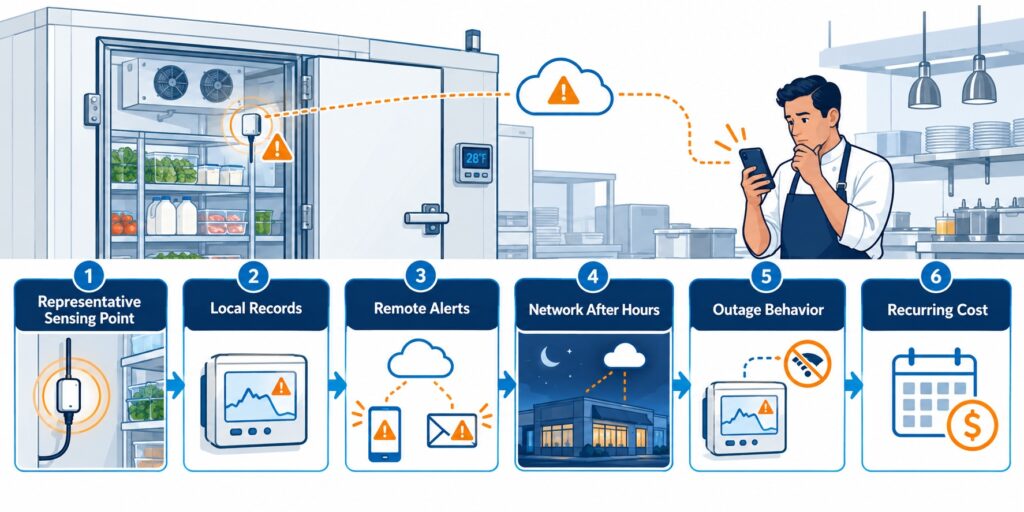
    Buying criteria for a restaurant walk-in cooler temperature alert system including sensor placement, local logging, remote alerts, network path, outage behavior, and recurring cost.. restaurant walk-in cooler temperature alerts selection guide

    The buying decision depends on sensor location, local logging, alert delivery, and the network path that remains available after closing time.

    Who Is This Comparison For?

    This comparison is for restaurant owners, general managers, food-safety leads, bakery and grocery operators, franchise operations teams, refrigeration contractors, and small-business buyers who need a practical walk-in cooler or freezer monitor rather than a heavy enterprise environmental monitoring platform.

    The trigger is often operational rather than regulatory. A cooler may have warmed overnight, a door may have been left open after closing, a refrigeration fault may have recovered before the morning shift, or an operator may have discovered that manual temperature checks cannot prove what happened between readings. Multi-location businesses add another problem: each store may have different Wi-Fi quality, different staffing, and different escalation habits.

    The page focuses on purchase decisions: sensing location, gateway requirements, outage behavior, alarm routing, and operating cost across one or many sites.

    Restaurant Walk-In Cooler Temperature Alerts Selection Guide: What Matters Most?

    1. Monitor the warmest representative location, not the easiest wall

    The FDA Food Code is a model offered for adoption by state and local jurisdictions. Section 4-204.112 says a mechanically refrigerated food-storage unit should measure air temperature or simulated-product temperature in its warmest part. Sensor placement is therefore a purchasing criterion: a device beside a cold air outlet may be less useful than a system that can monitor a representative food-storage zone.
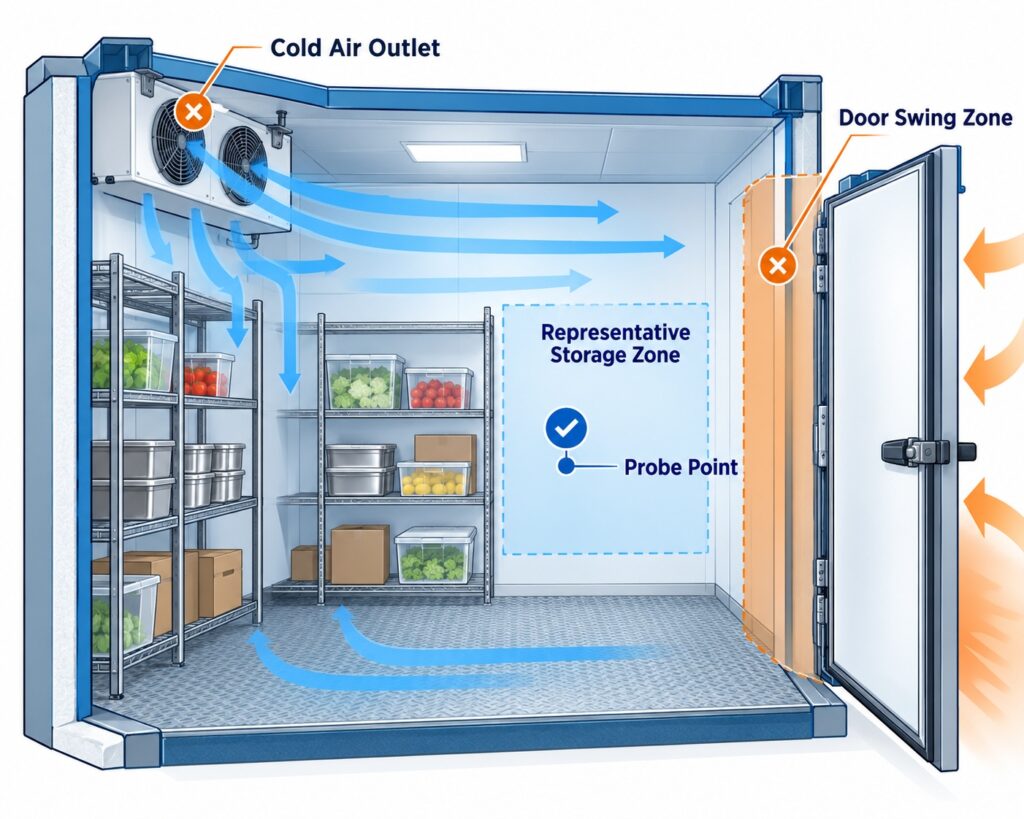
    Walk-in cooler sensor placement diagram comparing the warmest representative storage zone with cold airflow, door-adjacent, and easy-wall locations.

    Measure the representative storage zone, not the coldest airflow point near the evaporator.

    2. Decide whether you need an internal sensor or an external probe

    Walk-in coolers are wet, cold, busy spaces. Door seals, evaporator airflow, washdown, condensation, shelving, and loading patterns all influence where the sensing element should go. An external probe can keep the logger, display, power connection, or radio electronics outside the cold zone while the probe remains inside. An integrated sensor is simpler, but the entire device has to live where the temperature is measured.
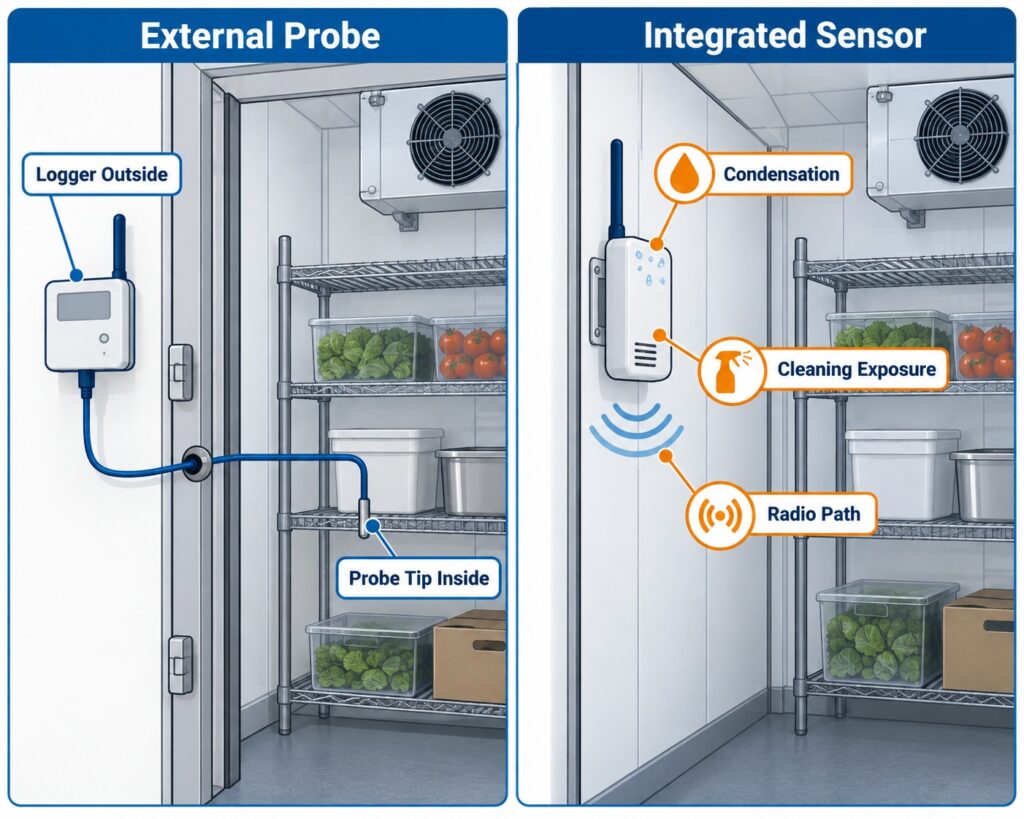
    Comparison of external probe and integrated sensor placement for a restaurant walk-in cooler temperature monitor.

    An external probe lets the logger stay accessible while the sensing element sits inside the cooler.

    3. Choose connectivity by what survives after closing time

    Wi-Fi is convenient when coverage is proven and the restaurant controls the network. Ethernet can be more stable but usually means cabling. A gateway architecture can serve many battery sensors, but it adds infrastructure. Direct cellular connectivity is useful when the monitoring system should not depend entirely on the restaurant router. The right question is not “Which radio is best?” but “What network path will still deliver an alert at 2 a.m. if local Wi-Fi is down?”
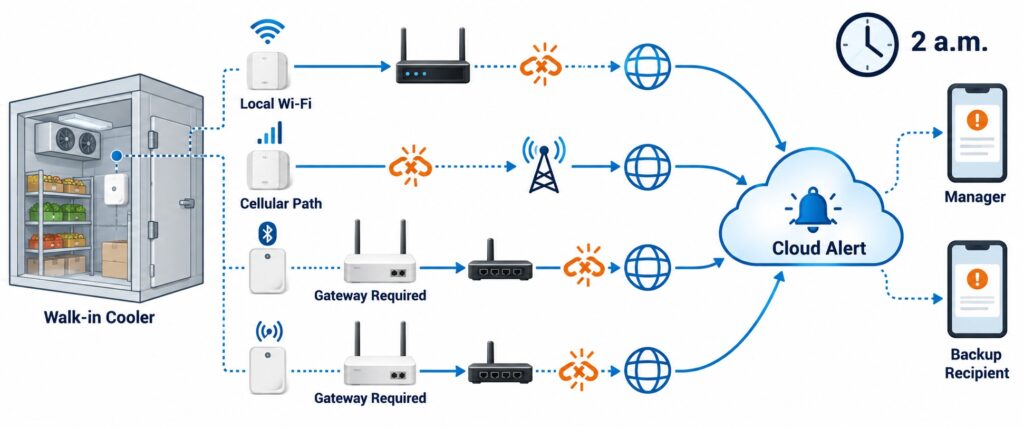
    Comparison of Wi-Fi, cellular, Ethernet gateway, Bluetooth gateway, and sub-GHz gateway paths for restaurant walk-in cooler temperature alerts after hours.

    Connectivity should be selected by what can still deliver alerts at 2 a.m. when store Wi-Fi or power is unstable.

    4. Separate local logging from remote alerts

    Local memory protects the record when communications fail. Remote alerts support action while an excursion is developing. Buyers should verify both. A sensor that stores readings locally but cannot reach the cloud during an outage may preserve evidence without warning staff. A cloud-only design without meaningful local buffering creates the opposite risk.
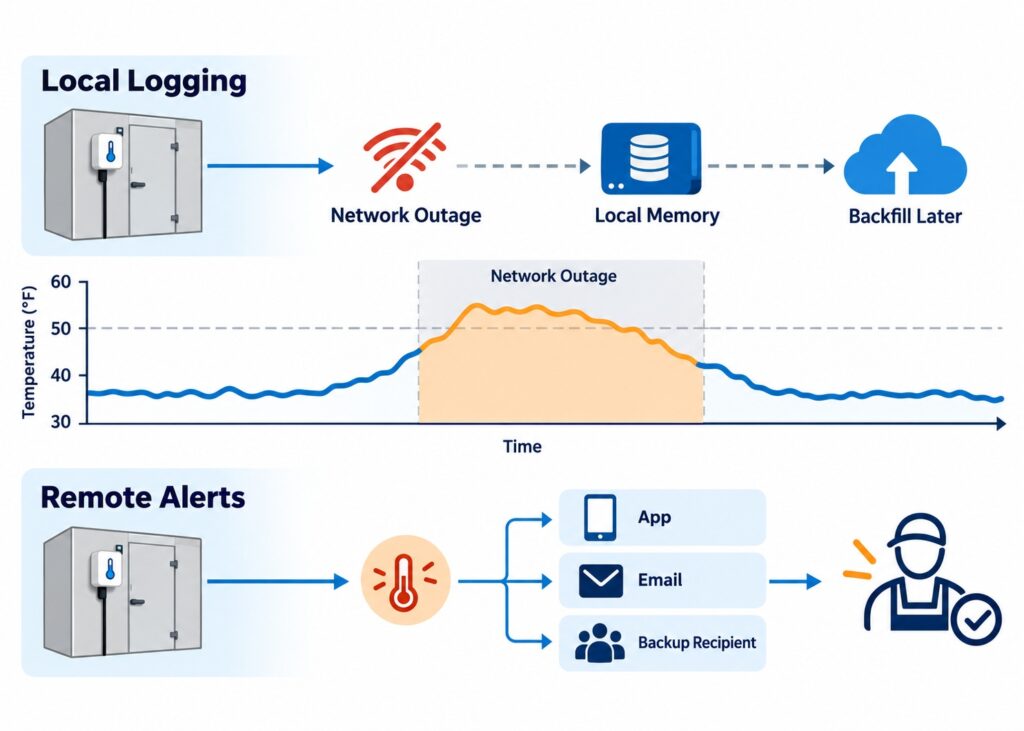
    Walk-in cooler monitoring diagram showing local data logging during an outage and remote alert delivery when the network is available.

    Local memory preserves evidence during outages, while remote alerts support action before the excursion becomes worse.

    5. Control nuisance alarms with delay, thresholds, and response rules

    Walk-in temperatures can spike when doors open, product is loaded, or defrost runs. Alerts that fire on every short event can create alarm fatigue. Prefer justified warning and critical thresholds, a delay or persistence rule where supported, and escalation to a backup recipient. Limits should come from the restaurant food-safety plan, product requirements, equipment performance, and local rules.
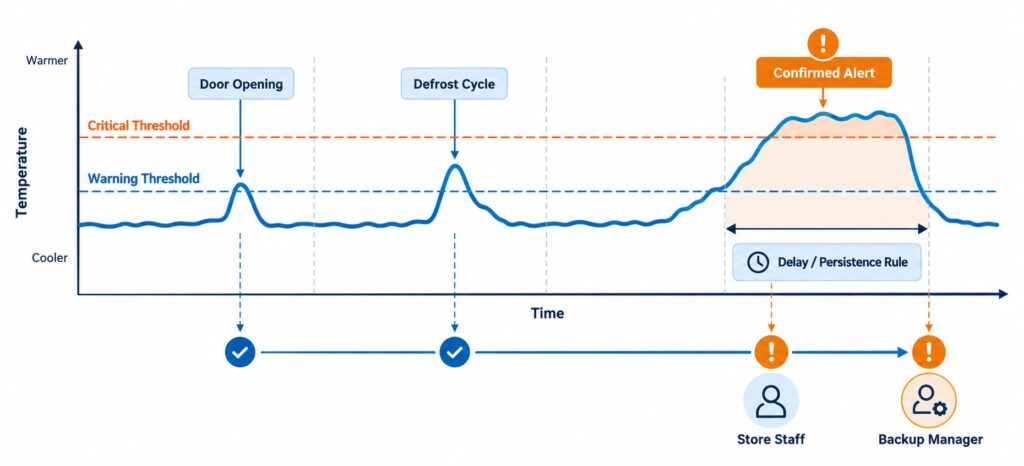
    Walk-in cooler temperature alert timeline showing warning threshold, critical threshold, delay rule, door opening, defrost cycle, and escalation to staff.

    Delay rules, warning thresholds, critical thresholds, and escalation help reduce nuisance alarms from door openings and defrost cycles.

    6. Compare total cost, not only the sensor price

    The real cost can include a gateway, external probe, wall power, batteries, cloud tier, SMS or voice credits, cellular data, calibration, installation, and replacement labor. A single restaurant may favor direct connectivity with fewer infrastructure parts. A 50-location chain may accept gateway architecture if many sensors can share the same network design.
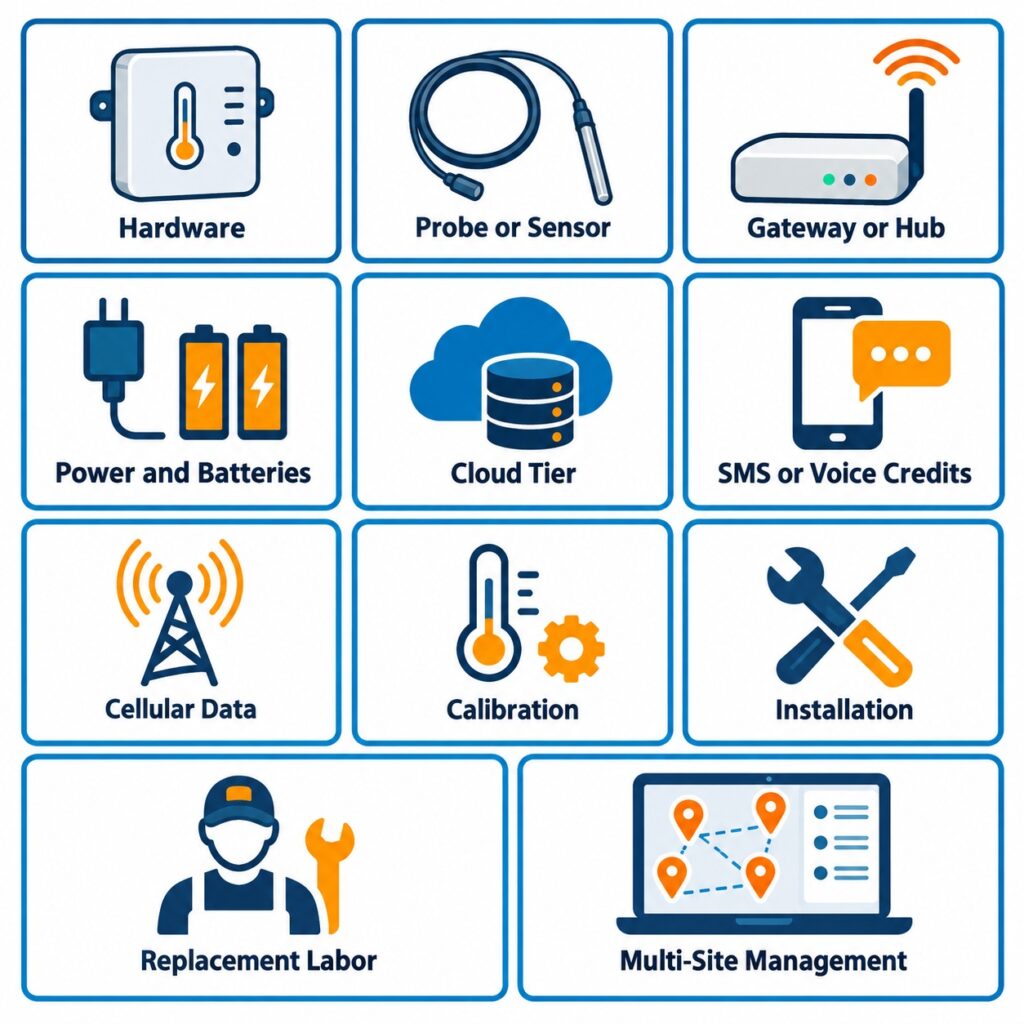
    Total cost components for restaurant walk-in cooler monitoring including sensor, probe, gateway, power, cloud plan, SMS, voice calls, cellular data, calibration, installation, and replacement labor.

    Total cost includes gateways, probes, power, cloud tier, messaging, cellular data, calibration, installation, and replacement labor.

    7 Questions to Ask Before Buying a Walk-In Cooler Temperature Alert System

    • Will it continue recording if Wi-Fi or the Internet fails?
    • Can it alert staff if the monitoring device itself goes offline?
    • Does the design require a separate gateway or hub?
    • Can the sensing point sit in the warmest representative storage location?
    • Can alerts be delayed or escalated so normal door events do not create alarm fatigue?
    • Are historical reports, additional users, APIs, SMS, or voice calls included—or paid extras?
    • What happens if the restaurant loses power or the network router reboots?
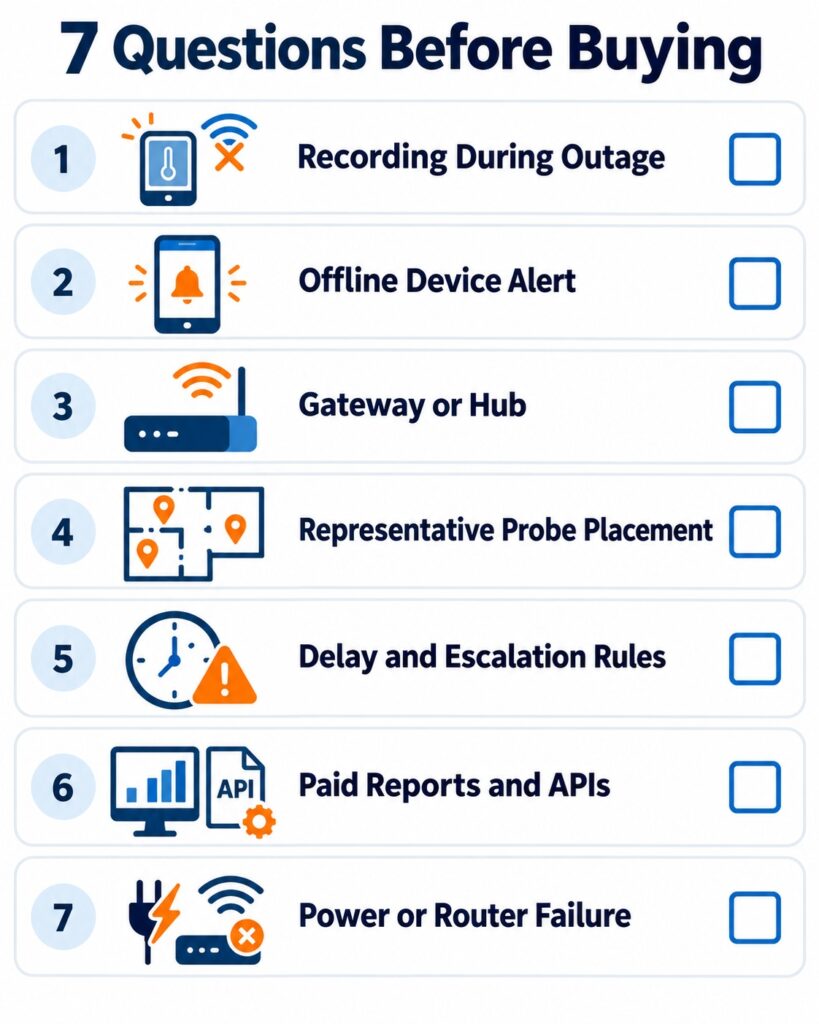
    A purchasing checklist should confirm outage recording, offline alerts, gateway needs, probe placement, alert rules, paid features, and power behavior.

    A purchasing checklist should confirm outage recording, offline alerts, gateway needs, probe placement, alert rules, paid features, and power behavior.

    Product Overview

    UbiBot WS1 Pro 4G / Wi-Fi

    UbiBot WS1 Pro combines internal temperature, humidity, and light sensing with a 4.4-inch LCD, 300,000-record local memory, Wi-Fi/4G connectivity, and external temperature/RS485 probe support. The 4G version can reach the UbiBot cloud without a separate gateway, reducing dependence on restaurant Wi-Fi. For a walk-in cooler, a practical configuration is to keep the logger accessible and place a compatible external probe at the representative monitoring point. The basic platform does not require a subscription, although paid storage, messaging, and services can add cost.

    SensorPush HTP.xw + G1 WiFi Gateway

    SensorPush HTP.xw is a compact water-resistant temperature, humidity, and barometric-pressure sensor. It samples once per minute, stores about 30 days of readings, and is specified from -40°C to 60°C with strong published temperature accuracy. Continuous Internet access and remote alerts require the G1 gateway, which connects by 2.4 GHz Wi-Fi or Ethernet and uses SensorPush cloud service without a monthly fee. The HTP.xw has no external probe or local display, so the sensing body itself must be placed in the monitored environment.

    Monnit ALTA Wireless Digital Temperature Sensor MNS2-9-W2-TS-SD-L10

    Monnit’s ALTA Digital Temperature Sensor uses a 10-foot stainless-steel leaded probe and local display. The probe covers -40°C to 125°C, with ±1°C accuracy at 25°C and a calibrated specification of ±0.25°C. It communicates by ALTA radio to a compatible gateway rather than directly to restaurant Wi-Fi. The extra gateway adds complexity at one site but becomes efficient when many sensors share it. Advanced iMonnit features depend on the selected software tier.

    testo Saveris 2-T1

    testo Saveris 2-T1 is an IP65 Wi-Fi logger with an integrated NTC sensor, local display, 10,000-value memory, and a -30°C to 50°C range at ±0.5°C. It uploads through 2.4 GHz Wi-Fi to Testo Cloud and can support email and, under applicable plans, SMS alarms. It is tested by TÜV Süd according to EN 12830. For this use case, its main limitation is the lack of an external probe, Ethernet, or cellular fallback. Regional product lifecycle and cloud terms should be checked before rollout.

    Side-by-Side Comparison Table

    Specifications below are based on official manufacturer pages and data sheets reviewed in September 2026. Where a feature depends on a gateway, software tier, region, probe, or calibration option, that dependency is stated instead of presenting it as universal.

    Comparison item UbiBot WS1 Pro 4G SensorPush HTP.xw + G1 Monnit ALTA MNS2-9-W2-TS-SD-L10 testo Saveris 2-T1
    Product positioning Direct Wi-Fi/4G multiparameter monitor with LCD and external-probe support Compact T/RH/pressure sensor + Wi-Fi/Ethernet gateway for remote access Leaded digital temperature sensor using ALTA radio + gateway Integrated Wi-Fi temperature logger for cloud monitoring
    Measurement parameters Internal temperature, RH, light; external probe parameters depend on accessory Temperature, RH, barometric pressure Temperature only Temperature only
    Measurement range Internal T: -20 to 60°C; RH: 0-100%; external probe depends on selected accessory -40 to 60°C; RH 0-100% Leaded probe: -40 to 125°C -30 to 50°C
    Accuracy Internal T ±0.2°C (0-60°C); RH ±2% (10-90% RH); external probe depends on accessory T: ±0.2°C typical full range, ±0.3°C max; RH accuracy varies by range ±1°C at 25°C; calibrated accuracy ±0.25°C ±0.5°C
    Connectivity 2.4 GHz Wi-Fi + 4G LTE (regional model) Sensor: Bluetooth LE; G1: 2.4 GHz Wi-Fi or Ethernet ALTA sub-GHz radio to compatible gateway; gateway backhaul depends on model 2.4 GHz Wi-Fi
    External probe support Yes; DS18B20 temperature probes and compatible RS485 probes subject to configuration No Yes; exact model includes 10-ft stainless-steel leaded probe No; integrated NTC sensor
    Gateway requirement No separate gateway G1 required for continuous Internet access / remote alerts Compatible ALTA gateway required No separate gateway
    Local display 4.4-inch LCD No 4-digit local display Local display for current value / status
    Power supply 4 x AA batteries or USB; variant details should be confirmed HTP.xw: CR2477; G1: 5 V DC 2 x AA batteries 4 x AA batteries; mains unit optional
    Local data storage 300,000 sensing records About 30 days on HTP.xw 2,000-4,000 readings when gateway connection is lost 10,000 values per channel
    Cloud access UbiBot public IoT platform SensorPush cloud via G1 iMonnit Testo Cloud
    Alert methods App, email; paid SMS/voice; HTTP and other integrations available Remote alerts via SensorPush app / cloud; verify current email-SMS support if required Email, push, SMS, voice depending on iMonnit tier and credits Email; optional SMS under applicable cloud plan
    Data export / reports CSV/PDF; automated reports subject to plan/service CSV export; full remote history through gateway/cloud History, export and reports depend on iMonnit tier PDF/CSV reports under applicable plan
    API / integration REST API, MQTT, data forwarding options Cloud API available through G1 account REST/Webhook APIs require Premiere or Enterprise API available in some Advanced offerings
    Subscription requirement No mandatory subscription for basic platform; paid add-ons may apply No monthly cloud fee stated for G1 Basic is free; Premiere adds advanced capabilities Cloud plan required; terms vary by region
    Installation complexity Low to medium; no hub, but 4G/SIM and probe routing must be planned Low to medium; add powered G1 and local network Medium; sensor + gateway + iMonnit architecture Low where Wi-Fi is proven
    Best suited for Restaurants wanting no hub, LCD, local memory, external probe, and Wi-Fi/4G flexibility Small simple sites with reliable local Internet and no external-probe requirement Multi-sensor or multi-zone sites where many nodes can share a gateway Temperature-only Wi-Fi monitoring with strong device-level specifications
    Restaurant-specific limitation Protect main unit from condensation/washdown; probe selection must be confirmed No external probe or local display; remote operation depends on G1 and local Internet Gateway required; full feature set depends on software tier No external probe, Ethernet, or cellular fallback on T1

    Connectivity and Deployment Comparison

    For a single restaurant, network simplicity often matters more than theoretical scale. UbiBot WS1 Pro 4G can use cellular service or Wi-Fi without a separate hub. That means the restaurant can avoid adding a gateway and can keep remote visibility even when it does not want the monitoring workflow tied entirely to the store router. Cellular performance, SIM cost, and regional frequency support still need to be confirmed.

    SensorPush uses Bluetooth between the HTP.xw and nearby phones or the G1 gateway. The G1 then uses Wi-Fi or Ethernet to reach the SensorPush cloud. This is easy to understand and there is no monthly cloud fee, but remote access depends on the powered gateway and the local Internet connection.

    Monnit separates the sensor layer from the Internet layer. The ALTA sensor talks to a gateway over long-range sub-GHz radio, and the gateway can use Ethernet, Wi-Fi, or cellular depending on the selected model. This adds hardware but can make multi-point deployments cleaner because many sensors can share one backhaul device.

    testo Saveris 2-T1 is Wi-Fi native. It is the simplest of the four when the walk-in sits within strong, managed WLAN coverage and the operator is comfortable with Testo Cloud. It is also the most directly dependent on Wi-Fi because the exact T1 does not offer Ethernet or cellular fallback.
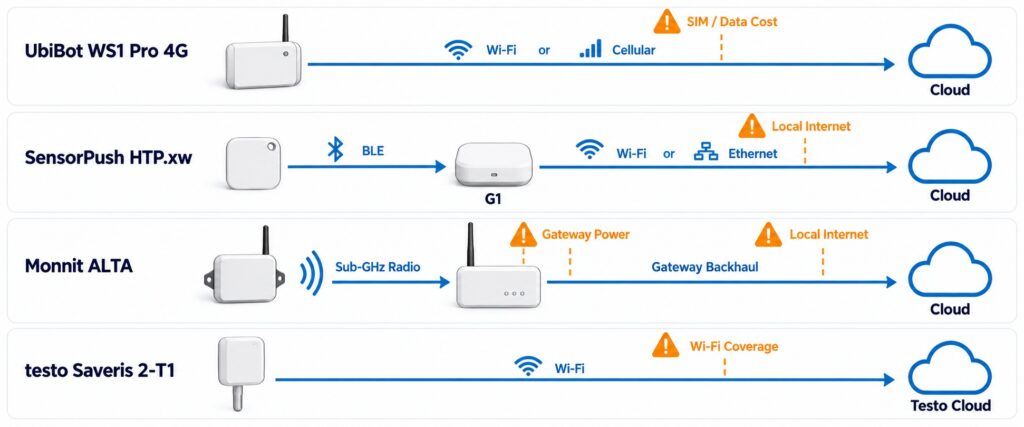
    Connectivity paths for UbiBot, SensorPush, Monnit, and Testo restaurant walk-in cooler monitoring systems, including direct cellular, Wi-Fi, Bluetooth gateway, and sub-GHz gateway architectures.

    The four systems differ mainly in whether remote access is direct, gateway-based, radio-based, or Wi-Fi-only.

    Sensor and External Probe Comparison

    The restaurant-specific question is not simply sensor accuracy. It is whether the sensing element can sit where the food risk is represented. The FDA Food Code’s warmest-location logic favors a placement that reflects the most demanding area of the refrigerated unit rather than the evaporator discharge or another artificially cold spot.

    UbiBot supports external temperature probes on WS1 Pro, which lets the restaurant keep the main device accessible while routing the probe into the walk-in. The exact external probe model determines the usable temperature range, cable arrangement, accuracy, and calibration evidence, so the ordered probe should be named in the purchase specification.

    SensorPush HTP.xw has strong published accuracy and a water-resistant design, but it is an integrated sensor. There is no separate probe to route through a wall or door penetration. That can be perfectly adequate for a simple ambient monitoring point, provided the device can be placed safely in a representative zone and remains within its environmental limitations.

    Monnit’s digital sensor is purpose-built around a leaded probe, and the 10-foot lead makes it practical to keep the radio/display body outside a difficult spot while positioning the stainless-steel sensing tip inside the cooler. Testo Saveris 2-T1 uses an internal sensor, so buyers who specifically want a leaded probe should compare the T1 with Testo’s external-probe models instead of assuming the T1 can accept one.
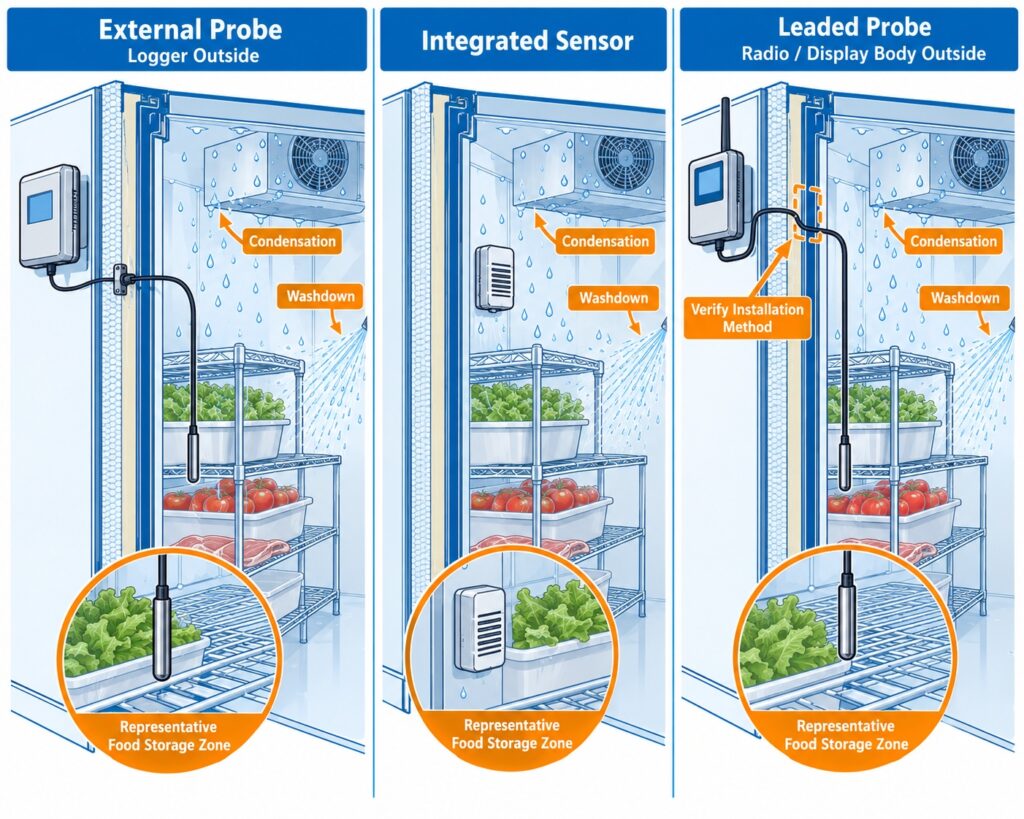
    External probe and integrated sensor architecture comparison for restaurant walk-in cooler temperature monitoring, showing electronics outside the cold zone and sensing tip inside the food storage area.

    Probe architecture determines whether the sensing point can be placed in the food-risk zone while the electronics stay protected.

    Cloud Platform, Alerts and Data Management

    UbiBot provides remote dashboards, historical graphs, device sharing, CSV/PDF export, rules, and multiple notification methods. App and email alerts are available, while SMS and voice calls use paid credits. HTTP-based actions and integrations are also available. The free device-level cloud plan lowers the mandatory software cost, but high data volume or additional services may require paid capacity.

    SensorPush keeps the software experience deliberately simple. With the G1 gateway, users can see current conditions, alerts, and full history remotely. SensorPush states that the cloud service has no monthly fee, and the G1 also exposes a cloud API. The current public G1 material clearly supports remote alerts, but restaurants that specifically require email or SMS should confirm the current alert-channel availability before standardizing on it.

    Monnit iMonnit provides rules, history, notifications, and management for sensor networks. The free Basic tier supports a limited configuration, while Premiere expands users, history, settings, reporting, SMS, and API access. This makes Monnit flexible, but the feature tier should be included in the total-cost comparison rather than treated as an afterthought.

    Testo Cloud is part of the Saveris 2 workflow. The logger uploads measurements by Wi-Fi, while the cloud handles configuration, charts, alarms, and reports. Advanced offerings can include automatic PDF/CSV reporting, multiple users, SMS allowances, and API export. Terms vary by region, so the exact license should be confirmed before rollout.
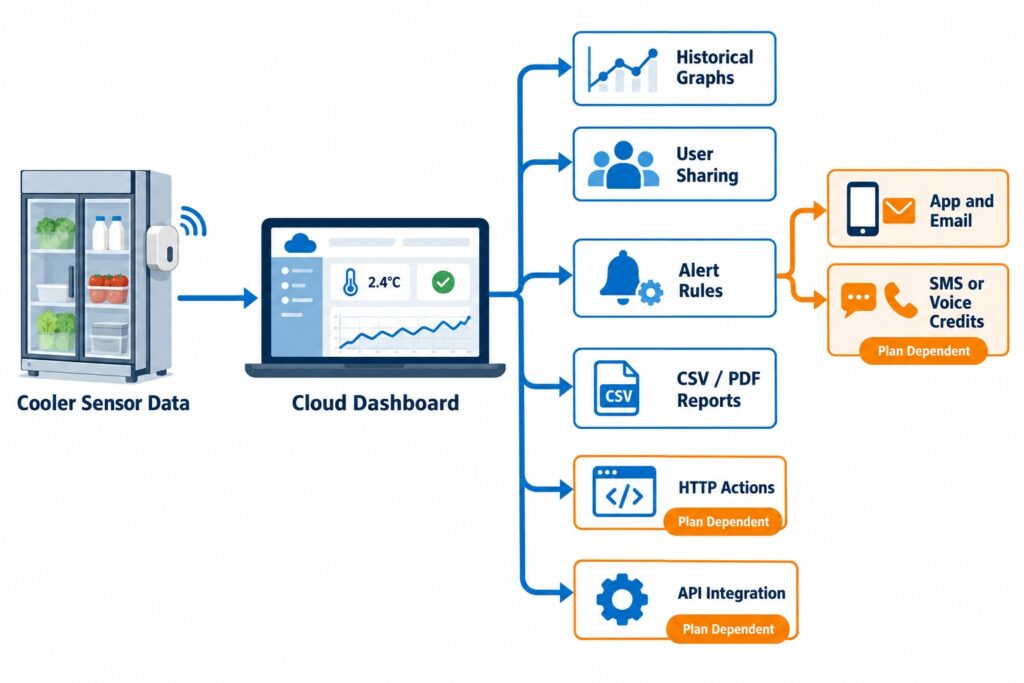
    Restaurant cooler cloud monitoring workflow showing dashboard, historical graph, device sharing, alerts, CSV and PDF reports, HTTP actions, API integrations, and paid notification credits.

    Remote monitoring should connect dashboard visibility, alert recipients, history, reports, and integration options.

    Total Deployment Cost and Recurring Burden

    For UbiBot, budget for the WS1 Pro 4G, a suitable external temperature probe, mounting or a protective case if required, batteries or USB power, SIM/data service, and any paid cloud capacity or message credits. There is no separate gateway and no mandatory subscription for the basic public platform.

    SensorPush cost includes each HTP.xw plus at least one powered G1 gateway for continuous remote monitoring. The cloud service is included without a monthly fee. The trade-off is that the gateway and local Internet path are part of every remote deployment.

    Monnit cost includes the digital temperature sensor, a compatible gateway, the selected backhaul, and the appropriate iMonnit tier. A gateway can look expensive at one point but becomes easier to justify as sensor count rises. If SMS, voice, multiple users, advanced rules, or APIs are required, the relevant software and notification charges should be added to the model.

    Testo cost includes the logger, batteries or optional mains power, the required cloud license terms for the chosen region, calibration if required by the business, and any Advanced functions such as SMS, automated reporting, or API access. Because commercial packages change, compare cost structure over three to five years rather than publishing a fixed “cheapest” claim.

    Brand-by-Brand Strengths and Trade-Offs

    UbiBot WS1 Pro 4G

    Best for restaurants that want a local display, external-probe flexibility, direct Wi-Fi or cellular cloud connectivity, substantial local memory, and a low mandatory software burden. Its trade-offs are that cellular service adds SIM/data cost and the main device should not be treated as a washdown-rated cooler instrument without appropriate protection and installation planning.

    SensorPush HTP.xw + G1

    Best for small operators that value a compact, highly accurate temperature/humidity sensor, a simple app, long sensor battery life, and no monthly cloud fee. Its main trade-offs are the lack of an external probe or local display and the need for a powered G1 plus local Internet for continuous remote access.

    Monnit ALTA Digital Temperature Sensor

    Best for restaurants, commissaries, or multi-point facilities that expect to expand into many sensors. The leaded probe and local display are useful for refrigeration, and a shared gateway can scale well. The trade-off is architecture: one sensor is not a complete remote system without a compatible gateway, and advanced iMonnit capabilities can add subscription cost.

    testo Saveris 2-T1

    Best for temperature-only monitoring where reliable Wi-Fi is already available and buyers value an IP65 logger with local display, 10,000-value memory, Testo Cloud, and published EN 12830 evidence. Its limitation is that the exact T1 has an integrated sensor and no Ethernet or cellular fallback.

    Which Product Should You Choose?

    Choose this option When this purchasing condition matters most
    Choose UbiBot WS1 Pro 4G if… you want a local LCD, 300,000 local records, external-probe flexibility, no separate hub, and a direct cellular option that can reduce dependence on restaurant Wi-Fi.
    Choose SensorPush HTP.xw + G1 if… you want a compact, highly accurate temperature/humidity sensor, a simple app, long battery life, and no monthly cloud fee—and a powered gateway plus local Internet are acceptable.
    Choose Monnit ALTA Digital Temperature Sensor if… you expect many monitoring points, want a leaded probe and local digital reading, and can justify a shared gateway architecture.
    Choose testo Saveris 2-T1 if… you need a compact IP65 temperature-only Wi-Fi logger with local memory, Testo Cloud, and published EN 12830 evidence, and you do not need an external probe or cellular fallback.

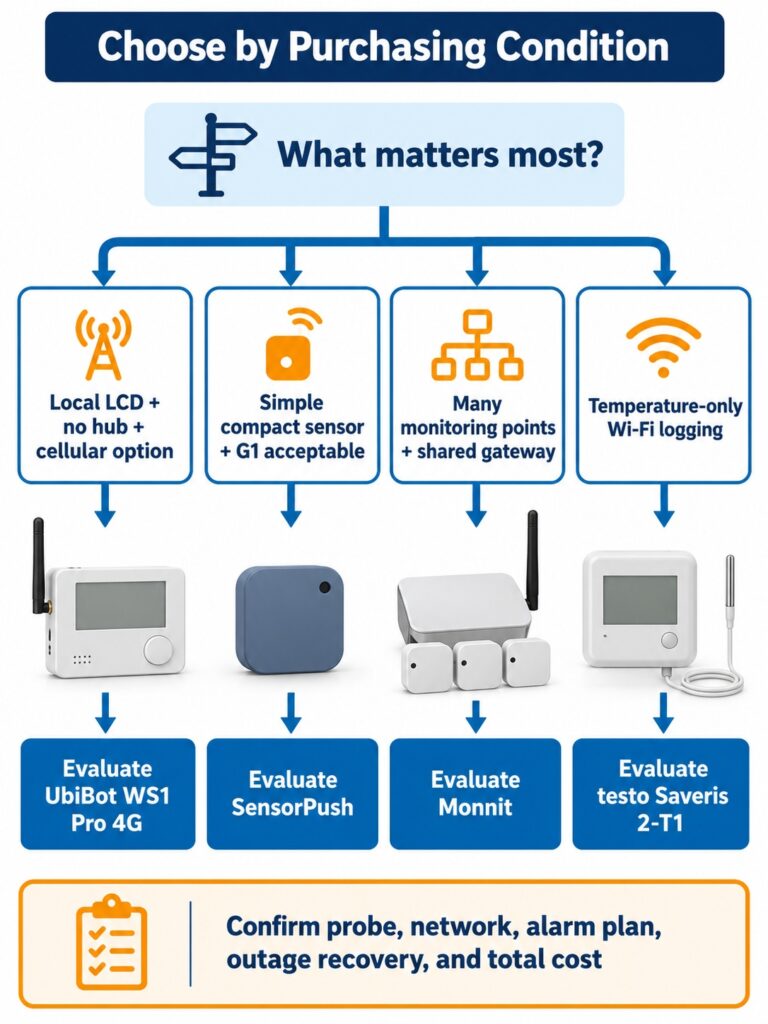
    Decision tree for choosing a restaurant walk-in cooler temperature monitoring system based on no hub, cellular flexibility, simple gateway monitoring, many shared sensors, or Wi-Fi temperature-only logging.

    Choose by purchasing condition: no hub and cellular flexibility, simple gateway monitoring, many shared sensors, or Wi-Fi temperature-only logging.

    Pros and Cons

    Product Scenario-specific advantages Scenario-specific limitations
    UbiBot WS1 Pro 4G No gateway; Wi-Fi + cellular; 4.4-inch LCD; 300,000 records; external probes; free basic cloud SIM/data cost; main unit needs appropriate protection; external-probe specification must be frozen before purchase
    SensorPush HTP.xw + G1 High published accuracy; T/RH/pressure; 30-day sensor storage; long sensor battery life; no monthly cloud fee G1 needed for remote access; no external probe; no local display; depends on local Internet
    Monnit ALTA Digital Temperature Leaded probe; local display; wide range; long-range radio; offline buffering; scalable sensor network Gateway required; paid software may be needed for multiple users/API/advanced rules; standard accuracy is ±1°C unless calibrated
    testo Saveris 2-T1 IP65; ±0.5°C; 10,000-value memory; local display; EN 12830 evidence; simple Wi-Fi architecture Integrated sensor only; Wi-Fi dependent; no Ethernet/cellular fallback; current regional product lifecycle should be checked

    Frequently Asked Questions

    What is the best walk-in cooler temperature alarm system for a small restaurant?

    For a small restaurant, prioritize a representative sensing point, local data logging, remote alerts, and simple connectivity. UbiBot WS1 Pro 4G is attractive when cellular fallback and no separate hub matter. SensorPush is simple when a G1 gateway and reliable local Internet are acceptable.

    Where should a walk-in cooler temperature sensor be placed?

    Use a location that represents the warmest relevant storage condition rather than the coldest airflow point. The FDA Food Code model specifies the warmest part of a mechanically refrigerated unit for air or simulated-product temperature measurement. Local requirements and the restaurant food-safety plan still govern the final setup.

    Does a restaurant walk-in cooler monitor need an external probe?

    Not always. An integrated sensor can work if the whole device can be placed safely at the representative monitoring point. An external probe is useful when the logger, display, power connection, or network electronics should remain outside the cold or wet zone.

    Can a walk-in cooler alarm still work if Wi-Fi fails?

    Only if the system has another working communications path. UbiBot WS1 Pro 4G can use cellular service; a Monnit deployment can use a cellular gateway if selected. SensorPush G1 and testo Saveris 2-T1 depend on their local Internet/Wi-Fi path for remote cloud alerts.

    Will these systems keep recording during an Internet outage?

    They all provide some form of local storage or buffering, but capacity and recovery behavior differ. UbiBot publishes 300,000 local records, SensorPush HTP.xw about 30 days on the sensor, Monnit ALTA sensors can buffer readings when the gateway link is lost, and testo Saveris 2-T1 stores 10,000 values.

    How do I reduce false temperature alarms from door openings or defrost cycles?

    Use justified thresholds, a delay or persistence rule where the platform supports it, and place the sensing point so it represents stored-food conditions rather than a fast-changing airflow location. A buffered or simulated-product approach can also reduce short air-temperature spikes when it is appropriate for the food-safety plan.

    Is a cloud subscription required?

    UbiBot includes a free basic platform plan, SensorPush states that its G1 cloud service has no monthly fee, and iMonnit Basic is free with limits. Testo Saveris 2 uses Testo Cloud and plan terms vary by region. Advanced reporting, SMS, API access, extra users, or extended history can add cost on several platforms.

    Is a temperature monitoring system automatically FDA or HACCP compliant?

    No. The FDA Food Code is a model code, and HACCP is a food-safety control system. A connected thermometer can support monitoring and records, but the business still needs justified limits, sensor placement, procedures, response actions, verification, and any locally required records or calibration.

    Final Verdict

    For the buying intent behind “restaurant walk-in cooler temperature alerts,” UbiBot WS1 Pro 4G is the most balanced option here when a restaurant wants an onsite display, large local memory, external-probe flexibility, cloud alerts, and a direct cellular path without a separate hub. That combination is especially relevant when the monitoring workflow should not depend entirely on store Wi-Fi.

    SensorPush is the minimalist choice when a compact high-accuracy sensor and no monthly cloud fee matter more than probe flexibility. Monnit becomes more compelling as sensor count grows and a shared gateway is economical. testo Saveris 2-T1 is a straightforward Wi-Fi logger with strong published specifications and EN 12830 evidence, but it is less flexible when an external probe or independent network path is required.

    Before purchase, confirm the monitoring point, probe or sensor configuration, alarm delay and escalation, outage recovery, network design, cloud tier, and ongoing service cost. In the United States, treat the FDA Food Code as a model and verify the rules adopted by the relevant state or local jurisdiction. A logger supports a food-safety process; it does not replace that process.
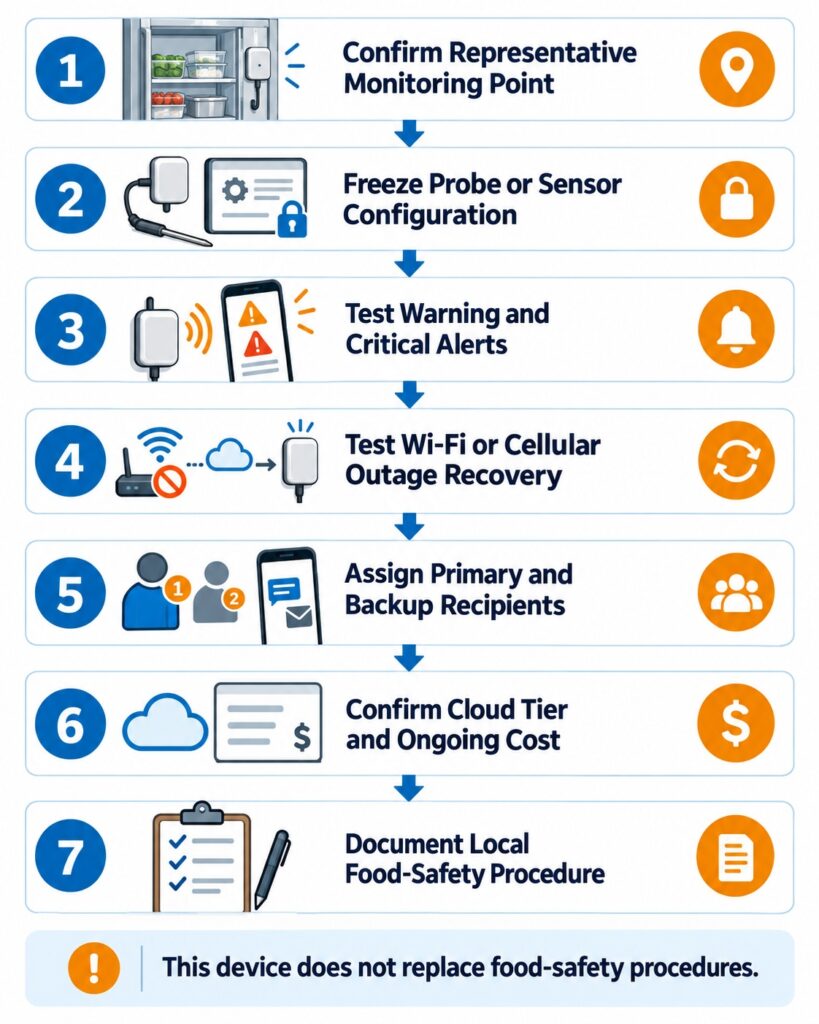
    Restaurant walk-in cooler monitoring rollout verification workflow covering probe placement, sensor configuration, alert delay, escalation, outage recovery, cloud tier, and ongoing service cost.

    Before rollout, verify probe placement, alert delay, escalation, outage recovery, cloud tier, and ongoing service cost.

    Official Sources Reviewed

    1. UbiBot WS1 Pro product page: https://www.ubibot.com/ubibot-ws1pro/
    2. UbiBot WS1 Pro specifications: https://www.ubibot.com/ubibot-ws1pro-specifications/
    3. UbiBot WS1 Pro 4G store specifications: https://store.ubibot.com/products/ubibot-ws1-pro-4g-north-america
    4. UbiBot free plan: https://helpdesk.ubibot.com/article/about-free-plan-subscription
    5. UbiBot IoT Platform: https://www.ubibot.com/big-data-platform/
    6. UbiBot alerts: https://www.ubibot.com/alerts/

    Related Resources

    How to Get an Alert Before a Walk-In Cooler Fails?
    How to Select Temperature Monitoring Devices for Pharmaceutical Storage and Transport Under USP <1079.3>
    What EN 12830 Means When Selecting a Cold-Chain Temperature Recorder?
    UbiBot vs Monnit vs ELPRO vs Dickson: Which Is Better for Laboratory Refrigerators and ULT Freezers?
    UbiBot vs Room Alert MAX vs Monnit vs HW Group: Which Is Better for Unattended Telecom Shelters?
    National University of Singapore Study Uses UbiBot WS1 Pro for Surface Temperature Calibration in District-Scale Thermal Infrared Monitoring
    Harbin Institute of Technology Uses UbiBot UB-DT-P1 Sensors to Monitor Residential Indoor Temperature in Severe Cold and Cold Regions of China
    Harbin Institute of Technology Uses UbiBot Sensors to Monitor Residential Indoor Temperature for Overheating and Shading Analysis
    menu-header-svg
    Search
    • Explore Knowledge
      • Comparison & Selection
      • Industry Solution
      • Product & Device
      • Criterion & Compliance
      • Deployment & Usage
      • Technology & Principle
    • Academic Research
    • In-depth Tech

    Comparison & Selection

    See More >>

    Best Walk-In Cooler Temperature Alarm Systems for Restaurants: UbiBot vs SensorPush vs Monnit vs Testo

    Published: September 28, 2026

    Updated: September 28, 2026

    By Jason Fallon

    Quick Answer

    For most independent restaurants and small multi-site operators, the right walk-in cooler alert system is the one that combines representative sensor placement, continuous local recording, dependable remote alerts, and a network path that still works after hours. UbiBot WS1 Pro 4G is the strongest fit here when a restaurant wants a local LCD, no separate hub, and cellular connectivity that can reduce dependence on site Wi-Fi. SensorPush HTP.xw is attractive for simple high-accuracy temperature/humidity monitoring when a G1 gateway and local Wi-Fi or Ethernet are acceptable. Monnit is better suited to larger multi-sensor deployments that justify a shared gateway. testo Saveris 2-T1 is a straightforward Wi-Fi temperature logger with EN 12830 evidence. The biggest buying differences are connectivity, gateway dependency, probe placement, offline data retention, alert workflow, and recurring software or network cost.

    Buying criteria for a restaurant walk-in cooler temperature alert system including sensor placement, local logging, remote alerts, network path, outage behavior, and recurring cost.. restaurant walk-in cooler temperature alerts selection guide

    The buying decision depends on sensor location, local logging, alert delivery, and the network path that remains available after closing time.

    Who Is This Comparison For?

    This comparison is for restaurant owners, general managers, food-safety leads, bakery and grocery operators, franchise operations teams, refrigeration contractors, and small-business buyers who need a practical walk-in cooler or freezer monitor rather than a heavy enterprise environmental monitoring platform.

    The trigger is often operational rather than regulatory. A cooler may have warmed overnight, a door may have been left open after closing, a refrigeration fault may have recovered before the morning shift, or an operator may have discovered that manual temperature checks cannot prove what happened between readings. Multi-location businesses add another problem: each store may have different Wi-Fi quality, different staffing, and different escalation habits.

    The page focuses on purchase decisions: sensing location, gateway requirements, outage behavior, alarm routing, and operating cost across one or many sites.

    Restaurant Walk-In Cooler Temperature Alerts Selection Guide: What Matters Most?

    1. Monitor the warmest representative location, not the easiest wall

    The FDA Food Code is a model offered for adoption by state and local jurisdictions. Section 4-204.112 says a mechanically refrigerated food-storage unit should measure air temperature or simulated-product temperature in its warmest part. Sensor placement is therefore a purchasing criterion: a device beside a cold air outlet may be less useful than a system that can monitor a representative food-storage zone.

    Walk-in cooler sensor placement diagram comparing the warmest representative storage zone with cold airflow, door-adjacent, and easy-wall locations.

    Measure the representative storage zone, not the coldest airflow point near the evaporator.

    2. Decide whether you need an internal sensor or an external probe

    Walk-in coolers are wet, cold, busy spaces. Door seals, evaporator airflow, washdown, condensation, shelving, and loading patterns all influence where the sensing element should go. An external probe can keep the logger, display, power connection, or radio electronics outside the cold zone while the probe remains inside. An integrated sensor is simpler, but the entire device has to live where the temperature is measured.

    Comparison of external probe and integrated sensor placement for a restaurant walk-in cooler temperature monitor.

    An external probe lets the logger stay accessible while the sensing element sits inside the cooler.

    3. Choose connectivity by what survives after closing time

    Wi-Fi is convenient when coverage is proven and the restaurant controls the network. Ethernet can be more stable but usually means cabling. A gateway architecture can serve many battery sensors, but it adds infrastructure. Direct cellular connectivity is useful when the monitoring system should not depend entirely on the restaurant router. The right question is not “Which radio is best?” but “What network path will still deliver an alert at 2 a.m. if local Wi-Fi is down?”

    Comparison of Wi-Fi, cellular, Ethernet gateway, Bluetooth gateway, and sub-GHz gateway paths for restaurant walk-in cooler temperature alerts after hours.

    Connectivity should be selected by what can still deliver alerts at 2 a.m. when store Wi-Fi or power is unstable.

    4. Separate local logging from remote alerts

    Local memory protects the record when communications fail. Remote alerts support action while an excursion is developing. Buyers should verify both. A sensor that stores readings locally but cannot reach the cloud during an outage may preserve evidence without warning staff. A cloud-only design without meaningful local buffering creates the opposite risk.

    Walk-in cooler monitoring diagram showing local data logging during an outage and remote alert delivery when the network is available.

    Local memory preserves evidence during outages, while remote alerts support action before the excursion becomes worse.

    5. Control nuisance alarms with delay, thresholds, and response rules

    Walk-in temperatures can spike when doors open, product is loaded, or defrost runs. Alerts that fire on every short event can create alarm fatigue. Prefer justified warning and critical thresholds, a delay or persistence rule where supported, and escalation to a backup recipient. Limits should come from the restaurant food-safety plan, product requirements, equipment performance, and local rules.

    Walk-in cooler temperature alert timeline showing warning threshold, critical threshold, delay rule, door opening, defrost cycle, and escalation to staff.

    Delay rules, warning thresholds, critical thresholds, and escalation help reduce nuisance alarms from door openings and defrost cycles.

    6. Compare total cost, not only the sensor price

    The real cost can include a gateway, external probe, wall power, batteries, cloud tier, SMS or voice credits, cellular data, calibration, installation, and replacement labor. A single restaurant may favor direct connectivity with fewer infrastructure parts. A 50-location chain may accept gateway architecture if many sensors can share the same network design.

    Total cost components for restaurant walk-in cooler monitoring including sensor, probe, gateway, power, cloud plan, SMS, voice calls, cellular data, calibration, installation, and replacement labor.

    Total cost includes gateways, probes, power, cloud tier, messaging, cellular data, calibration, installation, and replacement labor.

    7 Questions to Ask Before Buying a Walk-In Cooler Temperature Alert System

    • Will it continue recording if Wi-Fi or the Internet fails?
    • Can it alert staff if the monitoring device itself goes offline?
    • Does the design require a separate gateway or hub?
    • Can the sensing point sit in the warmest representative storage location?
    • Can alerts be delayed or escalated so normal door events do not create alarm fatigue?
    • Are historical reports, additional users, APIs, SMS, or voice calls included—or paid extras?
    • What happens if the restaurant loses power or the network router reboots?

    A purchasing checklist should confirm outage recording, offline alerts, gateway needs, probe placement, alert rules, paid features, and power behavior.

    A purchasing checklist should confirm outage recording, offline alerts, gateway needs, probe placement, alert rules, paid features, and power behavior.

    Product Overview

    UbiBot WS1 Pro 4G / Wi-Fi

    UbiBot WS1 Pro combines internal temperature, humidity, and light sensing with a 4.4-inch LCD, 300,000-record local memory, Wi-Fi/4G connectivity, and external temperature/RS485 probe support. The 4G version can reach the UbiBot cloud without a separate gateway, reducing dependence on restaurant Wi-Fi. For a walk-in cooler, a practical configuration is to keep the logger accessible and place a compatible external probe at the representative monitoring point. The basic platform does not require a subscription, although paid storage, messaging, and services can add cost.

    SensorPush HTP.xw + G1 WiFi Gateway

    SensorPush HTP.xw is a compact water-resistant temperature, humidity, and barometric-pressure sensor. It samples once per minute, stores about 30 days of readings, and is specified from -40°C to 60°C with strong published temperature accuracy. Continuous Internet access and remote alerts require the G1 gateway, which connects by 2.4 GHz Wi-Fi or Ethernet and uses SensorPush cloud service without a monthly fee. The HTP.xw has no external probe or local display, so the sensing body itself must be placed in the monitored environment.

    Monnit ALTA Wireless Digital Temperature Sensor MNS2-9-W2-TS-SD-L10

    Monnit’s ALTA Digital Temperature Sensor uses a 10-foot stainless-steel leaded probe and local display. The probe covers -40°C to 125°C, with ±1°C accuracy at 25°C and a calibrated specification of ±0.25°C. It communicates by ALTA radio to a compatible gateway rather than directly to restaurant Wi-Fi. The extra gateway adds complexity at one site but becomes efficient when many sensors share it. Advanced iMonnit features depend on the selected software tier.

    testo Saveris 2-T1

    testo Saveris 2-T1 is an IP65 Wi-Fi logger with an integrated NTC sensor, local display, 10,000-value memory, and a -30°C to 50°C range at ±0.5°C. It uploads through 2.4 GHz Wi-Fi to Testo Cloud and can support email and, under applicable plans, SMS alarms. It is tested by TÜV Süd according to EN 12830. For this use case, its main limitation is the lack of an external probe, Ethernet, or cellular fallback. Regional product lifecycle and cloud terms should be checked before rollout.

    Side-by-Side Comparison Table

    Specifications below are based on official manufacturer pages and data sheets reviewed in September 2026. Where a feature depends on a gateway, software tier, region, probe, or calibration option, that dependency is stated instead of presenting it as universal.

    Comparison item UbiBot WS1 Pro 4G SensorPush HTP.xw + G1 Monnit ALTA MNS2-9-W2-TS-SD-L10 testo Saveris 2-T1
    Product positioning Direct Wi-Fi/4G multiparameter monitor with LCD and external-probe support Compact T/RH/pressure sensor + Wi-Fi/Ethernet gateway for remote access Leaded digital temperature sensor using ALTA radio + gateway Integrated Wi-Fi temperature logger for cloud monitoring
    Measurement parameters Internal temperature, RH, light; external probe parameters depend on accessory Temperature, RH, barometric pressure Temperature only Temperature only
    Measurement range Internal T: -20 to 60°C; RH: 0-100%; external probe depends on selected accessory -40 to 60°C; RH 0-100% Leaded probe: -40 to 125°C -30 to 50°C
    Accuracy Internal T ±0.2°C (0-60°C); RH ±2% (10-90% RH); external probe depends on accessory T: ±0.2°C typical full range, ±0.3°C max; RH accuracy varies by range ±1°C at 25°C; calibrated accuracy ±0.25°C ±0.5°C
    Connectivity 2.4 GHz Wi-Fi + 4G LTE (regional model) Sensor: Bluetooth LE; G1: 2.4 GHz Wi-Fi or Ethernet ALTA sub-GHz radio to compatible gateway; gateway backhaul depends on model 2.4 GHz Wi-Fi
    External probe support Yes; DS18B20 temperature probes and compatible RS485 probes subject to configuration No Yes; exact model includes 10-ft stainless-steel leaded probe No; integrated NTC sensor
    Gateway requirement No separate gateway G1 required for continuous Internet access / remote alerts Compatible ALTA gateway required No separate gateway
    Local display 4.4-inch LCD No 4-digit local display Local display for current value / status
    Power supply 4 x AA batteries or USB; variant details should be confirmed HTP.xw: CR2477; G1: 5 V DC 2 x AA batteries 4 x AA batteries; mains unit optional
    Local data storage 300,000 sensing records About 30 days on HTP.xw 2,000-4,000 readings when gateway connection is lost 10,000 values per channel
    Cloud access UbiBot public IoT platform SensorPush cloud via G1 iMonnit Testo Cloud
    Alert methods App, email; paid SMS/voice; HTTP and other integrations available Remote alerts via SensorPush app / cloud; verify current email-SMS support if required Email, push, SMS, voice depending on iMonnit tier and credits Email; optional SMS under applicable cloud plan
    Data export / reports CSV/PDF; automated reports subject to plan/service CSV export; full remote history through gateway/cloud History, export and reports depend on iMonnit tier PDF/CSV reports under applicable plan
    API / integration REST API, MQTT, data forwarding options Cloud API available through G1 account REST/Webhook APIs require Premiere or Enterprise API available in some Advanced offerings
    Subscription requirement No mandatory subscription for basic platform; paid add-ons may apply No monthly cloud fee stated for G1 Basic is free; Premiere adds advanced capabilities Cloud plan required; terms vary by region
    Installation complexity Low to medium; no hub, but 4G/SIM and probe routing must be planned Low to medium; add powered G1 and local network Medium; sensor + gateway + iMonnit architecture Low where Wi-Fi is proven
    Best suited for Restaurants wanting no hub, LCD, local memory, external probe, and Wi-Fi/4G flexibility Small simple sites with reliable local Internet and no external-probe requirement Multi-sensor or multi-zone sites where many nodes can share a gateway Temperature-only Wi-Fi monitoring with strong device-level specifications
    Restaurant-specific limitation Protect main unit from condensation/washdown; probe selection must be confirmed No external probe or local display; remote operation depends on G1 and local Internet Gateway required; full feature set depends on software tier No external probe, Ethernet, or cellular fallback on T1

    Connectivity and Deployment Comparison

    For a single restaurant, network simplicity often matters more than theoretical scale. UbiBot WS1 Pro 4G can use cellular service or Wi-Fi without a separate hub. That means the restaurant can avoid adding a gateway and can keep remote visibility even when it does not want the monitoring workflow tied entirely to the store router. Cellular performance, SIM cost, and regional frequency support still need to be confirmed.

    SensorPush uses Bluetooth between the HTP.xw and nearby phones or the G1 gateway. The G1 then uses Wi-Fi or Ethernet to reach the SensorPush cloud. This is easy to understand and there is no monthly cloud fee, but remote access depends on the powered gateway and the local Internet connection.

    Monnit separates the sensor layer from the Internet layer. The ALTA sensor talks to a gateway over long-range sub-GHz radio, and the gateway can use Ethernet, Wi-Fi, or cellular depending on the selected model. This adds hardware but can make multi-point deployments cleaner because many sensors can share one backhaul device.

    testo Saveris 2-T1 is Wi-Fi native. It is the simplest of the four when the walk-in sits within strong, managed WLAN coverage and the operator is comfortable with Testo Cloud. It is also the most directly dependent on Wi-Fi because the exact T1 does not offer Ethernet or cellular fallback.

    Connectivity paths for UbiBot, SensorPush, Monnit, and Testo restaurant walk-in cooler monitoring systems, including direct cellular, Wi-Fi, Bluetooth gateway, and sub-GHz gateway architectures.

    The four systems differ mainly in whether remote access is direct, gateway-based, radio-based, or Wi-Fi-only.

    Sensor and External Probe Comparison

    The restaurant-specific question is not simply sensor accuracy. It is whether the sensing element can sit where the food risk is represented. The FDA Food Code’s warmest-location logic favors a placement that reflects the most demanding area of the refrigerated unit rather than the evaporator discharge or another artificially cold spot.

    UbiBot supports external temperature probes on WS1 Pro, which lets the restaurant keep the main device accessible while routing the probe into the walk-in. The exact external probe model determines the usable temperature range, cable arrangement, accuracy, and calibration evidence, so the ordered probe should be named in the purchase specification.

    SensorPush HTP.xw has strong published accuracy and a water-resistant design, but it is an integrated sensor. There is no separate probe to route through a wall or door penetration. That can be perfectly adequate for a simple ambient monitoring point, provided the device can be placed safely in a representative zone and remains within its environmental limitations.

    Monnit’s digital sensor is purpose-built around a leaded probe, and the 10-foot lead makes it practical to keep the radio/display body outside a difficult spot while positioning the stainless-steel sensing tip inside the cooler. Testo Saveris 2-T1 uses an internal sensor, so buyers who specifically want a leaded probe should compare the T1 with Testo’s external-probe models instead of assuming the T1 can accept one.

    External probe and integrated sensor architecture comparison for restaurant walk-in cooler temperature monitoring, showing electronics outside the cold zone and sensing tip inside the food storage area.

    Probe architecture determines whether the sensing point can be placed in the food-risk zone while the electronics stay protected.

    Cloud Platform, Alerts and Data Management

    UbiBot provides remote dashboards, historical graphs, device sharing, CSV/PDF export, rules, and multiple notification methods. App and email alerts are available, while SMS and voice calls use paid credits. HTTP-based actions and integrations are also available. The free device-level cloud plan lowers the mandatory software cost, but high data volume or additional services may require paid capacity.

    SensorPush keeps the software experience deliberately simple. With the G1 gateway, users can see current conditions, alerts, and full history remotely. SensorPush states that the cloud service has no monthly fee, and the G1 also exposes a cloud API. The current public G1 material clearly supports remote alerts, but restaurants that specifically require email or SMS should confirm the current alert-channel availability before standardizing on it.

    Monnit iMonnit provides rules, history, notifications, and management for sensor networks. The free Basic tier supports a limited configuration, while Premiere expands users, history, settings, reporting, SMS, and API access. This makes Monnit flexible, but the feature tier should be included in the total-cost comparison rather than treated as an afterthought.

    Testo Cloud is part of the Saveris 2 workflow. The logger uploads measurements by Wi-Fi, while the cloud handles configuration, charts, alarms, and reports. Advanced offerings can include automatic PDF/CSV reporting, multiple users, SMS allowances, and API export. Terms vary by region, so the exact license should be confirmed before rollout.

    Restaurant cooler cloud monitoring workflow showing dashboard, historical graph, device sharing, alerts, CSV and PDF reports, HTTP actions, API integrations, and paid notification credits.

    Remote monitoring should connect dashboard visibility, alert recipients, history, reports, and integration options.

    Total Deployment Cost and Recurring Burden

    For UbiBot, budget for the WS1 Pro 4G, a suitable external temperature probe, mounting or a protective case if required, batteries or USB power, SIM/data service, and any paid cloud capacity or message credits. There is no separate gateway and no mandatory subscription for the basic public platform.

    SensorPush cost includes each HTP.xw plus at least one powered G1 gateway for continuous remote monitoring. The cloud service is included without a monthly fee. The trade-off is that the gateway and local Internet path are part of every remote deployment.

    Monnit cost includes the digital temperature sensor, a compatible gateway, the selected backhaul, and the appropriate iMonnit tier. A gateway can look expensive at one point but becomes easier to justify as sensor count rises. If SMS, voice, multiple users, advanced rules, or APIs are required, the relevant software and notification charges should be added to the model.

    Testo cost includes the logger, batteries or optional mains power, the required cloud license terms for the chosen region, calibration if required by the business, and any Advanced functions such as SMS, automated reporting, or API access. Because commercial packages change, compare cost structure over three to five years rather than publishing a fixed “cheapest” claim.

    Brand-by-Brand Strengths and Trade-Offs

    UbiBot WS1 Pro 4G

    Best for restaurants that want a local display, external-probe flexibility, direct Wi-Fi or cellular cloud connectivity, substantial local memory, and a low mandatory software burden. Its trade-offs are that cellular service adds SIM/data cost and the main device should not be treated as a washdown-rated cooler instrument without appropriate protection and installation planning.

    SensorPush HTP.xw + G1

    Best for small operators that value a compact, highly accurate temperature/humidity sensor, a simple app, long sensor battery life, and no monthly cloud fee. Its main trade-offs are the lack of an external probe or local display and the need for a powered G1 plus local Internet for continuous remote access.

    Monnit ALTA Digital Temperature Sensor

    Best for restaurants, commissaries, or multi-point facilities that expect to expand into many sensors. The leaded probe and local display are useful for refrigeration, and a shared gateway can scale well. The trade-off is architecture: one sensor is not a complete remote system without a compatible gateway, and advanced iMonnit capabilities can add subscription cost.

    testo Saveris 2-T1

    Best for temperature-only monitoring where reliable Wi-Fi is already available and buyers value an IP65 logger with local display, 10,000-value memory, Testo Cloud, and published EN 12830 evidence. Its limitation is that the exact T1 has an integrated sensor and no Ethernet or cellular fallback.

    Which Product Should You Choose?

    Choose this option When this purchasing condition matters most
    Choose UbiBot WS1 Pro 4G if… you want a local LCD, 300,000 local records, external-probe flexibility, no separate hub, and a direct cellular option that can reduce dependence on restaurant Wi-Fi.
    Choose SensorPush HTP.xw + G1 if… you want a compact, highly accurate temperature/humidity sensor, a simple app, long battery life, and no monthly cloud fee—and a powered gateway plus local Internet are acceptable.
    Choose Monnit ALTA Digital Temperature Sensor if… you expect many monitoring points, want a leaded probe and local digital reading, and can justify a shared gateway architecture.
    Choose testo Saveris 2-T1 if… you need a compact IP65 temperature-only Wi-Fi logger with local memory, Testo Cloud, and published EN 12830 evidence, and you do not need an external probe or cellular fallback.

    Decision tree for choosing a restaurant walk-in cooler temperature monitoring system based on no hub, cellular flexibility, simple gateway monitoring, many shared sensors, or Wi-Fi temperature-only logging.

    Choose by purchasing condition: no hub and cellular flexibility, simple gateway monitoring, many shared sensors, or Wi-Fi temperature-only logging.

    Pros and Cons

    Product Scenario-specific advantages Scenario-specific limitations
    UbiBot WS1 Pro 4G No gateway; Wi-Fi + cellular; 4.4-inch LCD; 300,000 records; external probes; free basic cloud SIM/data cost; main unit needs appropriate protection; external-probe specification must be frozen before purchase
    SensorPush HTP.xw + G1 High published accuracy; T/RH/pressure; 30-day sensor storage; long sensor battery life; no monthly cloud fee G1 needed for remote access; no external probe; no local display; depends on local Internet
    Monnit ALTA Digital Temperature Leaded probe; local display; wide range; long-range radio; offline buffering; scalable sensor network Gateway required; paid software may be needed for multiple users/API/advanced rules; standard accuracy is ±1°C unless calibrated
    testo Saveris 2-T1 IP65; ±0.5°C; 10,000-value memory; local display; EN 12830 evidence; simple Wi-Fi architecture Integrated sensor only; Wi-Fi dependent; no Ethernet/cellular fallback; current regional product lifecycle should be checked

    Frequently Asked Questions

    What is the best walk-in cooler temperature alarm system for a small restaurant?

    For a small restaurant, prioritize a representative sensing point, local data logging, remote alerts, and simple connectivity. UbiBot WS1 Pro 4G is attractive when cellular fallback and no separate hub matter. SensorPush is simple when a G1 gateway and reliable local Internet are acceptable.

    Where should a walk-in cooler temperature sensor be placed?

    Use a location that represents the warmest relevant storage condition rather than the coldest airflow point. The FDA Food Code model specifies the warmest part of a mechanically refrigerated unit for air or simulated-product temperature measurement. Local requirements and the restaurant food-safety plan still govern the final setup.

    Does a restaurant walk-in cooler monitor need an external probe?

    Not always. An integrated sensor can work if the whole device can be placed safely at the representative monitoring point. An external probe is useful when the logger, display, power connection, or network electronics should remain outside the cold or wet zone.

    Can a walk-in cooler alarm still work if Wi-Fi fails?

    Only if the system has another working communications path. UbiBot WS1 Pro 4G can use cellular service; a Monnit deployment can use a cellular gateway if selected. SensorPush G1 and testo Saveris 2-T1 depend on their local Internet/Wi-Fi path for remote cloud alerts.

    Will these systems keep recording during an Internet outage?

    They all provide some form of local storage or buffering, but capacity and recovery behavior differ. UbiBot publishes 300,000 local records, SensorPush HTP.xw about 30 days on the sensor, Monnit ALTA sensors can buffer readings when the gateway link is lost, and testo Saveris 2-T1 stores 10,000 values.

    How do I reduce false temperature alarms from door openings or defrost cycles?

    Use justified thresholds, a delay or persistence rule where the platform supports it, and place the sensing point so it represents stored-food conditions rather than a fast-changing airflow location. A buffered or simulated-product approach can also reduce short air-temperature spikes when it is appropriate for the food-safety plan.

    Is a cloud subscription required?

    UbiBot includes a free basic platform plan, SensorPush states that its G1 cloud service has no monthly fee, and iMonnit Basic is free with limits. Testo Saveris 2 uses Testo Cloud and plan terms vary by region. Advanced reporting, SMS, API access, extra users, or extended history can add cost on several platforms.

    Is a temperature monitoring system automatically FDA or HACCP compliant?

    No. The FDA Food Code is a model code, and HACCP is a food-safety control system. A connected thermometer can support monitoring and records, but the business still needs justified limits, sensor placement, procedures, response actions, verification, and any locally required records or calibration.

    Final Verdict

    For the buying intent behind “restaurant walk-in cooler temperature alerts,” UbiBot WS1 Pro 4G is the most balanced option here when a restaurant wants an onsite display, large local memory, external-probe flexibility, cloud alerts, and a direct cellular path without a separate hub. That combination is especially relevant when the monitoring workflow should not depend entirely on store Wi-Fi.

    SensorPush is the minimalist choice when a compact high-accuracy sensor and no monthly cloud fee matter more than probe flexibility. Monnit becomes more compelling as sensor count grows and a shared gateway is economical. testo Saveris 2-T1 is a straightforward Wi-Fi logger with strong published specifications and EN 12830 evidence, but it is less flexible when an external probe or independent network path is required.

    Before purchase, confirm the monitoring point, probe or sensor configuration, alarm delay and escalation, outage recovery, network design, cloud tier, and ongoing service cost. In the United States, treat the FDA Food Code as a model and verify the rules adopted by the relevant state or local jurisdiction. A logger supports a food-safety process; it does not replace that process.

    Restaurant walk-in cooler monitoring rollout verification workflow covering probe placement, sensor configuration, alert delay, escalation, outage recovery, cloud tier, and ongoing service cost.

    Before rollout, verify probe placement, alert delay, escalation, outage recovery, cloud tier, and ongoing service cost.

    Official Sources Reviewed

    1. UbiBot WS1 Pro product page: https://www.ubibot.com/ubibot-ws1pro/
    2. UbiBot WS1 Pro specifications: https://www.ubibot.com/ubibot-ws1pro-specifications/
    3. UbiBot WS1 Pro 4G store specifications: https://store.ubibot.com/products/ubibot-ws1-pro-4g-north-america
    4. UbiBot free plan: https://helpdesk.ubibot.com/article/about-free-plan-subscription
    5. UbiBot IoT Platform: https://www.ubibot.com/big-data-platform/
    6. UbiBot alerts: https://www.ubibot.com/alerts/

    分享

    LinkedIn2

    Facebook2

    X

    Newsletter Signup

    Related Resources

    How to Get an Alert Before a Walk-In Cooler Fails?
    How to Select Temperature Monitoring Devices for Pharmaceutical Storage and Transport Under USP <1079.3>
    What EN 12830 Means When Selecting a Cold-Chain Temperature Recorder?
    UbiBot vs Monnit vs ELPRO vs Dickson: Which Is Better for Laboratory Refrigerators and ULT Freezers?
    UbiBot vs Room Alert MAX vs Monnit vs HW Group: Which Is Better for Unattended Telecom Shelters?
    National University of Singapore Study Uses UbiBot WS1 Pro for Surface Temperature Calibration in District-Scale Thermal Infrared Monitoring
    Harbin Institute of Technology Uses UbiBot UB-DT-P1 Sensors to Monitor Residential Indoor Temperature in Severe Cold and Cold Regions of China
    Harbin Institute of Technology Uses UbiBot Sensors to Monitor Residential Indoor Temperature for Overheating and Shading Analysis
    menu-header-svg
    Search
    • Explore Knowledge
      • Comparison & Selection
      • Industry Solution
      • Product & Device
      • Criterion & Compliance
      • Deployment & Usage
      • Technology & Principle
    • Academic Research
    • In-depth Tech
    Enter Your Information

    Confirm

    Products

    Dashboards

    Support

    Purchase

    Company

    Smart Sensing

    UbiBot Web Console

    APP Download

    UbiBot Online Store

    News

    Smart Control

    UbiBot Space

    Product Docs & APIs

    Find Distributors

    Learn Hub

    Smart Video

    UbiBot On-Premises

    Helpdesk & FAQ

    Volume Pricing

    About Us

    LoRa Products

    Agency Web Console

    Video Center

    Contact Us

    Software & Platform


    Pricing


    Architecture

    External Sensors


    System Status

    Accessories


    Become a Distributor

    Global SIM


    Become an Affiliate

    Positioning System


    Products

    Dashboards

    Business Partners

    WS1

    UbiBot Web Console

    Volume Pricing

    WS1 Pro

    UbiBot Space

    Become a Distributor

    GS1

    UbiBot Support Desk

    Affiliates

    GS2

    Agency Web Console


    MS1


    SP1


    Accessories


    Docs

    Purchase

    Company

    Platform API

    Pricing

    News

    Q&A

    UbiBot Partners

    About us

    Privacy Policy

    Online Store

    Contact

    Terms of Service


    System Status

    Products

    Dashboards

    Smart Sensing

    UbiBot Web Console

    Smart Control

    UbiBot Space

    Smart Video

    UbiBot On-Premises

    LoRa Products

    Agency Web Console

    Software & Platform


    External Sensors


    Accessories


    Global SIM


    Positioning System


    Support

    Purchase

    APP Download

    UbiBot Online Store

    Product Docs & APIs

    Find Distributors

    Helpdesk & FAQ

    Volume Pricing

    Video Center


    Pricing


    Company

    News

    Learn Hub

    About Us

    Contact Us

    Architecture

    System Status

    Become a Distributor

    Become an Affiliate

    Language:
    English 日本語 (ベータ)  
    Language:

    English

    日本語 (ベータ)


    IoT Product Family:
    ubibotico     Wireless environmental sensing products and smart building solutions
    ubitrackico     UWB-based real-time indoor tracking solutions with 30cm accuracy

    IoT Product Family:

    ubibotico  Wireless environmental sensing products and smart building solutions
    ubitrackico  UWB-based real-time indoor tracking solutions with 30cm accuracy

    © 2013-2026 UbiBot.com. All rights reserved.

    Terms of Service | Privacy Policy | Compliance

    youtube facebook twitter