

UBiBot Logo
UBiBot Logo
  • UBiBot Logo
  • Home
  • Products

    NEW

  • Pricing
  • Support
  • About Us
  • Download
  • magnifying-glass  Search
  • magnifying-glass header-close
  • Sign in Sign in
    Public Web Console Public Web Console
    On-Premises App Center On-Premises App Center
  • Home
  • Products

    NEW

  • Pricing
  • Support
  • About us
  • Download
  •  Public Web Console
  •  On-Premises App Center
  • Where to Buy

Learn Hub

Explore Knowledge Academic Research In-depth Tech

Share

LinkedIn

Facebook

X (Twitter)

Newsletter Signup

Table of contents

    LoRaWAN vs Wi-Fi vs Cellular: Which Connectivity Is Best for Environmental Monitoring?

    Direct Answer

    No single connection is best for every environmental monitoring system. LoRaWAN is usually the strongest fit for many battery-powered sensors sending small packets across a site. Wi-Fi works well where managed local coverage and power are already available. Cellular is valuable for mobile, remote, or independent devices that cannot rely on site infrastructure. The correct choice depends on coverage, payload, battery life, ownership, recurring cost, and failure recovery.

    Key Takeaway

    Decision statement

    The best IoT connectivity comparison starts with the deployment, not the radio brand. LoRaWAN is usually the best fit for many low-data battery sensors across a managed site; Wi-Fi suits infrastructure-rich local environments; cellular suits independent, remote, and mobile assets. Before deployment, verify regional support, final-position coverage, energy under failure conditions, offline storage, security lifecycle, and the party responsible for maintaining every network layer.

    1.Quick Summary

    Decision Area Practical Answer
    LoRaWAN Best for many low-data, battery-powered nodes across a campus, farm, warehouse, or industrial site. Requires a compatible gateway and careful regional configuration.
    Wi-Fi Best for local IP connectivity where an access point, credentials, power, and network administration are already available. Higher throughput, but coverage and battery use need attention.
    Cellular Best for remote, mobile, multi-site, or independent devices. Uses operator infrastructure and licensed spectrum, but adds SIM, subscription, certification, and coverage considerations.
    Main decision Choose the architecture, not only the radio: node-to-gateway, direct-to-cloud, backhaul, local storage, and failover all affect reliability.
    Security Each option can be deployed securely, but radio-layer security does not replace device identity, credential protection, application encryption, updates, and access control.
    Practical rule Use LoRaWAN for distributed small-packet sensing, Wi-Fi for infrastructure-rich local sites, cellular for independent wide-area connectivity, and hybrid designs for critical systems.

    2.What Are LoRaWAN, Wi-Fi, and Cellular IoT?

    LoRaWAN is a low-power wide-area networking protocol designed for battery-powered end devices. End devices communicate by LoRa radio with one or more gateways, and the gateways forward packets over standard IP connections to a network server. The LoRa Alliance describes this as a star-of-stars topology. LoRaWAN is not the same as LoRa: LoRa is the radio modulation and physical-layer technology, while LoRaWAN defines network behavior, addressing, device classes, security, and backend roles. [1]

    Wi-Fi is a wireless local-area network based on the IEEE 802.11 family. A sensor normally associates with an access point and uses IP connectivity to reach a local server or cloud service. The current base standard is IEEE 802.11-2024, published in 2025. Wi-Fi can deliver far more throughput than typical environmental telemetry requires, but that capacity can be useful for configuration, firmware downloads, local dashboards, cameras, or multi-purpose gateways. [3]

    Cellular IoT connects a device through a mobile network operator rather than a site-owned access point. The category includes several radio access technologies with different capabilities, such as LTE Cat 1 or Cat 1 bis, LTE-M, NB-IoT, and 5G options. LTE-M and NB-IoT were standardized by 3GPP for low-power wide-area use in licensed spectrum. A cellular comparison must therefore identify the actual modem, bands, operator support, mobility requirements, and deployment country rather than treating cellular as one uniform technology. [4][5]
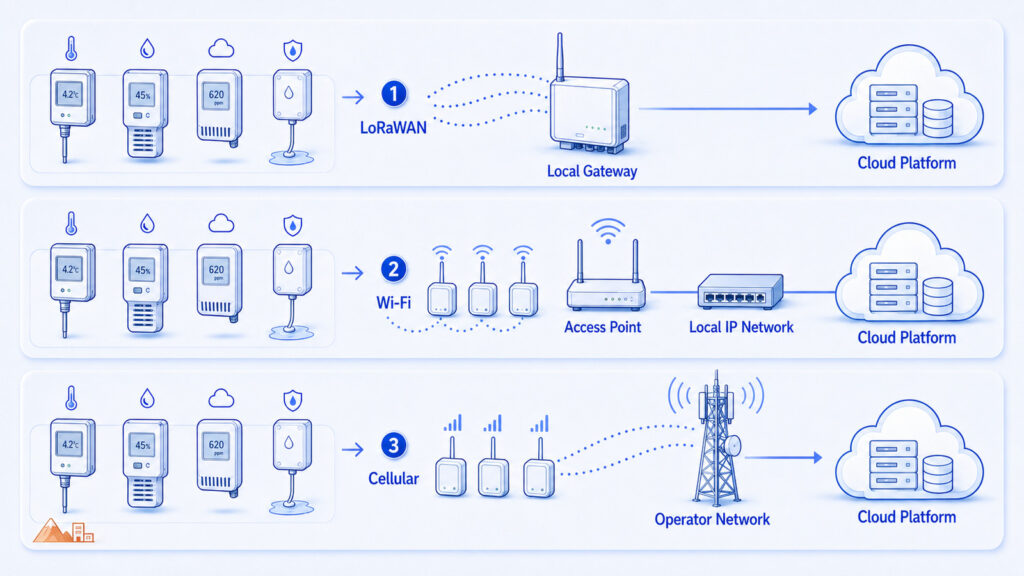
     

    IoT connectivity comparison

    3.Why Does Connectivity Matter in Environmental Monitoring?

    Environmental monitoring produces small measurements, but the network design determines whether those measurements arrive at the right time, from the right location, and with enough context to support an alarm or audit. A warehouse may have hundreds of static points behind insulated walls. A refrigerated vehicle moves between networks. A greenhouse may have no enterprise Wi-Fi. A laboratory may forbid unmanaged devices on the corporate network. These are architecture problems, not merely radio specifications.

    The wrong choice often fails gradually rather than immediately. Batteries require frequent replacement, access-point credentials expire, a gateway is installed in a poor location, a cellular modem lacks the required bands, or an application sends confirmed messages too often. The system appears connected during a pilot but becomes unreliable when node count, traffic, walls, seasons, or sites change.

    A useful IoT connectivity comparison therefore evaluates the complete path: sensor, antenna, power source, local cache, radio link, gateway or access point, backhaul, cloud endpoint, security credentials, and recovery process. Reliable monitoring depends on the weakest part of this chain.

    4.How Does Each Connectivity Path Work?

    In a LoRaWAN system, the end device normally wakes, measures, creates a compact payload, transmits an uplink, opens receive windows according to its device class, and returns to sleep. One or more gateways may receive the same packet. The network server validates and deduplicates traffic, manages network behavior, and routes application data to the application server. Class A provides the lowest-power baseline; Classes B and C increase downlink availability with different energy and infrastructure trade-offs. [1]
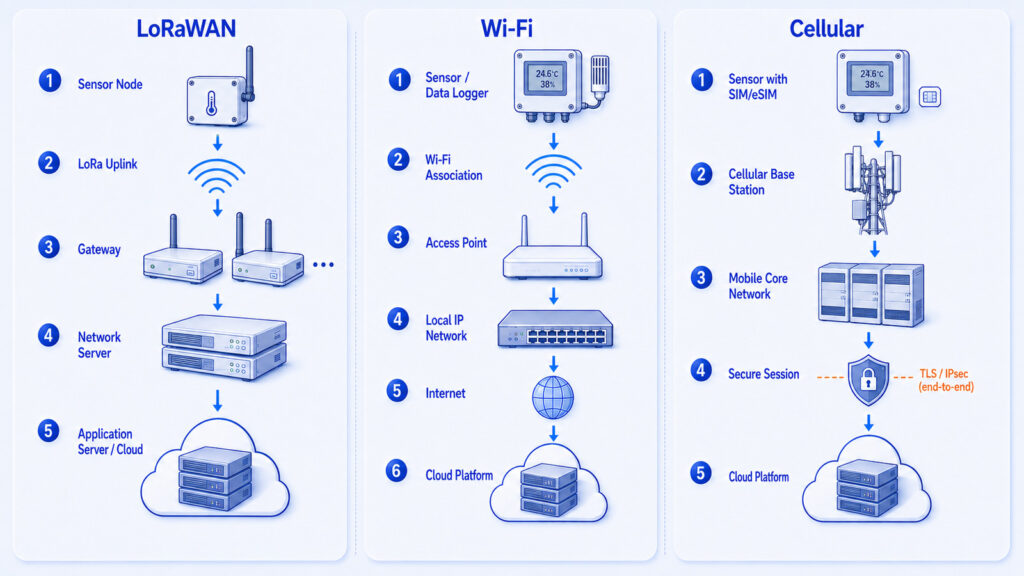
    LoRa WAN, Wi-Fi, Cellular data flow diagram

    In a Wi-Fi system, the sensor scans or reconnects to an access point, completes link authentication, obtains or reuses IP configuration, establishes an application session, and uploads data. For a continuously powered gateway, these steps have little operational cost. For a small battery device, repeated scanning, association, TLS handshakes, retries, and long awake periods can dominate energy use. Modern 802.11 mechanisms can improve efficiency, but actual battery life still depends on chipset, access point, firmware, signal quality, and upload schedule.

    In a cellular system, the modem registers with an operator network using a SIM, eSIM, or integrated SIM credential, establishes a packet data session, and connects to the application endpoint. Low-power cellular profiles can use extended sleep and paging mechanisms, while higher-throughput LTE or 5G devices may remain more available. Coverage is provided by the operator, but the device designer must handle band support, roaming, network transitions, data plans, certification, and the power cost of searching for service in weak areas.

    5.Which Technical Parameters Matter Most?

    The most important parameters are not maximum range or peak speed. They are the conditions that determine service continuity over the deployment life. Start with the measurement workload and operating environment, then evaluate the network against the table below.

    Parameter What It Means Why It Matters
    Coverage ownership Who builds and maintains the radio coverage. LoRaWAN and Wi-Fi can be private; cellular coverage is primarily operator-controlled.
    Payload and frequency Bytes per message and how often data are sent. Small infrequent telemetry favors low-power designs; frequent or large uploads favor Wi-Fi or higher-rate cellular.
    Battery budget Energy available between service visits. Connection setup, retries, receive time, and poor signal may matter more than the nominal radio data sheet.
    Latency and downlink How quickly the system must deliver alarms or commands. LoRaWAN Class A downlink timing differs from always-available local or cellular connections.
    Node density Number of devices sharing channels, gateways, or access points. Capacity depends on airtime, message behavior, RF design, and backend sizing, not only a quoted device count.
    Infrastructure Gateways, access points, Ethernet, power, SIMs, and backhaul. A radio that appears inexpensive may move cost into site infrastructure or recurring service.
    Regional support Frequency plans, bands, operator service, and certification. A design that works in one country may require different hardware or settings elsewhere.
    Offline recovery How data are preserved and reconciled after an outage. Local storage, timestamps, deduplication, and store-and-forward are essential for monitoring continuity.
    Security lifecycle Identity, keys, encryption, updates, and decommissioning. Built-in link security must be combined with application and operational controls.

    6.LoRaWAN vs Wi-Fi vs Cellular: How Do They Compare?

    LoRaWAN is usually the most efficient choice when a site needs many battery-powered nodes sending compact measurements at moderate intervals. Its architecture separates low-power radio access from IP backhaul, so a gateway can aggregate many nodes. However, the system must use the correct regional parameters, and network capacity depends on airtime, data rate, confirmation behavior, interference, and gateway placement. The current LoRaWAN regional-parameters document is RP002-1.0.5, published in October 2025. [2]

    Wi-Fi is attractive when infrastructure already exists and the monitoring device can tolerate its connection and power behavior. It provides direct IP connectivity, familiar enterprise controls, and ample bandwidth. It is often appropriate for powered data loggers, local displays, gateways, laboratories, offices, and smaller warehouses. The main risks are coverage gaps, congested 2.4 GHz environments, credential management, captive portals, firewall restrictions, and IT policies that may not permit unmanaged IoT clients.

    Cellular is the strongest option when the device must operate independently of the site, travel between locations, or be deployed where no local network can be trusted. It can reduce on-site networking work, but it does not remove engineering complexity. The project must validate operator coverage, supported bands, roaming, APN configuration, data consumption, SIM lifecycle, antenna location, power supply, and fallback behavior. NB-IoT, LTE-M, Cat 1 bis, and higher-rate LTE or 5G should be evaluated separately.
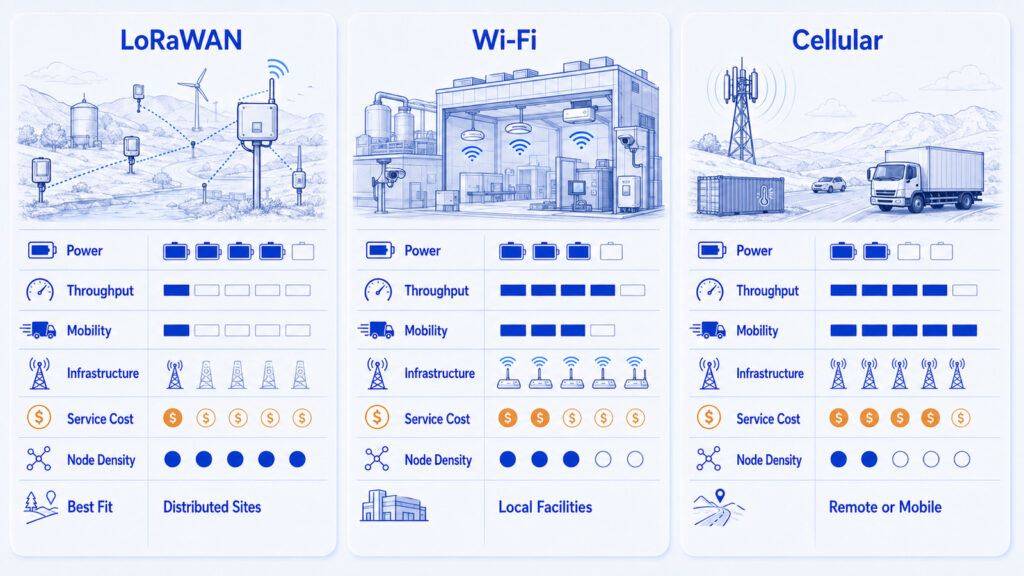
    LoRaWAN vs Wi-Fi vs Cellular comparison

    Dimension LoRaWAN Wi-Fi Cellular
    Network model End devices to gateway; gateway to network server Device to local access point and IP network Device to mobile operator network
    Typical fit Many static, low-data sensors across a site Local sites with managed WLAN and power Remote, mobile, temporary, or independent deployments
    Spectrum Region-specific unlicensed sub-GHz plans Mainly unlicensed 2.4/5/6 GHz bands Licensed operator spectrum
    Power profile Very low for well-designed, infrequent Class A traffic Efficient for powered devices; battery outcome varies widely Varies by radio profile, coverage, search time, and traffic
    Throughput Low; optimized for compact sensor payloads High Low to high depending on NB-IoT, LTE-M, LTE, or 5G
    Latency/downlink Application-dependent; Class A downlink follows uplink receive windows Usually responsive within local coverage Generally suitable for remote IP sessions; profile and power state matter
    Infrastructure Gateway, network server, and gateway backhaul Access points, LAN, credentials, firewall, and internet path SIM/eSIM, compatible modem, operator service, and data plan
    Recurring cost Private networks avoid per-node SIM fees but require owned infrastructure Usually absorbed into site IT and internet service Usually per-device or pooled connectivity charges
    Mobility Possible, but roaming and moving coverage need deliberate design Limited to managed WLAN coverage and handoff design Strongest option for wide-area movement where service exists
    Best limitation to remember Small payloads, airtime constraints, gateway planning Local coverage, credentials, enterprise IT policy, battery cost Coverage dependency, subscriptions, bands, certification, weak-signal power

    Conditional selection rule

    Choose LoRaWAN when many low-data battery nodes share a managed site. Choose Wi-Fi when local infrastructure and power are available. Choose cellular when the device must operate independently or move across sites. Consider a hybrid design when continuity matters more than architectural simplicity.

    7.What Changes Performance in Real Deployments?

    Radio propagation is strongly affected by the building and installation. Sub-GHz LoRaWAN links often penetrate farther through obstacles than higher-frequency local wireless, but there is no universal range figure. Reinforced concrete, metal racking, cold-room panels, machinery, soil, vegetation, antenna orientation, enclosure material, and mounting height can change the link budget. A site survey and pilot at representative points are more useful than a marketing range claim.

    LoRaWAN capacity depends on time-on-air. Lower data rates improve sensitivity but keep the channel occupied longer. Adaptive Data Rate can help suitable static devices use an efficient data rate and power level, while confirmed uplinks and unnecessary retransmissions can consume capacity. Regional rules and frequency plans differ, which is why hardware bands and channel plans must be checked for each market. [1][2]

    Wi-Fi performance depends on access-point density, channel planning, client behavior, and enterprise configuration. A sensor may show a strong signal near an access point but still fail because DHCP, DNS, firewall, certificate, or internet access is unavailable. For battery devices, repeated scanning after an outage can be especially costly. Separating sensing frequency from upload frequency and batching records often improves energy use.

    Cellular systems are most vulnerable at the edge of coverage. A modem can consume substantial energy while registering, retrying, or searching for another network. The antenna must be evaluated in the final enclosure and installation position. Global products also need a realistic operator and band strategy; a modem described as global may not have the required certification, roaming agreement, or service profile in every country.

    8.Which Option Is More Secure and Reliable?

    Security should not be reduced to whether a radio uses licensed or unlicensed spectrum. LoRaWAN specifies cryptographic protection and separate network and application security roles. The LoRa Alliance also emphasizes that implementation matters: keys must be unique, protected, and managed correctly. [1][6]

    Wi-Fi can be secure in a managed environment, but the access point is only one trust boundary. The device still needs secure boot where appropriate, protected credentials, validated server certificates, least-privilege cloud access, update controls, and network segmentation. A shared Wi-Fi password across many devices creates a different operational risk from individual device identities.

    Cellular provides operator authentication through the SIM and benefits from licensed-spectrum network operation, but a SIM does not automatically secure the application payload or cloud account. GSMA guidance treats IoT security as an end-to-end lifecycle issue covering endpoint, network, and service ecosystems. Application encryption and credential protection remain necessary. [7][8]

    Reliability also requires local data handling. None of the three networks guarantees uninterrupted cloud access. The device or gateway should timestamp records, buffer them locally, detect reconnection, upload in order, prevent duplicates, and preserve an audit trail. Critical alarms may require a second path, local audible indication, or on-site control rather than dependence on one cloud route.

    Dimension LoRaWAN Wi-Fi Cellular
    Network model End devices to gateway; gateway to network server Device to local access point and IP network Device to mobile operator network
    Typical fit Many static, low-data sensors across a site Local sites with managed WLAN and power Remote, mobile, temporary, or independent deployments
    Spectrum Region-specific unlicensed sub-GHz plans Mainly unlicensed 2.4/5/6 GHz bands Licensed operator spectrum
    Power profile Very low for well-designed, infrequent Class A traffic Efficient for powered devices; battery outcome varies widely Varies by radio profile, coverage, search time, and traffic
    Throughput Low; optimized for compact sensor payloads High Low to high depending on NB-IoT, LTE-M, LTE, or 5G
    Latency/downlink Application-dependent; Class A downlink follows uplink receive windows Usually responsive within local coverage Generally suitable for remote IP sessions; profile and power state matter
    Infrastructure Gateway, network server, and gateway backhaul Access points, LAN, credentials, firewall, and internet path SIM/eSIM, compatible modem, operator service, and data plan
    Recurring cost Private networks avoid per-node SIM fees but require owned infrastructure Usually absorbed into site IT and internet service Usually per-device or pooled connectivity charges
    Mobility Possible, but roaming and moving coverage need deliberate design Limited to managed WLAN coverage and handoff design Strongest option for wide-area movement where service exists
    Best limitation to remember Small payloads, airtime constraints, gateway planning Local coverage, credentials, enterprise IT policy, battery cost Coverage dependency, subscriptions, bands, certification, weak-signal power

    9.How Do These Networks Fit into a Complete AIoT Architecture?

    A complete architecture separates sensing from backhaul. A LoRaWAN node may reach a local gateway, while that gateway uses Ethernet, Wi-Fi, or cellular to reach the cloud. A Wi-Fi sensor may connect directly to a platform but still cache data locally. A cellular logger may operate independently yet provide local Bluetooth or wired service access. These combinations are often more practical than forcing one radio to solve every layer.

    The sensing layer measures temperature, humidity, carbon dioxide, air quality, pressure, soil conditions, leaks, or other variables. The device layer handles sampling, timestamps, calibration configuration, local storage, and power management. The connectivity layer transports data. The platform layer stores time series, applies alarms, manages users and devices, and exposes APIs. The application layer supports cold chains, laboratories, farms, warehouses, factories, buildings, and data centers.

    For higher-criticality monitoring, add explicit failure states: node offline, gateway offline, backhaul offline, cloud unavailable, time unsynchronized, storage nearly full, or calibration overdue. The architecture should indicate which functions continue locally and which require the cloud.

    10.Which Industries Benefit from Each Option?

    The same technology can be appropriate in one facility and unsuitable in another. The table below maps typical requirements to likely architectures, but the final decision should follow a site survey, traffic model, and failure analysis.
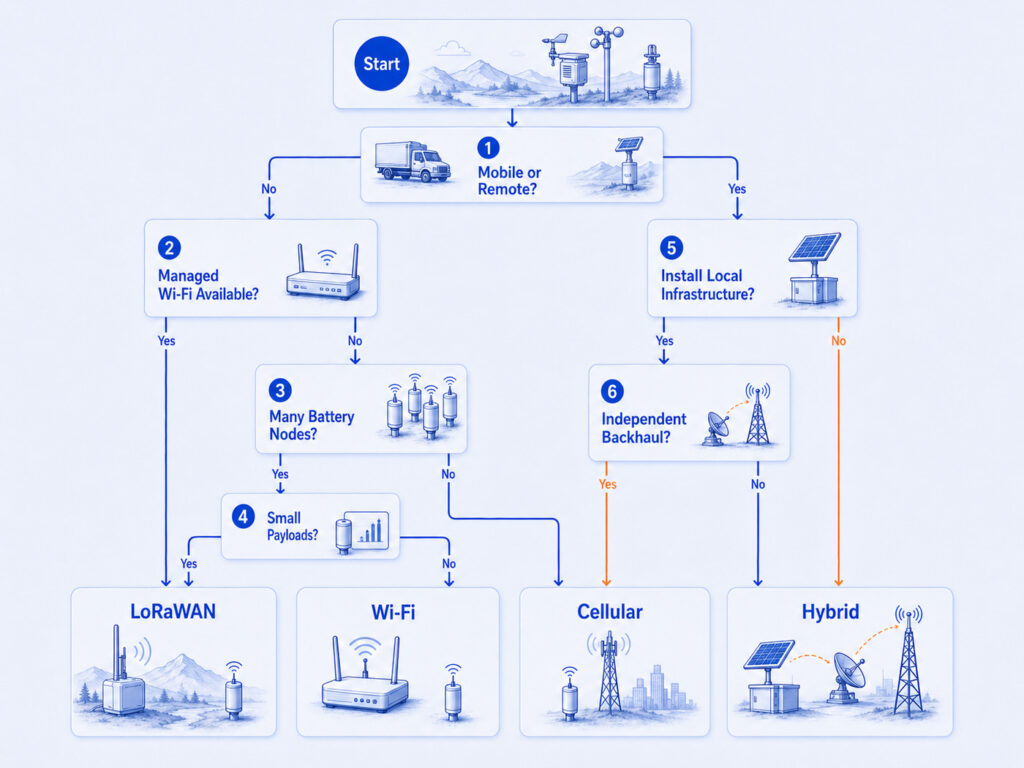
    choose IoT connectivity decision tree

    Scenario Main Requirement Likely Architecture
    Pharmaceutical warehouse Many fixed points, auditability, alarms, and difficult cold-room coverage LoRaWAN for distributed nodes or Wi-Fi for powered loggers; use redundant backhaul and local storage where continuity is critical.
    Cold-chain transport Mobility, cross-site operation, intermittent depots, and route coverage Cellular is usually the primary wide-area link; local buffering is mandatory and short-range links may support setup or probes.
    Greenhouse and agriculture Large area, battery nodes, limited cabling, weather exposure LoRaWAN is often efficient for distributed sensing; cellular can backhaul a gateway or connect isolated high-value assets.
    Laboratory and office Managed local network, smaller area, frequent access, powered equipment Wi-Fi is often practical if IT approval, coverage, credentials, and security policies are handled.
    Industrial and data-center site Interference, metal structures, multiple networks, alarms, integration Use a site survey and hybrid design; wired Ethernet or cellular backhaul can protect gateway availability.

    11.What Are the Common Failure Modes?

    Most failures come from treating a radio choice as a complete system design. Troubleshooting should follow the data path from sensor and power source through the local radio, gateway or access point, backhaul, DNS and security session, cloud ingestion, storage, and alarm engine.

    Symptom Possible Cause Recommended Check
    LoRaWAN nodes appear intermittently offline Poor gateway placement, weak link margin, excessive time-on-air, interference, incorrect regional settings, or battery voltage drop Review gateway coverage, RSSI/SNR trends, data rate, antenna installation, channel plan, message confirmations, and battery behavior.
    Wi-Fi sensor works during setup but not in service Captive portal, DHCP/DNS failure, firewall rule, changed credentials, roaming behavior, or weak coverage at the final position Test the production SSID and firewall path, reserve addresses if required, validate DNS/TLS, and survey the installed location.
    Cellular battery drains quickly Weak signal, repeated registration, unsupported bands, frequent uploads, roaming search, or large handshakes Check serving network and bands, antenna performance, registration logs, signal metrics, sleep mode, payload batching, and retry policy.
    Cloud history has gaps after an outage No local cache, full storage, missing timestamps, failed retry logic, or gateway reboot Verify store-and-forward capacity, retention period, clock behavior, upload ordering, deduplication, and power backup.
    Alarm arrives late Long upload interval, LoRaWAN receive-window behavior, cellular sleep state, congested network, or cloud processing delay Separate sampling from reporting, define alarm-specific behavior, measure end-to-end latency, and add local alarms for critical conditions.
    Deployment fails in another country Wrong LoRaWAN frequency plan, cellular band/operator mismatch, SIM roaming restriction, or certification gap Validate regional radio configuration, hardware SKU, operator service, roaming agreement, and regulatory approvals before shipment.

    12.How Should You Choose the Right Connectivity?

    Choose LoRaWAN when the deployment has many fixed sensors, small payloads, long service intervals, and a team able to install and manage gateways. It is particularly attractive when the site wants a private low-power network and can aggregate traffic onto a reliable backhaul.

    Choose Wi-Fi when the device is inside a well-managed local network, needs direct IP access or higher throughput, and has adequate power. Confirm enterprise onboarding and security before selecting hardware; consumer-style setup assumptions often fail in corporate environments.

    Choose cellular when the device is remote, mobile, temporary, or must remain independent of local IT. Select the actual cellular technology according to mobility, throughput, latency, voice or positioning needs, operator support, and power budget.

    Choose a hybrid design when monitoring is operationally important. Common patterns include LoRaWAN nodes with Ethernet and cellular gateway backhaul, Wi-Fi devices with cellular fallback, or cellular loggers with local storage and delayed synchronization. Hybrid designs add complexity, so failover behavior must be tested rather than assumed.

    13.Deployment Decision Sequence

    1. Define the measurement payload, sampling interval, upload interval, alarm latency, and downlink needs.
    2. Map every monitoring point, wall, rack, cold room, outdoor zone, vehicle route, and available power source.
    3. Decide who can own and maintain gateways, access points, SIMs, credentials, and backhaul.
    4. Estimate battery energy using realistic connection, retry, weak-signal, and temperature conditions.
    5. Check the exact regional LoRaWAN plan, Wi-Fi policy, cellular bands, operators, roaming, and certification needs.
    6. Model normal traffic and failure traffic, including reconnect storms, confirmed messages, and backlog uploads.
    7. Specify local storage, timestamp integrity, deduplication, retry, backup power, and offline alarm behavior.
    8. Run a representative pilot at difficult locations and during expected operating conditions.
    9. Use a hybrid architecture when no single path satisfies coverage, power, independence, and continuity requirements.

    14.How Can UbiBot Apply These Connectivity Models?

    UbiBot product pages show both direct-connect and gateway-based patterns. The DC1-L-TH is a LoRa temperature and humidity node that communicates through a gateway and provides local record storage. The GW1 gateway family supports LoRa on the field side and, depending on model, Wi-Fi and Ethernet or 4G and Ethernet for backhaul. This is a practical example of separating low-power sensor access from resilient IP connectivity. [9][10]

    For direct connectivity, the UbiBot WS4 product page lists dual-band Wi-Fi and 4G options. The appropriate model and regional network support should be confirmed for the project. Product selection should still follow the architecture criteria above: monitoring-point count, coverage, power, local storage, backhaul independence, and lifecycle cost. [11]

    These examples do not make one technology universally preferable. They illustrate how a portfolio can support different topologies: direct Wi-Fi, direct cellular, LoRa nodes with a gateway, and gateways with more than one backhaul option.

    15.Frequently Asked Questions

    Is LoRaWAN better than Wi-Fi for environmental sensors?

    LoRaWAN is often better for many battery-powered sensors sending small packets across a large site. Wi-Fi is usually better when strong managed coverage, direct IP connectivity, and power are already available. The decision changes when the device needs frequent downlink, large payloads, or enterprise network integration.

    Does LoRaWAN require a gateway?

    Yes. Standard LoRaWAN end devices send radio frames to one or more LoRaWAN gateways, which forward them to a network server over IP. The gateway may use Ethernet, Wi-Fi, or cellular backhaul. A gateway outage does not have to destroy data if nodes or the gateway provide local storage and recovery.

    Can LoRaWAN work without internet access?

    The radio link between nodes and a local gateway can operate without public internet, but normal LoRaWAN architecture still requires network-server functions. These can be hosted locally or reached over a private network. Cloud dashboards and remote notifications will not work until the required backhaul is restored.

    Which option uses the least power?

    A well-designed LoRaWAN Class A device sending compact infrequent messages usually offers the lowest radio energy profile. However, actual battery life depends on sensing load, temperature, retries, signal quality, firmware, and battery chemistry. LTE-M or NB-IoT can also support long-life devices, while Wi-Fi can be efficient when uploads are batched and reconnection is controlled.

    Is cellular more reliable than LoRaWAN?

    Cellular can provide wider independent coverage and professional operator infrastructure, but reliability depends on local service, supported bands, congestion, roaming, antenna placement, and subscription status. A private LoRaWAN network can be highly reliable when gateways and backhaul are engineered correctly. Critical systems should measure both paths and provide local buffering.

    How many sensors can one LoRaWAN gateway support?

    There is no single safe number. Capacity depends on payload size, reporting interval, spreading factors, regional channels, acknowledgements, retransmissions, interference, and the number and placement of gateways. Use an airtime and traffic model, then validate with a pilot. A vendor device limit is not the same as radio-network capacity.

    What happens when Wi-Fi or cellular goes offline?

    A resilient monitor continues sampling, timestamps each record, stores it locally, and uploads the backlog after reconnection. The system should preserve order, prevent duplicates, and show the outage period. Alarm behavior must be defined separately because a stored alarm delivered hours later may not meet operational needs.

    Should a project use one network or a hybrid design?

    Use one network when its coverage, power, ownership, and failure behavior clearly meet the requirement. Use a hybrid design when no single path can provide both low-power field coverage and independent backhaul. The extra path only improves resilience if switching, storage, power, and recovery are tested under real failure conditions.

    16.Technical References

    [1] LoRa Alliance, LoRaWAN Specification v1.1, published September 15, 2023. https://resources.lora-alliance.org/technical-specifications/lorawan-specification-v1-1

    [2] LoRa Alliance, RP002-1.0.5 LoRaWAN Regional Parameters, published October 8, 2025. https://resources.lora-alliance.org/technical-specifications/rp002-1-0-5-lorawan-regional-parameters

    [3] IEEE Standards Association, IEEE 802.11-2024, Wireless LAN MAC and PHY Specifications, published April 28, 2025. https://standards.ieee.org/ieee/802.11/10548/

    [4] 3GPP, The Cellular Internet of Things: LTE-M and NB-IoT introduced in Release 13. https://www.3gpp.org/news-events/3gpp-news/c-iot

    [5] GSMA, Mobile IoT Introduction: LTE-M and NB-IoT. https://www.gsma.com/solutions-and-impact/technologies/internet-of-things/mobile-iot-introduction/

    [6] LoRa Alliance Technical Committee, LoRaWAN Is Secure, but Implementation Matters. https://lora-alliance.org/resource_hub/lorawan-is-secure-but-implementation-matters/

    [7] GSMA, IoT Security Guidelines, revised 2024. https://www.gsma.com/solutions-and-impact/technologies/internet-of-things/iot-security/iot-security-guidelines/

    [8] GSMA, IoT SAFE: SIM-based hardware root of trust for end-to-end IoT security. https://www.gsma.com/solutions-and-impact/technologies/internet-of-things/iot-safe/

    [9] UbiBot, DC1-L-TH LoRa Temperature and Humidity Sensor product page. https://www.ubibot.com/ubibot-dc1lth/

    [10] UbiBot, GW1 LoRa Gateway technical specifications. https://www.ubibot.com/ubibot-gw1-specifications/

    [11] UbiBot, WS4 Wireless Temperature and Humidity Sensor product page. https://www.ubibot.com/ubibot-ws4/


    Related Resources

    Modbus RTU vs Modbus TCP: How Do RS485 Sensor Networks Work?
    Thermocouple vs RTD vs Thermistor: Which Temperature Sensor Should You Choose?
    How Do Sensor Calibration, Drift, and Traceability Affect Measurement Accuracy?
    menu-header-svg
    Search
    • Explore Knowledge
      • Comparison & Selection
      • Industry Solution
      • Product & Device
      • Criterion & Compliance
      • Deployment & Usage
      • Technology & Principle
    • Academic Research
    • In-depth Tech

    In-depth Tech

    See More >>

    LoRaWAN vs Wi-Fi vs Cellular: Which Connectivity Is Best for Environmental Monitoring?

    Direct Answer

    No single connection is best for every environmental monitoring system. LoRaWAN is usually the strongest fit for many battery-powered sensors sending small packets across a site. Wi-Fi works well where managed local coverage and power are already available. Cellular is valuable for mobile, remote, or independent devices that cannot rely on site infrastructure. The correct choice depends on coverage, payload, battery life, ownership, recurring cost, and failure recovery.

    Key Takeaway

    Decision statement

    The best IoT connectivity comparison starts with the deployment, not the radio brand. LoRaWAN is usually the best fit for many low-data battery sensors across a managed site; Wi-Fi suits infrastructure-rich local environments; cellular suits independent, remote, and mobile assets. Before deployment, verify regional support, final-position coverage, energy under failure conditions, offline storage, security lifecycle, and the party responsible for maintaining every network layer.

    1.Quick Summary

    Decision Area Practical Answer
    LoRaWAN Best for many low-data, battery-powered nodes across a campus, farm, warehouse, or industrial site. Requires a compatible gateway and careful regional configuration.
    Wi-Fi Best for local IP connectivity where an access point, credentials, power, and network administration are already available. Higher throughput, but coverage and battery use need attention.
    Cellular Best for remote, mobile, multi-site, or independent devices. Uses operator infrastructure and licensed spectrum, but adds SIM, subscription, certification, and coverage considerations.
    Main decision Choose the architecture, not only the radio: node-to-gateway, direct-to-cloud, backhaul, local storage, and failover all affect reliability.
    Security Each option can be deployed securely, but radio-layer security does not replace device identity, credential protection, application encryption, updates, and access control.
    Practical rule Use LoRaWAN for distributed small-packet sensing, Wi-Fi for infrastructure-rich local sites, cellular for independent wide-area connectivity, and hybrid designs for critical systems.

    2.What Are LoRaWAN, Wi-Fi, and Cellular IoT?

    LoRaWAN is a low-power wide-area networking protocol designed for battery-powered end devices. End devices communicate by LoRa radio with one or more gateways, and the gateways forward packets over standard IP connections to a network server. The LoRa Alliance describes this as a star-of-stars topology. LoRaWAN is not the same as LoRa: LoRa is the radio modulation and physical-layer technology, while LoRaWAN defines network behavior, addressing, device classes, security, and backend roles. [1]

    Wi-Fi is a wireless local-area network based on the IEEE 802.11 family. A sensor normally associates with an access point and uses IP connectivity to reach a local server or cloud service. The current base standard is IEEE 802.11-2024, published in 2025. Wi-Fi can deliver far more throughput than typical environmental telemetry requires, but that capacity can be useful for configuration, firmware downloads, local dashboards, cameras, or multi-purpose gateways. [3]

    Cellular IoT connects a device through a mobile network operator rather than a site-owned access point. The category includes several radio access technologies with different capabilities, such as LTE Cat 1 or Cat 1 bis, LTE-M, NB-IoT, and 5G options. LTE-M and NB-IoT were standardized by 3GPP for low-power wide-area use in licensed spectrum. A cellular comparison must therefore identify the actual modem, bands, operator support, mobility requirements, and deployment country rather than treating cellular as one uniform technology. [4][5]


    IoT connectivity comparison

    3.Why Does Connectivity Matter in Environmental Monitoring?

    Environmental monitoring produces small measurements, but the network design determines whether those measurements arrive at the right time, from the right location, and with enough context to support an alarm or audit. A warehouse may have hundreds of static points behind insulated walls. A refrigerated vehicle moves between networks. A greenhouse may have no enterprise Wi-Fi. A laboratory may forbid unmanaged devices on the corporate network. These are architecture problems, not merely radio specifications.

    The wrong choice often fails gradually rather than immediately. Batteries require frequent replacement, access-point credentials expire, a gateway is installed in a poor location, a cellular modem lacks the required bands, or an application sends confirmed messages too often. The system appears connected during a pilot but becomes unreliable when node count, traffic, walls, seasons, or sites change.

    A useful IoT connectivity comparison therefore evaluates the complete path: sensor, antenna, power source, local cache, radio link, gateway or access point, backhaul, cloud endpoint, security credentials, and recovery process. Reliable monitoring depends on the weakest part of this chain.

    4.How Does Each Connectivity Path Work?

    In a LoRaWAN system, the end device normally wakes, measures, creates a compact payload, transmits an uplink, opens receive windows according to its device class, and returns to sleep. One or more gateways may receive the same packet. The network server validates and deduplicates traffic, manages network behavior, and routes application data to the application server. Class A provides the lowest-power baseline; Classes B and C increase downlink availability with different energy and infrastructure trade-offs. [1]

    LoRa WAN, Wi-Fi, Cellular data flow diagram

    In a Wi-Fi system, the sensor scans or reconnects to an access point, completes link authentication, obtains or reuses IP configuration, establishes an application session, and uploads data. For a continuously powered gateway, these steps have little operational cost. For a small battery device, repeated scanning, association, TLS handshakes, retries, and long awake periods can dominate energy use. Modern 802.11 mechanisms can improve efficiency, but actual battery life still depends on chipset, access point, firmware, signal quality, and upload schedule.

    In a cellular system, the modem registers with an operator network using a SIM, eSIM, or integrated SIM credential, establishes a packet data session, and connects to the application endpoint. Low-power cellular profiles can use extended sleep and paging mechanisms, while higher-throughput LTE or 5G devices may remain more available. Coverage is provided by the operator, but the device designer must handle band support, roaming, network transitions, data plans, certification, and the power cost of searching for service in weak areas.

    5.Which Technical Parameters Matter Most?

    The most important parameters are not maximum range or peak speed. They are the conditions that determine service continuity over the deployment life. Start with the measurement workload and operating environment, then evaluate the network against the table below.

    Parameter What It Means Why It Matters
    Coverage ownership Who builds and maintains the radio coverage. LoRaWAN and Wi-Fi can be private; cellular coverage is primarily operator-controlled.
    Payload and frequency Bytes per message and how often data are sent. Small infrequent telemetry favors low-power designs; frequent or large uploads favor Wi-Fi or higher-rate cellular.
    Battery budget Energy available between service visits. Connection setup, retries, receive time, and poor signal may matter more than the nominal radio data sheet.
    Latency and downlink How quickly the system must deliver alarms or commands. LoRaWAN Class A downlink timing differs from always-available local or cellular connections.
    Node density Number of devices sharing channels, gateways, or access points. Capacity depends on airtime, message behavior, RF design, and backend sizing, not only a quoted device count.
    Infrastructure Gateways, access points, Ethernet, power, SIMs, and backhaul. A radio that appears inexpensive may move cost into site infrastructure or recurring service.
    Regional support Frequency plans, bands, operator service, and certification. A design that works in one country may require different hardware or settings elsewhere.
    Offline recovery How data are preserved and reconciled after an outage. Local storage, timestamps, deduplication, and store-and-forward are essential for monitoring continuity.
    Security lifecycle Identity, keys, encryption, updates, and decommissioning. Built-in link security must be combined with application and operational controls.

    6.LoRaWAN vs Wi-Fi vs Cellular: How Do They Compare?

    LoRaWAN is usually the most efficient choice when a site needs many battery-powered nodes sending compact measurements at moderate intervals. Its architecture separates low-power radio access from IP backhaul, so a gateway can aggregate many nodes. However, the system must use the correct regional parameters, and network capacity depends on airtime, data rate, confirmation behavior, interference, and gateway placement. The current LoRaWAN regional-parameters document is RP002-1.0.5, published in October 2025. [2]

    Wi-Fi is attractive when infrastructure already exists and the monitoring device can tolerate its connection and power behavior. It provides direct IP connectivity, familiar enterprise controls, and ample bandwidth. It is often appropriate for powered data loggers, local displays, gateways, laboratories, offices, and smaller warehouses. The main risks are coverage gaps, congested 2.4 GHz environments, credential management, captive portals, firewall restrictions, and IT policies that may not permit unmanaged IoT clients.

    Cellular is the strongest option when the device must operate independently of the site, travel between locations, or be deployed where no local network can be trusted. It can reduce on-site networking work, but it does not remove engineering complexity. The project must validate operator coverage, supported bands, roaming, APN configuration, data consumption, SIM lifecycle, antenna location, power supply, and fallback behavior. NB-IoT, LTE-M, Cat 1 bis, and higher-rate LTE or 5G should be evaluated separately.

    LoRaWAN vs Wi-Fi vs Cellular comparison

    Dimension LoRaWAN Wi-Fi Cellular
    Network model End devices to gateway; gateway to network server Device to local access point and IP network Device to mobile operator network
    Typical fit Many static, low-data sensors across a site Local sites with managed WLAN and power Remote, mobile, temporary, or independent deployments
    Spectrum Region-specific unlicensed sub-GHz plans Mainly unlicensed 2.4/5/6 GHz bands Licensed operator spectrum
    Power profile Very low for well-designed, infrequent Class A traffic Efficient for powered devices; battery outcome varies widely Varies by radio profile, coverage, search time, and traffic
    Throughput Low; optimized for compact sensor payloads High Low to high depending on NB-IoT, LTE-M, LTE, or 5G
    Latency/downlink Application-dependent; Class A downlink follows uplink receive windows Usually responsive within local coverage Generally suitable for remote IP sessions; profile and power state matter
    Infrastructure Gateway, network server, and gateway backhaul Access points, LAN, credentials, firewall, and internet path SIM/eSIM, compatible modem, operator service, and data plan
    Recurring cost Private networks avoid per-node SIM fees but require owned infrastructure Usually absorbed into site IT and internet service Usually per-device or pooled connectivity charges
    Mobility Possible, but roaming and moving coverage need deliberate design Limited to managed WLAN coverage and handoff design Strongest option for wide-area movement where service exists
    Best limitation to remember Small payloads, airtime constraints, gateway planning Local coverage, credentials, enterprise IT policy, battery cost Coverage dependency, subscriptions, bands, certification, weak-signal power

    Conditional selection rule

    Choose LoRaWAN when many low-data battery nodes share a managed site. Choose Wi-Fi when local infrastructure and power are available. Choose cellular when the device must operate independently or move across sites. Consider a hybrid design when continuity matters more than architectural simplicity.

    7.What Changes Performance in Real Deployments?

    Radio propagation is strongly affected by the building and installation. Sub-GHz LoRaWAN links often penetrate farther through obstacles than higher-frequency local wireless, but there is no universal range figure. Reinforced concrete, metal racking, cold-room panels, machinery, soil, vegetation, antenna orientation, enclosure material, and mounting height can change the link budget. A site survey and pilot at representative points are more useful than a marketing range claim.

    LoRaWAN capacity depends on time-on-air. Lower data rates improve sensitivity but keep the channel occupied longer. Adaptive Data Rate can help suitable static devices use an efficient data rate and power level, while confirmed uplinks and unnecessary retransmissions can consume capacity. Regional rules and frequency plans differ, which is why hardware bands and channel plans must be checked for each market. [1][2]

    Wi-Fi performance depends on access-point density, channel planning, client behavior, and enterprise configuration. A sensor may show a strong signal near an access point but still fail because DHCP, DNS, firewall, certificate, or internet access is unavailable. For battery devices, repeated scanning after an outage can be especially costly. Separating sensing frequency from upload frequency and batching records often improves energy use.

    Cellular systems are most vulnerable at the edge of coverage. A modem can consume substantial energy while registering, retrying, or searching for another network. The antenna must be evaluated in the final enclosure and installation position. Global products also need a realistic operator and band strategy; a modem described as global may not have the required certification, roaming agreement, or service profile in every country.

    8.Which Option Is More Secure and Reliable?

    Security should not be reduced to whether a radio uses licensed or unlicensed spectrum. LoRaWAN specifies cryptographic protection and separate network and application security roles. The LoRa Alliance also emphasizes that implementation matters: keys must be unique, protected, and managed correctly. [1][6]

    Wi-Fi can be secure in a managed environment, but the access point is only one trust boundary. The device still needs secure boot where appropriate, protected credentials, validated server certificates, least-privilege cloud access, update controls, and network segmentation. A shared Wi-Fi password across many devices creates a different operational risk from individual device identities.

    Cellular provides operator authentication through the SIM and benefits from licensed-spectrum network operation, but a SIM does not automatically secure the application payload or cloud account. GSMA guidance treats IoT security as an end-to-end lifecycle issue covering endpoint, network, and service ecosystems. Application encryption and credential protection remain necessary. [7][8]

    Reliability also requires local data handling. None of the three networks guarantees uninterrupted cloud access. The device or gateway should timestamp records, buffer them locally, detect reconnection, upload in order, prevent duplicates, and preserve an audit trail. Critical alarms may require a second path, local audible indication, or on-site control rather than dependence on one cloud route.

    Dimension LoRaWAN Wi-Fi Cellular
    Network model End devices to gateway; gateway to network server Device to local access point and IP network Device to mobile operator network
    Typical fit Many static, low-data sensors across a site Local sites with managed WLAN and power Remote, mobile, temporary, or independent deployments
    Spectrum Region-specific unlicensed sub-GHz plans Mainly unlicensed 2.4/5/6 GHz bands Licensed operator spectrum
    Power profile Very low for well-designed, infrequent Class A traffic Efficient for powered devices; battery outcome varies widely Varies by radio profile, coverage, search time, and traffic
    Throughput Low; optimized for compact sensor payloads High Low to high depending on NB-IoT, LTE-M, LTE, or 5G
    Latency/downlink Application-dependent; Class A downlink follows uplink receive windows Usually responsive within local coverage Generally suitable for remote IP sessions; profile and power state matter
    Infrastructure Gateway, network server, and gateway backhaul Access points, LAN, credentials, firewall, and internet path SIM/eSIM, compatible modem, operator service, and data plan
    Recurring cost Private networks avoid per-node SIM fees but require owned infrastructure Usually absorbed into site IT and internet service Usually per-device or pooled connectivity charges
    Mobility Possible, but roaming and moving coverage need deliberate design Limited to managed WLAN coverage and handoff design Strongest option for wide-area movement where service exists
    Best limitation to remember Small payloads, airtime constraints, gateway planning Local coverage, credentials, enterprise IT policy, battery cost Coverage dependency, subscriptions, bands, certification, weak-signal power

    9.How Do These Networks Fit into a Complete AIoT Architecture?

    A complete architecture separates sensing from backhaul. A LoRaWAN node may reach a local gateway, while that gateway uses Ethernet, Wi-Fi, or cellular to reach the cloud. A Wi-Fi sensor may connect directly to a platform but still cache data locally. A cellular logger may operate independently yet provide local Bluetooth or wired service access. These combinations are often more practical than forcing one radio to solve every layer.

    The sensing layer measures temperature, humidity, carbon dioxide, air quality, pressure, soil conditions, leaks, or other variables. The device layer handles sampling, timestamps, calibration configuration, local storage, and power management. The connectivity layer transports data. The platform layer stores time series, applies alarms, manages users and devices, and exposes APIs. The application layer supports cold chains, laboratories, farms, warehouses, factories, buildings, and data centers.

    For higher-criticality monitoring, add explicit failure states: node offline, gateway offline, backhaul offline, cloud unavailable, time unsynchronized, storage nearly full, or calibration overdue. The architecture should indicate which functions continue locally and which require the cloud.

    10.Which Industries Benefit from Each Option?

    The same technology can be appropriate in one facility and unsuitable in another. The table below maps typical requirements to likely architectures, but the final decision should follow a site survey, traffic model, and failure analysis.

    choose IoT connectivity decision tree

    Scenario Main Requirement Likely Architecture
    Pharmaceutical warehouse Many fixed points, auditability, alarms, and difficult cold-room coverage LoRaWAN for distributed nodes or Wi-Fi for powered loggers; use redundant backhaul and local storage where continuity is critical.
    Cold-chain transport Mobility, cross-site operation, intermittent depots, and route coverage Cellular is usually the primary wide-area link; local buffering is mandatory and short-range links may support setup or probes.
    Greenhouse and agriculture Large area, battery nodes, limited cabling, weather exposure LoRaWAN is often efficient for distributed sensing; cellular can backhaul a gateway or connect isolated high-value assets.
    Laboratory and office Managed local network, smaller area, frequent access, powered equipment Wi-Fi is often practical if IT approval, coverage, credentials, and security policies are handled.
    Industrial and data-center site Interference, metal structures, multiple networks, alarms, integration Use a site survey and hybrid design; wired Ethernet or cellular backhaul can protect gateway availability.

    11.What Are the Common Failure Modes?

    Most failures come from treating a radio choice as a complete system design. Troubleshooting should follow the data path from sensor and power source through the local radio, gateway or access point, backhaul, DNS and security session, cloud ingestion, storage, and alarm engine.

    Symptom Possible Cause Recommended Check
    LoRaWAN nodes appear intermittently offline Poor gateway placement, weak link margin, excessive time-on-air, interference, incorrect regional settings, or battery voltage drop Review gateway coverage, RSSI/SNR trends, data rate, antenna installation, channel plan, message confirmations, and battery behavior.
    Wi-Fi sensor works during setup but not in service Captive portal, DHCP/DNS failure, firewall rule, changed credentials, roaming behavior, or weak coverage at the final position Test the production SSID and firewall path, reserve addresses if required, validate DNS/TLS, and survey the installed location.
    Cellular battery drains quickly Weak signal, repeated registration, unsupported bands, frequent uploads, roaming search, or large handshakes Check serving network and bands, antenna performance, registration logs, signal metrics, sleep mode, payload batching, and retry policy.
    Cloud history has gaps after an outage No local cache, full storage, missing timestamps, failed retry logic, or gateway reboot Verify store-and-forward capacity, retention period, clock behavior, upload ordering, deduplication, and power backup.
    Alarm arrives late Long upload interval, LoRaWAN receive-window behavior, cellular sleep state, congested network, or cloud processing delay Separate sampling from reporting, define alarm-specific behavior, measure end-to-end latency, and add local alarms for critical conditions.
    Deployment fails in another country Wrong LoRaWAN frequency plan, cellular band/operator mismatch, SIM roaming restriction, or certification gap Validate regional radio configuration, hardware SKU, operator service, roaming agreement, and regulatory approvals before shipment.

    12.How Should You Choose the Right Connectivity?

    Choose LoRaWAN when the deployment has many fixed sensors, small payloads, long service intervals, and a team able to install and manage gateways. It is particularly attractive when the site wants a private low-power network and can aggregate traffic onto a reliable backhaul.

    Choose Wi-Fi when the device is inside a well-managed local network, needs direct IP access or higher throughput, and has adequate power. Confirm enterprise onboarding and security before selecting hardware; consumer-style setup assumptions often fail in corporate environments.

    Choose cellular when the device is remote, mobile, temporary, or must remain independent of local IT. Select the actual cellular technology according to mobility, throughput, latency, voice or positioning needs, operator support, and power budget.

    Choose a hybrid design when monitoring is operationally important. Common patterns include LoRaWAN nodes with Ethernet and cellular gateway backhaul, Wi-Fi devices with cellular fallback, or cellular loggers with local storage and delayed synchronization. Hybrid designs add complexity, so failover behavior must be tested rather than assumed.

    13.Deployment Decision Sequence

    1. Define the measurement payload, sampling interval, upload interval, alarm latency, and downlink needs.
    2. Map every monitoring point, wall, rack, cold room, outdoor zone, vehicle route, and available power source.
    3. Decide who can own and maintain gateways, access points, SIMs, credentials, and backhaul.
    4. Estimate battery energy using realistic connection, retry, weak-signal, and temperature conditions.
    5. Check the exact regional LoRaWAN plan, Wi-Fi policy, cellular bands, operators, roaming, and certification needs.
    6. Model normal traffic and failure traffic, including reconnect storms, confirmed messages, and backlog uploads.
    7. Specify local storage, timestamp integrity, deduplication, retry, backup power, and offline alarm behavior.
    8. Run a representative pilot at difficult locations and during expected operating conditions.
    9. Use a hybrid architecture when no single path satisfies coverage, power, independence, and continuity requirements.

    14.How Can UbiBot Apply These Connectivity Models?

    UbiBot product pages show both direct-connect and gateway-based patterns. The DC1-L-TH is a LoRa temperature and humidity node that communicates through a gateway and provides local record storage. The GW1 gateway family supports LoRa on the field side and, depending on model, Wi-Fi and Ethernet or 4G and Ethernet for backhaul. This is a practical example of separating low-power sensor access from resilient IP connectivity. [9][10]

    For direct connectivity, the UbiBot WS4 product page lists dual-band Wi-Fi and 4G options. The appropriate model and regional network support should be confirmed for the project. Product selection should still follow the architecture criteria above: monitoring-point count, coverage, power, local storage, backhaul independence, and lifecycle cost. [11]

    These examples do not make one technology universally preferable. They illustrate how a portfolio can support different topologies: direct Wi-Fi, direct cellular, LoRa nodes with a gateway, and gateways with more than one backhaul option.

    15.Frequently Asked Questions

    Is LoRaWAN better than Wi-Fi for environmental sensors?

    LoRaWAN is often better for many battery-powered sensors sending small packets across a large site. Wi-Fi is usually better when strong managed coverage, direct IP connectivity, and power are already available. The decision changes when the device needs frequent downlink, large payloads, or enterprise network integration.

    Does LoRaWAN require a gateway?

    Yes. Standard LoRaWAN end devices send radio frames to one or more LoRaWAN gateways, which forward them to a network server over IP. The gateway may use Ethernet, Wi-Fi, or cellular backhaul. A gateway outage does not have to destroy data if nodes or the gateway provide local storage and recovery.

    Can LoRaWAN work without internet access?

    The radio link between nodes and a local gateway can operate without public internet, but normal LoRaWAN architecture still requires network-server functions. These can be hosted locally or reached over a private network. Cloud dashboards and remote notifications will not work until the required backhaul is restored.

    Which option uses the least power?

    A well-designed LoRaWAN Class A device sending compact infrequent messages usually offers the lowest radio energy profile. However, actual battery life depends on sensing load, temperature, retries, signal quality, firmware, and battery chemistry. LTE-M or NB-IoT can also support long-life devices, while Wi-Fi can be efficient when uploads are batched and reconnection is controlled.

    Is cellular more reliable than LoRaWAN?

    Cellular can provide wider independent coverage and professional operator infrastructure, but reliability depends on local service, supported bands, congestion, roaming, antenna placement, and subscription status. A private LoRaWAN network can be highly reliable when gateways and backhaul are engineered correctly. Critical systems should measure both paths and provide local buffering.

    How many sensors can one LoRaWAN gateway support?

    There is no single safe number. Capacity depends on payload size, reporting interval, spreading factors, regional channels, acknowledgements, retransmissions, interference, and the number and placement of gateways. Use an airtime and traffic model, then validate with a pilot. A vendor device limit is not the same as radio-network capacity.

    What happens when Wi-Fi or cellular goes offline?

    A resilient monitor continues sampling, timestamps each record, stores it locally, and uploads the backlog after reconnection. The system should preserve order, prevent duplicates, and show the outage period. Alarm behavior must be defined separately because a stored alarm delivered hours later may not meet operational needs.

    Should a project use one network or a hybrid design?

    Use one network when its coverage, power, ownership, and failure behavior clearly meet the requirement. Use a hybrid design when no single path can provide both low-power field coverage and independent backhaul. The extra path only improves resilience if switching, storage, power, and recovery are tested under real failure conditions.

    16.Technical References

    [1] LoRa Alliance, LoRaWAN Specification v1.1, published September 15, 2023. https://resources.lora-alliance.org/technical-specifications/lorawan-specification-v1-1

    [2] LoRa Alliance, RP002-1.0.5 LoRaWAN Regional Parameters, published October 8, 2025. https://resources.lora-alliance.org/technical-specifications/rp002-1-0-5-lorawan-regional-parameters

    [3] IEEE Standards Association, IEEE 802.11-2024, Wireless LAN MAC and PHY Specifications, published April 28, 2025. https://standards.ieee.org/ieee/802.11/10548/

    [4] 3GPP, The Cellular Internet of Things: LTE-M and NB-IoT introduced in Release 13. https://www.3gpp.org/news-events/3gpp-news/c-iot

    [5] GSMA, Mobile IoT Introduction: LTE-M and NB-IoT. https://www.gsma.com/solutions-and-impact/technologies/internet-of-things/mobile-iot-introduction/

    [6] LoRa Alliance Technical Committee, LoRaWAN Is Secure, but Implementation Matters. https://lora-alliance.org/resource_hub/lorawan-is-secure-but-implementation-matters/

    [7] GSMA, IoT Security Guidelines, revised 2024. https://www.gsma.com/solutions-and-impact/technologies/internet-of-things/iot-security/iot-security-guidelines/

    [8] GSMA, IoT SAFE: SIM-based hardware root of trust for end-to-end IoT security. https://www.gsma.com/solutions-and-impact/technologies/internet-of-things/iot-safe/

    [9] UbiBot, DC1-L-TH LoRa Temperature and Humidity Sensor product page. https://www.ubibot.com/ubibot-dc1lth/

    [10] UbiBot, GW1 LoRa Gateway technical specifications. https://www.ubibot.com/ubibot-gw1-specifications/

    [11] UbiBot, WS4 Wireless Temperature and Humidity Sensor product page. https://www.ubibot.com/ubibot-ws4/

    分享

    LinkedIn2

    Facebook2

    X

    Newsletter Signup

    Related Resources

    Modbus RTU vs Modbus TCP: How Do RS485 Sensor Networks Work?
    Thermocouple vs RTD vs Thermistor: Which Temperature Sensor Should You Choose?
    How Do Sensor Calibration, Drift, and Traceability Affect Measurement Accuracy?
    menu-header-svg
    Search
    • Explore Knowledge
      • Comparison & Selection
      • Industry Solution
      • Product & Device
      • Criterion & Compliance
      • Deployment & Usage
      • Technology & Principle
    • Academic Research
    • In-depth Tech
    Enter Your Information

    Confirm

    Products

    Dashboards

    Support

    Purchase

    Company

    Smart Sensing

    UbiBot Web Console

    APP Download

    UbiBot Online Store

    News

    Smart Control

    UbiBot Space

    Product Docs & APIs

    Find Distributors

    About Us

    Smart Video

    UbiBot On-Premises

    Helpdesk & FAQ

    Volume Pricing

    Contact Us

    LoRa Products

    Agency Web Console

    Video Center

    Architecture

    Software & Platform


    Pricing


    System Status

    External Sensors


    Become a Distributor

    Accessories


    Become an Affiliate

    Global SIM


    Positioning System


    Products

    Dashboards

    Business Partners

    WS1

    UbiBot Web Console

    Volume Pricing

    WS1 Pro

    UbiBot Space

    Become a Distributor

    GS1

    UbiBot Support Desk

    Affiliates

    GS2

    Agency Web Console


    MS1


    SP1


    Accessories


    Docs

    Purchase

    Company

    Platform API

    Pricing

    News

    Q&A

    UbiBot Partners

    About us

    Privacy Policy

    Online Store

    Contact

    Terms of Service


    System Status

    Products

    Dashboards

    Smart Sensing

    UbiBot Web Console

    Smart Control

    UbiBot Space

    Smart Video

    UbiBot On-Premises

    LoRa Products

    Agency Web Console

    Software & Platform


    External Sensors


    Accessories


    Global SIM


    Positioning System


    Support

    Purchase

    APP Download

    UbiBot Online Store

    Product Docs & APIs

    Find Distributors

    Helpdesk & FAQ

    Volume Pricing

    Video Center


    Pricing


    Company

    News

    About Us

    Contact Us

    Architecture

    System Status

    Become a Distributor

    Become an Affiliate

    Language:
    English 日本語 (ベータ)  
    Language:

    English

    日本語 (ベータ)


    IoT Product Family:
    ubibotico     Wireless environmental sensing products and smart building solutions
    ubitrackico     UWB-based real-time indoor tracking solutions with 30cm accuracy

    IoT Product Family:

    ubibotico  Wireless environmental sensing products and smart building solutions
    ubitrackico  UWB-based real-time indoor tracking solutions with 30cm accuracy

    © 2013-2026 UbiBot.com. All rights reserved.

    Terms of Service | Privacy Policy | Compliance

    youtube facebook twitter