
UBiBot Logo
UBiBot Logo
  • UBiBot Logo
  • Home
  • Products

    NEW

  • Pricing
  • Support
  • About Us
  • Download
  • magnifying-glass  Search
  • magnifying-glass header-close
  • Sign in Sign in
    Public Web Console Public Web Console
    On-Premises App Center On-Premises App Center
  • Home
  • Products

    NEW

  • Pricing
  • Support
  • About us
  • Download
  •  Public Web Console
  •  On-Premises App Center
  • Where to Buy

Learn Hub

Explore Knowledge Academic Research In-depth Tech

Share

LinkedIn

Facebook

X (Twitter)

Newsletter Signup

Table of contents

    How to Build a Vaccine Refrigerator and Pharmacy Temperature Monitoring System

    Evidence base

    CDC vaccine storage guidance and current official manufacturer documentation reviewed in July 2026. The article distinguishes device features from complete program compliance.

    Introduction

    A vaccine refrigerator can remain powered and still expose inventory to damaging temperatures because of door activity, thermostat faults, airflow problems, accidental freezing, overloading, or a delayed response to an alarm. A handwritten temperature sheet may document a problem only after staff return to the site. A connected monitoring system is intended to close that gap by recording conditions continuously, preserving evidence during communication failures, and escalating exceptions while there is still time to act.
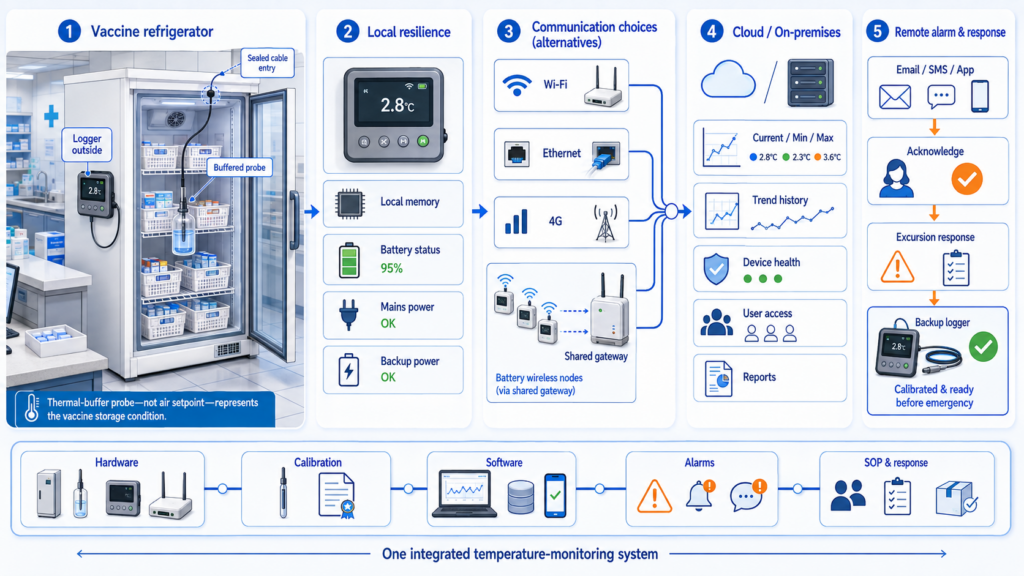
    A reliable vaccine refrigerator monitoring system combines a thermally buffered probe, a calibrated logger, local memory, resilient connectivity, remote alarms, a backup device, and a documented response workflow.

    This guide is written for vaccine coordinators, pharmacists, clinic administrators, healthcare quality teams, facilities and IT managers, system integrators, and procurement staff. It explains what to monitor, how the sensing and communication layers should be designed, how system architectures differ, and where representative products from UbiBot, Dickson, SensoScientific, and Vaisala fit.

    The article is not a product certification. CDC recommends—and the Vaccines for Children program requires—a digital data logger with defined characteristics, but state and local programs may add requirements. Suitability depends on the complete logger, detachable probe, thermal buffer, calibration certificate, logging interval, alarm workflow, record-retention process, and staff procedures. [1]

    Quick Summary

    A practical vaccine refrigerator monitoring system starts with a detachable, thermally buffered probe inside the storage unit and a logger or display outside. The device should record at least every 30 minutes, preserve data during network interruptions, show or make available current/minimum/maximum values, and send actionable alarms. Wi-Fi is practical where the network is reliable; Ethernet can reduce wireless uncertainty; cellular is useful at remote sites; gateway-based long-range radio can scale across large campuses. Product choice should consider calibration evidence, local memory, alarm paths, software governance, and lifecycle cost—not sensor accuracy alone. UbiBot suits direct-connected, lower-infrastructure deployments; Dickson offers a turnkey glycol-buffered small-site package; SensoScientific and Vaisala provide stronger regulated-enterprise service and validation ecosystems.

    Key Takeaway

    The right monitoring system is a documented measurement-and-response workflow, not merely a connected thermometer: the buffered probe, calibrated logger, offline record, network path, alarm escalation, backup device, and staff SOP must operate as one system.

    1.Why Is Vaccine Refrigerator Temperature Monitoring System  Important

    Protect vaccine potency and avoid preventable waste

    Improper storage can reduce or destroy vaccine potency, creating the risk of revaccination, replacement cost, disrupted appointments, and loss of patient confidence. CDC directs providers to follow current storage information from vaccine manufacturers and to maintain reliable temperature monitoring for every storage unit. [1]

    Maintain operational continuity
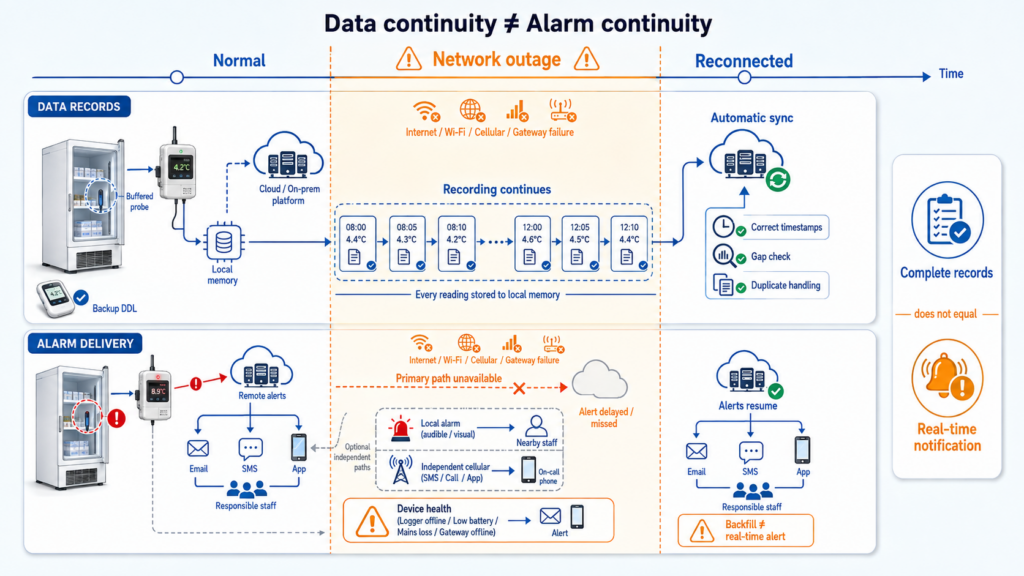
    Local memory can preserve complete temperature records during an outage, but real-time alarm delivery requires an available local or independent communication path.

    A remote alarm can shorten the time between a refrigerator failure and corrective action. However, notification alone is not enough: the device should continue recording when Wi-Fi, internet, a gateway, or a cloud service is unavailable, so staff can reconstruct the event and determine whether inventory was affected.

    Create traceable records

    Temperature history supports routine review, excursion investigation, audits, and communication with vaccine manufacturers or immunization programs. Calibration evidence, device identity, time synchronization, data export, alarm acknowledgement, and record ownership should be defined before deployment.

    Support quality and regulatory workflows

    A logger may provide useful technical functions without making the entire installation compliant. VFC participation, state requirements, internal quality policies, and broader pharmacy or hospital governance determine how devices are qualified, who can change limits, how long records are retained, and how exceptions are handled.

    Reduce the limitations of manual inspection

    Manual checks are snapshots. They can miss overnight excursions, short freezes, repeated door openings, and power or network failures. A continuous record shows duration, direction, and recovery, while a documented daily review keeps staff engaged with the storage unit rather than relying entirely on automation.

    2.What Environmental Parameters Should Be Monitored?
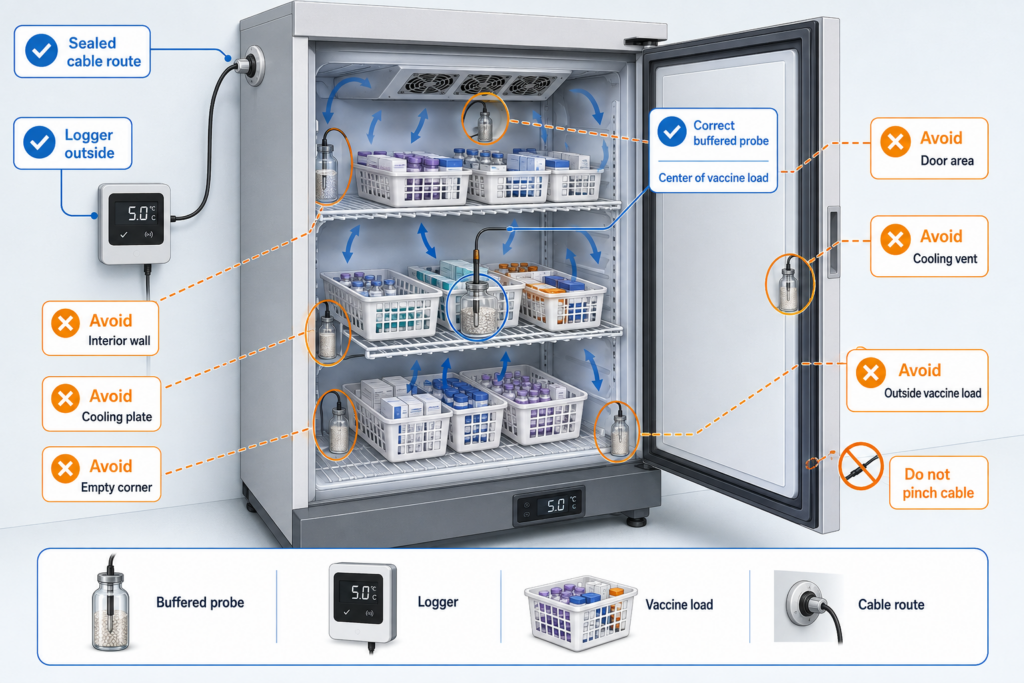
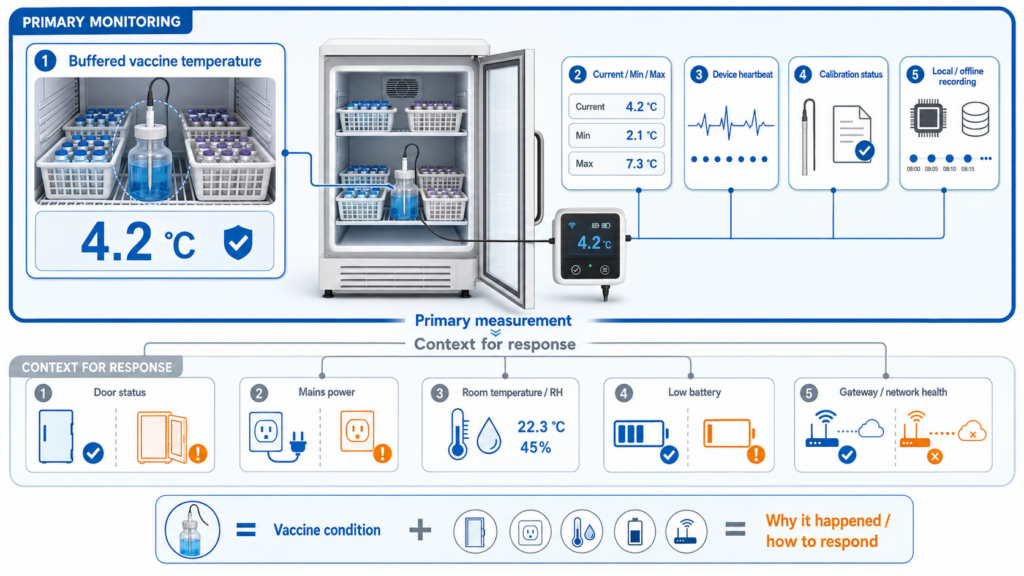
    The primary probe should be thermally buffered and positioned within the vaccine load, away from walls, vents, cooling plates, and the refrigerator door.

    Parameter Why it matters Monitoring location Recommended sensor type
    Buffered vaccine temperature (essential) Best represents the thermal response of stored vaccines and is the primary control variable. Near the center of the vaccine load, away from walls, vents, cooling plates, and doors. Detachable temperature probe in glycol, glass beads, sand, Teflon, or another documented thermal buffer.
    Current/minimum/maximum temperature (essential) Supports routine review and helps identify conditions since the last check. At the logger display or verified software view accessible to responsible staff. DDL or software workflow that clearly provides current, minimum, and maximum values.
    Door status (optional but useful) Distinguishes access events from equipment faults and can trigger an early warning. Door frame or switch point. Magnetic dry-contact or dedicated door sensor compatible with the monitoring system.
    Power status (optional but useful) Identifies loss of mains power before temperature rises significantly. Refrigerator circuit, logger power input, or monitored outlet. Power-failure input, relay/dry-contact monitor, or UPS status integration.
    Room temperature/RH (contextual) Explains extreme ambient conditions and supports pharmacy room management; RH is not a substitute for vaccine temperature. Medication room, pharmacy area, or mechanical space—not inside the thermal buffer. Calibrated ambient temperature/RH sensor where the risk assessment requires it.
    Communication health (essential for remote alerting) Detects when a device, gateway, or network path is unavailable. System level. Offline/device-health alarm, gateway status, heartbeat monitoring, and escalation rule.

    Buffered vaccine temperature and communication health are essential, while door, power, and ambient conditions provide useful operational context.

    3.What Does a Typical Environmental Monitoring System Include?

    A complete system contains several layers. Removing any one of them can create a blind spot:

    • Sensing layer: detachable temperature probe, documented thermal buffer, optional door/power/ambient sensors, and current calibration status.
    • Device layer: data logger or transmitter with local display or software visibility, programmable interval, local memory, clock, battery status, and alarm indicators.
    • Connectivity layer: Wi-Fi, Ethernet, cellular, or long-range radio, selected for the site rather than for marketing convenience.
    • Gateway or collection layer: unnecessary for direct-connected loggers, but required for proprietary long-range wireless systems such as Vaisala VaiNet.
    • Platform layer: cloud or on-premises software for trends, rules, users, reports, data retention, audit evidence, and multi-site visibility.
    • Alarm and integration layer: email, SMS, voice, audible/visual indicators, relays, APIs, or data forwarding, combined with an escalation and acknowledgement SOP.

    Text-Based Architecture Flow

    Buffered probe inside storage unit -> logger/display outside the unit -> local memory and battery status -> Wi-Fi/Ethernet/cellular OR wireless gateway -> cloud/on-premises platform -> threshold and device-health alarms -> responsible staff, reports, API, and excursion SOP.
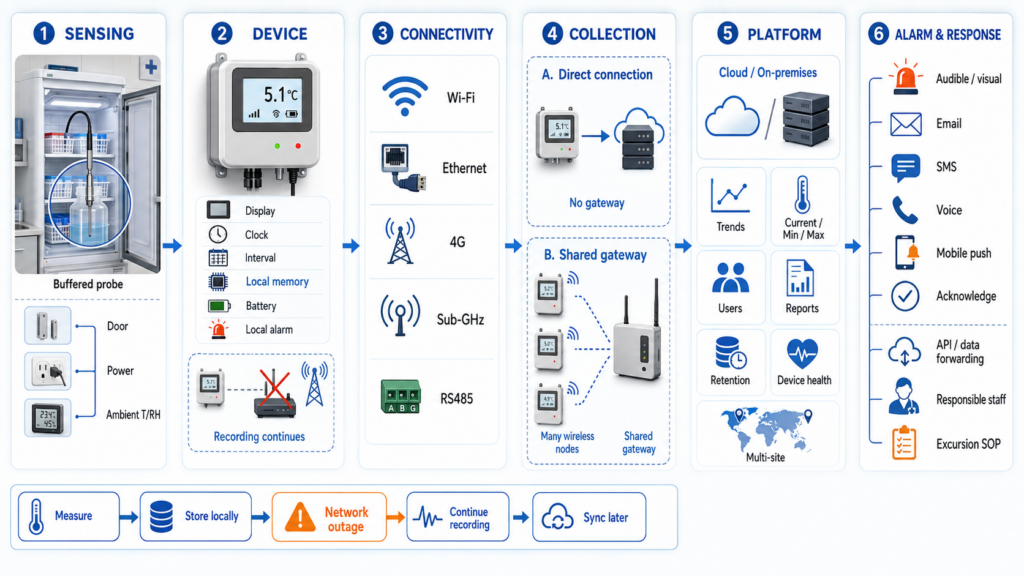
    A complete system links the buffered probe, logger, communications, optional gateway, monitoring platform, and alarm-response workflow while preserving data locally.

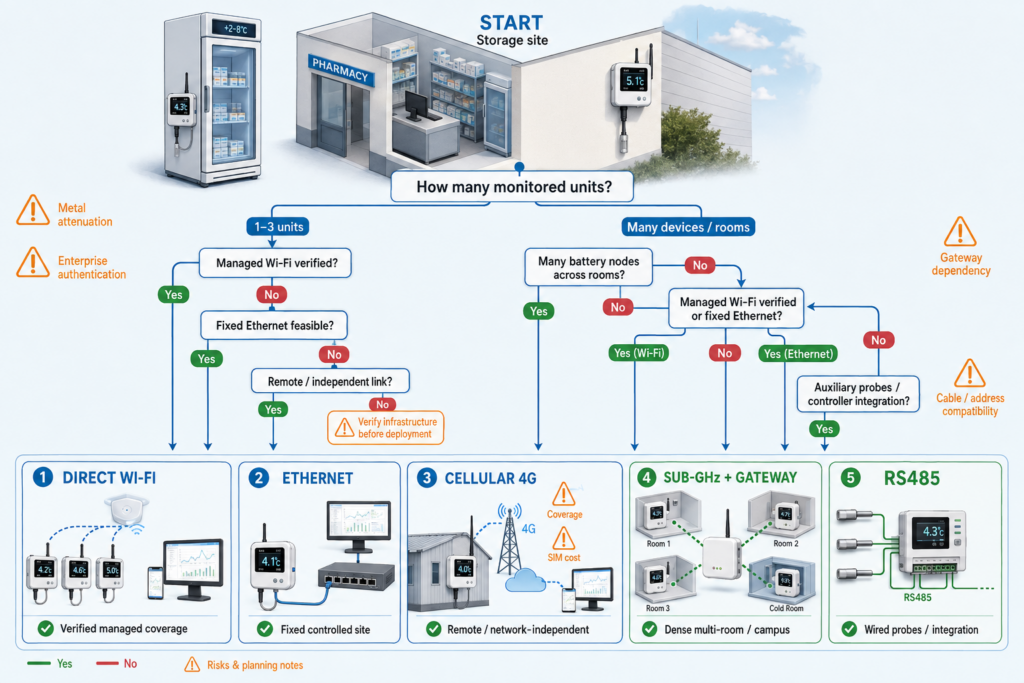
    4.Which Communication Method Should Be Used?

    Method Best fit Advantages Limitations / design checks
    Wi-Fi Clinics and pharmacies with managed wireless coverage. No cable to each logger; direct cloud connection; easy expansion at low point counts. Coverage near metal refrigerators, enterprise authentication, internet dependency, and IT approval must be verified.
    Ethernet Fixed medication rooms, hospitals, and sites that prefer wired infrastructure. Stable local link, easier network control, and potential PoE options depending on device. Requires cabling and switch capacity; device may still need separate power or a PoE splitter.
    4G / cellular Remote clinics, temporary sites, or locations where local IT is limited. Independent of local broadband; fast deployment; useful as the primary path at isolated sites. SIM, coverage, APN, region-specific bands, recurring data cost, and higher power demand.
    LoRa / proprietary sub-GHz Large hospitals, campuses, or dense multi-room deployments. Many battery-powered nodes can share a gateway; good building penetration and low node power. Gateway and radio survey required; protocol may be proprietary; gateway/network failure becomes a shared dependency.
    RS485 External probe or auxiliary sensor connection to a nearby logger/controller. Robust wired sensor bus, long cable runs, and support for specialized probes. Not an internet connection; requires addressing, power, wiring, and compatibility checks.

    Connectivity should be selected according to site coverage, IT policy, deployment scale, outage behavior, and the need for network independence.


    For one or two refrigerators, direct Wi-Fi, Ethernet, or cellular usually minimizes infrastructure. For dozens of devices across a hospital or regional network, a shared wireless architecture may reduce endpoint configuration and simplify standardized deployment. The decision should be based on coverage testing, IT policy, outage behavior, and the cost of gateways and software—not on radio range alone.

    5.How Should Monitoring Products Be Compared?

    Published accuracy is only one part of the measurement chain. Procurement teams should compare the complete configuration and ask whether the probe is buffered, whether the calibration certificate covers the exact probe and logger, and whether the accuracy applies at the actual operating range. They should also compare:

    • local memory and automatic backfill after communication loss;
    • current/minimum/maximum workflow and local alarm visibility;
    • Wi-Fi, Ethernet, cellular, gateway, and enterprise-network requirements;
    • battery backup, low-battery alarms, power-failure handling, and backup DDL strategy;
    • cloud, on-premises, API, data export, user permissions, and record-retention options;
    • calibration, validation, installation, and lifecycle support;
    • mandatory subscription, gateway, notification, SIM, calibration, and expansion costs.

    6.Product and Solution Comparison

    Specifications are based on official manufacturer pages reviewed in July 2026. “Not publicly specified” indicates that the exact value was not found for the reviewed configuration. Compliance depends on the complete installation and workflow.

    Comparison item UbiBot WS1 Pro 4G/WiFi + UB-DT-P1 Dickson DWE2 + RTHM SensoScientific B80-200-OTA + compatible RTD + glycol vial Vaisala RFL100 + TMP115 + AP10 + viewLinc
    System positioning Direct-connected, low-infrastructure monitor for small or distributed sites Turnkey display logger with vaccine-oriented glycol probe Pharmacy/life-science Wi-Fi monitoring with validated-cloud and calibration services Enterprise wireless continuous monitoring architecture for regulated multi-site organizations
    Primary measurement External buffered temperature; device also measures ambient T/RH/light Glycol-buffered temperature RTD temperature with selected buffer Temperature with TMP115 and optional thermal dampener
    Published accuracy UB-DT-P1: ±0.5°C from -10°C to 85°C RTHM: ±0.5°C from -50°C to 70°C B80 product page: ±0.5°C; exact probe/certificate configuration must be confirmed Exact complete-system accuracy depends on selected probe and calibration certificate; verify order configuration
    Connectivity 2.4 GHz Wi-Fi plus region-specific cellular; GS1-AETH1RS is an Ethernet alternative 2.4 GHz Wi-Fi or Ethernet 2.4 GHz Wi-Fi; dual-band B80-500-OTA option Proprietary VaiNet radio to AP10; AP10 uses Ethernet and PoE/AC
    Dedicated gateway No for WS1 Pro or GS1 direct-connected configurations No No proprietary gateway; uses site Wi-Fi Yes: AP10
    Local display / min-max 4.4-inch LCD; DDL-style resettable min/max workflow not publicly specified LCD with user-resettable min/max and audible/visible indicators E-Ink display and push-button reading; exact daily min/max workflow should be verified Logger display available; daily min/max workflow should be verified for the selected configuration
    Local/offline data 300,000 device records; automatic synchronization after reconnection should be verified in acceptance testing Approx. 400,000 backup sample points; local export supported 4,000 readings on transmitter; unlimited cloud memory stated RFL100 local memory supports outage backfill; official manual states about 30 days of measurements
    Alerts Cloud rule notifications; channel availability and paid notification credits depend on plan Phone, SMS, email, audible; subscription required Onboard visual/audible plus cloud SMS, voice, pager, fax, and email Onscreen, email, SMS, alarm tower, relay, and voice through viewLinc
    Software model Free basic cloud plan; paid storage/features available; on-premises and API options available DicksonOne subscription required SensoScientific cloud and services; commercial terms by quote viewLinc Enterprise Server or viewLinc Cloud; enterprise implementation and service options
    Calibration / validation support Factory report and accredited-lab recalibration path; offset adjustment does not replace formal calibration NIST/A2LA calibration options for replaceable sensors NIST and A2LA accredited calibration; IQ/OQ/PQ and mapping services advertised Traceable/ISO 17025 calibration options, IQ/OQ and GxP documentation/services
    Typical use case Independent pharmacy, clinic, remote branch, or budget-sensitive rollout with documented buffer/SOP Single or small group of vaccine refrigerators needing a ready glycol-probe workflow Healthcare organizations prioritizing enterprise Wi-Fi security, validated cloud, and accredited services Hospitals, large pharmacy networks, and multi-site validation-oriented programs
    Deployment complexity Low to medium Low to medium Medium High
    Relative total cost category Low to medium, depending on SIM, calibration, and software options Medium with mandatory software subscription Medium to high; quote-based services and cloud High; access points, software, validation, and service scope

    7.Which System Is Best for Each Use Case?

    Independent pharmacy or small clinic

    Dickson DWE2 with RTHM is the most turnkey of the compared small-site packages because the manufacturer supplies a glycol-buffered vaccine probe and a resettable min/max display. UbiBot is a strong alternative when direct Wi-Fi or cellular, large local memory, a visible screen, and lower base software burden matter more—and when the organization is prepared to document the buffer, calibration, and daily review workflow.

    Remote clinic or temporary vaccination site

    UbiBot WS1 Pro cellular models are practical where local broadband is unavailable or difficult to approve. Coverage, regional frequency, SIM/APN, power consumption, and failover behavior must be tested. Cellular independence does not remove the need for local memory, a backup DDL, and a response plan for loss of both mains power and mobile service.

    Hospital pharmacy using enterprise Wi-Fi

    SensoScientific is well aligned with organizations that prioritize enterprise Wi-Fi security, device certificates, accredited calibration, validated-cloud positioning, and qualification services. Dickson can also fit direct Wi-Fi/Ethernet environments, while UbiBot may be preferred for lower-complexity deployments that do not require the same validation-service package.

    Large health system or multi-site regulated program

    Vaisala RFL100, AP10, and viewLinc form the strongest enterprise architecture in this comparison. The system is designed for long-range wireless deployment, secure database workflows, multiple alarm channels, integration, traceable calibration, and validation services. Its infrastructure and implementation burden are higher, so it is usually justified by scale and governance requirements.

    Ethernet-first site

    UbiBot GS1-AETH1RS with UB-DT-P1 can provide a direct Ethernet alternative, while Dickson DWE2 supports Ethernet without a separate gateway. The exact UbiBot probe interface, buffer, calibration report, power method, and min/max review workflow must be confirmed for the ordered SKU.

    8.How Should the System Be Deployed?

    Small facility: one to three storage units
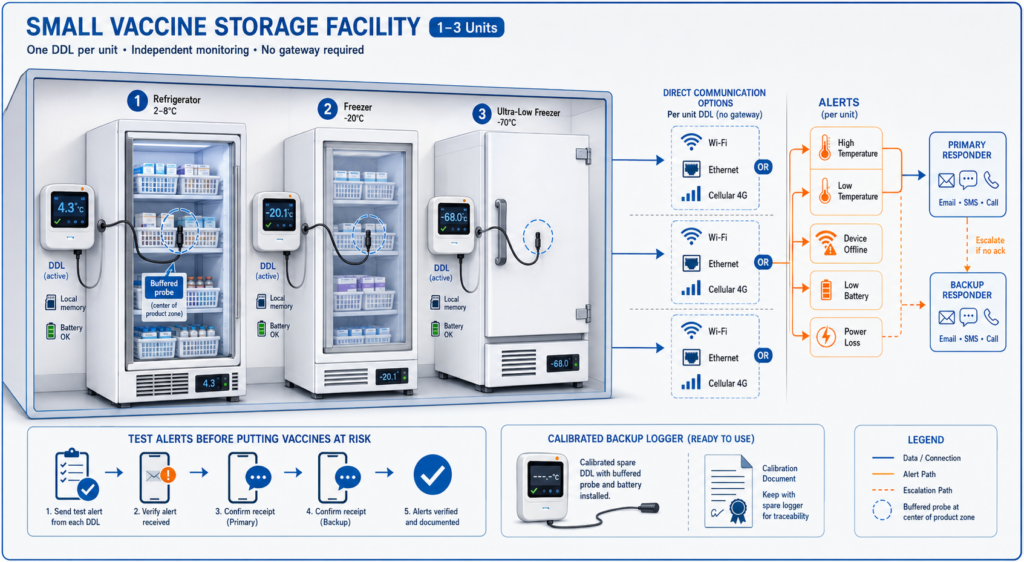
    Use one independent DDL per refrigerator or freezer, plus an available backup DDL with a current calibration certificate. Place the active logger outside the unit and the buffered probe near the center of the vaccine load. Configure high/low temperature, device-offline, low-battery, and power-related alarms where supported. Assign primary and backup responders, and test every notification path before placing vaccines at risk.

    Medium facility: several departments or pharmacy rooms
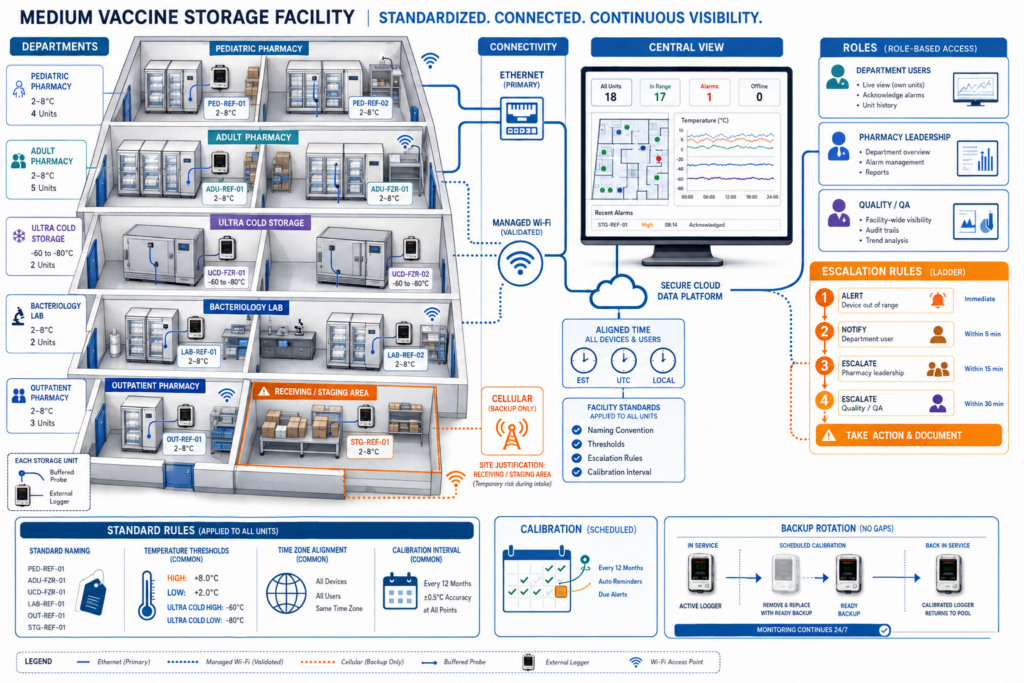
    Standardize device naming, thresholds, time zones, calibration intervals, and escalation rules. Segment responsibilities by department while giving quality or pharmacy leadership centralized visibility. Use Ethernet where practical, validated Wi-Fi coverage where necessary, and cellular only where its independence adds value. Include receiving/staging areas if vaccines may wait outside their primary storage unit.

    Large or multi-site organization
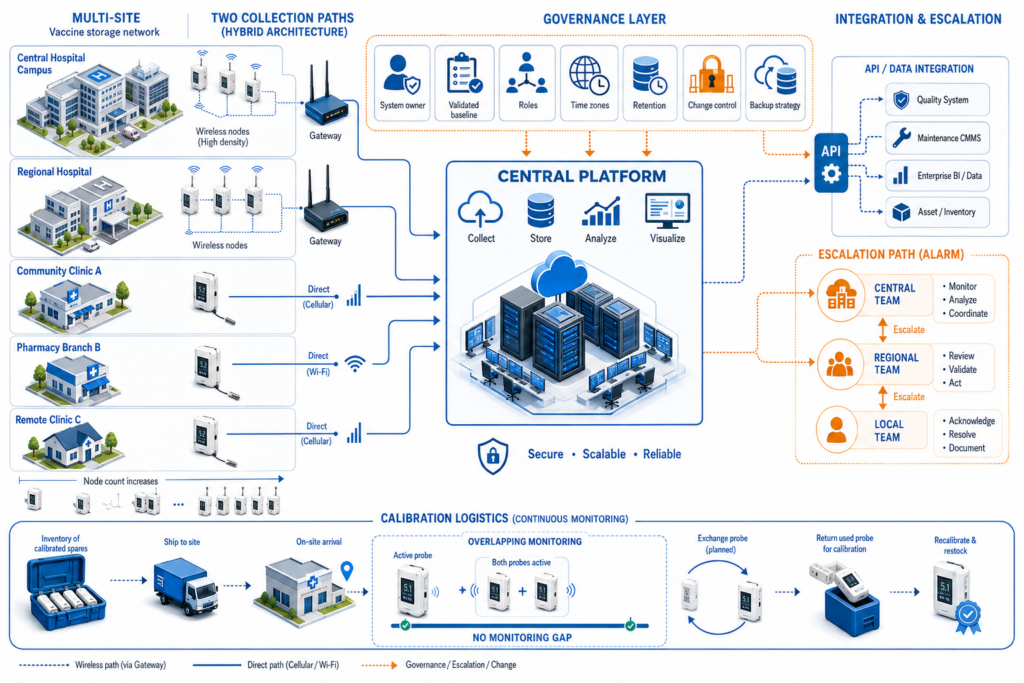
    Define a system owner, validated configuration baseline, user-role model, retention policy, change control, backup strategy, and integration requirements before selecting hardware. Gateway-based architectures can reduce endpoint network configuration at high node counts, while direct-connected devices may remain useful for remote branches. Plan calibration logistics so probe replacement does not create monitoring gaps.

    Deployment by functional area

    Area Deployment recommendation
    Primary vaccine refrigerator One buffered DDL probe in a representative central location; logger outside; clear current/min/max and alarm workflow.
    Freezer or ultra-cold unit Use a probe, cable, buffer, calibration points, and logger specifically rated for the actual range; do not assume a refrigerated-vaccine configuration is suitable.
    Receiving / unpacking area Use a separate calibrated device when vaccines can remain in staging long enough for temperature risk; define handoff timing and exception ownership.
    Backup storage unit Keep the unit ready, monitored, and documented; do not wait for an emergency to install or configure the backup logger.
    Network and power path Monitor device health, gateway status, mains power, UPS state, or outlet loss where the risk assessment justifies it.

    9.Common Design and Installation Mistakes

    1. Using an open-air sensor as though it were a buffered vaccine probe. It may react quickly to door openings but not represent vaccine temperature.
    2. Placing the probe against a wall, cooling plate, vent, door, or empty shelf instead of within the vaccine load at a representative location.
    3. Selecting a logger from the published accuracy number without checking calibration uncertainty, calibration points, serial-number coverage, or certificate validity.
    4. Assuming cloud alarms will work during every failure. A site may lose power, internet, Wi-Fi, cellular coverage, a gateway, or notification service at the same time.
    5. Failing to test the daily current/minimum/maximum review workflow before go-live, especially where the hardware does not offer a resettable local min/max display.
    6. Ignoring cable routing and door-seal integrity. A poorly routed probe cable can damage the seal, create frost, or be pinched during routine use.
    7. Using one account for everyone. Shared credentials weaken accountability; roles, alert recipients, acknowledgement, and staff turnover should be managed formally.
    8. Deploying without a calibrated backup DDL and written emergency transfer procedure.

    10.Frequently Asked Questions

    What does CDC recommend for a vaccine temperature monitoring device?

    CDC recommends—and VFC requires—a continuous digital data logger set to record at least every 30 minutes. Important characteristics include a detachable probe that reflects vaccine temperature, an out-of-range alarm, a low-battery indicator, current/minimum/maximum temperature display, recommended uncertainty of ±0.5°C, and a current valid calibration certificate. State and local immunization programs may add requirements, so the device specification must be checked against the jurisdiction and the complete operating procedure. [1]

    Why is a buffered probe used in a vaccine refrigerator?

    A glycol, glass-bead, sand, Teflon, or similar buffer adds thermal mass. It slows the probe response to short air-temperature changes caused by door openings or defrost cycles and more closely represents the temperature behavior of vaccine containers. The buffer does not automatically make a logger suitable: its material, volume, position, response time, cable route, and calibration coverage should be documented as part of the complete measurement system.

    Can a standard room temperature sensor monitor vaccines?

    A room sensor can provide useful context, but it should not be treated as the primary vaccine probe. Air temperature changes faster than the stored product and can produce alarms that do not reflect vaccine temperature—or fail to represent localized conditions inside the unit. The primary measurement should use a detachable, calibrated, thermally buffered probe placed with the vaccine inventory, while room temperature and humidity remain optional contextual parameters.

    Is Wi-Fi or cellular better for a pharmacy refrigerator?

    Wi-Fi is usually more economical where coverage, authentication, and internet service are reliable. Cellular is valuable for remote clinics, temporary sites, or locations that cannot use the local network. The better choice is the path that remains available during realistic failures. Both require acceptance testing for signal strength, outage behavior, local data retention, alarm delivery, and power consumption. Ethernet may be preferable at fixed sites that want a controlled wired connection.

    Does the logger need a local minimum and maximum display?

    CDC lists current, minimum, and maximum temperature display among important DDL characteristics. A local resettable display can simplify daily review, but some organizations may use a validated software workflow. Before purchase, confirm exactly how staff will retrieve, record, and reset or define the review period for minimum and maximum values. A large cloud history does not automatically make the daily operating workflow simple or acceptable to the local program.

    How often should vaccine temperatures be recorded?

    CDC recommends setting the DDL to record at least every 30 minutes. A shorter interval may provide more detail during excursions, but it increases data volume and can affect battery life or communication traffic. The organization should choose the interval through a risk-based procedure, verify the device can maintain it during offline periods, and ensure reports and retention settings preserve the required history.

    How many temperature sensors are needed per refrigerator?

    For a standard vaccine storage unit, the usual starting point is one independent DDL with a buffered probe positioned in a representative central location. Additional probes may be justified for very large units, unusual airflow, separate compartments, qualification studies, or unresolved temperature gradients. Temperature mapping or a documented assessment should drive extra points. Each refrigerator and freezer should have its own active monitoring device; a room sensor cannot cover several storage units.

    Can a product be described as CDC-compliant or VFC-approved?

    That wording should be avoided unless an authoritative program explicitly approves the exact configuration. CDC publishes recommended characteristics and VFC establishes program requirements; it does not generally certify private products. A suitable system combines hardware, probe, buffer, calibration certificate, logging settings, daily review, alarm escalation, retention, backup equipment, and staff procedures. The safest wording is that a configuration can support a CDC- or VFC-aligned workflow subject to local verification.

    Can the same system monitor ultra-cold vaccines?

    Not automatically. Ultra-cold storage requires probes, cables, logger electronics, calibration points, installation methods, and safety procedures rated for the actual temperature. A probe body may have a narrower operating range than its sensor tip. Review the vaccine manufacturer’s current package insert and use a complete configuration specified and calibrated for the required range. The refrigerated-vaccine setup in this guide should not be assumed suitable for ultra-cold storage.

    How should alarm testing be performed before go-live?

    Simulate high and low temperature conditions or use a safe test method that does not endanger inventory. Test device-offline, power-loss, low-battery, Wi-Fi or Ethernet loss, cellular loss, gateway loss, cloud unavailability, notification delivery, acknowledgement, escalation, and data backfill. Confirm timestamps, recipients, repeat intervals, after-hours coverage, and the transition to the backup DDL. Document the results and repeat tests after material changes to hardware, network, software, or SOPs.

    11.Conclusion and Selection Recommendations

    Start with the operating workflow, not the product catalog. Define the vaccine type and storage range, select a detachable buffered probe, specify calibration points and uncertainty, decide how staff will review current/minimum/maximum values, and test how records and alarms behave during loss of power and communications. Then select the connectivity and software architecture that fits the site count and governance model.

    UbiBot provides a balanced option for clinics and pharmacy branches that value direct Wi-Fi or cellular connectivity, large local memory, visible readings, external probes, and a lower base infrastructure burden. It is not a turnkey vaccine package: the buffer, complete calibration evidence, and daily review workflow must be confirmed. Dickson is better aligned with a simple small-site glycol-probe workflow. SensoScientific is stronger when enterprise Wi-Fi security, accredited calibration, and validated-cloud services are priorities. Vaisala is more appropriate when a large organization requires a mature, gateway-based, validation-oriented continuous monitoring system.

    No vendor removes the need for trained staff, a calibrated backup device, documented alarm escalation, manufacturer consultation during excursions, and periodic review of local immunization-program requirements.

    12.Sources and Product Information Disclaimer

    Specifications, model availability, wireless bands, software features, subscriptions, server regions, notification methods, calibration services, and validation packages may vary by model, probe, country, software release, and contract. Verify the final bill of materials and current official documents before publication or procurement. Product features can support a management requirement; they do not by themselves prove that the complete installation is CDC-, VFC-, FDA-, or 21 CFR Part 11-compliant.

    [1] CDC — Chapter 5: Vaccine Storage and Handling / Vaccine Storage and Handling resources — https://www.cdc.gov/pinkbook/hcp/table-of-contents/chapter-5-vaccine-storage-and-handling.html

    [2] UbiBot — WS1 Pro Wi-Fi/SIM specifications — https://store.ubibot.com/pages/ubibotws1pro-2-4ghzwifiandsimversion_specifications

    [3] UbiBot — Temperature Sensor Comparison (UB-DT-P1) — https://support.ubibot.com/hc/en-us/articles/45863713116825-Temperature-Sensor-Comparison

    [4] UbiBot — Platform access without subscriptions — https://support.ubibot.com/hc/en-us/articles/29062969455641-Get-access-to-the-platform-without-subscriptions

    [5] UbiBot — Calibration & Traceability Policy — https://www.ubibot.com/certification-and-compliance/8456/calibration-traceability-policy/


    Related Resources

    How to Monitor Temperature in Refrigerated Trucks in Real Time
    How to Monitor Temperature and Humidity in Electronics Manufacturing
    How to Build an Environmental Monitoring System for Food Processing Facilities
    menu-header-svg
    Search
    • Explore Knowledge
      • Comparison & Selection
      • Industry Solution
      • Product & Device
      • Criterion & Compliance
      • Deployment & Usage
      • Technology & Principle
    • Academic Research
    • In-depth Tech

    Industry Solution

    See More >>

    How to Build a Vaccine Refrigerator and Pharmacy Temperature Monitoring System

    Evidence base

    CDC vaccine storage guidance and current official manufacturer documentation reviewed in July 2026. The article distinguishes device features from complete program compliance.

    Introduction

    A vaccine refrigerator can remain powered and still expose inventory to damaging temperatures because of door activity, thermostat faults, airflow problems, accidental freezing, overloading, or a delayed response to an alarm. A handwritten temperature sheet may document a problem only after staff return to the site. A connected monitoring system is intended to close that gap by recording conditions continuously, preserving evidence during communication failures, and escalating exceptions while there is still time to act.

    A reliable vaccine refrigerator monitoring system combines a thermally buffered probe, a calibrated logger, local memory, resilient connectivity, remote alarms, a backup device, and a documented response workflow.

    This guide is written for vaccine coordinators, pharmacists, clinic administrators, healthcare quality teams, facilities and IT managers, system integrators, and procurement staff. It explains what to monitor, how the sensing and communication layers should be designed, how system architectures differ, and where representative products from UbiBot, Dickson, SensoScientific, and Vaisala fit.

    The article is not a product certification. CDC recommends—and the Vaccines for Children program requires—a digital data logger with defined characteristics, but state and local programs may add requirements. Suitability depends on the complete logger, detachable probe, thermal buffer, calibration certificate, logging interval, alarm workflow, record-retention process, and staff procedures. [1]

    Quick Summary

    A practical vaccine refrigerator monitoring system starts with a detachable, thermally buffered probe inside the storage unit and a logger or display outside. The device should record at least every 30 minutes, preserve data during network interruptions, show or make available current/minimum/maximum values, and send actionable alarms. Wi-Fi is practical where the network is reliable; Ethernet can reduce wireless uncertainty; cellular is useful at remote sites; gateway-based long-range radio can scale across large campuses. Product choice should consider calibration evidence, local memory, alarm paths, software governance, and lifecycle cost—not sensor accuracy alone. UbiBot suits direct-connected, lower-infrastructure deployments; Dickson offers a turnkey glycol-buffered small-site package; SensoScientific and Vaisala provide stronger regulated-enterprise service and validation ecosystems.

    Key Takeaway

    The right monitoring system is a documented measurement-and-response workflow, not merely a connected thermometer: the buffered probe, calibrated logger, offline record, network path, alarm escalation, backup device, and staff SOP must operate as one system.

    1.Why Is Vaccine Refrigerator Temperature Monitoring System  Important

    Protect vaccine potency and avoid preventable waste

    Improper storage can reduce or destroy vaccine potency, creating the risk of revaccination, replacement cost, disrupted appointments, and loss of patient confidence. CDC directs providers to follow current storage information from vaccine manufacturers and to maintain reliable temperature monitoring for every storage unit. [1]

    Maintain operational continuity

    Local memory can preserve complete temperature records during an outage, but real-time alarm delivery requires an available local or independent communication path.

    A remote alarm can shorten the time between a refrigerator failure and corrective action. However, notification alone is not enough: the device should continue recording when Wi-Fi, internet, a gateway, or a cloud service is unavailable, so staff can reconstruct the event and determine whether inventory was affected.

    Create traceable records

    Temperature history supports routine review, excursion investigation, audits, and communication with vaccine manufacturers or immunization programs. Calibration evidence, device identity, time synchronization, data export, alarm acknowledgement, and record ownership should be defined before deployment.

    Support quality and regulatory workflows

    A logger may provide useful technical functions without making the entire installation compliant. VFC participation, state requirements, internal quality policies, and broader pharmacy or hospital governance determine how devices are qualified, who can change limits, how long records are retained, and how exceptions are handled.

    Reduce the limitations of manual inspection

    Manual checks are snapshots. They can miss overnight excursions, short freezes, repeated door openings, and power or network failures. A continuous record shows duration, direction, and recovery, while a documented daily review keeps staff engaged with the storage unit rather than relying entirely on automation.

    2.What Environmental Parameters Should Be Monitored?

    The primary probe should be thermally buffered and positioned within the vaccine load, away from walls, vents, cooling plates, and the refrigerator door.

    Parameter Why it matters Monitoring location Recommended sensor type
    Buffered vaccine temperature (essential) Best represents the thermal response of stored vaccines and is the primary control variable. Near the center of the vaccine load, away from walls, vents, cooling plates, and doors. Detachable temperature probe in glycol, glass beads, sand, Teflon, or another documented thermal buffer.
    Current/minimum/maximum temperature (essential) Supports routine review and helps identify conditions since the last check. At the logger display or verified software view accessible to responsible staff. DDL or software workflow that clearly provides current, minimum, and maximum values.
    Door status (optional but useful) Distinguishes access events from equipment faults and can trigger an early warning. Door frame or switch point. Magnetic dry-contact or dedicated door sensor compatible with the monitoring system.
    Power status (optional but useful) Identifies loss of mains power before temperature rises significantly. Refrigerator circuit, logger power input, or monitored outlet. Power-failure input, relay/dry-contact monitor, or UPS status integration.
    Room temperature/RH (contextual) Explains extreme ambient conditions and supports pharmacy room management; RH is not a substitute for vaccine temperature. Medication room, pharmacy area, or mechanical space—not inside the thermal buffer. Calibrated ambient temperature/RH sensor where the risk assessment requires it.
    Communication health (essential for remote alerting) Detects when a device, gateway, or network path is unavailable. System level. Offline/device-health alarm, gateway status, heartbeat monitoring, and escalation rule.

    Buffered vaccine temperature and communication health are essential, while door, power, and ambient conditions provide useful operational context.

    3.What Does a Typical Environmental Monitoring System Include?

    A complete system contains several layers. Removing any one of them can create a blind spot:

    • Sensing layer: detachable temperature probe, documented thermal buffer, optional door/power/ambient sensors, and current calibration status.
    • Device layer: data logger or transmitter with local display or software visibility, programmable interval, local memory, clock, battery status, and alarm indicators.
    • Connectivity layer: Wi-Fi, Ethernet, cellular, or long-range radio, selected for the site rather than for marketing convenience.
    • Gateway or collection layer: unnecessary for direct-connected loggers, but required for proprietary long-range wireless systems such as Vaisala VaiNet.
    • Platform layer: cloud or on-premises software for trends, rules, users, reports, data retention, audit evidence, and multi-site visibility.
    • Alarm and integration layer: email, SMS, voice, audible/visual indicators, relays, APIs, or data forwarding, combined with an escalation and acknowledgement SOP.

    Text-Based Architecture Flow

    Buffered probe inside storage unit -> logger/display outside the unit -> local memory and battery status -> Wi-Fi/Ethernet/cellular OR wireless gateway -> cloud/on-premises platform -> threshold and device-health alarms -> responsible staff, reports, API, and excursion SOP.

    A complete system links the buffered probe, logger, communications, optional gateway, monitoring platform, and alarm-response workflow while preserving data locally.

    4.Which Communication Method Should Be Used?

    Method Best fit Advantages Limitations / design checks
    Wi-Fi Clinics and pharmacies with managed wireless coverage. No cable to each logger; direct cloud connection; easy expansion at low point counts. Coverage near metal refrigerators, enterprise authentication, internet dependency, and IT approval must be verified.
    Ethernet Fixed medication rooms, hospitals, and sites that prefer wired infrastructure. Stable local link, easier network control, and potential PoE options depending on device. Requires cabling and switch capacity; device may still need separate power or a PoE splitter.
    4G / cellular Remote clinics, temporary sites, or locations where local IT is limited. Independent of local broadband; fast deployment; useful as the primary path at isolated sites. SIM, coverage, APN, region-specific bands, recurring data cost, and higher power demand.
    LoRa / proprietary sub-GHz Large hospitals, campuses, or dense multi-room deployments. Many battery-powered nodes can share a gateway; good building penetration and low node power. Gateway and radio survey required; protocol may be proprietary; gateway/network failure becomes a shared dependency.
    RS485 External probe or auxiliary sensor connection to a nearby logger/controller. Robust wired sensor bus, long cable runs, and support for specialized probes. Not an internet connection; requires addressing, power, wiring, and compatibility checks.

    Connectivity should be selected according to site coverage, IT policy, deployment scale, outage behavior, and the need for network independence.


    For one or two refrigerators, direct Wi-Fi, Ethernet, or cellular usually minimizes infrastructure. For dozens of devices across a hospital or regional network, a shared wireless architecture may reduce endpoint configuration and simplify standardized deployment. The decision should be based on coverage testing, IT policy, outage behavior, and the cost of gateways and software—not on radio range alone.

    5.How Should Monitoring Products Be Compared?

    Published accuracy is only one part of the measurement chain. Procurement teams should compare the complete configuration and ask whether the probe is buffered, whether the calibration certificate covers the exact probe and logger, and whether the accuracy applies at the actual operating range. They should also compare:

    • local memory and automatic backfill after communication loss;
    • current/minimum/maximum workflow and local alarm visibility;
    • Wi-Fi, Ethernet, cellular, gateway, and enterprise-network requirements;
    • battery backup, low-battery alarms, power-failure handling, and backup DDL strategy;
    • cloud, on-premises, API, data export, user permissions, and record-retention options;
    • calibration, validation, installation, and lifecycle support;
    • mandatory subscription, gateway, notification, SIM, calibration, and expansion costs.

    6.Product and Solution Comparison

    Specifications are based on official manufacturer pages reviewed in July 2026. “Not publicly specified” indicates that the exact value was not found for the reviewed configuration. Compliance depends on the complete installation and workflow.

    Comparison item UbiBot WS1 Pro 4G/WiFi + UB-DT-P1 Dickson DWE2 + RTHM SensoScientific B80-200-OTA + compatible RTD + glycol vial Vaisala RFL100 + TMP115 + AP10 + viewLinc
    System positioning Direct-connected, low-infrastructure monitor for small or distributed sites Turnkey display logger with vaccine-oriented glycol probe Pharmacy/life-science Wi-Fi monitoring with validated-cloud and calibration services Enterprise wireless continuous monitoring architecture for regulated multi-site organizations
    Primary measurement External buffered temperature; device also measures ambient T/RH/light Glycol-buffered temperature RTD temperature with selected buffer Temperature with TMP115 and optional thermal dampener
    Published accuracy UB-DT-P1: ±0.5°C from -10°C to 85°C RTHM: ±0.5°C from -50°C to 70°C B80 product page: ±0.5°C; exact probe/certificate configuration must be confirmed Exact complete-system accuracy depends on selected probe and calibration certificate; verify order configuration
    Connectivity 2.4 GHz Wi-Fi plus region-specific cellular; GS1-AETH1RS is an Ethernet alternative 2.4 GHz Wi-Fi or Ethernet 2.4 GHz Wi-Fi; dual-band B80-500-OTA option Proprietary VaiNet radio to AP10; AP10 uses Ethernet and PoE/AC
    Dedicated gateway No for WS1 Pro or GS1 direct-connected configurations No No proprietary gateway; uses site Wi-Fi Yes: AP10
    Local display / min-max 4.4-inch LCD; DDL-style resettable min/max workflow not publicly specified LCD with user-resettable min/max and audible/visible indicators E-Ink display and push-button reading; exact daily min/max workflow should be verified Logger display available; daily min/max workflow should be verified for the selected configuration
    Local/offline data 300,000 device records; automatic synchronization after reconnection should be verified in acceptance testing Approx. 400,000 backup sample points; local export supported 4,000 readings on transmitter; unlimited cloud memory stated RFL100 local memory supports outage backfill; official manual states about 30 days of measurements
    Alerts Cloud rule notifications; channel availability and paid notification credits depend on plan Phone, SMS, email, audible; subscription required Onboard visual/audible plus cloud SMS, voice, pager, fax, and email Onscreen, email, SMS, alarm tower, relay, and voice through viewLinc
    Software model Free basic cloud plan; paid storage/features available; on-premises and API options available DicksonOne subscription required SensoScientific cloud and services; commercial terms by quote viewLinc Enterprise Server or viewLinc Cloud; enterprise implementation and service options
    Calibration / validation support Factory report and accredited-lab recalibration path; offset adjustment does not replace formal calibration NIST/A2LA calibration options for replaceable sensors NIST and A2LA accredited calibration; IQ/OQ/PQ and mapping services advertised Traceable/ISO 17025 calibration options, IQ/OQ and GxP documentation/services
    Typical use case Independent pharmacy, clinic, remote branch, or budget-sensitive rollout with documented buffer/SOP Single or small group of vaccine refrigerators needing a ready glycol-probe workflow Healthcare organizations prioritizing enterprise Wi-Fi security, validated cloud, and accredited services Hospitals, large pharmacy networks, and multi-site validation-oriented programs
    Deployment complexity Low to medium Low to medium Medium High
    Relative total cost category Low to medium, depending on SIM, calibration, and software options Medium with mandatory software subscription Medium to high; quote-based services and cloud High; access points, software, validation, and service scope

    7.Which System Is Best for Each Use Case?

    Independent pharmacy or small clinic

    Dickson DWE2 with RTHM is the most turnkey of the compared small-site packages because the manufacturer supplies a glycol-buffered vaccine probe and a resettable min/max display. UbiBot is a strong alternative when direct Wi-Fi or cellular, large local memory, a visible screen, and lower base software burden matter more—and when the organization is prepared to document the buffer, calibration, and daily review workflow.

    Remote clinic or temporary vaccination site

    UbiBot WS1 Pro cellular models are practical where local broadband is unavailable or difficult to approve. Coverage, regional frequency, SIM/APN, power consumption, and failover behavior must be tested. Cellular independence does not remove the need for local memory, a backup DDL, and a response plan for loss of both mains power and mobile service.

    Hospital pharmacy using enterprise Wi-Fi

    SensoScientific is well aligned with organizations that prioritize enterprise Wi-Fi security, device certificates, accredited calibration, validated-cloud positioning, and qualification services. Dickson can also fit direct Wi-Fi/Ethernet environments, while UbiBot may be preferred for lower-complexity deployments that do not require the same validation-service package.

    Large health system or multi-site regulated program

    Vaisala RFL100, AP10, and viewLinc form the strongest enterprise architecture in this comparison. The system is designed for long-range wireless deployment, secure database workflows, multiple alarm channels, integration, traceable calibration, and validation services. Its infrastructure and implementation burden are higher, so it is usually justified by scale and governance requirements.

    Ethernet-first site

    UbiBot GS1-AETH1RS with UB-DT-P1 can provide a direct Ethernet alternative, while Dickson DWE2 supports Ethernet without a separate gateway. The exact UbiBot probe interface, buffer, calibration report, power method, and min/max review workflow must be confirmed for the ordered SKU.

    8.How Should the System Be Deployed?

    Small facility: one to three storage units

    Use one independent DDL per refrigerator or freezer, plus an available backup DDL with a current calibration certificate. Place the active logger outside the unit and the buffered probe near the center of the vaccine load. Configure high/low temperature, device-offline, low-battery, and power-related alarms where supported. Assign primary and backup responders, and test every notification path before placing vaccines at risk.

    Medium facility: several departments or pharmacy rooms

    Standardize device naming, thresholds, time zones, calibration intervals, and escalation rules. Segment responsibilities by department while giving quality or pharmacy leadership centralized visibility. Use Ethernet where practical, validated Wi-Fi coverage where necessary, and cellular only where its independence adds value. Include receiving/staging areas if vaccines may wait outside their primary storage unit.

    Large or multi-site organization

    Define a system owner, validated configuration baseline, user-role model, retention policy, change control, backup strategy, and integration requirements before selecting hardware. Gateway-based architectures can reduce endpoint network configuration at high node counts, while direct-connected devices may remain useful for remote branches. Plan calibration logistics so probe replacement does not create monitoring gaps.

    Deployment by functional area

    Area Deployment recommendation
    Primary vaccine refrigerator One buffered DDL probe in a representative central location; logger outside; clear current/min/max and alarm workflow.
    Freezer or ultra-cold unit Use a probe, cable, buffer, calibration points, and logger specifically rated for the actual range; do not assume a refrigerated-vaccine configuration is suitable.
    Receiving / unpacking area Use a separate calibrated device when vaccines can remain in staging long enough for temperature risk; define handoff timing and exception ownership.
    Backup storage unit Keep the unit ready, monitored, and documented; do not wait for an emergency to install or configure the backup logger.
    Network and power path Monitor device health, gateway status, mains power, UPS state, or outlet loss where the risk assessment justifies it.

    9.Common Design and Installation Mistakes

    1. Using an open-air sensor as though it were a buffered vaccine probe. It may react quickly to door openings but not represent vaccine temperature.
    2. Placing the probe against a wall, cooling plate, vent, door, or empty shelf instead of within the vaccine load at a representative location.
    3. Selecting a logger from the published accuracy number without checking calibration uncertainty, calibration points, serial-number coverage, or certificate validity.
    4. Assuming cloud alarms will work during every failure. A site may lose power, internet, Wi-Fi, cellular coverage, a gateway, or notification service at the same time.
    5. Failing to test the daily current/minimum/maximum review workflow before go-live, especially where the hardware does not offer a resettable local min/max display.
    6. Ignoring cable routing and door-seal integrity. A poorly routed probe cable can damage the seal, create frost, or be pinched during routine use.
    7. Using one account for everyone. Shared credentials weaken accountability; roles, alert recipients, acknowledgement, and staff turnover should be managed formally.
    8. Deploying without a calibrated backup DDL and written emergency transfer procedure.

    10.Frequently Asked Questions

    What does CDC recommend for a vaccine temperature monitoring device?

    CDC recommends—and VFC requires—a continuous digital data logger set to record at least every 30 minutes. Important characteristics include a detachable probe that reflects vaccine temperature, an out-of-range alarm, a low-battery indicator, current/minimum/maximum temperature display, recommended uncertainty of ±0.5°C, and a current valid calibration certificate. State and local immunization programs may add requirements, so the device specification must be checked against the jurisdiction and the complete operating procedure. [1]

    Why is a buffered probe used in a vaccine refrigerator?

    A glycol, glass-bead, sand, Teflon, or similar buffer adds thermal mass. It slows the probe response to short air-temperature changes caused by door openings or defrost cycles and more closely represents the temperature behavior of vaccine containers. The buffer does not automatically make a logger suitable: its material, volume, position, response time, cable route, and calibration coverage should be documented as part of the complete measurement system.

    Can a standard room temperature sensor monitor vaccines?

    A room sensor can provide useful context, but it should not be treated as the primary vaccine probe. Air temperature changes faster than the stored product and can produce alarms that do not reflect vaccine temperature—or fail to represent localized conditions inside the unit. The primary measurement should use a detachable, calibrated, thermally buffered probe placed with the vaccine inventory, while room temperature and humidity remain optional contextual parameters.

    Is Wi-Fi or cellular better for a pharmacy refrigerator?

    Wi-Fi is usually more economical where coverage, authentication, and internet service are reliable. Cellular is valuable for remote clinics, temporary sites, or locations that cannot use the local network. The better choice is the path that remains available during realistic failures. Both require acceptance testing for signal strength, outage behavior, local data retention, alarm delivery, and power consumption. Ethernet may be preferable at fixed sites that want a controlled wired connection.

    Does the logger need a local minimum and maximum display?

    CDC lists current, minimum, and maximum temperature display among important DDL characteristics. A local resettable display can simplify daily review, but some organizations may use a validated software workflow. Before purchase, confirm exactly how staff will retrieve, record, and reset or define the review period for minimum and maximum values. A large cloud history does not automatically make the daily operating workflow simple or acceptable to the local program.

    How often should vaccine temperatures be recorded?

    CDC recommends setting the DDL to record at least every 30 minutes. A shorter interval may provide more detail during excursions, but it increases data volume and can affect battery life or communication traffic. The organization should choose the interval through a risk-based procedure, verify the device can maintain it during offline periods, and ensure reports and retention settings preserve the required history.

    How many temperature sensors are needed per refrigerator?

    For a standard vaccine storage unit, the usual starting point is one independent DDL with a buffered probe positioned in a representative central location. Additional probes may be justified for very large units, unusual airflow, separate compartments, qualification studies, or unresolved temperature gradients. Temperature mapping or a documented assessment should drive extra points. Each refrigerator and freezer should have its own active monitoring device; a room sensor cannot cover several storage units.

    Can a product be described as CDC-compliant or VFC-approved?

    That wording should be avoided unless an authoritative program explicitly approves the exact configuration. CDC publishes recommended characteristics and VFC establishes program requirements; it does not generally certify private products. A suitable system combines hardware, probe, buffer, calibration certificate, logging settings, daily review, alarm escalation, retention, backup equipment, and staff procedures. The safest wording is that a configuration can support a CDC- or VFC-aligned workflow subject to local verification.

    Can the same system monitor ultra-cold vaccines?

    Not automatically. Ultra-cold storage requires probes, cables, logger electronics, calibration points, installation methods, and safety procedures rated for the actual temperature. A probe body may have a narrower operating range than its sensor tip. Review the vaccine manufacturer’s current package insert and use a complete configuration specified and calibrated for the required range. The refrigerated-vaccine setup in this guide should not be assumed suitable for ultra-cold storage.

    How should alarm testing be performed before go-live?

    Simulate high and low temperature conditions or use a safe test method that does not endanger inventory. Test device-offline, power-loss, low-battery, Wi-Fi or Ethernet loss, cellular loss, gateway loss, cloud unavailability, notification delivery, acknowledgement, escalation, and data backfill. Confirm timestamps, recipients, repeat intervals, after-hours coverage, and the transition to the backup DDL. Document the results and repeat tests after material changes to hardware, network, software, or SOPs.

    11.Conclusion and Selection Recommendations

    Start with the operating workflow, not the product catalog. Define the vaccine type and storage range, select a detachable buffered probe, specify calibration points and uncertainty, decide how staff will review current/minimum/maximum values, and test how records and alarms behave during loss of power and communications. Then select the connectivity and software architecture that fits the site count and governance model.

    UbiBot provides a balanced option for clinics and pharmacy branches that value direct Wi-Fi or cellular connectivity, large local memory, visible readings, external probes, and a lower base infrastructure burden. It is not a turnkey vaccine package: the buffer, complete calibration evidence, and daily review workflow must be confirmed. Dickson is better aligned with a simple small-site glycol-probe workflow. SensoScientific is stronger when enterprise Wi-Fi security, accredited calibration, and validated-cloud services are priorities. Vaisala is more appropriate when a large organization requires a mature, gateway-based, validation-oriented continuous monitoring system.

    No vendor removes the need for trained staff, a calibrated backup device, documented alarm escalation, manufacturer consultation during excursions, and periodic review of local immunization-program requirements.

    12.Sources and Product Information Disclaimer

    Specifications, model availability, wireless bands, software features, subscriptions, server regions, notification methods, calibration services, and validation packages may vary by model, probe, country, software release, and contract. Verify the final bill of materials and current official documents before publication or procurement. Product features can support a management requirement; they do not by themselves prove that the complete installation is CDC-, VFC-, FDA-, or 21 CFR Part 11-compliant.

    [1] CDC — Chapter 5: Vaccine Storage and Handling / Vaccine Storage and Handling resources — https://www.cdc.gov/pinkbook/hcp/table-of-contents/chapter-5-vaccine-storage-and-handling.html

    [2] UbiBot — WS1 Pro Wi-Fi/SIM specifications — https://store.ubibot.com/pages/ubibotws1pro-2-4ghzwifiandsimversion_specifications

    [3] UbiBot — Temperature Sensor Comparison (UB-DT-P1) — https://support.ubibot.com/hc/en-us/articles/45863713116825-Temperature-Sensor-Comparison

    [4] UbiBot — Platform access without subscriptions — https://support.ubibot.com/hc/en-us/articles/29062969455641-Get-access-to-the-platform-without-subscriptions

    [5] UbiBot — Calibration & Traceability Policy — https://www.ubibot.com/certification-and-compliance/8456/calibration-traceability-policy/

    分享

    LinkedIn2

    Facebook2

    X

    Newsletter Signup

    Related Resources

    How to Monitor Temperature in Refrigerated Trucks in Real Time
    How to Monitor Temperature and Humidity in Electronics Manufacturing
    How to Build an Environmental Monitoring System for Food Processing Facilities
    menu-header-svg
    Search
    • Explore Knowledge
      • Comparison & Selection
      • Industry Solution
      • Product & Device
      • Criterion & Compliance
      • Deployment & Usage
      • Technology & Principle
    • Academic Research
    • In-depth Tech
    Enter Your Information

    Confirm

    Products

    Dashboards

    Support

    Purchase

    Company

    Smart Sensing

    UbiBot Web Console

    APP Download

    UbiBot Online Store

    News

    Smart Control

    UbiBot Space

    Product Docs & APIs

    Find Distributors

    About Us

    Smart Video

    UbiBot On-Premises

    Helpdesk & FAQ

    Volume Pricing

    Contact Us

    LoRa Products

    Agency Web Console

    Video Center

    Architecture

    Software & Platform


    Pricing


    System Status

    External Sensors


    Become a Distributor

    Accessories


    Become an Affiliate

    Global SIM


    Positioning System


    Products

    Dashboards

    Business Partners

    WS1

    UbiBot Web Console

    Volume Pricing

    WS1 Pro

    UbiBot Space

    Become a Distributor

    GS1

    UbiBot Support Desk

    Affiliates

    GS2

    Agency Web Console


    MS1


    SP1


    Accessories


    Docs

    Purchase

    Company

    Platform API

    Pricing

    News

    Q&A

    UbiBot Partners

    About us

    Privacy Policy

    Online Store

    Contact

    Terms of Service


    System Status

    Products

    Dashboards

    Smart Sensing

    UbiBot Web Console

    Smart Control

    UbiBot Space

    Smart Video

    UbiBot On-Premises

    LoRa Products

    Agency Web Console

    Software & Platform


    External Sensors


    Accessories


    Global SIM


    Positioning System


    Support

    Purchase

    APP Download

    UbiBot Online Store

    Product Docs & APIs

    Find Distributors

    Helpdesk & FAQ

    Volume Pricing

    Video Center


    Pricing


    Company

    News

    About Us

    Contact Us

    Architecture

    System Status

    Become a Distributor

    Become an Affiliate

    Language:
    English 日本語 (ベータ)  
    Language:

    English

    日本語 (ベータ)


    IoT Product Family:
    ubibotico     Wireless environmental sensing products and smart building solutions
    ubitrackico     UWB-based real-time indoor tracking solutions with 30cm accuracy

    IoT Product Family:

    ubibotico  Wireless environmental sensing products and smart building solutions
    ubitrackico  UWB-based real-time indoor tracking solutions with 30cm accuracy

    © 2013-2026 UbiBot.com. All rights reserved.

    Terms of Service | Privacy Policy | Compliance

    youtube facebook twitter