
UBiBot Logo
UBiBot Logo
  • UBiBot Logo
  • Home
  • Products

    NEW

  • Pricing
  • Support
  • About Us
  • Download
  • magnifying-glass  Search
  • magnifying-glass header-close
  • Sign in Sign in
    Public Web Console Public Web Console
    On-Premises App Center On-Premises App Center
  • Home
  • Products

    NEW

  • Pricing
  • Support
  • About us
  • Download
  •  Public Web Console
  •  On-Premises App Center
  • Where to Buy

Learn Hub

Explore Knowledge Academic Research In-depth Tech

Share

LinkedIn

Facebook

X (Twitter)

Newsletter Signup

Table of contents

    How to Monitor Walk-In Coolers and Freezers for Food Safety and Excursion Alerts

    Key Takeaway

    Use a sensor and logger that can continue recording during power or network interruptions, place the probe where it represents stored food rather than local airflow, and design alerts around the facility’s food-safety plan rather than around a generic default threshold.

    A walk-in cooler can return to its normal setpoint before the morning shift begins, even though food inside experienced an overnight temperature excursion. A freezer may still feel cold after a power interruption, yet some products may have partially thawed. A single display reading cannot show when the event began, how long it lasted, or whether the warmest part of the room remained within the required limit.

    Continuous monitoring addresses this blind spot by creating a time-stamped temperature history and notifying staff when conditions move outside configured limits. In the United States, the FDA Food Code is a model used by retail and foodservice jurisdictions, and it generally requires time/temperature control for safety (TCS) food to be cold-held at 41°F (5°C) or below. FDA emergency guidance also states that walk-in refrigerators should maintain cold-holding temperatures at or below 41°F and walk-in freezers should keep food in a frozen state. Local regulations and product specifications still control the actual operating requirements for each facility.

    For general food-storage guidance, USDA recommends keeping refrigerators at 40°F (4.4°C) or below and freezers at 0°F (-18°C) or below. These values are useful engineering targets, but they should not be treated as universal regulatory limits for every food, process, or jurisdiction. 

    This article explains how walk-in cooler and freezer monitoring systems work, how temperature data become excursion alerts, why air temperature and product temperature are not identical, and how different wired, wireless, cloud, and enterprise architectures affect system selection.

    Walk-In Cooler and Freezer Monitoring in 30 Seconds

    Question Direct answer
    What should a monitoring system record? Time-stamped temperatures, alarm events, device status, and enough local history to reconstruct an excursion.
    Is the walk-in controller display enough? No. It shows the refrigeration controller’s current reading, not necessarily the warmest storage zone or the full temperature history.
    Where should the sensor be installed? At a representative location identified through operating experience or temperature mapping, away from direct evaporator discharge, doors, walls, and local heat sources.
    Should the alarm be set exactly at 41°F? Not automatically. Facilities often use an earlier warning threshold and a separate critical limit so staff have time to respond before a regulatory or product limit is exceeded.
    What happens if the internet fails? A well-designed logger continues recording locally and uploads buffered records after connectivity returns.
    What else should be monitored? Door status, water leaks, power condition, device offline status, and sometimes humidity or equipment current can explain the cause of an excursion.
    What should buyers compare? Probe range and accuracy, logging interval, local memory, alarm logic, connectivity, battery backup, report export, APIs, and multi-site management.

    1.Why Do Walk-In Coolers and Freezers Need Continuous Monitoring?

    Continuous monitoring is needed because cold rooms are dynamic systems. Product loading, door openings, defrost cycles, evaporator operation, fan cycling, blocked airflow, damaged door gaskets, refrigerant faults, and power interruptions all change the temperature pattern inside a walk-in. A controller can regulate the refrigeration system correctly while a remote corner, upper shelf, or congested aisle becomes warmer than the controller sensor indicates.

    Manual checks create isolated observations. They can confirm the condition at the moment of inspection, but they cannot reveal whether an excursion occurred two hours earlier and then recovered. A minimum/maximum thermometer adds useful information, yet it still cannot show the shape of the event, its duration, or whether repeated short excursions occur every time the door is opened.

    A continuous logger records a sequence of readings. That history allows a food-safety manager to distinguish a brief air-temperature spike from a prolonged loss of control. It also helps maintenance teams see whether temperatures rise slowly, oscillate during defrost, or change abruptly after a door is left open.

    Temperature monitoring supports food-safety decisions, but it does not replace product assessment. USDA emergency guidance explains that refrigerated food may remain safe for about four hours during a power outage if the door stays closed, while perishable food held above 40°F for more than two hours may need to be discarded. Actual disposition should follow the facility’s approved procedure, local requirements, product type, and verified time-temperature history. [5]

    2.What Does a Complete Monitoring Data Path Include?

    A complete walk-in monitoring system can be understood as a chain of technical functions:

    Cold room or freezer → temperature probe → signal conversion → data logger → local memory → network → cloud or on-premises platform → alarms, reports, APIs, and review records
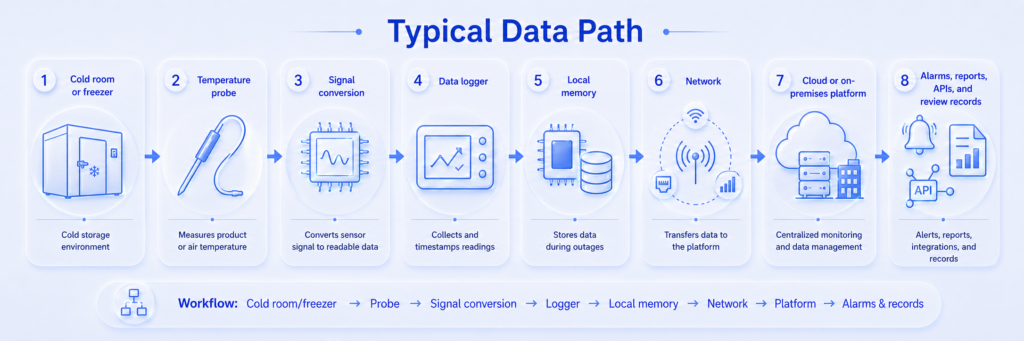
    Typical monitoring data path schematic diagram

    The probe senses the temperature at a selected point. The logger converts the electrical signal into a digital reading, assigns a timestamp, and stores it. The network sends the record to software, while the software presents trends, evaluates alarm rules, distributes notifications, and retains reports.

    These functions should remain logically separate. The probe should continue measuring if the cloud is unavailable. The logger should continue saving data if Wi-Fi is down. The alarm platform should identify a device that has stopped reporting, because a silent offline device can be as serious as a high-temperature alarm.

    UbiBot’s GS1-AETH1RS combines Wi-Fi and Ethernet, while the GS1-AL4G1RS combines Wi-Fi and cellular connectivity. Both provide local capacity for 300,000 sensor records and support external RS485 probes. The selected external probe determines the usable range and measurement performance for the walk-in application. 

    3.How Does the Monitoring Technology Work?

    Temperature sensing and signal conversion

    Most walk-in monitoring probes use a thermistor, resistance temperature detector (RTD), thermocouple, or digital sensing element. A thermistor changes resistance as temperature changes. A platinum RTD, such as a PT100, uses a more standardized resistance-temperature relationship and is often chosen where stability, wide range, or calibration flexibility matters. A digital probe performs conversion near the sensing element and sends a numerical value to the host.

    The final reading is produced by the whole measurement channel, not by the sensor element alone. Probe tolerance, cable resistance, signal-conversion electronics, logger resolution, calibration, airflow, thermal mass, and mounting position can all affect the result. A specification such as ±0.2°C should therefore be interpreted together with its stated temperature range and calibration conditions.

    Sampling, logging, and uploading

    The sampling interval is how often the electronics read the sensor. The logging interval is how often a reading is written to memory. The upload interval is how often records are transmitted to a remote platform. These values may be different.

    A system might sample every 30 seconds, save a one-minute value, and upload every five minutes. Shorter intervals provide more detail but consume more memory, power, and network bandwidth. Longer intervals may hide short events. The correct interval should be selected according to the thermal response of the room, the value and risk of the food, the facility’s corrective-action procedure, and the expected response time of staff.

    Local memory and data backfill

    Local memory prevents a network outage from becoming a permanent data gap. The logger continues recording while communication is unavailable and later sends the stored records to the platform. Buyers should confirm the exact buffering behaviour, the number of channels included in the stated memory capacity, and whether timestamps remain correct after power loss.

    Memory should be evaluated as offline duration rather than as a headline record count. The same memory supports a much longer outage at a 15-minute interval than at a one-minute interval, and multiple probes reduce the number of days that can be stored.

    Alarm thresholds, delays, and hysteresis

    A useful excursion alert is more than a high limit. A complete alarm rule may include a warning threshold, a critical threshold, a delay, a recovery condition, hysteresis, escalation to additional contacts, and separate alerts for device offline, power loss, or low battery.
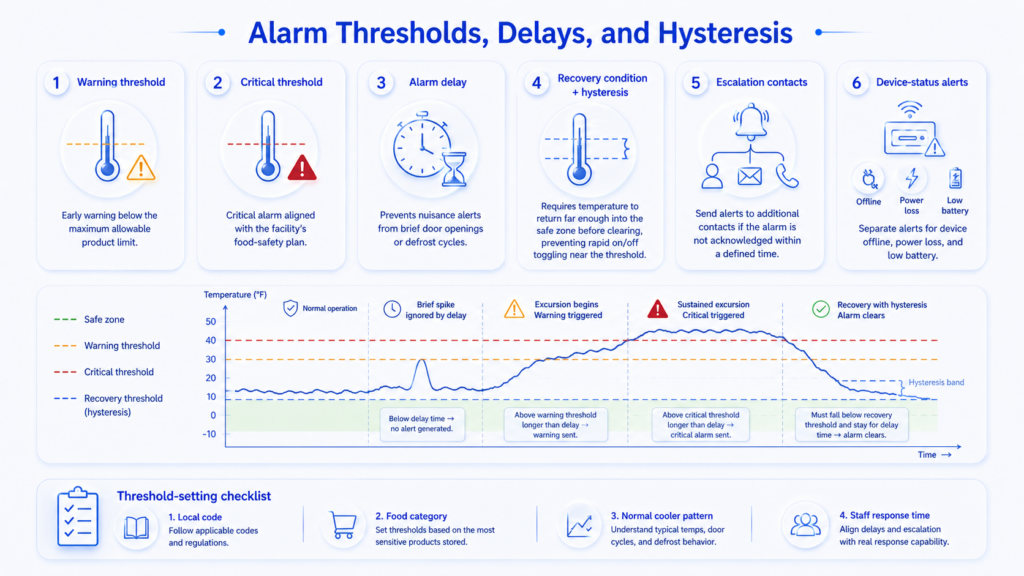
    Temperature excursion alarm logic

    Alarm delay is intended to prevent nuisance notifications caused by brief door openings or defrost cycles. It must not be so long that a genuine refrigeration failure remains unnoticed. Hysteresis prevents an alarm from repeatedly switching on and off when the temperature sits close to the threshold.

    Facilities can use a two-level strategy: an early warning below the maximum allowable product limit and a critical alarm aligned with the facility’s food-safety plan. Thresholds should be verified against the local code, the food category, the cooler’s normal operating pattern, and the response time available to staff.

    Air temperature, product temperature, and thermal buffering

    A walk-in sensor normally measures air temperature. Food temperature changes more slowly because the product has thermal mass. A bare probe responds quickly to warm air entering through the door, while a buffered probe responds more slowly and may better approximate the behaviour of stored product.

    Neither response is universally correct. Fast air sensing is useful for diagnosing airflow and door events. A buffered probe can reduce nuisance alarms but may delay detection of a rapid rise. When a food-safety disposition decision is required, a calibrated food thermometer and the facility’s product-assessment procedure may be needed; ambient monitoring alone should not be treated as proof of product temperature.

    Door, leak, and power context

    Temperature explains what happened, but additional sensors often explain why. A door contact can show that a rise began after the door was left open. A water-leak cable can detect condensate, drain blockage, or defrost-water leakage. Power or current monitoring can indicate whether refrigeration equipment stopped operating.

    The UbiBot LD1 is a separate leak-monitoring device that supports dual-channel conductive-liquid detection, a cable length of up to 100 metres, local audible and visual alarms, network options including Wi-Fi, cellular, and Ethernet depending on model, and relay output for auxiliary response devices. [8]

    Smart plugs and network relays can be used for auxiliary alarms or carefully engineered automation. They should not bypass manufacturer safety controls or directly switch critical refrigeration equipment without electrical, refrigeration, and food-safety review.

    4.What Monitoring Architectures Are Available?

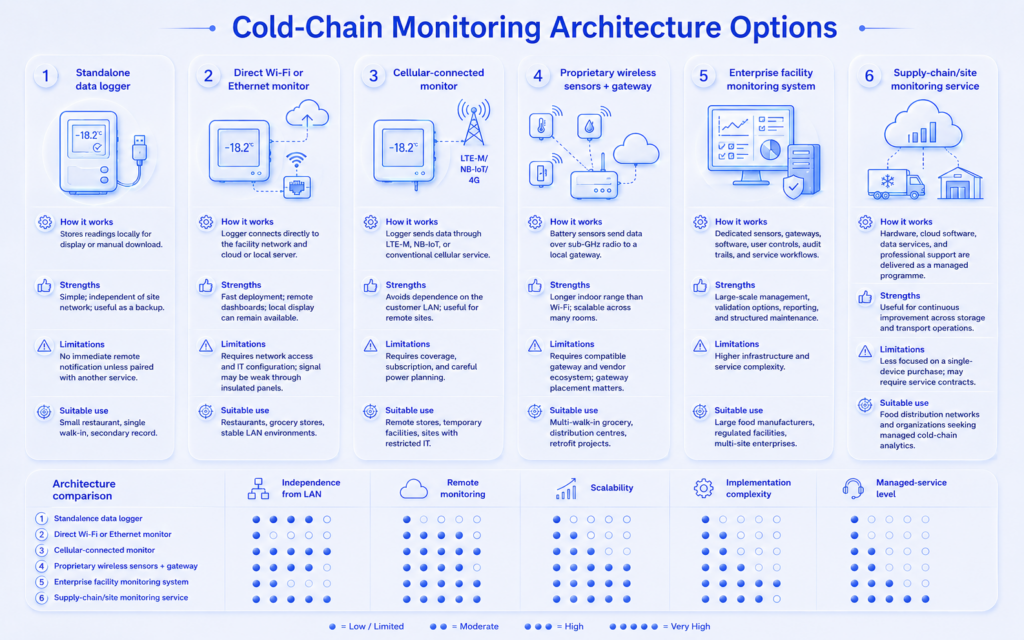
    Walk-in monitoring systems fall into several technical architectures. The difference is not simply whether a product is ‘wireless.’ It is where data are stored, how the sensor reaches the network, what happens during outages, and how the system scales across sites.

    A direct-to-network monitor connects each logger to Wi-Fi, Ethernet, or cellular service. This can be the simplest arrangement for one or several walk-ins because each device can communicate without a separate radio gateway. The design must still account for insulated panels, weak indoor coverage, firewall rules, cellular subscriptions, and the behaviour of the logger when the connection is unavailable.

    A gateway architecture separates the low-power sensor network from the site network. Sensors use a proprietary sub-GHz radio or another local protocol to reach a gateway, and the gateway forwards data to cloud or on-premises software. This approach can simplify large multi-zone deployments and reduce Wi-Fi configuration at every sensor, but it introduces another critical component whose placement, power, and redundancy must be planned.

    The software layer can also follow different models. A cloud platform reduces local server maintenance and supports remote multi-site access. An on-premises platform gives the organization greater control over hosting and integration but requires server administration, backups, security, and change management. Managed-service programmes add mapping, qualification, analytics, and operational support. The practical selection criterion is not the marketing label; it is whether the complete architecture preserves data, delivers alerts, and remains maintainable during network, power, and equipment failures.

    5.Which Monitoring Architecture Should Be Used?

    Architecture How it works Strengths Limitations Suitable use
    Standalone data logger Stores readings locally for display or manual download. Simple; independent of a site network; useful as a backup. No immediate remote notification unless paired with another service. Small restaurant, single walk-in, secondary record.
    Direct Wi-Fi or Ethernet monitor Logger connects directly to the facility network and cloud or local server. Fast deployment; remote dashboards; local display can remain available. Requires network access and IT configuration; signal may be weak through insulated panels. Restaurants, grocery stores, stable LAN environments.
    Cellular-connected monitor Logger sends data through LTE-M, NB-IoT, or conventional cellular service. Avoids dependence on the customer LAN; useful for remote sites. Requires coverage, subscription, and careful power planning. Remote stores, temporary facilities, sites with restricted IT.
    Proprietary wireless sensors plus gateway Battery sensors send data over sub-GHz radio to a local gateway. Longer indoor range than Wi-Fi; scalable across many rooms. Requires compatible gateway and vendor ecosystem; gateway placement matters. Multi-weight-in grocery, distribution centres, retrofit projects.
    Enterprise facility monitoring system Dedicated sensors, gateways, software, user controls, audit trails, and service workflows. Large-scale management, validation options, reporting, and structured maintenance. Higher infrastructure and service complexity. Large food manufacturers, regulated facilities, multi-site enterprises.
    Supply-chain/site monitoring service Hardware, cloud software, data services, and professional support are delivered as a managed programme. Useful for continuous improvement across storage and transport operations. Less focused on a single-device purchase; may require service contracts. Food distribution networks and organizations seeking managed cold-chain analytics.

    Monitoring a rchitecture comparison diagram

    A small foodservice site may prefer a direct Wi-Fi, Ethernet, or cellular logger because it reduces infrastructure. A grocery chain with many sensors may prefer a sub-GHz gateway system. A food manufacturer with formal validation and audit requirements may need enterprise software and structured services. The correct architecture is the one that maintains measurement continuity, delivers actionable alarms, and can be maintained by the organization over the full equipment lifecycle.

    6.Representative Monitoring Products Compared

    The following products do not use identical architectures. The comparison therefore focuses on how each system approaches fixed-site cold-room monitoring rather than treating every entry as a directly interchangeable device.

    Comparison field UbiBot DicksonOne Monnit ALTA ELPRO ECOLOG-PRO Sensitech ColdStream Site
    Representative configuration GS1-AETH1RS or GS1-AL4G1RS with selected external probe Smart Leak Detector LD1; optional Wireless Smart Plug_SP1 / Smart Network Relay NR1 TWP touchscreen with replaceable temperature sensor, such as RTMP or glycol-buffered RTHM ALTA AA wireless temperature sensor with external lead + Ethernet Gateway 4 + iMonnit ECOLOG-PRO 1NTR / 2PTR sensors + RBR bridge + elproCLOUD or elproMONITOR ColdStream Site network controller and temperature, humidity, cryogenic, and door sensors
    System type Connected IoT host with external-sensor expansion and optional safety/control devices Cloud-connected touchscreen data logger Proprietary sub-GHz wireless sensor network Validated wireless or wired enterprise monitoring platform Stationary monitoring service and web platform
    Temperature range and accuracy Probe-dependent. GS1 built-in sensor: -20 to 60°C, ±0.2°C; use external probe specifications for the walk-in channel. Probe-dependent; official TWP page lists multiple replaceable probes and calibration options. Official product page reviewed offers 3–100 ft leads and NIST options; range/accuracy not stated on that page. 1NTR: -35 to 50°C internal NTC. 2PTR: -200 to 400°C with external Pt100; accuracy depends on probe/configuration. Not stated in the official ColdStream Site page reviewed.
    Connectivity Wi-Fi + Ethernet or Wi-Fi + cellular, depending on GS1 model; RS485 external probes Wi-Fi and Ethernet; USB export ALTA regional sub-GHz radio to Ethernet gateway 868/915 MHz sensors to Ethernet radio bridge; cloud or on-premises software Wireless sensor network and web-based platform
    Local storage / buffering 300,000 sensor records Approx. 1,000,000 backup sample points Not stated in the official product pages reviewed 1NTR: 14,800 measurements; 2PTR: 43,000 measurements; sensors buffer data during link loss Live data history for the contract period; device-level buffering not stated on the reviewed page
    Alarm and reporting Configurable remote alerts; CSV/PDF export; platform dashboards; offline alerts Audible/visual plus phone, text, and email through DicksonOne iMonnit rules, reports, local alert accessory, REST API and webhooks on eligible plans Email/SMS alerts, audit trail, automated reports, optional API Real-time web alerts, live history, browser access, qualified installation options
    Leak and automation options LD1 leak detection; SP1/NR1 can support auxiliary control and alarm workflows Relay sensor accessory available; separate leak sensors depend on system design Broader ALTA portfolio includes water and dry-contact sensors Digital inputs/outputs and analog modules available in the platform Door sensors are listed; other integrations depend on project scope
    Platform and integration Public cloud, REST/MQTT options, data forwarding, developer tools, optional on-premises platform DicksonOne SaaS iMonnit cloud/enterprise; REST API and webhooks require eligible plans elproCLOUD or elproMONITOR; API integration available Web-based ColdStream Site service; integration details not stated on reviewed page
    Best fit Sites needing flexible network choices, RS485 expansion, leak detection, automation options, and shared platform management Facilities wanting a large local touchscreen and mature cloud monitoring workflow Multi-zone wireless deployments requiring long probe leads and a gateway architecture Large or highly controlled facilities needing validation, calibration, and enterprise workflows Food organizations seeking stationary monitoring plus cold-chain expertise and managed services

    UbiBot’s main differentiation in this comparison is architectural breadth. The same platform can combine a GS1 temperature channel, LD1 leak detection, multi-network connectivity, local memory, reports, APIs, and optional on-premises deployment. This can be useful when a restaurant or grocery operator wants temperature, leak, and auxiliary automation data in one system.

    DicksonOne TWP provides a large touchscreen, Wi-Fi/Ethernet connectivity, approximately one million backup sample points, a 72-hour backup battery, and configurable sampling intervals. It is well suited to facilities that value strong local visibility together with a mature cloud workflow. 

    Monnit ALTA is a gateway-based wireless architecture. The standard temperature sensor can be ordered with probe leads from 3 to 100 feet and optional NIST certification, while the Ethernet Gateway 4 connects the sub-GHz sensor network to iMonnit. API access and webhooks are available on eligible software plans. 

    ELPRO ECOLOG-PRO is designed for scalable facility monitoring. The wireless RBR bridge supports up to 50 sensors, and sensors buffer values if communication is interrupted. ELPRO also provides cloud and on-premises software, calibration, mapping, qualification, audit trails, and optional API integration. 

    Sensitech ColdStream Site represents a managed stationary-monitoring approach. Sensitech positions the service for real-time web monitoring, alerts, live history, wireless sensor networks, and food storage in distribution centres and walk-ins. It is particularly relevant when the organization wants monitoring technology combined with cold-chain expertise and professional services. 

    7.Which Specifications Most Affect Real-World Performance?

    Measurement range and accuracy

    The probe range must cover both normal operation and credible faults. A cooler sensor should remain accurate near the facility’s cold-holding range, while a freezer probe must be rated for the expected negative temperature. Do not rely on the host unit’s ambient range when the host is mounted outside and the external probe is the actual measuring channel.

    Accuracy must be read with its conditions. A headline accuracy may apply only within a central temperature band. Calibration points should include the operating range that matters to the facility. Resolution, such as 0.1°C, is only the smallest displayed increment and does not prove ±0.1°C accuracy.

    Response time and thermal mass

    A fast probe shows air changes quickly. A buffered probe or probe mounted in a thermal bottle changes more slowly. The best response time depends on whether the objective is to detect airflow events, approximate product temperature, or provide early equipment-failure warning.

    Probe cable and installation

    The cable must tolerate low temperature, moisture, cleaning chemicals, and door movement. Running a thick cable through the door gasket can create an air leak and condensation path. Whenever possible, use a dedicated access port and keep the logger body outside the cold room if its operating range is not suitable for the interior.

    Local memory, battery backup, and clock behaviour

    A monitoring system should preserve readings during network and short power failures. Buyers should verify how long the device can operate on backup power, whether memory is non-volatile, how the clock is maintained, and whether records are automatically backfilled after reconnection.

    Alarm delivery and escalation

    Email alone may be insufficient for a 24-hour operation. The alert plan should identify primary and secondary contacts, repeat notifications until acknowledgement where appropriate, and include local audible or visual warning. Device-offline, low-battery, probe-disconnection, and power-loss alerts should be considered separately from temperature excursions.

    Platform, reports, and APIs

    A single-site operator may need only trend graphs and CSV exports. A multi-site grocery or QSR chain may need device naming, role-based access, scheduled reports, alarm acknowledgement, cross-site dashboards, and APIs to integrate data with facilities, maintenance, or food-safety systems.

    8.How Should Monitoring Be Selected for Different Sites?

    A single walk-in cooler in an independent restaurant

    A direct Wi-Fi or Ethernet logger with an external probe is usually the simplest architecture. The device should have local memory, a visible current reading, a local alarm, and remote notification for after-hours excursions. A door contact can help distinguish operating behaviour from refrigeration faults.
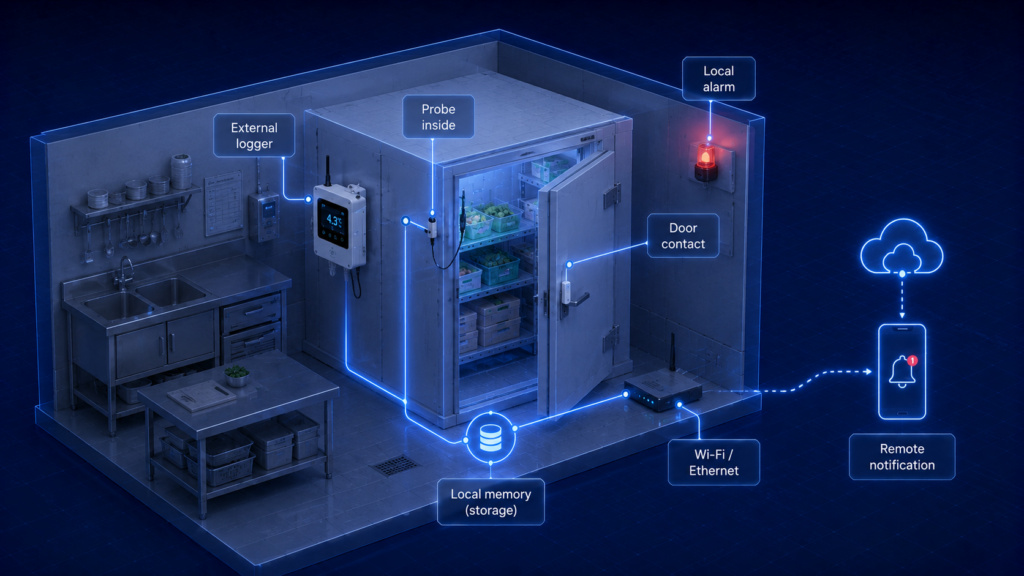
    Deployment example for a single walk-in cooler in an independent restaurant

    A grocery store with several coolers and freezers

    A multi-zone dashboard becomes more important than the interface on any one sensor. Sub-GHz sensors with a gateway can reduce Wi-Fi configuration across many rooms, while direct Ethernet devices may be preferred where fixed cabling is available. Leak sensors should be considered near evaporator drains and refrigeration equipment areas.
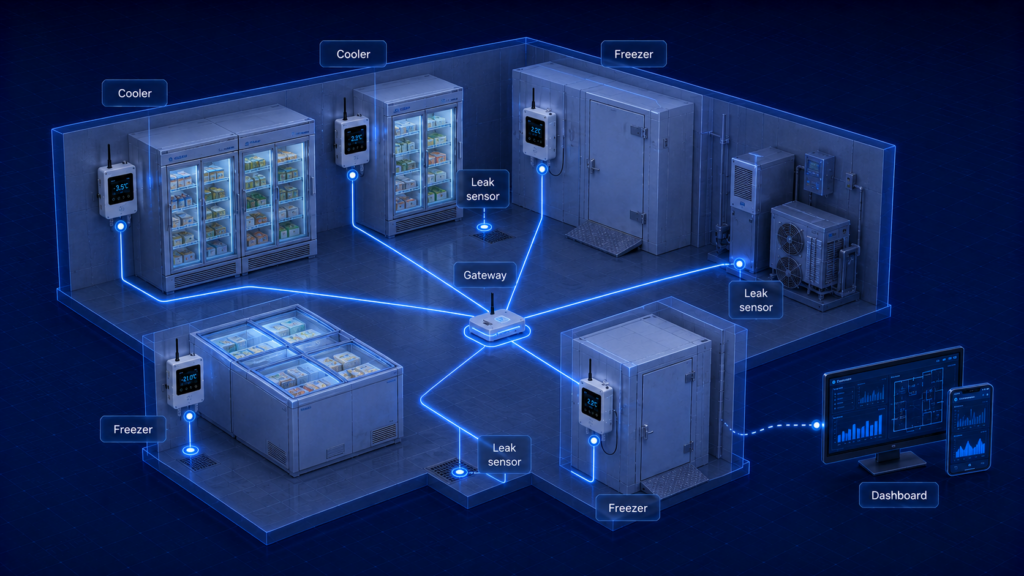
    Deployment example for a grocery store with several coolers and freezers

    A quick-service restaurant chain

    Centralized cloud management allows operations teams to compare sites, identify repeated door-open events, and standardize alert rules. APIs and scheduled reports can feed maintenance and food-safety workflows. Local managers still need clear escalation instructions because a central dashboard cannot physically move food or inspect equipment.
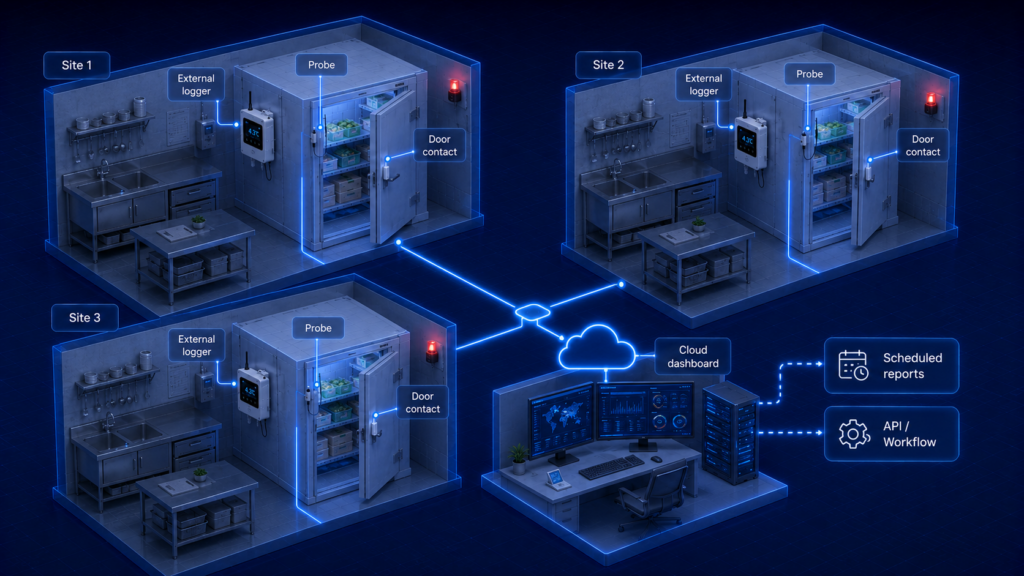
    Deployment example for a quick-service restaurant chain

    A food distribution center

    Large cold rooms require multiple sensors. Temperature mapping or structured testing should identify warm zones, cold zones, door influence, and seasonal variation before permanent sensor positions are finalized. Sensitech describes using mapping results to rank locations and select permanent monitoring points for ColdStream Site. 
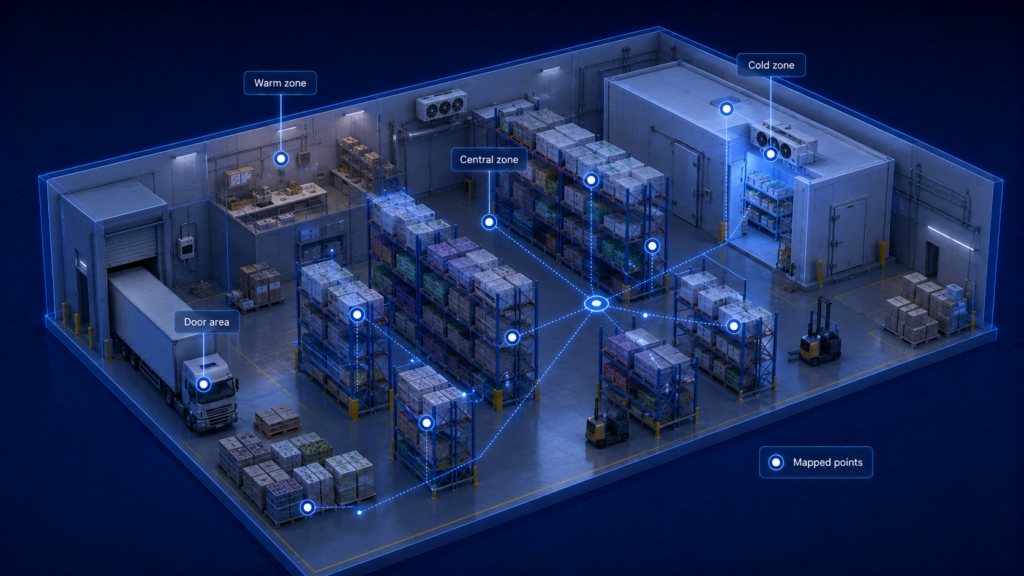
    Deployment example for a food distribution center

    A remote store with unreliable internet

    Cellular monitoring can avoid dependence on a weak local network, but coverage and subscription costs must be checked. Regardless of communication method, the logger should store data locally. If neither Wi-Fi nor cellular service is dependable, the facility should have a documented local review and escalation process.
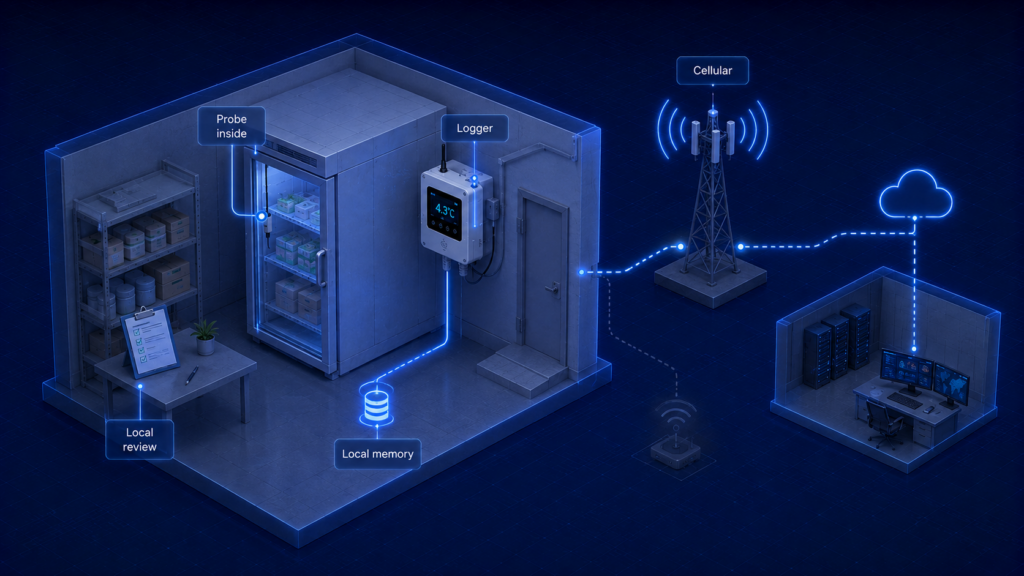
    Deployment example for a remote store with unreliable internet


    A walk-in freezer

    The probe, cable, and sealing materials must be rated for freezer temperatures. The logger body may need to remain outside. Alarm rules should distinguish the normal defrost cycle from a sustained loss of freezing conditions, and product disposition should follow the food category and facility procedure rather than a generic ambient threshold alone.
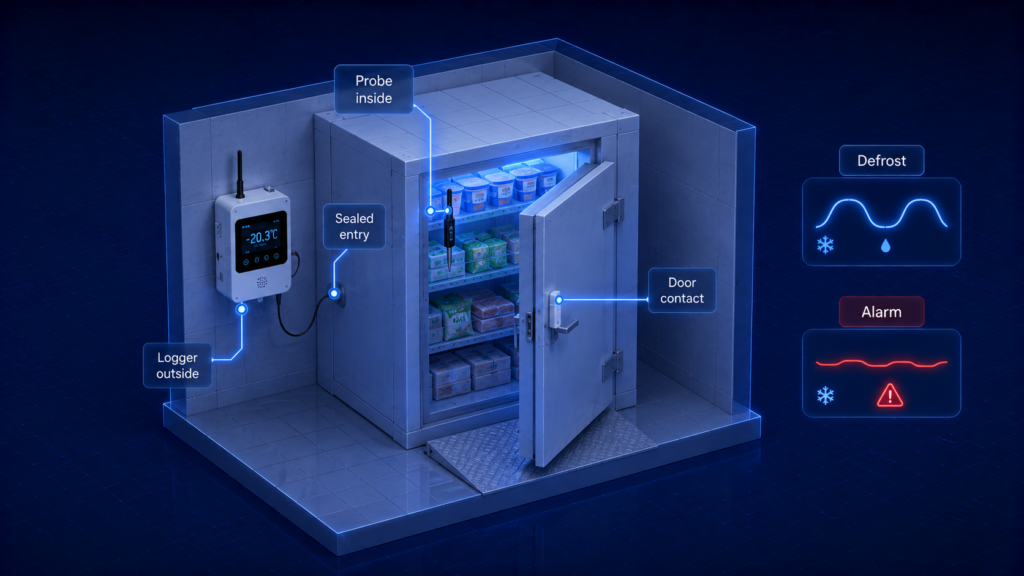
    Deployment example for a walk-in freezer

    9.What Deployment Mistakes Reduce Reliability?

    Placing the probe in direct evaporator airflow. The reading may be colder than the stored food and may hide a warm zone elsewhere in the room.

    Installing only one sensor in a large or irregular walk-in. Racks, doorways, ceiling height, loading patterns, and airflow can produce significant spatial variation.

    Setting the alarm at the regulatory limit with no warning margin. Staff may receive the first alert only after the limit has already been exceeded.

    Using an excessive alarm delay. A delay that eliminates nuisance alerts may also postpone response to compressor failure or a propped-open door.

    Treating Wi-Fi loss as data loss. A suitable logger should continue recording locally; this behaviour must be verified during commissioning.

    Ignoring door, leak, and power context. Temperature alone may show the event but not its cause, slowing corrective action.

    Running the cable through the door gasket. The cable can deform the seal, introduce warm moist air, and create condensation.

    Assuming decimal places equal accuracy. A 0.01°C display does not establish 0.01°C measurement accuracy or calibration uncertainty.

    10. Frequently Asked Questions

    What temperature should a walk-in cooler maintain?

    For U.S. retail foodservice, the FDA Food Code model generally uses 41°F (5°C) or below for cold holding of TCS food, while USDA consumer guidance recommends 40°F (4.4°C) or below. The applicable local code, product requirements, and facility food-safety plan should determine the operating limit. Many facilities use a lower internal warning threshold to preserve response margin.

    What temperature should a walk-in freezer maintain?

    USDA commonly recommends 0°F (-18°C) or below for frozen-food storage, and FDA emergency guidance states that walk-in freezers should keep food in a frozen state. The correct threshold depends on the food, quality requirement, local rules, defrost behaviour, and the facility’s corrective-action plan.

    How often should a walk-in cooler temperature be recorded?

    There is no universal interval for every food operation. One- to five-minute logging provides detailed excursion evidence, while longer intervals reduce memory and network use. The interval should be short enough to capture meaningful changes and should align with the facility’s HACCP or food-safety procedures.

    Where should the temperature sensor be placed?

    Place it at a representative or worst-case monitoring point, not directly beside the evaporator, door, wall, ceiling heat source, or warm equipment. Large walk-ins may require several sensors. Temperature mapping or structured testing is the strongest way to identify permanent locations.

    Should I measure air temperature or food temperature?

    Continuous room monitors normally measure air temperature and provide early warning of equipment or operational problems. Food temperature changes more slowly. When deciding whether food remains safe after an excursion, the facility may need product-temperature checks and a time-temperature assessment under its approved procedure.

    What happens if Wi-Fi or Ethernet fails?

    A logger with local memory should continue measuring and saving records. When the connection returns, it may backfill the platform automatically. Confirm this function, memory duration, timestamp behaviour, and device-offline alerts before deployment.

    Can the monitoring system automatically turn refrigeration equipment on or off?

    Some platforms can trigger relays or smart controls, but critical refrigeration control should not be modified without qualified engineering review. Automation is safer when used for auxiliary alarms, backup notifications, or approved interlocks that do not bypass the manufacturer’s control and protection system.

    Do I need leak detection in a walk-in?

    Leak detection is not a substitute for temperature monitoring, but it can provide earlier warning of blocked drains, condensate overflow, or water ingress. It is most useful where a leak could damage stock, create a slip hazard, or indicate a refrigeration-system problem.

    11.Conclusion

    Reliable walk-in cooler and freezer monitoring requires more than reading the controller display. A complete system combines a suitable probe, time-stamped local logging, resilient communications, well-designed alarm logic, and records that allow staff to reconstruct an excursion.

    The most important design decision is matching the architecture to the site. Direct Wi-Fi, Ethernet, or cellular monitors are practical for small and medium facilities. Proprietary wireless networks can simplify multi-zone deployment. Enterprise and managed-service platforms add validation, mapping, audit, and multi-site workflows where those capabilities are required.

    UbiBot can be positioned as a flexible architecture for operators that want temperature monitoring, RS485 sensor expansion, Wi-Fi/Ethernet or Wi-Fi/cellular connectivity, 300,000-record local memory, leak detection, report export, APIs, and optional on-premises deployment within one ecosystem. Its suitability for a particular food operation still depends on the selected probe, calibration, placement, alarm configuration, network design, and facility procedures.

    Continuous monitoring improves visibility and response. It does not replace trained staff, product-temperature verification, local food-code requirements, refrigeration maintenance, or documented corrective actions.

    12.Source and Specification Note

    This article was prepared from current official regulatory guidance and manufacturer documentation reviewed in July 2026. The FDA Food Code is a model code; state, local, tribal, territorial, and national requirements may differ. Product specifications, software plans, subscriptions, APIs, and platform capabilities may change. Where an official page did not state a specification, the comparison identifies it as not stated rather than estimating it.


    Related Resources

    No related resources found

    menu-header-svg
    Search
    • Explore Knowledge
      • Comparison & Selection
      • Industry Solution
      • Product & Device
      • Criterion & Compliance
      • Deployment & Usage
      • Technology & Principle
    • Academic Research
    • In-depth Tech

    learn

    See More >>

    How to Monitor Walk-In Coolers and Freezers for Food Safety and Excursion Alerts

    Key Takeaway

    Use a sensor and logger that can continue recording during power or network interruptions, place the probe where it represents stored food rather than local airflow, and design alerts around the facility’s food-safety plan rather than around a generic default threshold.

    A walk-in cooler can return to its normal setpoint before the morning shift begins, even though food inside experienced an overnight temperature excursion. A freezer may still feel cold after a power interruption, yet some products may have partially thawed. A single display reading cannot show when the event began, how long it lasted, or whether the warmest part of the room remained within the required limit.

    Continuous monitoring addresses this blind spot by creating a time-stamped temperature history and notifying staff when conditions move outside configured limits. In the United States, the FDA Food Code is a model used by retail and foodservice jurisdictions, and it generally requires time/temperature control for safety (TCS) food to be cold-held at 41°F (5°C) or below. FDA emergency guidance also states that walk-in refrigerators should maintain cold-holding temperatures at or below 41°F and walk-in freezers should keep food in a frozen state. Local regulations and product specifications still control the actual operating requirements for each facility.

    For general food-storage guidance, USDA recommends keeping refrigerators at 40°F (4.4°C) or below and freezers at 0°F (-18°C) or below. These values are useful engineering targets, but they should not be treated as universal regulatory limits for every food, process, or jurisdiction. 

    This article explains how walk-in cooler and freezer monitoring systems work, how temperature data become excursion alerts, why air temperature and product temperature are not identical, and how different wired, wireless, cloud, and enterprise architectures affect system selection.

    Walk-In Cooler and Freezer Monitoring in 30 Seconds

    Question Direct answer
    What should a monitoring system record? Time-stamped temperatures, alarm events, device status, and enough local history to reconstruct an excursion.
    Is the walk-in controller display enough? No. It shows the refrigeration controller’s current reading, not necessarily the warmest storage zone or the full temperature history.
    Where should the sensor be installed? At a representative location identified through operating experience or temperature mapping, away from direct evaporator discharge, doors, walls, and local heat sources.
    Should the alarm be set exactly at 41°F? Not automatically. Facilities often use an earlier warning threshold and a separate critical limit so staff have time to respond before a regulatory or product limit is exceeded.
    What happens if the internet fails? A well-designed logger continues recording locally and uploads buffered records after connectivity returns.
    What else should be monitored? Door status, water leaks, power condition, device offline status, and sometimes humidity or equipment current can explain the cause of an excursion.
    What should buyers compare? Probe range and accuracy, logging interval, local memory, alarm logic, connectivity, battery backup, report export, APIs, and multi-site management.

    1.Why Do Walk-In Coolers and Freezers Need Continuous Monitoring?

    Continuous monitoring is needed because cold rooms are dynamic systems. Product loading, door openings, defrost cycles, evaporator operation, fan cycling, blocked airflow, damaged door gaskets, refrigerant faults, and power interruptions all change the temperature pattern inside a walk-in. A controller can regulate the refrigeration system correctly while a remote corner, upper shelf, or congested aisle becomes warmer than the controller sensor indicates.

    Manual checks create isolated observations. They can confirm the condition at the moment of inspection, but they cannot reveal whether an excursion occurred two hours earlier and then recovered. A minimum/maximum thermometer adds useful information, yet it still cannot show the shape of the event, its duration, or whether repeated short excursions occur every time the door is opened.

    A continuous logger records a sequence of readings. That history allows a food-safety manager to distinguish a brief air-temperature spike from a prolonged loss of control. It also helps maintenance teams see whether temperatures rise slowly, oscillate during defrost, or change abruptly after a door is left open.

    Temperature monitoring supports food-safety decisions, but it does not replace product assessment. USDA emergency guidance explains that refrigerated food may remain safe for about four hours during a power outage if the door stays closed, while perishable food held above 40°F for more than two hours may need to be discarded. Actual disposition should follow the facility’s approved procedure, local requirements, product type, and verified time-temperature history. [5]

    2.What Does a Complete Monitoring Data Path Include?

    A complete walk-in monitoring system can be understood as a chain of technical functions:

    Cold room or freezer → temperature probe → signal conversion → data logger → local memory → network → cloud or on-premises platform → alarms, reports, APIs, and review records

    Typical monitoring data path schematic diagram

    The probe senses the temperature at a selected point. The logger converts the electrical signal into a digital reading, assigns a timestamp, and stores it. The network sends the record to software, while the software presents trends, evaluates alarm rules, distributes notifications, and retains reports.

    These functions should remain logically separate. The probe should continue measuring if the cloud is unavailable. The logger should continue saving data if Wi-Fi is down. The alarm platform should identify a device that has stopped reporting, because a silent offline device can be as serious as a high-temperature alarm.

    UbiBot’s GS1-AETH1RS combines Wi-Fi and Ethernet, while the GS1-AL4G1RS combines Wi-Fi and cellular connectivity. Both provide local capacity for 300,000 sensor records and support external RS485 probes. The selected external probe determines the usable range and measurement performance for the walk-in application. 

    3.How Does the Monitoring Technology Work?

    Temperature sensing and signal conversion

    Most walk-in monitoring probes use a thermistor, resistance temperature detector (RTD), thermocouple, or digital sensing element. A thermistor changes resistance as temperature changes. A platinum RTD, such as a PT100, uses a more standardized resistance-temperature relationship and is often chosen where stability, wide range, or calibration flexibility matters. A digital probe performs conversion near the sensing element and sends a numerical value to the host.

    The final reading is produced by the whole measurement channel, not by the sensor element alone. Probe tolerance, cable resistance, signal-conversion electronics, logger resolution, calibration, airflow, thermal mass, and mounting position can all affect the result. A specification such as ±0.2°C should therefore be interpreted together with its stated temperature range and calibration conditions.

    Sampling, logging, and uploading

    The sampling interval is how often the electronics read the sensor. The logging interval is how often a reading is written to memory. The upload interval is how often records are transmitted to a remote platform. These values may be different.

    A system might sample every 30 seconds, save a one-minute value, and upload every five minutes. Shorter intervals provide more detail but consume more memory, power, and network bandwidth. Longer intervals may hide short events. The correct interval should be selected according to the thermal response of the room, the value and risk of the food, the facility’s corrective-action procedure, and the expected response time of staff.

    Local memory and data backfill

    Local memory prevents a network outage from becoming a permanent data gap. The logger continues recording while communication is unavailable and later sends the stored records to the platform. Buyers should confirm the exact buffering behaviour, the number of channels included in the stated memory capacity, and whether timestamps remain correct after power loss.

    Memory should be evaluated as offline duration rather than as a headline record count. The same memory supports a much longer outage at a 15-minute interval than at a one-minute interval, and multiple probes reduce the number of days that can be stored.

    Alarm thresholds, delays, and hysteresis

    A useful excursion alert is more than a high limit. A complete alarm rule may include a warning threshold, a critical threshold, a delay, a recovery condition, hysteresis, escalation to additional contacts, and separate alerts for device offline, power loss, or low battery.

    Temperature excursion alarm logic

    Alarm delay is intended to prevent nuisance notifications caused by brief door openings or defrost cycles. It must not be so long that a genuine refrigeration failure remains unnoticed. Hysteresis prevents an alarm from repeatedly switching on and off when the temperature sits close to the threshold.

    Facilities can use a two-level strategy: an early warning below the maximum allowable product limit and a critical alarm aligned with the facility’s food-safety plan. Thresholds should be verified against the local code, the food category, the cooler’s normal operating pattern, and the response time available to staff.

    Air temperature, product temperature, and thermal buffering

    A walk-in sensor normally measures air temperature. Food temperature changes more slowly because the product has thermal mass. A bare probe responds quickly to warm air entering through the door, while a buffered probe responds more slowly and may better approximate the behaviour of stored product.

    Neither response is universally correct. Fast air sensing is useful for diagnosing airflow and door events. A buffered probe can reduce nuisance alarms but may delay detection of a rapid rise. When a food-safety disposition decision is required, a calibrated food thermometer and the facility’s product-assessment procedure may be needed; ambient monitoring alone should not be treated as proof of product temperature.

    Door, leak, and power context

    Temperature explains what happened, but additional sensors often explain why. A door contact can show that a rise began after the door was left open. A water-leak cable can detect condensate, drain blockage, or defrost-water leakage. Power or current monitoring can indicate whether refrigeration equipment stopped operating.

    The UbiBot LD1 is a separate leak-monitoring device that supports dual-channel conductive-liquid detection, a cable length of up to 100 metres, local audible and visual alarms, network options including Wi-Fi, cellular, and Ethernet depending on model, and relay output for auxiliary response devices. [8]

    Smart plugs and network relays can be used for auxiliary alarms or carefully engineered automation. They should not bypass manufacturer safety controls or directly switch critical refrigeration equipment without electrical, refrigeration, and food-safety review.

    4.What Monitoring Architectures Are Available?

    Walk-in monitoring systems fall into several technical architectures. The difference is not simply whether a product is ‘wireless.’ It is where data are stored, how the sensor reaches the network, what happens during outages, and how the system scales across sites.

    A direct-to-network monitor connects each logger to Wi-Fi, Ethernet, or cellular service. This can be the simplest arrangement for one or several walk-ins because each device can communicate without a separate radio gateway. The design must still account for insulated panels, weak indoor coverage, firewall rules, cellular subscriptions, and the behaviour of the logger when the connection is unavailable.

    A gateway architecture separates the low-power sensor network from the site network. Sensors use a proprietary sub-GHz radio or another local protocol to reach a gateway, and the gateway forwards data to cloud or on-premises software. This approach can simplify large multi-zone deployments and reduce Wi-Fi configuration at every sensor, but it introduces another critical component whose placement, power, and redundancy must be planned.

    The software layer can also follow different models. A cloud platform reduces local server maintenance and supports remote multi-site access. An on-premises platform gives the organization greater control over hosting and integration but requires server administration, backups, security, and change management. Managed-service programmes add mapping, qualification, analytics, and operational support. The practical selection criterion is not the marketing label; it is whether the complete architecture preserves data, delivers alerts, and remains maintainable during network, power, and equipment failures.

    5.Which Monitoring Architecture Should Be Used?

    Architecture How it works Strengths Limitations Suitable use
    Standalone data logger Stores readings locally for display or manual download. Simple; independent of a site network; useful as a backup. No immediate remote notification unless paired with another service. Small restaurant, single walk-in, secondary record.
    Direct Wi-Fi or Ethernet monitor Logger connects directly to the facility network and cloud or local server. Fast deployment; remote dashboards; local display can remain available. Requires network access and IT configuration; signal may be weak through insulated panels. Restaurants, grocery stores, stable LAN environments.
    Cellular-connected monitor Logger sends data through LTE-M, NB-IoT, or conventional cellular service. Avoids dependence on the customer LAN; useful for remote sites. Requires coverage, subscription, and careful power planning. Remote stores, temporary facilities, sites with restricted IT.
    Proprietary wireless sensors plus gateway Battery sensors send data over sub-GHz radio to a local gateway. Longer indoor range than Wi-Fi; scalable across many rooms. Requires compatible gateway and vendor ecosystem; gateway placement matters. Multi-weight-in grocery, distribution centres, retrofit projects.
    Enterprise facility monitoring system Dedicated sensors, gateways, software, user controls, audit trails, and service workflows. Large-scale management, validation options, reporting, and structured maintenance. Higher infrastructure and service complexity. Large food manufacturers, regulated facilities, multi-site enterprises.
    Supply-chain/site monitoring service Hardware, cloud software, data services, and professional support are delivered as a managed programme. Useful for continuous improvement across storage and transport operations. Less focused on a single-device purchase; may require service contracts. Food distribution networks and organizations seeking managed cold-chain analytics.

    Monitoring a rchitecture comparison diagram

    A small foodservice site may prefer a direct Wi-Fi, Ethernet, or cellular logger because it reduces infrastructure. A grocery chain with many sensors may prefer a sub-GHz gateway system. A food manufacturer with formal validation and audit requirements may need enterprise software and structured services. The correct architecture is the one that maintains measurement continuity, delivers actionable alarms, and can be maintained by the organization over the full equipment lifecycle.

    6.Representative Monitoring Products Compared

    The following products do not use identical architectures. The comparison therefore focuses on how each system approaches fixed-site cold-room monitoring rather than treating every entry as a directly interchangeable device.

    Comparison field UbiBot DicksonOne Monnit ALTA ELPRO ECOLOG-PRO Sensitech ColdStream Site
    Representative configuration GS1-AETH1RS or GS1-AL4G1RS with selected external probe Smart Leak Detector LD1; optional Wireless Smart Plug_SP1 / Smart Network Relay NR1 TWP touchscreen with replaceable temperature sensor, such as RTMP or glycol-buffered RTHM ALTA AA wireless temperature sensor with external lead + Ethernet Gateway 4 + iMonnit ECOLOG-PRO 1NTR / 2PTR sensors + RBR bridge + elproCLOUD or elproMONITOR ColdStream Site network controller and temperature, humidity, cryogenic, and door sensors
    System type Connected IoT host with external-sensor expansion and optional safety/control devices Cloud-connected touchscreen data logger Proprietary sub-GHz wireless sensor network Validated wireless or wired enterprise monitoring platform Stationary monitoring service and web platform
    Temperature range and accuracy Probe-dependent. GS1 built-in sensor: -20 to 60°C, ±0.2°C; use external probe specifications for the walk-in channel. Probe-dependent; official TWP page lists multiple replaceable probes and calibration options. Official product page reviewed offers 3–100 ft leads and NIST options; range/accuracy not stated on that page. 1NTR: -35 to 50°C internal NTC. 2PTR: -200 to 400°C with external Pt100; accuracy depends on probe/configuration. Not stated in the official ColdStream Site page reviewed.
    Connectivity Wi-Fi + Ethernet or Wi-Fi + cellular, depending on GS1 model; RS485 external probes Wi-Fi and Ethernet; USB export ALTA regional sub-GHz radio to Ethernet gateway 868/915 MHz sensors to Ethernet radio bridge; cloud or on-premises software Wireless sensor network and web-based platform
    Local storage / buffering 300,000 sensor records Approx. 1,000,000 backup sample points Not stated in the official product pages reviewed 1NTR: 14,800 measurements; 2PTR: 43,000 measurements; sensors buffer data during link loss Live data history for the contract period; device-level buffering not stated on the reviewed page
    Alarm and reporting Configurable remote alerts; CSV/PDF export; platform dashboards; offline alerts Audible/visual plus phone, text, and email through DicksonOne iMonnit rules, reports, local alert accessory, REST API and webhooks on eligible plans Email/SMS alerts, audit trail, automated reports, optional API Real-time web alerts, live history, browser access, qualified installation options
    Leak and automation options LD1 leak detection; SP1/NR1 can support auxiliary control and alarm workflows Relay sensor accessory available; separate leak sensors depend on system design Broader ALTA portfolio includes water and dry-contact sensors Digital inputs/outputs and analog modules available in the platform Door sensors are listed; other integrations depend on project scope
    Platform and integration Public cloud, REST/MQTT options, data forwarding, developer tools, optional on-premises platform DicksonOne SaaS iMonnit cloud/enterprise; REST API and webhooks require eligible plans elproCLOUD or elproMONITOR; API integration available Web-based ColdStream Site service; integration details not stated on reviewed page
    Best fit Sites needing flexible network choices, RS485 expansion, leak detection, automation options, and shared platform management Facilities wanting a large local touchscreen and mature cloud monitoring workflow Multi-zone wireless deployments requiring long probe leads and a gateway architecture Large or highly controlled facilities needing validation, calibration, and enterprise workflows Food organizations seeking stationary monitoring plus cold-chain expertise and managed services

    UbiBot’s main differentiation in this comparison is architectural breadth. The same platform can combine a GS1 temperature channel, LD1 leak detection, multi-network connectivity, local memory, reports, APIs, and optional on-premises deployment. This can be useful when a restaurant or grocery operator wants temperature, leak, and auxiliary automation data in one system.

    DicksonOne TWP provides a large touchscreen, Wi-Fi/Ethernet connectivity, approximately one million backup sample points, a 72-hour backup battery, and configurable sampling intervals. It is well suited to facilities that value strong local visibility together with a mature cloud workflow. 

    Monnit ALTA is a gateway-based wireless architecture. The standard temperature sensor can be ordered with probe leads from 3 to 100 feet and optional NIST certification, while the Ethernet Gateway 4 connects the sub-GHz sensor network to iMonnit. API access and webhooks are available on eligible software plans. 

    ELPRO ECOLOG-PRO is designed for scalable facility monitoring. The wireless RBR bridge supports up to 50 sensors, and sensors buffer values if communication is interrupted. ELPRO also provides cloud and on-premises software, calibration, mapping, qualification, audit trails, and optional API integration. 

    Sensitech ColdStream Site represents a managed stationary-monitoring approach. Sensitech positions the service for real-time web monitoring, alerts, live history, wireless sensor networks, and food storage in distribution centres and walk-ins. It is particularly relevant when the organization wants monitoring technology combined with cold-chain expertise and professional services. 

    7.Which Specifications Most Affect Real-World Performance?

    Measurement range and accuracy

    The probe range must cover both normal operation and credible faults. A cooler sensor should remain accurate near the facility’s cold-holding range, while a freezer probe must be rated for the expected negative temperature. Do not rely on the host unit’s ambient range when the host is mounted outside and the external probe is the actual measuring channel.

    Accuracy must be read with its conditions. A headline accuracy may apply only within a central temperature band. Calibration points should include the operating range that matters to the facility. Resolution, such as 0.1°C, is only the smallest displayed increment and does not prove ±0.1°C accuracy.

    Response time and thermal mass

    A fast probe shows air changes quickly. A buffered probe or probe mounted in a thermal bottle changes more slowly. The best response time depends on whether the objective is to detect airflow events, approximate product temperature, or provide early equipment-failure warning.

    Probe cable and installation

    The cable must tolerate low temperature, moisture, cleaning chemicals, and door movement. Running a thick cable through the door gasket can create an air leak and condensation path. Whenever possible, use a dedicated access port and keep the logger body outside the cold room if its operating range is not suitable for the interior.

    Local memory, battery backup, and clock behaviour

    A monitoring system should preserve readings during network and short power failures. Buyers should verify how long the device can operate on backup power, whether memory is non-volatile, how the clock is maintained, and whether records are automatically backfilled after reconnection.

    Alarm delivery and escalation

    Email alone may be insufficient for a 24-hour operation. The alert plan should identify primary and secondary contacts, repeat notifications until acknowledgement where appropriate, and include local audible or visual warning. Device-offline, low-battery, probe-disconnection, and power-loss alerts should be considered separately from temperature excursions.

    Platform, reports, and APIs

    A single-site operator may need only trend graphs and CSV exports. A multi-site grocery or QSR chain may need device naming, role-based access, scheduled reports, alarm acknowledgement, cross-site dashboards, and APIs to integrate data with facilities, maintenance, or food-safety systems.

    8.How Should Monitoring Be Selected for Different Sites?

    A single walk-in cooler in an independent restaurant

    A direct Wi-Fi or Ethernet logger with an external probe is usually the simplest architecture. The device should have local memory, a visible current reading, a local alarm, and remote notification for after-hours excursions. A door contact can help distinguish operating behaviour from refrigeration faults.

    Deployment example for a single walk-in cooler in an independent restaurant

    A grocery store with several coolers and freezers

    A multi-zone dashboard becomes more important than the interface on any one sensor. Sub-GHz sensors with a gateway can reduce Wi-Fi configuration across many rooms, while direct Ethernet devices may be preferred where fixed cabling is available. Leak sensors should be considered near evaporator drains and refrigeration equipment areas.

    Deployment example for a grocery store with several coolers and freezers

    A quick-service restaurant chain

    Centralized cloud management allows operations teams to compare sites, identify repeated door-open events, and standardize alert rules. APIs and scheduled reports can feed maintenance and food-safety workflows. Local managers still need clear escalation instructions because a central dashboard cannot physically move food or inspect equipment.

    Deployment example for a quick-service restaurant chain

    A food distribution center

    Large cold rooms require multiple sensors. Temperature mapping or structured testing should identify warm zones, cold zones, door influence, and seasonal variation before permanent sensor positions are finalized. Sensitech describes using mapping results to rank locations and select permanent monitoring points for ColdStream Site. 

    Deployment example for a food distribution center

    A remote store with unreliable internet

    Cellular monitoring can avoid dependence on a weak local network, but coverage and subscription costs must be checked. Regardless of communication method, the logger should store data locally. If neither Wi-Fi nor cellular service is dependable, the facility should have a documented local review and escalation process.

    Deployment example for a remote store with unreliable internet


    A walk-in freezer

    The probe, cable, and sealing materials must be rated for freezer temperatures. The logger body may need to remain outside. Alarm rules should distinguish the normal defrost cycle from a sustained loss of freezing conditions, and product disposition should follow the food category and facility procedure rather than a generic ambient threshold alone.

    Deployment example for a walk-in freezer

    9.What Deployment Mistakes Reduce Reliability?

    Placing the probe in direct evaporator airflow. The reading may be colder than the stored food and may hide a warm zone elsewhere in the room.

    Installing only one sensor in a large or irregular walk-in. Racks, doorways, ceiling height, loading patterns, and airflow can produce significant spatial variation.

    Setting the alarm at the regulatory limit with no warning margin. Staff may receive the first alert only after the limit has already been exceeded.

    Using an excessive alarm delay. A delay that eliminates nuisance alerts may also postpone response to compressor failure or a propped-open door.

    Treating Wi-Fi loss as data loss. A suitable logger should continue recording locally; this behaviour must be verified during commissioning.

    Ignoring door, leak, and power context. Temperature alone may show the event but not its cause, slowing corrective action.

    Running the cable through the door gasket. The cable can deform the seal, introduce warm moist air, and create condensation.

    Assuming decimal places equal accuracy. A 0.01°C display does not establish 0.01°C measurement accuracy or calibration uncertainty.

    10. Frequently Asked Questions

    What temperature should a walk-in cooler maintain?

    For U.S. retail foodservice, the FDA Food Code model generally uses 41°F (5°C) or below for cold holding of TCS food, while USDA consumer guidance recommends 40°F (4.4°C) or below. The applicable local code, product requirements, and facility food-safety plan should determine the operating limit. Many facilities use a lower internal warning threshold to preserve response margin.

    What temperature should a walk-in freezer maintain?

    USDA commonly recommends 0°F (-18°C) or below for frozen-food storage, and FDA emergency guidance states that walk-in freezers should keep food in a frozen state. The correct threshold depends on the food, quality requirement, local rules, defrost behaviour, and the facility’s corrective-action plan.

    How often should a walk-in cooler temperature be recorded?

    There is no universal interval for every food operation. One- to five-minute logging provides detailed excursion evidence, while longer intervals reduce memory and network use. The interval should be short enough to capture meaningful changes and should align with the facility’s HACCP or food-safety procedures.

    Where should the temperature sensor be placed?

    Place it at a representative or worst-case monitoring point, not directly beside the evaporator, door, wall, ceiling heat source, or warm equipment. Large walk-ins may require several sensors. Temperature mapping or structured testing is the strongest way to identify permanent locations.

    Should I measure air temperature or food temperature?

    Continuous room monitors normally measure air temperature and provide early warning of equipment or operational problems. Food temperature changes more slowly. When deciding whether food remains safe after an excursion, the facility may need product-temperature checks and a time-temperature assessment under its approved procedure.

    What happens if Wi-Fi or Ethernet fails?

    A logger with local memory should continue measuring and saving records. When the connection returns, it may backfill the platform automatically. Confirm this function, memory duration, timestamp behaviour, and device-offline alerts before deployment.

    Can the monitoring system automatically turn refrigeration equipment on or off?

    Some platforms can trigger relays or smart controls, but critical refrigeration control should not be modified without qualified engineering review. Automation is safer when used for auxiliary alarms, backup notifications, or approved interlocks that do not bypass the manufacturer’s control and protection system.

    Do I need leak detection in a walk-in?

    Leak detection is not a substitute for temperature monitoring, but it can provide earlier warning of blocked drains, condensate overflow, or water ingress. It is most useful where a leak could damage stock, create a slip hazard, or indicate a refrigeration-system problem.

    11.Conclusion

    Reliable walk-in cooler and freezer monitoring requires more than reading the controller display. A complete system combines a suitable probe, time-stamped local logging, resilient communications, well-designed alarm logic, and records that allow staff to reconstruct an excursion.

    The most important design decision is matching the architecture to the site. Direct Wi-Fi, Ethernet, or cellular monitors are practical for small and medium facilities. Proprietary wireless networks can simplify multi-zone deployment. Enterprise and managed-service platforms add validation, mapping, audit, and multi-site workflows where those capabilities are required.

    UbiBot can be positioned as a flexible architecture for operators that want temperature monitoring, RS485 sensor expansion, Wi-Fi/Ethernet or Wi-Fi/cellular connectivity, 300,000-record local memory, leak detection, report export, APIs, and optional on-premises deployment within one ecosystem. Its suitability for a particular food operation still depends on the selected probe, calibration, placement, alarm configuration, network design, and facility procedures.

    Continuous monitoring improves visibility and response. It does not replace trained staff, product-temperature verification, local food-code requirements, refrigeration maintenance, or documented corrective actions.

    12.Source and Specification Note

    This article was prepared from current official regulatory guidance and manufacturer documentation reviewed in July 2026. The FDA Food Code is a model code; state, local, tribal, territorial, and national requirements may differ. Product specifications, software plans, subscriptions, APIs, and platform capabilities may change. Where an official page did not state a specification, the comparison identifies it as not stated rather than estimating it.

    分享

    LinkedIn2

    Facebook2

    X

    Newsletter Signup

    Related Resources

    No related resources found

    menu-header-svg
    Search
    • Explore Knowledge
      • Comparison & Selection
      • Industry Solution
      • Product & Device
      • Criterion & Compliance
      • Deployment & Usage
      • Technology & Principle
    • Academic Research
    • In-depth Tech
    Enter Your Information

    Confirm

    Products

    Dashboards

    Support

    Purchase

    Company

    Smart Sensing

    UbiBot Web Console

    APP Download

    UbiBot Online Store

    News

    Smart Control

    UbiBot Space

    Product Docs & APIs

    Find Distributors

    About Us

    Smart Video

    UbiBot On-Premises

    Helpdesk & FAQ

    Volume Pricing

    Contact Us

    LoRa Products

    Agency Web Console

    Video Center

    Architecture

    Software & Platform


    Pricing


    System Status

    External Sensors


    Become a Distributor

    Accessories


    Become an Affiliate

    Global SIM


    Positioning System


    Products

    Dashboards

    Business Partners

    WS1

    UbiBot Web Console

    Volume Pricing

    WS1 Pro

    UbiBot Space

    Become a Distributor

    GS1

    UbiBot Support Desk

    Affiliates

    GS2

    Agency Web Console


    MS1


    SP1


    Accessories


    Docs

    Purchase

    Company

    Platform API

    Pricing

    News

    Q&A

    UbiBot Partners

    About us

    Privacy Policy

    Online Store

    Contact

    Terms of Service


    System Status

    Products

    Dashboards

    Smart Sensing

    UbiBot Web Console

    Smart Control

    UbiBot Space

    Smart Video

    UbiBot On-Premises

    LoRa Products

    Agency Web Console

    Software & Platform


    External Sensors


    Accessories


    Global SIM


    Positioning System


    Support

    Purchase

    APP Download

    UbiBot Online Store

    Product Docs & APIs

    Find Distributors

    Helpdesk & FAQ

    Volume Pricing

    Video Center


    Pricing


    Company

    News

    About Us

    Contact Us

    Architecture

    System Status

    Become a Distributor

    Become an Affiliate

    Language:
    English 日本語 (ベータ)  
    Language:

    English

    日本語 (ベータ)


    IoT Product Family:
    ubibotico     Wireless environmental sensing products and smart building solutions
    ubitrackico     UWB-based real-time indoor tracking solutions with 30cm accuracy

    IoT Product Family:

    ubibotico  Wireless environmental sensing products and smart building solutions
    ubitrackico  UWB-based real-time indoor tracking solutions with 30cm accuracy

    © 2013-2026 UbiBot.com. All rights reserved.

    Terms of Service | Privacy Policy | Compliance

    youtube facebook twitter