
UBiBot Logo
UBiBot Logo
  • UBiBot Logo
  • Home
  • Products

    NEW

  • Pricing
  • Support
  • About Us
  • Download
  • magnifying-glass  Search
  • magnifying-glass header-close
  • Sign in Sign in
    Public Web Console Public Web Console
    On-Premises App Center On-Premises App Center
  • Home
  • Products

    NEW

  • Pricing
  • Support
  • About us
  • Download
  •  Public Web Console
  •  On-Premises App Center
  • Where to Buy

Learn Hub

Explore Knowledge Academic Research In-depth Tech

Share

LinkedIn

Facebook

X (Twitter)

Newsletter Signup

Table of contents

    How to Build a Server Room Temperature and Humidity Monitoring System?

    Published: September 9, 2026

    Update: September 9, 2026

    By Susan Jones

    An air conditioner can stop overnight while servers continue generating heat. By morning, an otherwise healthy network may be throttling, shutting down, or running beyond its intended environmental conditions. A thermostat on the opposite wall may miss the problem because it does not measure the air entering the affected equipment.

    For an IT manager covering several offices, the practical requirement is straightforward: detect a developing problem, identify its location, and reach someone who can respond. That requires more than a connected thermometer. Sensor placement, network availability, backup power, alarm routing, and accessible records all determine whether the system is useful.

    This guide explains how to build that system for enterprise server rooms and network cabinet rooms. It compares UbiBot GS1-AETH1RS with an LD1 leak detector, AVTECH Room Alert 32S, Vertiv Geist Watchdog 100, and Schneider Electric NetBotz Rack Monitor 250. It also identifies where a dedicated rack appliance or enterprise platform offers capabilities a lightweight installation may need to add separately.

    Quick Summary

    Monitor air temperature at representative equipment inlets, relative humidity in each distinct environmental zone, and water near credible leak paths. Add door, airflow, cooling-status, or power signals where they answer a specific operational question. A working system combines suitable probes, a networked monitor or gateway, historical records, and an alarm process with an owner and backup contact. Ethernet is a practical starting point where managed cabling exists; Wi-Fi suits accessible retrofits, while cellular can support an independent communication path. LoRa and RS485 belong in designs with compatible collection infrastructure. Compare complete installations rather than headline accuracy: include probe placement, offline recording, power resilience, software entitlement, integration, and support. Commission the installation by testing both environmental events and communication failures before relying on unattended alerts.
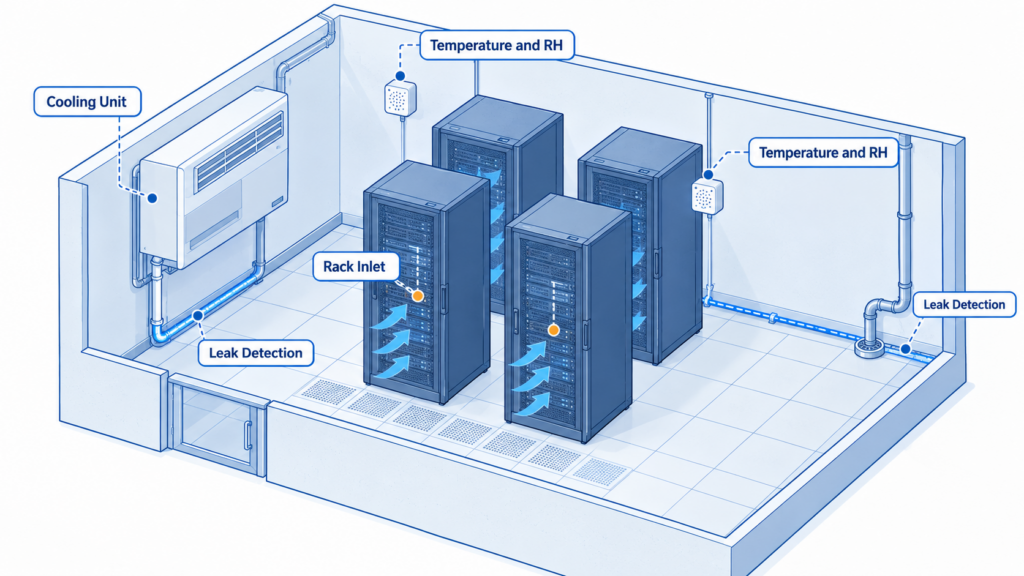
     Isometric server room showing rack inlet sensors, humidity monitoring zones, and leak detection beside cooling equipment.

    Temperature and humidity monitoring follows equipment intake zones, while leak detection follows water sources and drainage paths.

    Key Takeaway

    A server room monitoring system should reveal conditions at equipment air inlets and give staff enough time to act. Select hardware only after defining monitoring locations, warning thresholds, and the response path. Local recording preserves evidence during a network interruption; remote notification still needs a working route to the person responsible.

    Why Is Environmental Monitoring Important in a Server Room?

    The assets at risk include servers, storage, network switches, and the services they support. Environmental monitoring helps operators recognize cooling deterioration, moisture problems, and localized hot spots before these become service incidents. It also helps distinguish a room-wide cooling failure from recirculation affecting one cabinet.

    Manual inspection remains useful for finding blocked vents, damaged drains, and poorly routed cables. It cannot provide continuous coverage between visits. A logged temperature rise that starts after office air conditioning switches to an evening schedule gives facilities staff a more actionable diagnosis than a single morning reading.

    Historical records should connect the incident to its location, time, alarm, and response. They support internal change reviews and maintenance verification; they do not independently establish regulatory compliance. NIST SP 800-53 provides a risk-based control framework organizations can use when designing their information-system safeguards. Applicability and implementation depend on the organization, rather than on purchasing a particular sensor. [3]

    What Environmental Parameters Should Be Monitored?

    Start with inlet temperature and humidity. Treat water detection as essential wherever cooling equipment, condensate drains, or nearby plumbing create a credible leak hazard. Other parameters should be justified by the failure the team needs to detect.
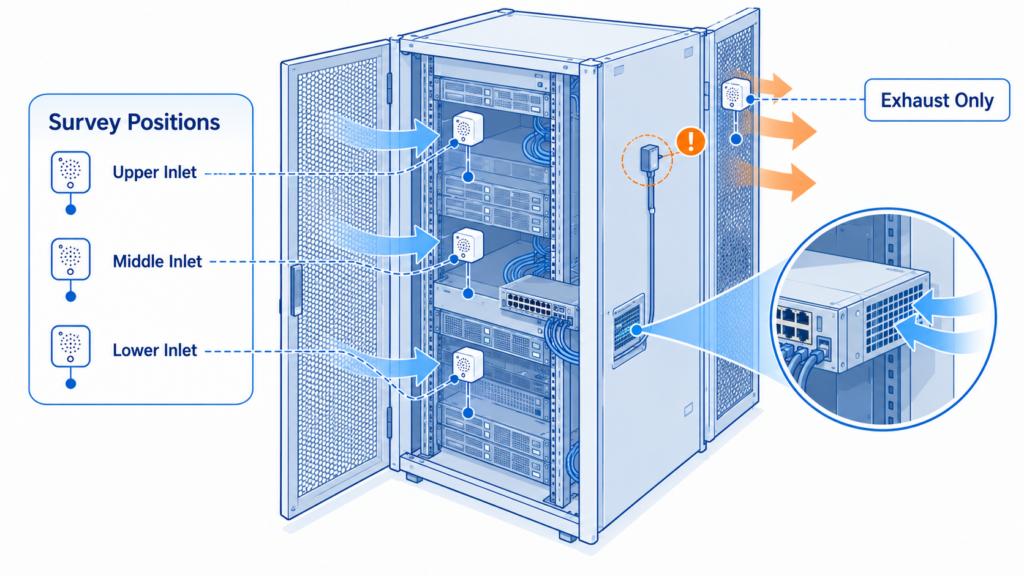
    Rack cutaway with lower, middle, and upper inlet measurement positions and a separately labeled exhaust probe.

    Survey multiple inlet heights and identify actual equipment airflow before selecting permanent monitoring points.

    Parameter Why It Matters Monitoring Location Recommended Sensor Type
    Temperature — essential Reveals hot spots and cooling loss Actual equipment air inlets; multiple heights during the survey Air temperature probe
    Relative humidity — essential Helps assess moisture and electrostatic risk Representative inlet air in each distinct zone Combined temperature and RH probe
    Water — essential where exposed Detects leaks before water reaches equipment Drain outlets, cooling-unit bases, low points Conductive sensing rope or spot detector
    Dew point — useful addition Helps assess condensation risk Derived from colocated air measurements T/RH probe and validated calculation
    Airflow or pressure — optional Investigates blocked or ineffective cooling Selected supply paths or containment boundaries Airflow or differential-pressure sensor
    Door and power status — optional Explains access events and supply interruptions Cabinet doors, UPS or cooling status outputs Contacts or compatible status interfaces

    The priority is coverage of distinct risks. A light sensor is not a substitute for a door switch, and a humidity sensor does not detect water pooling beneath a raised floor. Smoke detection must remain part of the approved fire-protection design; a monitoring accessory does not replace that system.

    How should operating limits be chosen?

    Use equipment manufacturers’ environmental limits and the applicable ASHRAE class. ASHRAE’s revised fifth-edition reference card recommends 18–27°C (64.4–80.6°F) for Classes A1–A4. Class H1 has a different recommended temperature range. Humidity guidance combines dew point and RH, with conditions affecting the upper RH limit; a universal “40–60% RH” rule would oversimplify it. Recommended conditions and allowable operating limits serve different purposes. [1]

    Set warning thresholds with time for investigation before the site’s approved maximum is reached. For example, a site might trial a warning at 26°C and a critical alert at 28°C only after confirming equipment limits, normal inlet variation, and response time. These are commissioning examples, not ASHRAE-prescribed alarm settings. Review them under representative load and seasonal conditions.

    What Does a Server Room Temperature and Humidity Monitoring System Include?

    The sensing layer measures conditions at the locations that matter. A combined probe can serve a humidity zone, while additional temperature probes cover racks with different loads or airflow. Leak detectors form a separate sensing branch because they follow water paths rather than air paths.

    The collection layer reads and timestamps measurements. It may be integrated into a networked monitor or provided by a separate gateway. Ethernet and Wi-Fi devices can connect directly to the appropriate network; compatible LoRa nodes normally need a gateway, and RS485 probes need a suitable controller.

    The platform displays current conditions, preserves history, and manages access. A cloud service reduces local server administration. An on-premises installation gives the organization responsibility for hosting, updates, backups, and availability. Neither architecture automatically supplies an independent alarm path.

    Environmental data path: Rack inlet probes → networked monitor or compatible collector → approved LAN/WAN connection → cloud or on-premises platform → assigned responder and incident record.

    Leak detection path: Sensing rope or spot detector → leak controller → local alarm, where supported, plus a separate network connection to the monitoring platform.

    In the proposed UbiBot design, GS1-AETH1RS and LD1 should be treated as separate networked devices grouped in the platform. Do not assume LD1 is a plug-and-play GS1 probe simply because both have RS485 interfaces. Their protocol, wiring, roles, and firmware would require explicit compatibility confirmation. [4, 6]
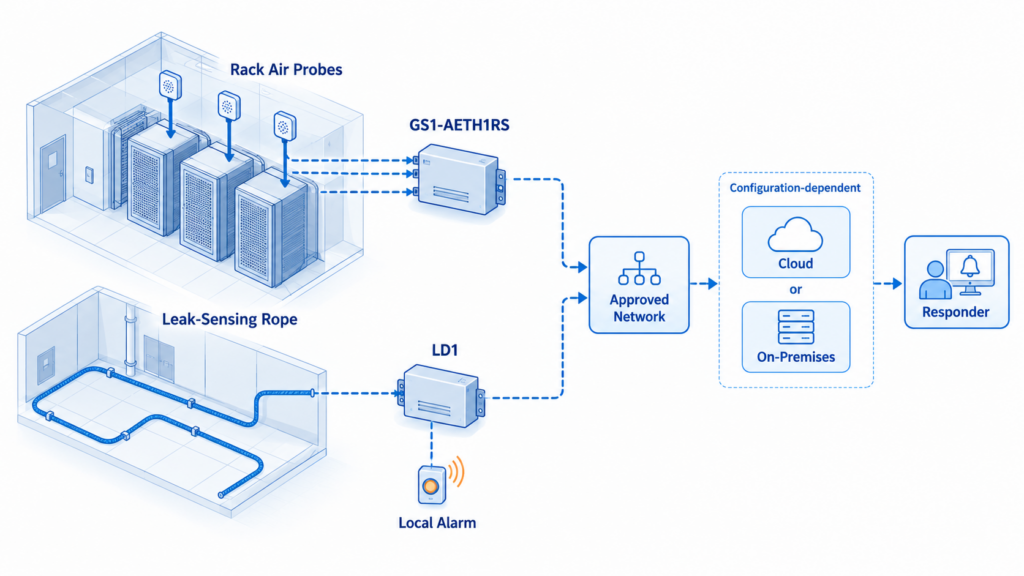
    Monitoring architecture with rack probes connected to a GS1 controller and leak rope connected separately to an LD1 controller.

    Environmental and leak controllers connect independently to the selected platform; integration and alarm paths must be confirmed for the deployed configuration.

    Which Communication Method Should Be Used?

    Choose connectivity around site policy, installation access, and failure behavior. A second interface offers little resilience if both interfaces depend on the same unprotected switch, router, or internet circuit.

    Method Suitable Scenario Advantages Limitations
    Ethernet Permanent racks with managed cabling Predictable physical connection; straightforward network administration Needs ports and cable; PoE requires exact device support
    Wi-Fi Small-room retrofit or awkward cable route Avoids a new data cable to each monitor Metal cabinets and security settings affect connection quality
    Cellular Branch site or independent WAN backup Can avoid dependence on the primary internet circuit Coverage, carrier approval, SIM costs, and backup power need checking
    LoRa Dispersed rooms or buildings Useful for modest sensor traffic over wider areas Requires compatible nodes and gateway; survey radio paths
    RS485 Wired probes and industrial interfaces Practical bus connection to a local collector Needs compatible protocol, addressing, wiring, and power

    For a typical enterprise server room, start with Ethernet if the network team can provide a protected connection. Use Wi-Fi where cabling costs outweigh its benefit and coverage is verified with cabinet doors closed. Consider cellular when an alarm must survive primary WAN loss. LoRa and RS485 solve different collection problems and are not direct substitutes for internet backhaul. GS1-AETH1RS is a Wi-Fi/Ethernet model; cellular requires different hardware or a suitable external network design. [4]

    How Should Monitoring Products Be Compared?

    Accuracy matters only at the correct measurement point. A precisely specified sensor mounted in warm exhaust air cannot represent the inlet temperature. Compare the external probes needed for the installation, their operating ranges, response times, calibration evidence, and placement constraints. Do not compare one supplier’s internal sensor against another supplier’s optional calibrated probe without identifying the difference.

    Then examine data continuity. Ask what constitutes one stored record, how many channels consume memory, what happens when memory fills, and whether readings retain their original timestamps after reconnection. A storage count is not a guaranteed retention period. Confirm power-loss behavior separately from network-loss behavior.

    Finally, evaluate the workflow: who sees each location, who changes thresholds, how alarms reach the on-call person, and how records enter the existing service desk or network management system. An advertised API does not establish endpoint entitlement, rate limits, delivery guarantees, or a finished integration. Ask for a demonstration using the exact software edition and proposed account plan.

    Product and Solution Comparison

    The following matrices compare the specified models, not entire product families. “Not publicly specified” means the reviewed official material did not establish that item for the stated configuration; it does not mean the capability is absent. Sources were checked September 9, 2026.

    Lifecycle note: Schneider Electric lists NBRK0250 as discontinued on August 31, 2023, with standard service ending June 30, 2028. Its recommended replacement is NBRK0250A, NetBotz 250A. The original 250 remains below for installed-base comparison; new projects should assess the replacement separately.

    Hardware and sensing

    Criterion UbiBot GS1-AETH1RS plus LD1-A2L AVTECH Room Alert 32S Vertiv Geist Watchdog 100 NetBotz Rack Monitor 250 NBRK0250
    Positioning Separate environmental monitor and leak controller Rack-oriented, high-I/O monitor Compact network environmental monitor Rack monitoring and access appliance
    Parameters GS1: temperature, RH, light; LD1: conductive-liquid leaks [4, 6] Temperature, RH, power status; optional sensors Temperature, RH, calculated dew point; optional sensors Temperature/RH, water, doors and other connected sensors
    Accuracy GS1 family advertises ±0.2°C, ±2% RH; confirm exact probe/range. LD1 location: ±0.5 m [5, 6] Internal: ±2°C; RH ±4.5% at 5–59%, ±6.5% at 60–95% Manual: ±0.5°C at −20–80°C; ±2% RH at 20–80% RH. Datasheet differs [11, 12] Probe-specific matched configuration: Not publicly specified
    Connectivity GS1: Ethernet, 2.4 GHz Wi-Fi, RS485; confirm LD1 network SKU [4, 6] Ethernet; PoE Ethernet; PoE configuration optional Network/serial; not PoE compatible
    External sensors Supported GS1 probes; LD1 sensing cord purchased separately [4, 6] 8 digital, 16 switch, 2 analog inputs 2 RJ12 ports supporting 4 digital sensors; 4 analog/contact inputs Sensor Pod 150 expansion; wireless sensor network
    Separate gateway None for direct IP deployment None for basic IP monitoring None for basic IP monitoring Appliance collects data; expansion may need pods

    These products differ most in expansion style. UbiBot separates environmental sensing from leak coverage; AVTECH supplies many wired inputs, Watchdog provides compact rack monitoring, and NetBotz adds a broader rack-control architecture. Count the probes, cables, controllers, and accessories needed for equivalent coverage before choosing.

    Accuracy qualification: AVTECH’s quoted RH accuracy bands extend beyond its stated 5–85% RH operating range; they do not authorize operation beyond that range. Watchdog’s datasheet quotes ±0.3°C, while its manual gives ±0.5°C. Confirm the supplied revision rather than selecting the more favorable number. GS1 family claims likewise require confirmation against the ordered hardware and external probe. [5, 9, 11, 12]

    Records and software

    Criterion UbiBot GS1-AETH1RS plus LD1-A2L AVTECH Room Alert 32S Vertiv Geist Watchdog 100 NetBotz Rack Monitor 250 NBRK0250
    Local storage GS1: 300,000 sensing records [S4] No local historical storage On-device logging; capacity Not publicly specified Local data/event logs; maximum capacity Not publicly specified
    Offline data protection Local memory; confirm backfill and overwrite behavior History needs reachable external logging platform Local logs; power-loss persistence Not publicly specified Finite storage; oldest entries overwritten when full
    Cloud platform UbiBot public platform [7] Room Alert Account Bundled cloud service: Not publicly specified Bundled cloud service: Not publicly specified
    On-premises Separate UbiBot deployment option [8] Room Alert Manager Embedded web interface Embedded management interface
    API and integrations Platform APIs and forwarding; entitlements vary [5, 7] SNMP/JSON; software integrations JSON API; SNMP; Syslog SNMP; Modbus TCP/RTU; RADIUS
    Alarm methods Platform notifications; LD1 local sound/light [5, 6] Email/SNMP; relay/light-tower outputs; platform options Email, SNMP, relay Email, SNMP; configured device outputs

    Local data storage and centralized history are different capabilities. AVTECH’s external logging design can work well with an available local collector, but it should not be described as recorder-style buffering in the 32S. For every system, test interrupted connectivity and verify which functions remain available.

    Procurement and project cost

    Criterion UbiBot GS1-AETH1RS plus LD1-A2L AVTECH Room Alert 32S Vertiv Geist Watchdog 100 NetBotz Rack Monitor 250 NBRK0250
    Calibration options Factory-report policy; confirm serial/probe coverage Model-specific certificate service: Not publicly specified Offset adjustment; certificate service Not publicly specified Matched probe certificate service: Not publicly specified
    Subscription model Free and paid cloud tiers; forwarding and message charges [7] Account/software entitlements vary Local browser operation; enterprise services quoted separately Appliance operation; enterprise software quoted separately
    Typical use Branch rooms and shared facility monitoring Many wired environmental/contact points Compact Ethernet-monitored cabinets Existing NetBotz rack/access deployments
    Complexity estimate Low–moderate with approved network; two devices Moderate: wire and identify multiple inputs Low–moderate with existing IT skills Moderate–high with expansion and access control
    Relative project-cost estimate Entry–mid for modest coverage Mid–higher for extensive wired coverage Entry–mid for modest coverage Project-specific legacy/migration cost

    Complexity and cost categories are editorial estimates, not vendor quotations or a measured price ranking. They assume usable network infrastructure and ordinary monitoring needs. Existing software licenses, sensor counts, cabling labor, support, and migration can reverse the apparent order. Request matched three-year quotations including alarms, calibration, hosting, accessories, and maintenance.

    Which System Is Best for Each Use Case?

    For a small branch office needing remote temperature and leak notifications, UbiBot is a reasonable shortlist candidate when the network policy permits it and the required probes are confirmed. Its direct connectivity and shared platform can reduce infrastructure work when the same team also monitors other facility environments. That is a project-fit advantage, not proof of lower cost in every installation. [4, 5, 6, 7, 8]

    Choose Room Alert 32S when many wired contacts and environmental inputs must terminate at one appliance. Its expansion and output options may avoid additional controllers. Choose Watchdog 100 for a compact cabinet installation where an IT team already operates network monitoring and prefers a local interface. Both deserve consideration even when cloud access is not the primary requirement.

    For an established NetBotz estate, compatibility with existing sensors, access processes, and management tools may outweigh a lower initial device price. For new purchases, evaluate 250A rather than assuming the discontinued 250 is current. Schneider explicitly positions 250A for integration with its data-center software. Confirm scope and licensing in the proposal.

    How Should the System Be Deployed?

    Survey the room before counting sensors

    Map racks, actual equipment intake directions, cooling supply and return paths, ceiling voids, condensate drains, and water entry points. Record network and power dependencies. Side-breathing switches need attention to their actual inlet location, not a generic front-of-rack rule.

    Use temporary measurements at different rack heights and during higher load to find variation. Air management guidance from the U.S. Department of Energy supports distinguishing supply air, return air, and recirculation when assessing cooling. Permanent sensors should then cover the locations that distinguish the room’s actual failure modes. [2]
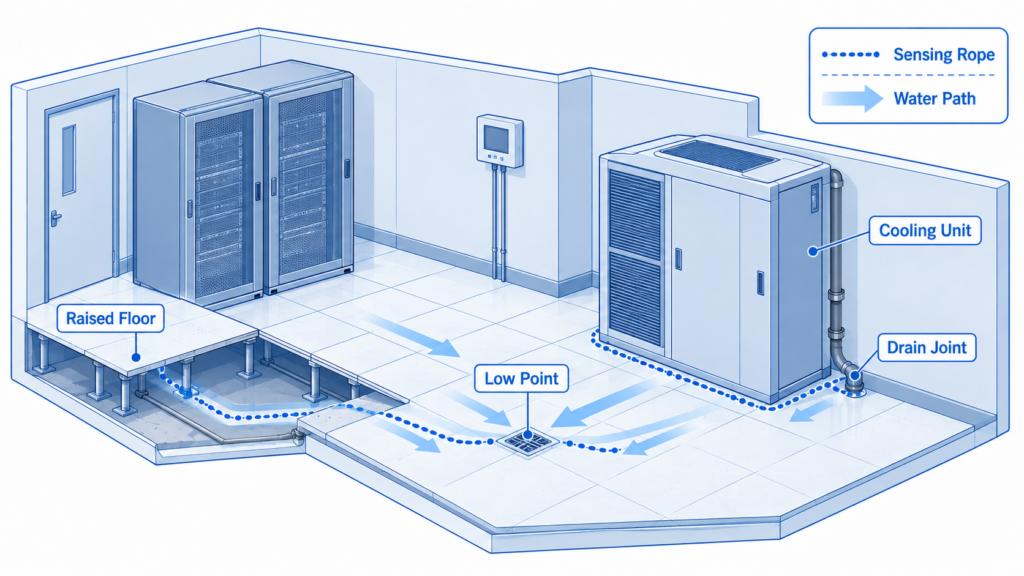
    Server room floor cutaway showing leak rope beside a cooling unit, condensate drain, and underfloor water path.

    Route leak sensing along credible water paths, including cooling-unit bases, drain joints, and accessible underfloor low points.

    Facility Scale Illustrative Starting Coverage Deployment Priorities
    Small room or 1–2 cabinets Survey low/middle/high inlets; retain coverage of each distinct intake zone; one RH point per zone; leak sensing where exposed Clear contact ownership, protected network/power, verified remote alerts
    Medium room or several rows Cover different cooling zones and critical racks; retain extra points where gradients persist Consistent naming, warning/critical levels, permission separation, centralized history
    Large or multi-site estate Risk-based rack/zone coverage, repeated across sites and reviewed locally Site groups, scoped permissions, managed integration, backup and escalation testing

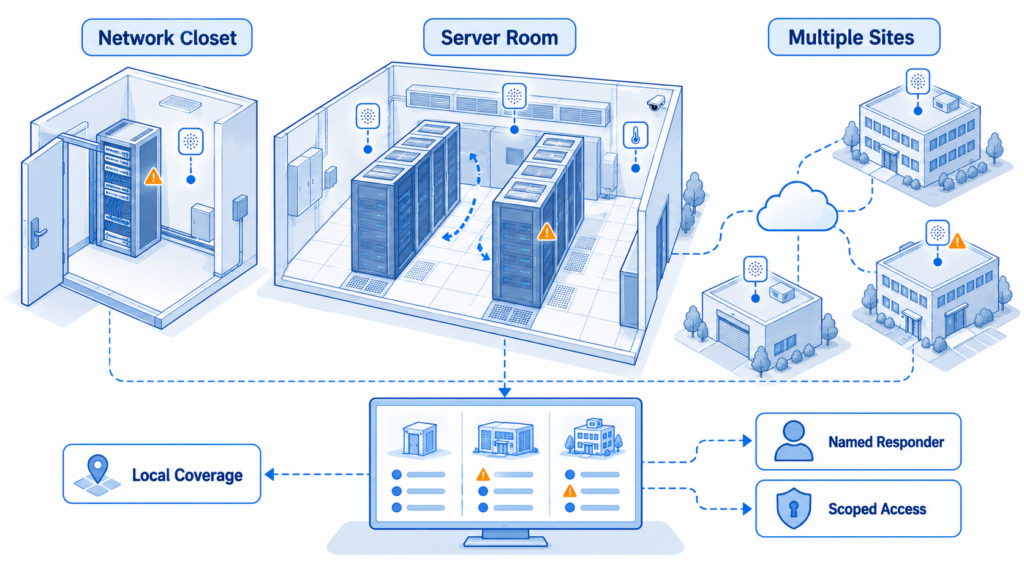
    Three deployment scales showing a network closet, a multi-rack server room, and several sites with separate monitoring access groups.

    Scale monitoring by repeating a verified site design while preserving local coverage, ownership, and access boundaries.

    These are planning patterns, not minimum sensor quantities or validated room designs. The correct count follows thermal differences, leak exposure, service criticality, and the time available for intervention. A single sensor may be inadequate even in a small closet with two different airflow paths.

    Place probes by functional area

    At racks, place air probes near representative inlets without touching hot chassis surfaces, obstructing airflow, or interfering with servicing. Identify their height and the equipment they represent. Place diagnostic exhaust probes separately and label them clearly so inlet and outlet trends are not confused.

    At cooling equipment, route sensing rope where condensate or other conductive water can reach it. Consider drain joints, unit bases, floor slopes, and underfloor paths. Protect sensing cable from cleaning damage and avoid positions that remain dry while water passes elsewhere. Leak-rope length and channel limits must match the selected controller. [6]

    Near UPS systems and electrical distribution, use approved status interfaces or qualified personnel. Record whether monitoring power and communication equipment share the same UPS. In branch closets, check what happens when building HVAC changes schedule and doors remain closed overnight.

    Configure the response and prove it works

    Name every point using a consistent pattern such as “Boston / IT Room / Rack 03 / Inlet Upper.” Define an owner, alternate responder, and action for high temperature, humidity excursion, water detection, sensor loss, and device offline. Where native acknowledgment or escalation is unavailable, implement it in the receiving incident system.

    Select sampling, upload, and alarm delays together. A useful trial might begin with one-minute sampling where supported, but only a site test establishes whether the complete notification path is fast enough. Use hysteresis and short persistence delays where available to avoid repeated alarms near a boundary. Do not delay a confirmed leak merely to reduce message traffic.

    Commission one point at a time using safe, controlled stimuli. Confirm its physical label, live value, event timestamp, recipient, and recovery message. Disconnect the WAN without interrupting protected power; verify local behavior and restored records. Separately test power loss and recipient unavailability. Record results before handing over responsibility.

    Give viewing access to routine users and restrict threshold, device, and account changes to designated administrators. Set a retention period based on incident review and organizational policy. Maintain export and backup procedures, a device inventory, and a schedule for checking probes, sensing rope, battery condition, and notification delivery.
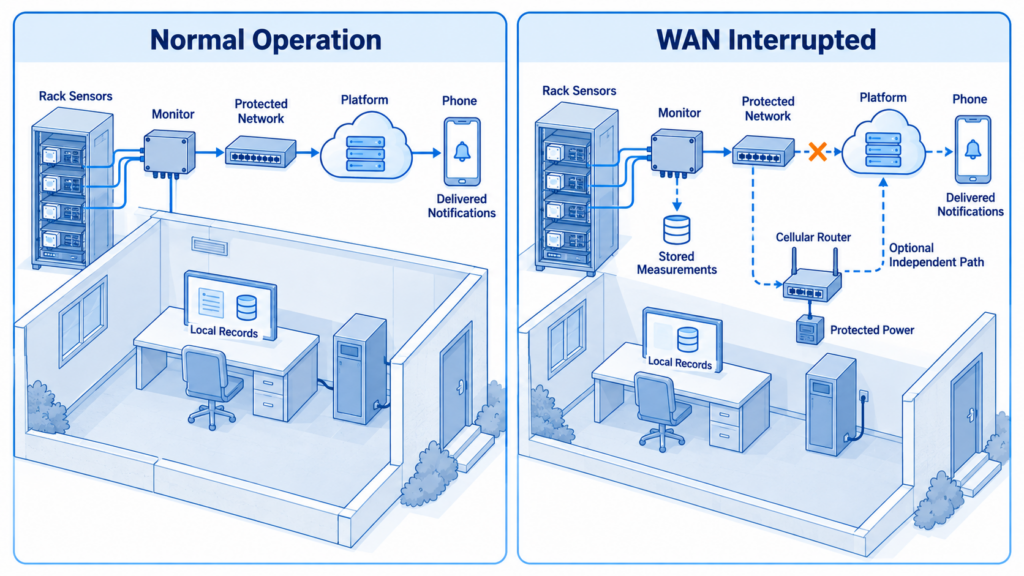
    Comparison of normal cloud notification and WAN outage with local recording and an optional independent cellular path.

    Local records can continue during a WAN interruption, but off-site notification requires an available communication route.

    Common Design and Installation Mistakes

    1. Using the wall thermostat as rack evidence. It can miss an upper-rack hot spot or the intake of a side-breathing switch. Survey the actual equipment inlets.
    2. Attaching an air probe to a hot metal panel. The reading may represent surface heating rather than incoming air. Mount it for the intended measurement.
    3. Installing wireless monitors inside closed metal cabinets without testing. Verify the final mounting position under normal cabinet and door conditions.
    4. Routing leak rope by room geometry alone. Follow plausible water paths and test wet contact, including beneath raised floors where accessible.
    5. Protecting the monitor but leaving its switch unprotected. A functioning sensor cannot deliver a network message through failed infrastructure.
    6. Treating stored readings as delivered alarms. Offline history helps investigation, but a cloud service cannot evaluate fresh measurements it has not received.
    7. Copying family-level product features into the bill of materials. Confirm GS1 connectivity, LD1 variant, PoE accessories, probe compatibility, and NetBotz lifecycle for the exact order.

    Frequently Asked Questions

    What temperature should a server room be kept at?

    Choose the operating target from the installed equipment specifications and applicable environmental class. ASHRAE provides different recommended and allowable envelopes, so one temperature limit should not be applied indiscriminately to enterprise servers, switches, and high-density systems. Measure inlet air rather than relying only on a room thermostat. Set warnings early enough for the responsible team to investigate, considering cooling behavior, measurement uncertainty, and how quickly someone can reach the site. [1]

    Where should a server room humidity sensor be installed?

    Place a combined temperature and humidity probe in representative air near the equipment intake zone. Avoid direct discharge from humidifiers, cold surfaces, and positions heated by the monitor’s electronics unless the manufacturer has accounted for that effect. Separate environmental zones may need separate probes. Comparing colocated temperature and humidity helps explain changing RH and supports dew-point assessment. Floor-level water detection remains a separate requirement wherever leaks could reach equipment.

    How many temperature sensors does a network closet need?

    There is no reliable universal count. Begin by checking the cabinet’s intake locations at several heights and looking for different airflow paths, including side-to-side switches. Retain enough permanent points to detect meaningful variation and cover the equipment whose failure would disrupt service. One room-level point may be useful for context, but it cannot prove every inlet is acceptable. Reassess coverage after adding equipment, increasing load, or changing ventilation.

    Can I receive a network closet temperature alert without internet access?

    Remote notification needs a functioning communication route. A local monitor may still read sensors, log values, or activate a supported relay while the internet is unavailable, but external recipients will not receive fresh cloud-triggered temperature alerts through that failed connection. A local management server can help if its notification route remains operational. Alternatively, assess a separately powered cellular path. Test the complete arrangement rather than assuming that a second interface provides independence.

    Does local storage guarantee that no monitoring data will be lost?

    No. Finite memory can fill, power can fail, and software may handle timestamps or reconnection differently. UbiBot specifies a local sensing-record count for GS1-AETH1RS, but buyers should establish what consumes a record and how their channel configuration affects retention. Ask for a power-loss and network-loss demonstration, inspect the exported results, and check overwrite and backfill behavior. Preserve longer-term records in the selected platform according to the organization’s retention policy. [4]

    Is Wi-Fi reliable enough for server room temperature monitoring?

    It can be suitable when coverage, network security, power, and monitoring frequency have been verified in the installed position. Closed metal cabinets, changing access-point configurations, and a shared failure domain can undermine an otherwise adequate connection. Ethernet is often easier to manage where cabling already exists, but it still depends on switches and upstream infrastructure. Decide from the tested environment and required response time, then add independent communication where the risk justifies it.

    Do I need a subscription or an on-premises server?

    It depends on the selected platform and workflow. A local appliance interface may cover basic monitoring, while multi-site history, advanced notifications, API access, or centralized administration can involve additional software or services. UbiBot lists free and paid cloud options plus separately charged services; AVTECH distinguishes device features from account and Manager capabilities. Ask for the full operating cost and entitlement schedule, including message volume and retention, before comparing proposals. [7]

    Can an environmental monitor replace DCIM or building controls?

    A lightweight monitor can supply useful measurements and alerts, but its scope is narrower than a complete data center infrastructure management platform or building management system. It does not automatically provide capacity planning, power-chain modeling, controlled shutdown, or cooling control. Integrations must be designed and tested for their intended use. If the project requires automated actions affecting production equipment, involve the responsible IT and facilities teams and use approved control procedures with documented failure behavior.

    Conclusion and Selection Recommendations

    Build the system around the incident you need to detect and the response you can deliver. Establish sensor locations, acceptable conditions, and communication dependencies before comparing the final hardware and software packages. An installation is ready when the right person receives a tested alarm with a clear location and action, and the records remain usable afterward.

    UbiBot GS1-AETH1RS with a correctly specified LD1 configuration is worth evaluating for manageable deployment, reusable devices, and shared facility monitoring. AVTECH and Vertiv offer practical rack-oriented alternatives; Schneider’s current platform deserves attention where access control and established enterprise integration dominate. For formal validation, complex cooling controls, or enterprise governance, specify those requirements explicitly and obtain the corresponding engineering, software, and service evidence.

    Sources and Product Information Disclaimer

    Specifications and capabilities may vary by exact model, probe, hardware revision, firmware, software edition, country, and subscription plan. The comparison uses official sources available on September 9, 2026; several manuals describe earlier hardware generations. Confirm the delivered configuration and current commercial terms in writing. No product is represented here as universally compliant with ASHRAE, NIST, or another regulation or framework. The guide provides design and procurement guidance, not a site-specific engineering approval.

    Official Sources and Comparison Evidence

    All sources below were checked September 9, 2026. Numbered citations in the article refer to these records. Product source titles link directly to official pages or documents. Where an older manual and a live page disagree, the article identifies the conflict instead of combining their most favorable specifications.

    1 ASHRAE. 2021 Equipment Thermal Guidelines reference card, revised and expanded fifth edition. Basis: recommended versus allowable conditions, equipment classes, humidity qualifications. Copyright 2021 and 2024; paraphrased selectively, not reproduced.

    2 U.S. Department of Energy. Best Practices Guide for Energy-Efficient Data Center Design. July 2024 source. Basis: air-management and cooling-assessment context; placement quantities in this article remain design recommendations.

    3 NIST. SP 800-53 Rev. 5 — Security and Privacy Controls for Information Systems and Organizations. Official publication page with current update links. Basis: risk-based organizational control framework; not a sensor certification.

    4 UbiBot. GS1-AETH1RS official product listing. Basis: exact-model Wi-Fi/Ethernet connection, 300,000 sensing records, RS485 probes, battery, and optional PoE splitter. Family-level protection or GPS claims are not applied to this model.

    5 UbiBot. GS1 product family information. Basis: advertised family accuracy, external expansion, platform notification methods, API and forwarding, model distinctions. Probe count and exact accuracy conditions require reconciliation with the ordered configuration.

    6 UbiBot. LD1-A2L official product listing and LD1 user manual. Basis: separate leak controller, conductive-liquid sensing, local audible/visual alarm, sensing cord, interfaces, and variant-dependent network options. Store page tabulates ±0.5 m location accuracy; verify current hardware and per-channel rope limits.

    7 UbiBot. Public cloud pricing and feature schedule. Basis: free/paid tiers, account and API entitlements, separately priced forwarding, SMS and voice notifications. Read current terms for the proposed region and account; the article does not imply all features are free.

    8 UbiBot. On-premises platform pre-sale notice. Basis: separately hosted local deployment and its infrastructure requirements. Confirm current supported operating systems, software edition, and device compatibility; old minimum server specifications are not a current security recommendation.


    9 UbiBot. Calibration and Traceability Policy. Basis: factory-report policy and recalibration options. Offset adjustment is not treated as a substitute for a formal external calibration certificate.


    10 Google Search Central. Search documentation updates. May 8 and June 15, 2026 entries. Basis: FAQ rich result deprecation from May 7, 2026 and subsequent documentation removal.


    Related Resources

    Livestock Barn Temperature Monitoring Deployment Guide
    University of Alberta Study Uses UbiBot WS1 Pro to Monitor Environmental Conditions in Hydroponic Lettuce Production
    Shanghai Jiao Tong University and National University of Singapore Study Use UbiBot GS1-AETH1RS for Vertical Farming Environment Monitoring
    Polish Academy of Sciences Study Uses UbiBot WS1 Pro to Monitor Temperature and Humidity During PM Filter Conditioning
    University of Amsterdam Study Uses UbiBot WS1 to Monitor Indoor Environment During a COVID-19 Social Distancing Art Fair Experiment
    University of South China Uses UbiBot GS1 to Monitor Temperature and Humidity in a Uranium Mill Tailings Pond Cover-Layer Experiment
    Temperature, Humidity, and Leak Detection in Server Rooms and Edge Closets
    How to Monitor Temperature and Humidity in Electronics Manufacturing
    menu-header-svg
    Search
    • Explore Knowledge
      • Comparison & Selection
      • Industry Solution
      • Product & Device
      • Criterion & Compliance
      • Deployment & Usage
      • Technology & Principle
    • Academic Research
    • In-depth Tech

    Industry Solution

    See More >>

    How to Build a Server Room Temperature and Humidity Monitoring System?

    Published: September 9, 2026

    Updated: September 9, 2026

    By Susan Jones

    An air conditioner can stop overnight while servers continue generating heat. By morning, an otherwise healthy network may be throttling, shutting down, or running beyond its intended environmental conditions. A thermostat on the opposite wall may miss the problem because it does not measure the air entering the affected equipment.

    For an IT manager covering several offices, the practical requirement is straightforward: detect a developing problem, identify its location, and reach someone who can respond. That requires more than a connected thermometer. Sensor placement, network availability, backup power, alarm routing, and accessible records all determine whether the system is useful.

    This guide explains how to build that system for enterprise server rooms and network cabinet rooms. It compares UbiBot GS1-AETH1RS with an LD1 leak detector, AVTECH Room Alert 32S, Vertiv Geist Watchdog 100, and Schneider Electric NetBotz Rack Monitor 250. It also identifies where a dedicated rack appliance or enterprise platform offers capabilities a lightweight installation may need to add separately.

    Quick Summary

    Monitor air temperature at representative equipment inlets, relative humidity in each distinct environmental zone, and water near credible leak paths. Add door, airflow, cooling-status, or power signals where they answer a specific operational question. A working system combines suitable probes, a networked monitor or gateway, historical records, and an alarm process with an owner and backup contact. Ethernet is a practical starting point where managed cabling exists; Wi-Fi suits accessible retrofits, while cellular can support an independent communication path. LoRa and RS485 belong in designs with compatible collection infrastructure. Compare complete installations rather than headline accuracy: include probe placement, offline recording, power resilience, software entitlement, integration, and support. Commission the installation by testing both environmental events and communication failures before relying on unattended alerts.

     Isometric server room showing rack inlet sensors, humidity monitoring zones, and leak detection beside cooling equipment.

    Temperature and humidity monitoring follows equipment intake zones, while leak detection follows water sources and drainage paths.

    Key Takeaway

    A server room monitoring system should reveal conditions at equipment air inlets and give staff enough time to act. Select hardware only after defining monitoring locations, warning thresholds, and the response path. Local recording preserves evidence during a network interruption; remote notification still needs a working route to the person responsible.

    Why Is Environmental Monitoring Important in a Server Room?

    The assets at risk include servers, storage, network switches, and the services they support. Environmental monitoring helps operators recognize cooling deterioration, moisture problems, and localized hot spots before these become service incidents. It also helps distinguish a room-wide cooling failure from recirculation affecting one cabinet.

    Manual inspection remains useful for finding blocked vents, damaged drains, and poorly routed cables. It cannot provide continuous coverage between visits. A logged temperature rise that starts after office air conditioning switches to an evening schedule gives facilities staff a more actionable diagnosis than a single morning reading.

    Historical records should connect the incident to its location, time, alarm, and response. They support internal change reviews and maintenance verification; they do not independently establish regulatory compliance. NIST SP 800-53 provides a risk-based control framework organizations can use when designing their information-system safeguards. Applicability and implementation depend on the organization, rather than on purchasing a particular sensor. [3]

    What Environmental Parameters Should Be Monitored?

    Start with inlet temperature and humidity. Treat water detection as essential wherever cooling equipment, condensate drains, or nearby plumbing create a credible leak hazard. Other parameters should be justified by the failure the team needs to detect.

    Rack cutaway with lower, middle, and upper inlet measurement positions and a separately labeled exhaust probe.

    Survey multiple inlet heights and identify actual equipment airflow before selecting permanent monitoring points.

    Parameter Why It Matters Monitoring Location Recommended Sensor Type
    Temperature — essential Reveals hot spots and cooling loss Actual equipment air inlets; multiple heights during the survey Air temperature probe
    Relative humidity — essential Helps assess moisture and electrostatic risk Representative inlet air in each distinct zone Combined temperature and RH probe
    Water — essential where exposed Detects leaks before water reaches equipment Drain outlets, cooling-unit bases, low points Conductive sensing rope or spot detector
    Dew point — useful addition Helps assess condensation risk Derived from colocated air measurements T/RH probe and validated calculation
    Airflow or pressure — optional Investigates blocked or ineffective cooling Selected supply paths or containment boundaries Airflow or differential-pressure sensor
    Door and power status — optional Explains access events and supply interruptions Cabinet doors, UPS or cooling status outputs Contacts or compatible status interfaces

    The priority is coverage of distinct risks. A light sensor is not a substitute for a door switch, and a humidity sensor does not detect water pooling beneath a raised floor. Smoke detection must remain part of the approved fire-protection design; a monitoring accessory does not replace that system.

    How should operating limits be chosen?

    Use equipment manufacturers’ environmental limits and the applicable ASHRAE class. ASHRAE’s revised fifth-edition reference card recommends 18–27°C (64.4–80.6°F) for Classes A1–A4. Class H1 has a different recommended temperature range. Humidity guidance combines dew point and RH, with conditions affecting the upper RH limit; a universal “40–60% RH” rule would oversimplify it. Recommended conditions and allowable operating limits serve different purposes. [1]

    Set warning thresholds with time for investigation before the site’s approved maximum is reached. For example, a site might trial a warning at 26°C and a critical alert at 28°C only after confirming equipment limits, normal inlet variation, and response time. These are commissioning examples, not ASHRAE-prescribed alarm settings. Review them under representative load and seasonal conditions.

    What Does a Server Room Temperature and Humidity Monitoring System Include?

    The sensing layer measures conditions at the locations that matter. A combined probe can serve a humidity zone, while additional temperature probes cover racks with different loads or airflow. Leak detectors form a separate sensing branch because they follow water paths rather than air paths.

    The collection layer reads and timestamps measurements. It may be integrated into a networked monitor or provided by a separate gateway. Ethernet and Wi-Fi devices can connect directly to the appropriate network; compatible LoRa nodes normally need a gateway, and RS485 probes need a suitable controller.

    The platform displays current conditions, preserves history, and manages access. A cloud service reduces local server administration. An on-premises installation gives the organization responsibility for hosting, updates, backups, and availability. Neither architecture automatically supplies an independent alarm path.

    Environmental data path: Rack inlet probes → networked monitor or compatible collector → approved LAN/WAN connection → cloud or on-premises platform → assigned responder and incident record.

    Leak detection path: Sensing rope or spot detector → leak controller → local alarm, where supported, plus a separate network connection to the monitoring platform.

    In the proposed UbiBot design, GS1-AETH1RS and LD1 should be treated as separate networked devices grouped in the platform. Do not assume LD1 is a plug-and-play GS1 probe simply because both have RS485 interfaces. Their protocol, wiring, roles, and firmware would require explicit compatibility confirmation. [4, 6]

    Monitoring architecture with rack probes connected to a GS1 controller and leak rope connected separately to an LD1 controller.

    Environmental and leak controllers connect independently to the selected platform; integration and alarm paths must be confirmed for the deployed configuration.

    Which Communication Method Should Be Used?

    Choose connectivity around site policy, installation access, and failure behavior. A second interface offers little resilience if both interfaces depend on the same unprotected switch, router, or internet circuit.

    Method Suitable Scenario Advantages Limitations
    Ethernet Permanent racks with managed cabling Predictable physical connection; straightforward network administration Needs ports and cable; PoE requires exact device support
    Wi-Fi Small-room retrofit or awkward cable route Avoids a new data cable to each monitor Metal cabinets and security settings affect connection quality
    Cellular Branch site or independent WAN backup Can avoid dependence on the primary internet circuit Coverage, carrier approval, SIM costs, and backup power need checking
    LoRa Dispersed rooms or buildings Useful for modest sensor traffic over wider areas Requires compatible nodes and gateway; survey radio paths
    RS485 Wired probes and industrial interfaces Practical bus connection to a local collector Needs compatible protocol, addressing, wiring, and power

    For a typical enterprise server room, start with Ethernet if the network team can provide a protected connection. Use Wi-Fi where cabling costs outweigh its benefit and coverage is verified with cabinet doors closed. Consider cellular when an alarm must survive primary WAN loss. LoRa and RS485 solve different collection problems and are not direct substitutes for internet backhaul. GS1-AETH1RS is a Wi-Fi/Ethernet model; cellular requires different hardware or a suitable external network design. [4]

    How Should Monitoring Products Be Compared?

    Accuracy matters only at the correct measurement point. A precisely specified sensor mounted in warm exhaust air cannot represent the inlet temperature. Compare the external probes needed for the installation, their operating ranges, response times, calibration evidence, and placement constraints. Do not compare one supplier’s internal sensor against another supplier’s optional calibrated probe without identifying the difference.

    Then examine data continuity. Ask what constitutes one stored record, how many channels consume memory, what happens when memory fills, and whether readings retain their original timestamps after reconnection. A storage count is not a guaranteed retention period. Confirm power-loss behavior separately from network-loss behavior.

    Finally, evaluate the workflow: who sees each location, who changes thresholds, how alarms reach the on-call person, and how records enter the existing service desk or network management system. An advertised API does not establish endpoint entitlement, rate limits, delivery guarantees, or a finished integration. Ask for a demonstration using the exact software edition and proposed account plan.

    Product and Solution Comparison

    The following matrices compare the specified models, not entire product families. “Not publicly specified” means the reviewed official material did not establish that item for the stated configuration; it does not mean the capability is absent. Sources were checked September 9, 2026.

    Lifecycle note: Schneider Electric lists NBRK0250 as discontinued on August 31, 2023, with standard service ending June 30, 2028. Its recommended replacement is NBRK0250A, NetBotz 250A. The original 250 remains below for installed-base comparison; new projects should assess the replacement separately.

    Hardware and sensing

    Criterion UbiBot GS1-AETH1RS plus LD1-A2L AVTECH Room Alert 32S Vertiv Geist Watchdog 100 NetBotz Rack Monitor 250 NBRK0250
    Positioning Separate environmental monitor and leak controller Rack-oriented, high-I/O monitor Compact network environmental monitor Rack monitoring and access appliance
    Parameters GS1: temperature, RH, light; LD1: conductive-liquid leaks [4, 6] Temperature, RH, power status; optional sensors Temperature, RH, calculated dew point; optional sensors Temperature/RH, water, doors and other connected sensors
    Accuracy GS1 family advertises ±0.2°C, ±2% RH; confirm exact probe/range. LD1 location: ±0.5 m [5, 6] Internal: ±2°C; RH ±4.5% at 5–59%, ±6.5% at 60–95% Manual: ±0.5°C at −20–80°C; ±2% RH at 20–80% RH. Datasheet differs [11, 12] Probe-specific matched configuration: Not publicly specified
    Connectivity GS1: Ethernet, 2.4 GHz Wi-Fi, RS485; confirm LD1 network SKU [4, 6] Ethernet; PoE Ethernet; PoE configuration optional Network/serial; not PoE compatible
    External sensors Supported GS1 probes; LD1 sensing cord purchased separately [4, 6] 8 digital, 16 switch, 2 analog inputs 2 RJ12 ports supporting 4 digital sensors; 4 analog/contact inputs Sensor Pod 150 expansion; wireless sensor network
    Separate gateway None for direct IP deployment None for basic IP monitoring None for basic IP monitoring Appliance collects data; expansion may need pods

    These products differ most in expansion style. UbiBot separates environmental sensing from leak coverage; AVTECH supplies many wired inputs, Watchdog provides compact rack monitoring, and NetBotz adds a broader rack-control architecture. Count the probes, cables, controllers, and accessories needed for equivalent coverage before choosing.

    Accuracy qualification: AVTECH’s quoted RH accuracy bands extend beyond its stated 5–85% RH operating range; they do not authorize operation beyond that range. Watchdog’s datasheet quotes ±0.3°C, while its manual gives ±0.5°C. Confirm the supplied revision rather than selecting the more favorable number. GS1 family claims likewise require confirmation against the ordered hardware and external probe. [5, 9, 11, 12]

    Records and software

    Criterion UbiBot GS1-AETH1RS plus LD1-A2L AVTECH Room Alert 32S Vertiv Geist Watchdog 100 NetBotz Rack Monitor 250 NBRK0250
    Local storage GS1: 300,000 sensing records [S4] No local historical storage On-device logging; capacity Not publicly specified Local data/event logs; maximum capacity Not publicly specified
    Offline data protection Local memory; confirm backfill and overwrite behavior History needs reachable external logging platform Local logs; power-loss persistence Not publicly specified Finite storage; oldest entries overwritten when full
    Cloud platform UbiBot public platform [7] Room Alert Account Bundled cloud service: Not publicly specified Bundled cloud service: Not publicly specified
    On-premises Separate UbiBot deployment option [8] Room Alert Manager Embedded web interface Embedded management interface
    API and integrations Platform APIs and forwarding; entitlements vary [5, 7] SNMP/JSON; software integrations JSON API; SNMP; Syslog SNMP; Modbus TCP/RTU; RADIUS
    Alarm methods Platform notifications; LD1 local sound/light [5, 6] Email/SNMP; relay/light-tower outputs; platform options Email, SNMP, relay Email, SNMP; configured device outputs

    Local data storage and centralized history are different capabilities. AVTECH’s external logging design can work well with an available local collector, but it should not be described as recorder-style buffering in the 32S. For every system, test interrupted connectivity and verify which functions remain available.

    Procurement and project cost

    Criterion UbiBot GS1-AETH1RS plus LD1-A2L AVTECH Room Alert 32S Vertiv Geist Watchdog 100 NetBotz Rack Monitor 250 NBRK0250
    Calibration options Factory-report policy; confirm serial/probe coverage Model-specific certificate service: Not publicly specified Offset adjustment; certificate service Not publicly specified Matched probe certificate service: Not publicly specified
    Subscription model Free and paid cloud tiers; forwarding and message charges [7] Account/software entitlements vary Local browser operation; enterprise services quoted separately Appliance operation; enterprise software quoted separately
    Typical use Branch rooms and shared facility monitoring Many wired environmental/contact points Compact Ethernet-monitored cabinets Existing NetBotz rack/access deployments
    Complexity estimate Low–moderate with approved network; two devices Moderate: wire and identify multiple inputs Low–moderate with existing IT skills Moderate–high with expansion and access control
    Relative project-cost estimate Entry–mid for modest coverage Mid–higher for extensive wired coverage Entry–mid for modest coverage Project-specific legacy/migration cost

    Complexity and cost categories are editorial estimates, not vendor quotations or a measured price ranking. They assume usable network infrastructure and ordinary monitoring needs. Existing software licenses, sensor counts, cabling labor, support, and migration can reverse the apparent order. Request matched three-year quotations including alarms, calibration, hosting, accessories, and maintenance.

    Which System Is Best for Each Use Case?

    For a small branch office needing remote temperature and leak notifications, UbiBot is a reasonable shortlist candidate when the network policy permits it and the required probes are confirmed. Its direct connectivity and shared platform can reduce infrastructure work when the same team also monitors other facility environments. That is a project-fit advantage, not proof of lower cost in every installation. [4, 5, 6, 7, 8]

    Choose Room Alert 32S when many wired contacts and environmental inputs must terminate at one appliance. Its expansion and output options may avoid additional controllers. Choose Watchdog 100 for a compact cabinet installation where an IT team already operates network monitoring and prefers a local interface. Both deserve consideration even when cloud access is not the primary requirement.

    For an established NetBotz estate, compatibility with existing sensors, access processes, and management tools may outweigh a lower initial device price. For new purchases, evaluate 250A rather than assuming the discontinued 250 is current. Schneider explicitly positions 250A for integration with its data-center software. Confirm scope and licensing in the proposal.

    How Should the System Be Deployed?

    Survey the room before counting sensors

    Map racks, actual equipment intake directions, cooling supply and return paths, ceiling voids, condensate drains, and water entry points. Record network and power dependencies. Side-breathing switches need attention to their actual inlet location, not a generic front-of-rack rule.

    Use temporary measurements at different rack heights and during higher load to find variation. Air management guidance from the U.S. Department of Energy supports distinguishing supply air, return air, and recirculation when assessing cooling. Permanent sensors should then cover the locations that distinguish the room’s actual failure modes. [2]

    Server room floor cutaway showing leak rope beside a cooling unit, condensate drain, and underfloor water path.

    Route leak sensing along credible water paths, including cooling-unit bases, drain joints, and accessible underfloor low points.

    Facility Scale Illustrative Starting Coverage Deployment Priorities
    Small room or 1–2 cabinets Survey low/middle/high inlets; retain coverage of each distinct intake zone; one RH point per zone; leak sensing where exposed Clear contact ownership, protected network/power, verified remote alerts
    Medium room or several rows Cover different cooling zones and critical racks; retain extra points where gradients persist Consistent naming, warning/critical levels, permission separation, centralized history
    Large or multi-site estate Risk-based rack/zone coverage, repeated across sites and reviewed locally Site groups, scoped permissions, managed integration, backup and escalation testing

    Three deployment scales showing a network closet, a multi-rack server room, and several sites with separate monitoring access groups.

    Scale monitoring by repeating a verified site design while preserving local coverage, ownership, and access boundaries.

    These are planning patterns, not minimum sensor quantities or validated room designs. The correct count follows thermal differences, leak exposure, service criticality, and the time available for intervention. A single sensor may be inadequate even in a small closet with two different airflow paths.

    Place probes by functional area

    At racks, place air probes near representative inlets without touching hot chassis surfaces, obstructing airflow, or interfering with servicing. Identify their height and the equipment they represent. Place diagnostic exhaust probes separately and label them clearly so inlet and outlet trends are not confused.

    At cooling equipment, route sensing rope where condensate or other conductive water can reach it. Consider drain joints, unit bases, floor slopes, and underfloor paths. Protect sensing cable from cleaning damage and avoid positions that remain dry while water passes elsewhere. Leak-rope length and channel limits must match the selected controller. [6]

    Near UPS systems and electrical distribution, use approved status interfaces or qualified personnel. Record whether monitoring power and communication equipment share the same UPS. In branch closets, check what happens when building HVAC changes schedule and doors remain closed overnight.

    Configure the response and prove it works

    Name every point using a consistent pattern such as “Boston / IT Room / Rack 03 / Inlet Upper.” Define an owner, alternate responder, and action for high temperature, humidity excursion, water detection, sensor loss, and device offline. Where native acknowledgment or escalation is unavailable, implement it in the receiving incident system.

    Select sampling, upload, and alarm delays together. A useful trial might begin with one-minute sampling where supported, but only a site test establishes whether the complete notification path is fast enough. Use hysteresis and short persistence delays where available to avoid repeated alarms near a boundary. Do not delay a confirmed leak merely to reduce message traffic.

    Commission one point at a time using safe, controlled stimuli. Confirm its physical label, live value, event timestamp, recipient, and recovery message. Disconnect the WAN without interrupting protected power; verify local behavior and restored records. Separately test power loss and recipient unavailability. Record results before handing over responsibility.

    Give viewing access to routine users and restrict threshold, device, and account changes to designated administrators. Set a retention period based on incident review and organizational policy. Maintain export and backup procedures, a device inventory, and a schedule for checking probes, sensing rope, battery condition, and notification delivery.

    Comparison of normal cloud notification and WAN outage with local recording and an optional independent cellular path.

    Local records can continue during a WAN interruption, but off-site notification requires an available communication route.

    Common Design and Installation Mistakes

    1. Using the wall thermostat as rack evidence. It can miss an upper-rack hot spot or the intake of a side-breathing switch. Survey the actual equipment inlets.
    2. Attaching an air probe to a hot metal panel. The reading may represent surface heating rather than incoming air. Mount it for the intended measurement.
    3. Installing wireless monitors inside closed metal cabinets without testing. Verify the final mounting position under normal cabinet and door conditions.
    4. Routing leak rope by room geometry alone. Follow plausible water paths and test wet contact, including beneath raised floors where accessible.
    5. Protecting the monitor but leaving its switch unprotected. A functioning sensor cannot deliver a network message through failed infrastructure.
    6. Treating stored readings as delivered alarms. Offline history helps investigation, but a cloud service cannot evaluate fresh measurements it has not received.
    7. Copying family-level product features into the bill of materials. Confirm GS1 connectivity, LD1 variant, PoE accessories, probe compatibility, and NetBotz lifecycle for the exact order.

    Frequently Asked Questions

    What temperature should a server room be kept at?

    Choose the operating target from the installed equipment specifications and applicable environmental class. ASHRAE provides different recommended and allowable envelopes, so one temperature limit should not be applied indiscriminately to enterprise servers, switches, and high-density systems. Measure inlet air rather than relying only on a room thermostat. Set warnings early enough for the responsible team to investigate, considering cooling behavior, measurement uncertainty, and how quickly someone can reach the site. [1]

    Where should a server room humidity sensor be installed?

    Place a combined temperature and humidity probe in representative air near the equipment intake zone. Avoid direct discharge from humidifiers, cold surfaces, and positions heated by the monitor’s electronics unless the manufacturer has accounted for that effect. Separate environmental zones may need separate probes. Comparing colocated temperature and humidity helps explain changing RH and supports dew-point assessment. Floor-level water detection remains a separate requirement wherever leaks could reach equipment.

    How many temperature sensors does a network closet need?

    There is no reliable universal count. Begin by checking the cabinet’s intake locations at several heights and looking for different airflow paths, including side-to-side switches. Retain enough permanent points to detect meaningful variation and cover the equipment whose failure would disrupt service. One room-level point may be useful for context, but it cannot prove every inlet is acceptable. Reassess coverage after adding equipment, increasing load, or changing ventilation.

    Can I receive a network closet temperature alert without internet access?

    Remote notification needs a functioning communication route. A local monitor may still read sensors, log values, or activate a supported relay while the internet is unavailable, but external recipients will not receive fresh cloud-triggered temperature alerts through that failed connection. A local management server can help if its notification route remains operational. Alternatively, assess a separately powered cellular path. Test the complete arrangement rather than assuming that a second interface provides independence.

    Does local storage guarantee that no monitoring data will be lost?

    No. Finite memory can fill, power can fail, and software may handle timestamps or reconnection differently. UbiBot specifies a local sensing-record count for GS1-AETH1RS, but buyers should establish what consumes a record and how their channel configuration affects retention. Ask for a power-loss and network-loss demonstration, inspect the exported results, and check overwrite and backfill behavior. Preserve longer-term records in the selected platform according to the organization’s retention policy. [4]

    Is Wi-Fi reliable enough for server room temperature monitoring?

    It can be suitable when coverage, network security, power, and monitoring frequency have been verified in the installed position. Closed metal cabinets, changing access-point configurations, and a shared failure domain can undermine an otherwise adequate connection. Ethernet is often easier to manage where cabling already exists, but it still depends on switches and upstream infrastructure. Decide from the tested environment and required response time, then add independent communication where the risk justifies it.

    Do I need a subscription or an on-premises server?

    It depends on the selected platform and workflow. A local appliance interface may cover basic monitoring, while multi-site history, advanced notifications, API access, or centralized administration can involve additional software or services. UbiBot lists free and paid cloud options plus separately charged services; AVTECH distinguishes device features from account and Manager capabilities. Ask for the full operating cost and entitlement schedule, including message volume and retention, before comparing proposals. [7]

    Can an environmental monitor replace DCIM or building controls?

    A lightweight monitor can supply useful measurements and alerts, but its scope is narrower than a complete data center infrastructure management platform or building management system. It does not automatically provide capacity planning, power-chain modeling, controlled shutdown, or cooling control. Integrations must be designed and tested for their intended use. If the project requires automated actions affecting production equipment, involve the responsible IT and facilities teams and use approved control procedures with documented failure behavior.

    Conclusion and Selection Recommendations

    Build the system around the incident you need to detect and the response you can deliver. Establish sensor locations, acceptable conditions, and communication dependencies before comparing the final hardware and software packages. An installation is ready when the right person receives a tested alarm with a clear location and action, and the records remain usable afterward.

    UbiBot GS1-AETH1RS with a correctly specified LD1 configuration is worth evaluating for manageable deployment, reusable devices, and shared facility monitoring. AVTECH and Vertiv offer practical rack-oriented alternatives; Schneider’s current platform deserves attention where access control and established enterprise integration dominate. For formal validation, complex cooling controls, or enterprise governance, specify those requirements explicitly and obtain the corresponding engineering, software, and service evidence.

    Sources and Product Information Disclaimer

    Specifications and capabilities may vary by exact model, probe, hardware revision, firmware, software edition, country, and subscription plan. The comparison uses official sources available on September 9, 2026; several manuals describe earlier hardware generations. Confirm the delivered configuration and current commercial terms in writing. No product is represented here as universally compliant with ASHRAE, NIST, or another regulation or framework. The guide provides design and procurement guidance, not a site-specific engineering approval.

    Official Sources and Comparison Evidence

    All sources below were checked September 9, 2026. Numbered citations in the article refer to these records. Product source titles link directly to official pages or documents. Where an older manual and a live page disagree, the article identifies the conflict instead of combining their most favorable specifications.

    1 ASHRAE. 2021 Equipment Thermal Guidelines reference card, revised and expanded fifth edition. Basis: recommended versus allowable conditions, equipment classes, humidity qualifications. Copyright 2021 and 2024; paraphrased selectively, not reproduced.

    2 U.S. Department of Energy. Best Practices Guide for Energy-Efficient Data Center Design. July 2024 source. Basis: air-management and cooling-assessment context; placement quantities in this article remain design recommendations.

    3 NIST. SP 800-53 Rev. 5 — Security and Privacy Controls for Information Systems and Organizations. Official publication page with current update links. Basis: risk-based organizational control framework; not a sensor certification.

    4 UbiBot. GS1-AETH1RS official product listing. Basis: exact-model Wi-Fi/Ethernet connection, 300,000 sensing records, RS485 probes, battery, and optional PoE splitter. Family-level protection or GPS claims are not applied to this model.

    5 UbiBot. GS1 product family information. Basis: advertised family accuracy, external expansion, platform notification methods, API and forwarding, model distinctions. Probe count and exact accuracy conditions require reconciliation with the ordered configuration.

    6 UbiBot. LD1-A2L official product listing and LD1 user manual. Basis: separate leak controller, conductive-liquid sensing, local audible/visual alarm, sensing cord, interfaces, and variant-dependent network options. Store page tabulates ±0.5 m location accuracy; verify current hardware and per-channel rope limits.

    7 UbiBot. Public cloud pricing and feature schedule. Basis: free/paid tiers, account and API entitlements, separately priced forwarding, SMS and voice notifications. Read current terms for the proposed region and account; the article does not imply all features are free.

    8 UbiBot. On-premises platform pre-sale notice. Basis: separately hosted local deployment and its infrastructure requirements. Confirm current supported operating systems, software edition, and device compatibility; old minimum server specifications are not a current security recommendation.


    9 UbiBot. Calibration and Traceability Policy. Basis: factory-report policy and recalibration options. Offset adjustment is not treated as a substitute for a formal external calibration certificate.


    10 Google Search Central. Search documentation updates. May 8 and June 15, 2026 entries. Basis: FAQ rich result deprecation from May 7, 2026 and subsequent documentation removal.

    分享

    LinkedIn2

    Facebook2

    X

    Newsletter Signup

    Related Resources

    Livestock Barn Temperature Monitoring Deployment Guide
    University of Alberta Study Uses UbiBot WS1 Pro to Monitor Environmental Conditions in Hydroponic Lettuce Production
    Shanghai Jiao Tong University and National University of Singapore Study Use UbiBot GS1-AETH1RS for Vertical Farming Environment Monitoring
    Polish Academy of Sciences Study Uses UbiBot WS1 Pro to Monitor Temperature and Humidity During PM Filter Conditioning
    University of Amsterdam Study Uses UbiBot WS1 to Monitor Indoor Environment During a COVID-19 Social Distancing Art Fair Experiment
    University of South China Uses UbiBot GS1 to Monitor Temperature and Humidity in a Uranium Mill Tailings Pond Cover-Layer Experiment
    Temperature, Humidity, and Leak Detection in Server Rooms and Edge Closets
    How to Monitor Temperature and Humidity in Electronics Manufacturing
    menu-header-svg
    Search
    • Explore Knowledge
      • Comparison & Selection
      • Industry Solution
      • Product & Device
      • Criterion & Compliance
      • Deployment & Usage
      • Technology & Principle
    • Academic Research
    • In-depth Tech
    Enter Your Information

    Confirm

    Products

    Dashboards

    Support

    Purchase

    Company

    Smart Sensing

    UbiBot Web Console

    APP Download

    UbiBot Online Store

    News

    Smart Control

    UbiBot Space

    Product Docs & APIs

    Find Distributors

    Learn Hub

    Smart Video

    UbiBot On-Premises

    Helpdesk & FAQ

    Volume Pricing

    About Us

    LoRa Products

    Agency Web Console

    Video Center

    Contact Us

    Software & Platform


    Pricing


    Architecture

    External Sensors


    System Status

    Accessories


    Become a Distributor

    Global SIM


    Become an Affiliate

    Positioning System


    Products

    Dashboards

    Business Partners

    WS1

    UbiBot Web Console

    Volume Pricing

    WS1 Pro

    UbiBot Space

    Become a Distributor

    GS1

    UbiBot Support Desk

    Affiliates

    GS2

    Agency Web Console


    MS1


    SP1


    Accessories


    Docs

    Purchase

    Company

    Platform API

    Pricing

    News

    Q&A

    UbiBot Partners

    About us

    Privacy Policy

    Online Store

    Contact

    Terms of Service


    System Status

    Products

    Dashboards

    Smart Sensing

    UbiBot Web Console

    Smart Control

    UbiBot Space

    Smart Video

    UbiBot On-Premises

    LoRa Products

    Agency Web Console

    Software & Platform


    External Sensors


    Accessories


    Global SIM


    Positioning System


    Support

    Purchase

    APP Download

    UbiBot Online Store

    Product Docs & APIs

    Find Distributors

    Helpdesk & FAQ

    Volume Pricing

    Video Center


    Pricing


    Company

    News

    Learn Hub

    About Us

    Contact Us

    Architecture

    System Status

    Become a Distributor

    Become an Affiliate

    Language:
    English 日本語 (ベータ)  
    Language:

    English

    日本語 (ベータ)


    IoT Product Family:
    ubibotico     Wireless environmental sensing products and smart building solutions
    ubitrackico     UWB-based real-time indoor tracking solutions with 30cm accuracy

    IoT Product Family:

    ubibotico  Wireless environmental sensing products and smart building solutions
    ubitrackico  UWB-based real-time indoor tracking solutions with 30cm accuracy

    © 2013-2026 UbiBot.com. All rights reserved.

    Terms of Service | Privacy Policy | Compliance

    youtube facebook twitter