

UBiBot Logo
UBiBot Logo
  • UBiBot Logo
  • Home
  • Products

    NEW

  • Pricing
  • Support
  • About Us
  • Download
  • magnifying-glass  Search
  • magnifying-glass header-close
  • Sign in Sign in
    Public Web Console Public Web Console
    On-Premises App Center On-Premises App Center
  • Home
  • Products

    NEW

  • Pricing
  • Support
  • About us
  • Download
  •  Public Web Console
  •  On-Premises App Center
  • Where to Buy

Learn Hub

Explore Knowledge Academic Research In-depth Tech

Share

LinkedIn

Facebook

X (Twitter)

Newsletter Signup

Table of contents

    How to Choose a Wireless Temperature and Humidity Data Logger: Wi-Fi, 4G, Alerts, Accuracy and Cloud Costs

    30-Second Summary

    A wireless temperature and humidity data logger measures conditions at a defined interval, stores readings locally and transfers data to a cloud or local platform through Wi-Fi, cellular, LoRa or another communication path.

    For a small room with stable internet access, a Wi-Fi logger is usually the simplest option. For remote buildings, temporary sites or locations where local Wi-Fi cannot be trusted, a cellular model reduces dependence on the customer network. LoRa is useful for many battery-powered points spread across a site, but LoRa and LoRa WAN are not interchangeable terms.

    The most important buying criteria are the complete measurement accuracy, probe suitability, offline storage, alarm workflow, battery and power strategy, network compatibility, platform functions, calibration process and recurring cost.

    UbiBot is most relevant when a project needs a choice of Wi-Fi and cellular devices, external RS-485 sensors, large local memory, multiple alarm channels, public-cloud and on-premises deployment paths, and API or data-forwarding options. Projects that require a specific validated regulatory package should review documentation and project configuration separately.

    1.Why Does Choosing the Right Wireless Data Logger Matter?

    A wireless temperature and humidity data logger is often purchased as a small piece of hardware, but the operational decision is much larger. The device determines how measurements are collected, how quickly abnormal conditions are reported, what happens when the network fails, and whether data from one room or hundreds of sites can be managed consistently. A low purchase price can become expensive if the logger requires frequent battery changes, lacks offline memory, uses a limited cloud plan, or cannot connect to the probes and business systems needed later.

    The risk is especially clear in warehouses, laboratories, museums, food storage areas, pharmaceutical facilities, greenhouses and server rooms. Manual checks provide only isolated readings. They do not show what happened between inspections, and they rarely notify staff at the moment a threshold is exceeded. A remote temperature monitoring system closes that gap by recording continuously, preserving historical trends and sending alerts when the measured environment moves outside the required range.

    The right choice therefore depends on more than temperature range and headline accuracy. Buyers should evaluate the complete monitoring chain: sensor, probe, logger electronics, communication network, local memory, alarm workflow, cloud or on-premises platform, calibration process, data export and integration costs. This guide explains how those parts fit together and compares five current configurations from UbiBot, T&D, Testo and Lascar.

    2.Who Is This Guide For?

    This guide is written for people who need to select, specify or approve a connected environmental monitoring device. A QA or validation manager will usually focus on calibration, data integrity, alarm acknowledgement and report retention. A laboratory or museum manager may care more about stable humidity measurement, multi-room visibility and simple historical analysis. Warehouse and facilities teams often prioritize coverage, battery life, offline storage and rapid alarm escalation. System integrators need APIs, data forwarding and clear protocol boundaries, while procurement teams need a realistic view of hardware, network, platform and lifecycle costs.

    3.What Is a Wireless Temperature and Humidity Data Logger?

    A wireless temperature and humidity data logger is a measurement device that samples temperature and relative humidity, timestamps each reading, stores the data and transfers it through a wireless network for remote viewing. Unlike a basic thermometer or humidity sensor, a logger creates a continuous record. Unlike a simple wireless sensor, it normally retains readings when the network is unavailable and synchronizes them after the connection returns.

    How Is a Data Logger Different from a Sensor, Transmitter or Monitoring System?

    Term Practical meaning
    Sensor The sensing element that converts temperature or humidity into an electrical signal. It may be built into the logger or located in an external probe.
    Data logger A device that measures, timestamps and stores readings. A connected logger may also upload data and evaluate alarm rules.
    Transmitter An industrial device that converts a measurement into an output such as 4-20 mA or RS-485/Modbus. Many transmitters do not provide cloud storage or local user-facing reports by themselves.
    Remote monitor A broader commercial term for a connected device and service that allow readings and alarms to be viewed away from the measurement point.
    Gateway A communication bridge that receives data from local nodes and forwards it to a server or cloud platform. LoRa systems commonly use a gateway.
    Environmental monitoring system The complete arrangement of sensors, loggers, networks, software, alarms, users, reports and integrations across one or more sites.

    4.What Problems Does a Wireless Data Logger Solve?

    The main benefit is not simply that the data can be viewed on a phone. The value comes from replacing fragmented manual checks with a continuous and reviewable process. The logger can show how long an excursion lasted, whether conditions recovered before staff arrived, and whether the same problem occurs at a particular time of day or in a particular zone.

    A connected logger also changes the response workflow. Threshold rules can trigger email, app, SMS, voice or local audible notifications depending on the platform and device. Multi-site dashboards allow a central team to compare rooms, warehouses or facilities without asking each location to send spreadsheets. Local memory protects the record during an internet outage, while exports and APIs make the information available to quality systems, building management software or internal reporting tools.

    These advantages are only reliable when the system is designed correctly. A logger installed beside an air-conditioning outlet will report a different environment from the stored goods. A humidity sensor used in condensation may drift or fail. A Wi-Fi-only device cannot upload from a vehicle with no network. A cloud account with short retention may not support the required audit period. Product selection and deployment therefore need to be considered together.

    5.What Are the Core Components of a Remote Temperature Monitoring System?
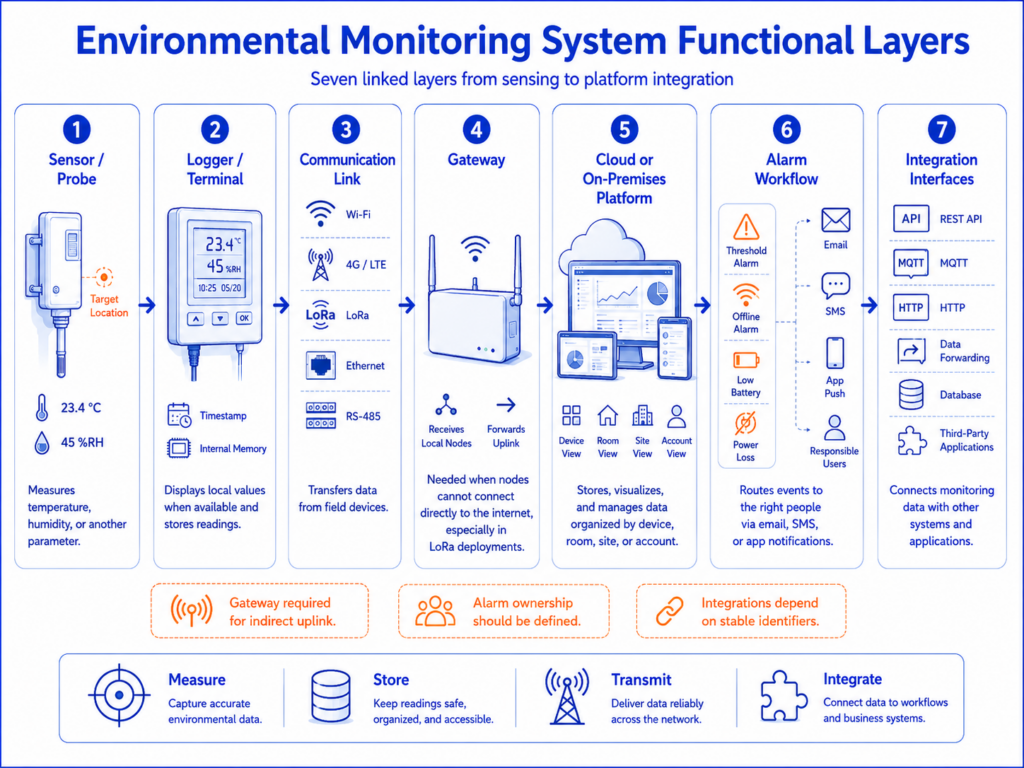
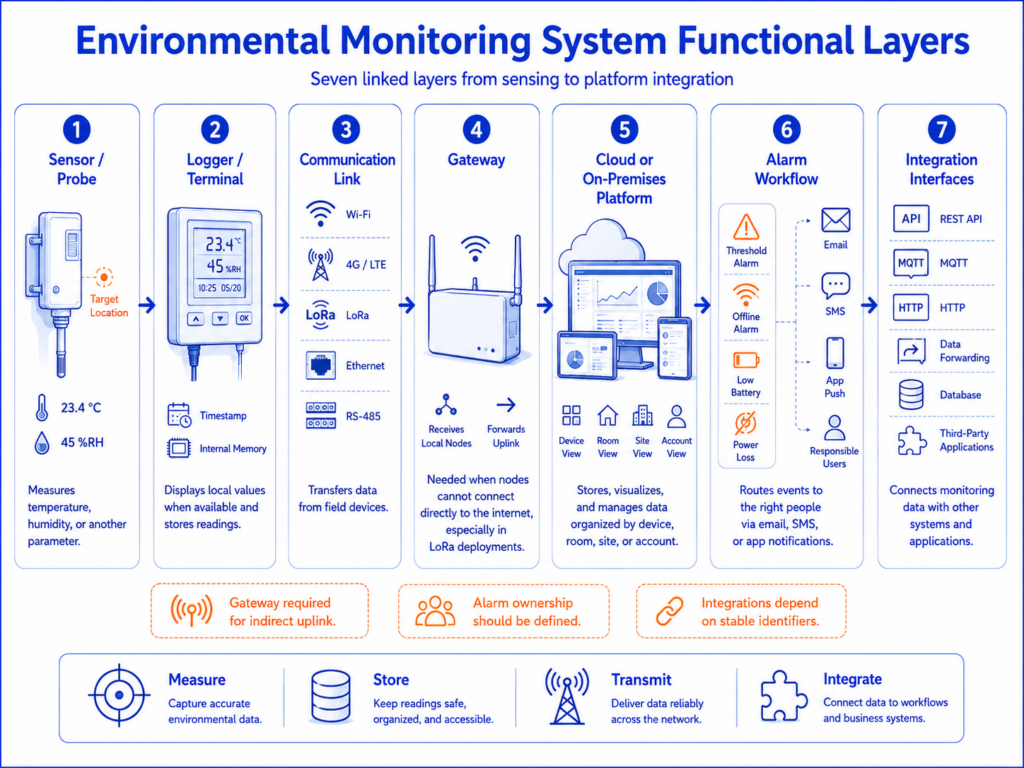
    System architecture diagram

    A complete system usually contains seven functional layers. The exact hardware varies, but the data path is similar whether the project has one logger or thousands of monitoring points.

    1. The sensor or external probe measures temperature, humidity or another parameter at the required location.
    2. The logger or monitoring terminal timestamps readings, displays local values when a screen is available and stores data in internal memory.
    3. The communication link uses Wi-Fi, 4G/LTE, LoRa, Ethernet or an industrial bus such as RS-485.
    4. A gateway is required when local nodes cannot connect directly to the internet, as in many LoRa deployments.
    5. The cloud or on-premises platform stores, visualizes and organizes data by device, room, site or customer account.
    6. The alarm workflow routes threshold, offline, low-battery or power-loss events to the responsible users.
    7. APIs, MQTT, HTTP, data forwarding or database interfaces connect the monitoring data with third-party applications.

    A standalone sensor is therefore not equivalent to a remote monitoring system. Buyers should confirm which layers are included, which require a separate license, and which need engineering work from the supplier or system integrator.

    6.Which Sensor and Specification Details Matter Most?

    The specification sheet should be read as a set of conditions, not as a list of isolated numbers. The central question is whether the complete configured system can measure the target environment with sufficient accuracy and maintain a usable record throughout the required operating period.

    Measurement Range: Can the Device Survive and Measure the Target Environment?

    The measurement range is the interval over which the sensor can report a value. The logger operating range may be narrower. For example, an external temperature probe may measure below -80°C (-112°F), while the logger body must remain outside the freezer. Humidity ranges also need context: a specification of 0 to 100% RH does not mean the device is designed for continuous condensation. The operating environment, enclosure rating, cable routing and probe installation all matter.

    For ordinary rooms, warehouses and museums, an integrated temperature and humidity sensor may be sufficient. Refrigerators, freezers, ducts, tanks and harsh outdoor locations normally require an external probe so the electronics can remain in a safer position. Ultra-low-temperature or cryogenic applications should be evaluated as a full chain that includes probe class, logger input accuracy, cable effects, calibration points, response time and installation method.

    Accuracy: Sensor Accuracy Is Not the Same as System Accuracy
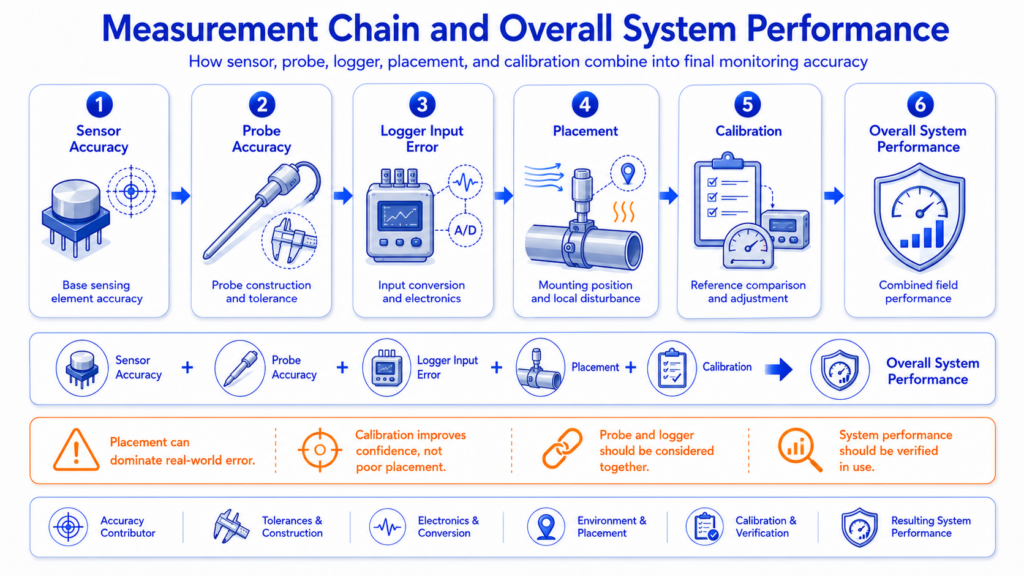
    Measurement-chain diagram

    Sensor accuracy describes the expected deviation of the sensing element under stated conditions. Logger input accuracy describes the error added by the electronics that read an external probe. Probe accuracy may include the sensing element, cable and connector. Overall system performance also depends on placement, calibration, thermal response, airflow and environmental gradients. These terms should not be combined into one headline number unless the manufacturer has specified the complete assembly.

    For humidity, accuracy normally changes across the range. A device may provide its tightest tolerance around normal room conditions and a wider tolerance near very low or very high humidity. Buyers should compare the accuracy at the actual operating point, not only the best value printed in a brochure. For a museum at 45 to 55% RH, the central-range specification is more relevant. For a greenhouse close to saturation, long-term drift, condensation resistance and maintenance become more important.

    Resolution, Response Time and Drift: Why Do They Affect the Decision?

    Resolution is the smallest displayed or recorded increment. It does not prove that the measurement is accurate to that increment. A logger may display 0.01°C while its stated accuracy is much wider. Response time describes how quickly the sensor approaches a change in the environment. A protected or buffered probe responds more slowly than an exposed air sensor, which can be desirable when the goal is to represent product temperature rather than every brief door opening.

    Long-term drift is especially important for humidity sensors. Even a good initial calibration does not remove the need for periodic verification. The required interval depends on risk, environment, sensor technology, internal procedures and applicable standards. Procurement should therefore include the availability, turnaround time and cost of calibration services or replacement probes.

    Sampling Interval and Upload Interval: Are They the Same?

    The sampling or recording interval controls how often the device creates a measurement record. The upload or communication interval controls how often stored data is sent to the platform. They may be different. A logger can sample every minute and upload every hour to reduce power consumption while preserving detailed data locally. Some devices increase sampling or transmission frequency when an alarm threshold is crossed.

    A shorter interval creates more detail but consumes more battery, memory and network traffic. The correct setting should reflect how quickly the environment can change and how quickly the team must respond. A stable archive room may not need the same interval as a frequently opened cold room. The selected interval should also be included in validation or monitoring procedures, because it determines the visibility of short excursions.

    Local Memory and Offline Recovery: What Happens When the Network Fails?

    Offline storage is a critical buying criterion. The logger should continue recording when Wi-Fi, cellular service or the cloud is unavailable. When the connection returns, the platform should receive the missing records without overwriting timestamps or creating unexplained gaps. The memory capacity must be evaluated against the number of channels and the sampling interval. A statement such as 300,000 readings may represent individual sensor values, while another manufacturer may specify 30,000 data sets containing all channels.

    The alarm limitation during an outage must also be understood. Local recording can preserve evidence, but a cloud alert cannot be delivered if the device has no communication path. Projects with high loss exposure may use cellular backup, redundant gateways, local sirens or a secondary monitoring point rather than relying only on later synchronization.

    Calibration and Certificates: What Should a Buyer Ask For?

    Calibration confirms how the device or probe performed at defined points at a particular time. A certificate may be traceable to national standards, but the scope, points, uncertainty and serial-number coverage need to match the project. A generic factory test report is not equivalent to an accredited calibration certificate. The buyer should also confirm whether the complete logger and probe are calibrated together, whether a probe can be replaced independently, and how data continuity is handled during recalibration.

    For regulated or high-risk environments, calibration is only one element of the monitoring workflow. Alarm testing, user access, audit records, electronic approvals, data retention, backup, change control and system validation may also be required. A product feature should not be described as compliant with a regulation unless the complete configured system and supporting documentation have been assessed for the intended use.

    Battery Life and Power: Why Are Published Estimates Not Directly Comparable?

    Battery life changes with sampling frequency, upload interval, signal strength, display use, alarm activity, temperature and battery chemistry. A Wi-Fi device that uploads every minute will normally use more power than the same device uploading every hour. Cellular radios can consume significant energy when coverage is poor. Cold environments reduce the performance of many battery types.

    For fixed sites, external power with battery backup can reduce maintenance. Battery-only operation is useful where cabling is difficult, but the replacement process, low-battery alarms and maintenance access should be included in the design. Published battery life should be treated as a test condition, not a guarantee for every deployment.

    7.How Should You Choose Between Wi-Fi, 4G, LoRa, Ethernet and RS-485?

    Connectivity should be selected from the site conditions and the number of points, not from a general belief that one technology is always better. Wi-Fi is easy when a reliable customer network is available. Cellular is valuable when the monitoring system must operate independently of local IT. LoRa supports long-range, low-power local links to a gateway. Ethernet provides a stable wired network. RS-485 is an industrial sensor bus rather than an internet connection and normally requires a logger or gateway to move data to a platform.
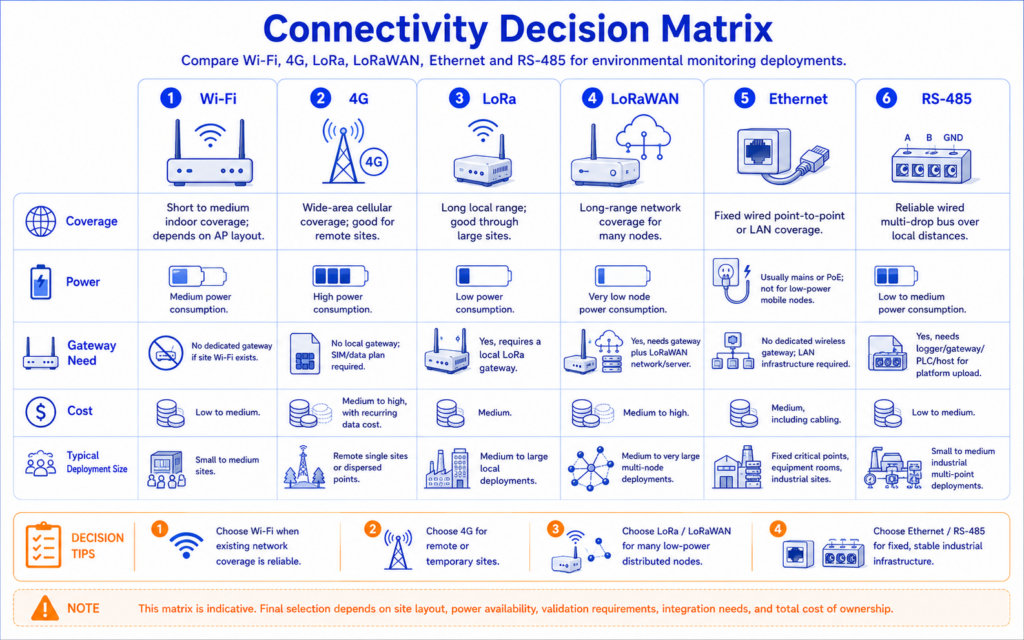
    Decision matrix comparing Wi-Fi, 4G, LoRa, LoRa WAN, Ethernet and RS-485 by coverage, power, gateway need, cost and typical deployment size.

    Connection Best suited to Strengths Main limitations
    Wi-Fi Rooms, laboratories, museums, offices and warehouses with reliable coverage No SIM cost; direct cloud connection; familiar infrastructure Coverage gaps, enterprise authentication and customer IT policies can delay deployment
    4G/LTE Remote sites, temporary facilities, vehicles and projects that should not depend on local Wi-Fi Independent connection; fast deployment; useful backup path SIM, data and roaming costs; regional bands; signal quality; higher power use
    LoRa Many battery-powered points across a warehouse, farm, campus or underground area Long local range and low node power; one gateway can collect many points Requires a gateway; proprietary and standard implementations differ
    LoRa WAN Standards-based low-power networks using compatible gateways and network servers Broader ecosystem and network architecture Frequency plans, device profiles and interoperability must be verified
    Ethernet Fixed equipment rooms and industrial sites with available cabling Stable wired connection; easier to isolate and manage Installation cost and limited mobility

    LoRa describes the radio modulation and local link. LoRa WAN describes a network protocol and architecture. Do not assume that a LoRa device works with any LoRaWAN gateway unless the manufacturer confirms the protocol stack and interoperability.

    8.Which Wireless Temperature and Humidity Data Loggers Should You Compare?

    The following comparison uses specific current configurations rather than brand-level claims. UbiBot is represented by the WS1 Pro-4G and WS4-A4G1RS because they show two different approaches: a large-screen general-purpose logger and a rugged, dual-band Wi-Fi/4G model with RS-485 expansion. T&D is represented by the TR72A2-S with its supplied high-precision SHA-3151 probe. Testo is represented by the testo 162 H1 with integrated sensors. Lascar is represented by the EL-IOT-SP-TH+ with the high-accuracy hot-swappable smart probe.

    The table should be used as a shortlist tool, not as a universal ranking. Accuracy conditions, platform terms and regional availability differ. The best choice depends on the measurement point, network, calibration workflow and expected scale.

    9.Product Comparison Table

    Table 1. Measurement and hardware configuration

    Comparison point UbiBot WS1 Pro-4G UbiBot WS4-A4G1RS T&D TR72A2-S
    SHA-3151
    testo 162 H1 Lascar EL-IOT-SP-TH+
    EL-SP2-TH+
    Product type Wi-Fi / 4G logger with built-in temperature, humidity and light sensors; external probe support IP65 multi-sensor logger with dual-band Wi-Fi, 4G and RS-485 expansion Wi-Fi logger with external high-precision temperature and humidity probe Wi-Fi online logger with integrated temperature and humidity sensors Wi-Fi cloud logger with external hot-swappable high-accuracy smart probe
    Temperature range Built-in: -20 to 60°C Built-in: -20 to 60°C Probe: -25 to 70°C Integrated: -30 to 50°C Probe: -30 to 80°C
    Temperature accuracy Built-in: ±0.2°C at 0 to 60°C Built-in: ±0.2°C at 0 to 60°C ±0.3°C at 10 to 40°C; ±0.5°C outside that interval ±0.5°C ±1 digit Typical ±0.2°C in the central range; maximum ±0.8°C across the stated range. Confirm exact conditions in the current datasheet.
    Humidity range Built-in: 0 to 100% RH; operating environment 10 to 90% RH, non-condensing Built-in: 0 to 100% RH; operating environment 10 to 90% RH, non-condensing 0 to 99% RH; humidity not measurable below -20°C 0 to 100% RH, non-condensing 0 to 100% RH
    Humidity accuracy Built-in: ±2% RH at 10 to 90% RH Built-in: ±2% RH at 10 to 90% RH ±2.5% RH at 15 to 35°C and 30 to 80% RH ±2% RH in the central range; wider tolerances at higher and extreme humidity Typical ±1.8% RH at 20 to 80% RH; maximum ±4% RH across the full range
    Resolution 0.1°C and 0.1% RH 0.1°C and 0.1% RH 0.1°C and 0.1% RH 0.1°C and 0.1% RH 0.01°C and 0.1% RH
    Sensor arrangement Built-in sensor plus optional UB-DT-P1, PT100 and selected RS-485 probes Built-in sensors; selected variants accept external RS-485 environmental probes Supplied external SHA-3151 probe Integrated sensor; H1 does not provide external probe inputs External EL-SP2-TH+ smart probe with 2 m (79 in) cable
    Enclosure / operating note Logger body is not presented as IP65; optional protective case is available IP65; logger operating environment -20 to 60°C and 10 to 90% RH, non-condensing No waterproof rating stated; logger operating environment -10 to 60°C, ≤90% RH, non-condensing IP30 IP54; logger operating range depends on battery or mains power

    Measurement accuracy is conditional. The values above summarize the reviewed official specifications and should be checked against the current datasheet for the exact operating range, probe and calibration configuration.

    Table 2. Connectivity, storage, power and alarms

    Comparison point UbiBot WS1 Pro-4G UbiBot WS4-A4G1RS T&D TR72A2-S
    SHA-3151
    testo 162 H1 Lascar EL-IOT-SP-TH+
    EL-SP2-TH+
    Network 2.4 GHz Wi-Fi; region-specific 4G/LTE model 2.4/5 GHz Wi-Fi; 4G/LTE bands shown on the current specification page 2.4 GHz Wi-Fi, Bluetooth 4.2 and USB 2.4 GHz Wi-Fi; supports listed enterprise authentication methods Wi-Fi; cloud-connected
    External interfaces Two Micro-USB ports; one supports RS-485; up to two UB-DT-P1 temperature probes and one supported RS-485 probe subject to port/splitter rules Type-C serial interface; RS-485 sensor support on selected models USB for setup/download; no cellular interface Micro-USB power; no external probe interface on H1 Smart-probe interface; mains adapter option
    Local memory 300,000 sensing records 300,000 sensing records 30,000 data sets 10,000 values per channel 300,000 readings
    Recording interval Configurable in the UbiBot platform; minimum value should be confirmed for the selected firmware and account Dynamic acquisition is described on current product pages; exact configurable limits should be confirmed 1 sec to 60 min from the listed choices 1 min to 24 h 10 sec to 12 h
    Upload interval Configurable; minimum value should be confirmed for the selected device and plan Configurable; device can increase acquisition/upload activity after threshold events 1 min to 24 h from the listed choices 1 min to 24 h 1 min to 24 h
    Offline behavior Continues storing readings internally and synchronizes when connectivity returns Continues storing readings internally and synchronizes when connectivity returns Records locally; data can be uploaded to cloud or downloaded by USB/Bluetooth Local memory retains readings; exact recovery workflow should be tested in the project Continues recording and uploads stored data after Wi-Fi returns
    Power 4 AA batteries or 5 V Micro-USB; V2 supports specified Li-SOC12 cells subject to current requirements Built-in 2500 mAh lithium battery or 5 V Type-C 2 AA batteries or USB/AC power 4 AA batteries; USB power option 4 AA batteries or mains adapter
    Display 4.4-inch LCD 57 x 23 mm LCD LCD with current values, max/min and alarm icon Large display with latest values and status Local visual and audible alarm indication; display details should be confirmed by model
    Alarm methods App, email, SMS, voice call, web and audible/connected alarm options; paid credits may apply to SMS/voice Uses the UbiBot alarm platform and can support a connected RS-485 light/siren on relevant variants Email and push notification through T&D services; local ALM icon Push, email and optional SMS through testo Smart Connect Email and SMS plus local audible and visual indication

    An offline logger can preserve data but cannot deliver a remote cloud alert without a working communication path. High-risk projects should consider local alarms, redundant links or secondary monitoring points.

    Table 3. Platform, integration, calibration and buying fit

    Comparison point UbiBot WS1 Pro-4G UbiBot WS4-A4G1RS T&D TR72A2-S
    SHA-3151
    testo 162 H1 Lascar EL-IOT-SP-TH+
    EL-SP2-TH+
    Cloud platform UbiBot Public IoT Platform, web, app, dashboards, exports, reports and device sharing UbiBot Public IoT Platform, same multi-device ecosystem as other UbiBot devices T&D WebStorage Service; free cloud service testo Smart Connect; paid Data Monitoring License required EasyLog Cloud; Starter and Professional account options
    On-premises route UbiBot On-Premises Platform available separately UbiBot On-Premises Platform available separately Free T&D Data Server can receive/store data on a local PC/server and provide browser monitoring No standard on-premises route publicly specified on the reviewed H1 page No standard on-premises route publicly specified for the reviewed product
    API / integration REST APIs, MQTT feeds, HTTP and data forwarding subject to plan/service REST APIs, MQTT feeds, HTTP and data forwarding subject to plan/service T&D WebStorage Service Open API available Not publicly specified on the reviewed product page Not publicly specified for the standard EasyLog Cloud on the reviewed product page
    Calibration workflow Calibration functions and services available; exact certificate scope and selected probe configuration must be confirmed Calibration requirements depend on built-in and external sensors High-precision probe; calibration arrangements should be confirmed with supplier ISO and DAkkS certificate options are listed separately Hot-swappable pre-calibrated probe can reduce logger downtime; calibration options available
    Subscription consideration Free plan plus paid tiers. Official platform page listed $15, $30, $50 and $80 monthly tiers on the review date; features vary by tier. Same UbiBot platform plan structure; 4G also adds SIM/data costs Cloud service is described as free; local server software is also free A valid paid Data Monitoring License is required; global price not publicly fixed on the reviewed product page Starter supports up to four connected devices and limited storage; Professional adds unlimited storage, multiple users and advanced notifications. Pricing is dynamic by device count and currency.
    Best fit General-purpose rooms and multi-site projects needing cellular choice, large display and probe expansion Rugged sites needing IP65, dual-band Wi-Fi, cellular and RS-485 expansion High-precision room monitoring with free cloud, enterprise Wi-Fi support and a local server option Managed indoor environments already using Testo and requiring simple licensed cloud monitoring Projects prioritizing probe replacement/calibration workflow, local sounder and 300,000-reading memory
    Main limitations 2.4 GHz Wi-Fi only; regional 4G SKU must be selected; external TH30S-B humidity is not shown on the device LCD Cellular band support and regional availability require confirmation; exact external-sensor compatibility depends on variant No 4G; external probe cable and non-waterproof logger need suitable placement Wi-Fi only, 10,000 values per channel, paid license and no external probe on H1 Wi-Fi only; standard API/on-premises options not publicly specified; cloud account terms add recurring cost at scale

    Specifications and platform features were reviewed using publicly available manufacturer information on July 23, 2026. Product configurations, regional availability and subscription terms may change. Confirm the latest specifications with each manufacturer before purchasing.

    Five Practical Takeaways from the Comparison

    Decision priority Configuration to examine first
    Flexible Wi-Fi/4G deployment and broad probe expansion UbiBot WS1 Pro-4G
    IP65 enclosure, dual-band Wi-Fi, cellular and RS-485 expansion UbiBot WS4-A4G1RS
    High-precision room monitoring with free cloud and local-server routes T&D TR72A2-S + SHA-3151
    Managed indoor Wi-Fi monitoring within the Testo software ecosystem testo 162 H1
    Hot-swappable calibrated probe workflow with local sound and light alarms Lascar EL-IOT-SP-TH+ + EL-SP2-TH+

    This is a fit-by-priority summary, not a universal ranking. Confirm the exact probe, regional network variant, calibration scope and software plan before purchasing.

    10.How Do the Compared Models Differ in Practice?

    When Does UbiBot WS1 Pro Make Sense?

    The WS1 Pro-4G is suited to projects that need a visible local display, Wi-Fi or cellular connectivity and a broader external-sensor path than a basic room logger. Its 4.4-inch LCD allows staff to check built-in measurements at the device, while 300,000 sensing records provide substantial offline capacity. The two Micro-USB ports support external temperature probes, and the lower port includes RS-485 for selected temperature and humidity, soil, PT100 and wind-speed sensors. Current UbiBot support information notes that the TH30S-B external humidity value can be viewed in the app or console but is not displayed on the WS1 Pro screen.

    The main buying checks are network compatibility and probe configuration. The WS1 Pro specification page states that Wi-Fi is 2.4 GHz only and that WPA2-Enterprise is not supported. Cellular bands differ by regional SKU. A buyer should therefore select the North America, Latin America or Europe/other-region configuration based on the operator network rather than assuming one global 4G model works everywhere.

    When Does UbiBot WS4 Make Sense?

    The WS4 series is a more rugged option for projects that need IP65 protection, a built-in rechargeable battery, dual-band Wi-Fi and selected 4G/RS-485 combinations. The WS4-A4G1RS configuration combines built-in temperature, humidity and light sensing with cellular and RS-485 expansion. The current specification page lists 300,000 sensing records, a 2500 mAh battery and external sensor support that can extend the system to air, soil, CO2, pressure, light and other industrial parameters depending on the exact variant.

    The key limitation is regional and variant complexity. The current page lists specific LTE bands rather than a universal global radio. Buyers should verify local operator coverage, certification and the exact WS4 suffix before ordering. UbiBot marketing pages also use wording that can be read as 5G connectivity, while the detailed specification lists dual-band Wi-Fi and 4G mobile service; the cellular technology should be confirmed in the final product documentation.

    When Does T&D TR72A2-S Make Sense?

    The TR72A2-S is strong where high-precision room measurement, enterprise Wi-Fi authentication and straightforward local or cloud data management are the priorities. Its supplied SHA-3151 probe is specified at ±0.3°C from 10 to 40°C and ±2.5% RH under the stated central conditions. It stores 30,000 data sets and supports Wi-Fi, Bluetooth and USB. T&D WebStorage Service is described as free, and T&D Data Server provides a free local-server route for organizations that do not want to use the cloud.

    It is not a cellular logger and the logger body is not waterproof. The external probe and logger placement must be planned accordingly. Battery life varies substantially with the auto-upload interval, which is a useful reminder that published battery figures should always be compared at similar communication settings.

    When Does testo 162 H1 Make Sense?

    The testo 162 H1 is a focused indoor Wi-Fi logger with integrated temperature and humidity sensing, a clear local display and support for enterprise wireless authentication methods. It is well suited to organizations that already use Testo software or want a licensed, centrally managed cloud system without configuring external probes. The product records 10,000 values per channel and provides push, email and optional SMS alerts through testo Smart Connect.

    Its main constraints are the paid Data Monitoring License, Wi-Fi-only communication, IP30 enclosure and lack of external probe inputs on the H1 model. Other testo 162 variants provide external temperature or humidity inputs, so a buyer who needs a fridge, freezer or duct probe should compare the appropriate model rather than assuming the H1 covers every application.

    When Does Lascar EL-IOT-SP-TH+ Make Sense?

    The EL-IOT-SP-TH+ is attractive when calibration workflow and replaceable probe design are important. The smart probe can be exchanged without returning the logger, reducing downtime. The device provides 300,000-reading internal memory, IP54 protection, local audible and visual alarms and email/SMS notification through EasyLog Cloud. Its stated central-range accuracy is competitive for controlled rooms, and the external 2 m probe can be positioned away from the logger body.

    The system is Wi-Fi dependent for remote access. Standard API and on-premises options were not publicly specified on the reviewed product pages. EasyLog Cloud has Starter and Professional account structures; the recurring cost and data retention should be checked for the planned number of loggers and users.

    11.Which Configuration Is Best for Each Use Case?

    There is no single best wireless temperature and humidity data logger for every environment. The correct configuration starts with the measurement point and then adds the communication, platform and documentation required by the organization.

    Use case Minimum system requirements Possible UbiBot route Important boundary
    Small laboratory Integrated or external room probe; Wi-Fi; local memory; calibration certificate where required WS1 Pro Wi-Fi or WS4-A; use an external probe if the logger heat, enclosure or placement could bias the reading Confirm calibration points, alarm recipients and power-loss response.
    Pharmaceutical warehouse Multiple mapped points, calibrated probes; escalation rules; audit-ready exports; multi-user platform WS1 Pro-4G/WS4 by zone with UbiBot Public IoT Platform or an on-premises design The final system may require validation, controlled access and procedures beyond device features.
    Vaccine refrigerator Buffered temperature probe, min/max workflow, calibration and rapid alerts Use a suitable external temperature probe with a supported logger after project verification Do not treat an ordinary built-in room sensor as a vaccine DDL. Confirm applicable national program requirements.
    Cold room External probe, door/defrost context, offline memory, Wi-Fi or cellular WS1 Pro-4G with external probe or WS4 configuration selected for the site Place the logger body and probe to avoid condensation and cable damage.
    Multi-site warehouse Central dashboard, role-based access, cellular option, API and scalable reporting Mix WS1 Pro and WS4 models under one UbiBot platform account; consider on-premises for data-control requirements Model subscription, SIM, calibration and support costs across all sites.
    Museum or archive Stable humidity accuracy, trend analysis, unobtrusive installation and calibration WS1 Pro Wi-Fi for visible local data or a suitable external-probe configuration Avoid direct airflow, exterior walls, sunlight and display-case microclimates, unless intentionally measured.
    Server room / data center Temperature, humidity and potentially leak detection, Ethernet/Wi-Fi/cellular redundancy, rapid alarms WS4 or WS1 Pro plus leak and additional environmental sensors in the wider UbiBot ecosystem Use rack-level placement and do not rely on one room-average point.
    Greenhouse Air temperature/humidity plus soil, light and possibly CO2; long-range or cellular connection WS4 with supported RS-485 probes, or a LoRa architecture for many distributed nodes Outdoor enclosure, condensation, sensor shielding and local calibration are critical.
    Industrial workshop Robust enclosure, external industrial probes, RS-485 integration and local alarms WS4-A4G1RS or another WS4 RS-485 variant Confirm electromagnetic environment, wiring, grounding and protocol compatibility.
    Temporary or remote site Independent cellular connection, battery operation and offline memory WS1 Pro-4G or WS4 4G configuration with the correct regional bands Check signal, roaming, SIM plan and power budget before deployment.

    12.How Should You Calculate Deployment Scale and Total Cost of Ownership?

    Hardware price is only the first line of the budget. The more useful calculation is total cost of ownership over the planned service period. That calculation should include the logger, external probes, protective cases, gateways, SIM and data charges, cloud subscription, data retention, API access, calibration, battery replacement, installation, validation, support, replacement stock and future expansion.
    Lifecycle cost stack

    At the time of review, the UbiBot Public IoT Platform showed a free plan and paid tiers at $15, $30, $50 and $80 per month, with different report, dashboard, sub-account and API capabilities. The correct tier depends on the required functions rather than only the number of devices. SMS and voice notifications can consume paid credits. Cellular models add SIM and data costs. These terms are time-sensitive and should be confirmed before quotation.

    T&D describes its WebStorage Service and T&D Data Server as free, which can reduce recurring platform cost for a straightforward TR7 deployment. Testo requires a paid Data Monitoring License for the testo 162 system, but the global price is not fixed on the reviewed product page. EasyLog Cloud offers Starter and Professional account types; Starter is designed for up to four connected devices and limited retention, while Professional adds unlimited storage, multiple users and advanced notification features. Pricing is calculated by device count and currency.

    Deployment size Cost pattern Planning priority
    1-10 points Logger and probe price dominate. Free cloud tiers may be sufficient, but verify retention, exports and alert allowances. Installation position, calibration certificate and notification testing often matter more than advanced integration.
    10-100 points Cloud plans, calibration cycles, replacement batteries, SIM charges and user management become material. Standardize naming, zones, alarm escalation and maintenance procedures before rollout.
    100+ points / multiple sites Platform licenses, API traffic, private deployment, server redundancy, support and integration can exceed hardware cost. Run a pilot, define data ownership and retention, test offline recovery and model five-year lifecycle cost.

    13.What Are the Most Common Buying Mistakes?

    Choosing the Lowest Hardware Price

    A cheaper logger may require a paid cloud account, frequent calibration returns, more gateways or manual exports. Compare the five-year system cost, not only the initial unit price.

    Comparing the Best Accuracy Number Without Its Conditions

    Accuracy varies with temperature, humidity and probe configuration. Compare the tolerance at the expected operating point and include logger input error and placement effects.

    Using a Room Sensor for a Refrigerator or Ultra-Low-Temperature Application

    The logger body and sensor may not be suitable inside the chamber. Use a properly specified external probe and confirm calibration, cable entry, buffering and alarm delay.

    Ignoring Offline Data and Offline Alarms

    Local memory can preserve readings, but it does not guarantee a remote alert during a network failure. Define how the site will detect communication loss and whether local alarming or a backup network is required.

    Assuming LoRa and LoRa WAN Mean the Same Thing

    A proprietary LoRa node may not join a third-party LoRa WAN network. Confirm frequency, protocol, keys, gateway compatibility and network-server requirements before purchase.

    Ignoring Regional Wi-Fi and Cellular Requirements

    Check Wi-Fi frequency, enterprise authentication, LTE bands, local certification, SIM roaming and carrier shutdown schedules. A product name alone does not prove regional compatibility.

    Forgetting Calibration and Replacement Logistics

    A monitoring point can be unavailable while a probe or logger is calibrated. Consider spare devices, field-replaceable probes and how certificates are associated with serial numbers in the software.

    Buying a Cloud Feature Without Confirming the Subscription Tier

    APIs, automated reports, SMS, sub-accounts, dashboards and retention may be limited by plan. Put the required software functions into the purchase specification and quotation.

    Deploying Many Devices Without a Naming and Alarm Structure

    A multi-site platform becomes difficult to manage if devices are not organized by site, building, zone and measurement position. Alarm ownership, escalation and acknowledgement should be designed before the rollout.

    14.Where Does UbiBot Fit in the Market?

    UbiBot fits projects that need a flexible path from a small Wi-Fi deployment to a mixed network with cellular models, external probes and centralized multi-site management. The WS1 Pro emphasizes a large local display, two external interfaces and optional 4G. The WS4 series adds IP65 protection, dual-band Wi-Fi, rechargeable power and a wider set of RS-485-oriented configurations. Both can feed the same public IoT platform, which provides web and mobile access, alerts, exports, dashboards, APIs, MQTT and data-forwarding options depending on the plan.

    The availability of an on-premises platform is relevant to organizations that need local data control or private infrastructure. It also gives system integrators a migration path beyond a simple consumer cloud account. The strongest UbiBot comparison is therefore not a claim that every built-in sensor has the tightest specification. It is the combination of communication choices, external sensor expansion, 300,000-record local storage, multi-channel alarms, public-cloud and on-premises routes, and integration tools across several industries.

    The boundaries should be stated clearly. A UbiBot device does not automatically make a project compliant with GxP, 21 CFR Part 11, CDC/VFC requirements or another regulation. The monitoring workflow remains subject to calibration, validation, documentation, user controls, alarm procedures, data retention and project configuration. For specialized pharmaceutical transport, validated laboratory monitoring or a particular high-accuracy probe, a vertical-market supplier may provide a more mature documentation package. The buying decision should compare that documentation and service scope as well as the hardware.

    15.Frequently Asked Questions

    What is the difference between a wireless temperature sensor and a data logger?

    A wireless sensor measures a value and transmits it. A data logger also timestamps and stores readings, so the record can continue during a network outage and be reviewed later. Some products combine both functions in one device.

    Does a wireless temperature and humidity data logger work without Wi-Fi?

    It can continue measuring if it has local memory and battery power, but a Wi-Fi-only model cannot upload data or send cloud alerts until the network returns. A cellular or LoRa system may be more suitable where Wi-Fi is unavailable.

    Is 4G better than Wi-Fi for temperature monitoring?

    Not always. 4G is useful when the system must operate independently of local IT or at a remote site. Wi-Fi usually has lower recurring communication cost. The correct choice depends on coverage, power, security policy and the value of network independence.

    How much local memory should a logger have?

    Calculate the required records from the number of channels, sampling interval and maximum expected outage. Also confirm whether the manufacturer counts individual readings or complete multi-channel data sets.

    How often should temperature and humidity sensors be calibrated?

    The interval should be based on risk, environment, drift history, internal procedures and applicable standards. Many organizations use an annual cycle, but harsher environments or critical processes may require more frequent verification.

    Can one logger use an external temperature and humidity probe?

    Some can. The exact input and probe must be confirmed. UbiBot WS1 Pro supports selected DS18B20 and RS-485 probes, while the testo 162 H1 uses integrated sensors and the Lascar EL-IOT-SP-TH+ uses a dedicated smart probe.

    What happens to alerts if the internet connection is lost?

    Cloud alerts normally cannot be delivered until communication returns. The device may continue recording locally. High-risk sites should add offline alerts, local sounders, cellular backup or a redundant monitoring point.

    Do cloud temperature monitoring systems charge a monthly fee?

    Some do and some provide a free tier. UbiBot offers free and paid plans, T&D describes WebStorage Service as free, Testo requires a paid Data Monitoring License, and EasyLog Cloud offers Starter and Professional account structures.

    Can a wireless data logger connect to a BMS, LIMS or QMS?

    It can if the platform provides a suitable API, MQTT, HTTP, data-forwarding or database interface and the receiving system is configured to use it. Integration scope, authentication, data mapping and support should be confirmed before purchase.

    How many sensors are needed in a warehouse?

    The number should be determined by a temperature and humidity mapping study, building layout, airflow, stored products, risk zones and applicable procedures. One sensor near the door or office is rarely representative of a large warehouse.

    Is a data logger with ±0.2°C accuracy automatically suitable for pharmaceutical use?

    No. Accuracy is only one requirement. The project may also need traceable calibration, mapped placement, alarms, controlled access, audit records, validation, backup and documented response procedures.

    Should I choose a public cloud or an on-premises monitoring platform?

    Use a public cloud for fast deployment and lower IT overhead. Consider on-premises deployment when data sovereignty, isolated networks, internal authentication, custom integration or local control is more important. Compare security, backup, upgrades and total support cost for both options.

    16.How Do You Choose the Right System?

    Start with the environment, not the product list. Define the parameters, expected range, required accuracy and calibration points. Decide whether the measurement should represent room air, stored product, a refrigerator buffer, a duct or an outdoor microclimate. Estimate the number of points and the maximum distance between them.

    Next, select the communication path. Use Wi-Fi where coverage and authentication are reliable. Use cellular when independence from local IT is worth the additional power and data cost. Use LoRa for distributed low-power nodes connected to a gateway, and verify whether the implementation is proprietary LoRa or standards-based LoRaWAN. Use RS-485 for industrial sensors that need a logger or gateway to reach the platform.

    Then check local storage, offline recovery, alarm channels, power strategy, calibration workflow, cloud retention, user roles, reports and integration. Model the full lifecycle cost and test the system in a pilot before a multi-site rollout. UbiBot WS1 Pro and WS4 can be considered when the project benefits from mixed connectivity, external sensor expansion, large offline memory and a choice between public cloud, on-premises software and open interfaces. The final configuration should be confirmed against the current specification, regional SKU and project requirements.

    Final buying checklist

    1. Define the monitored asset and required temperature/humidity range.
    2. Confirm accuracy conditions, probe type, calibration points and response time.
    3. Map the number and location of monitoring points.
    4. Select Wi-Fi, 4G, LoRa/LoRaWAN, Ethernet or RS-485 from the actual site conditions.
    5. Verify local memory, offline synchronization and the alarm behavior during network failure.
    6. Confirm power, battery maintenance, enclosure rating and installation accessories.
    7. Match cloud, on-premises, API, reporting and user-management functions to the required plan.
    8. Calculate recurring platform, SIM, calibration, maintenance and support costs.
    9. Pilot the complete system and document acceptance criteria before scaling.
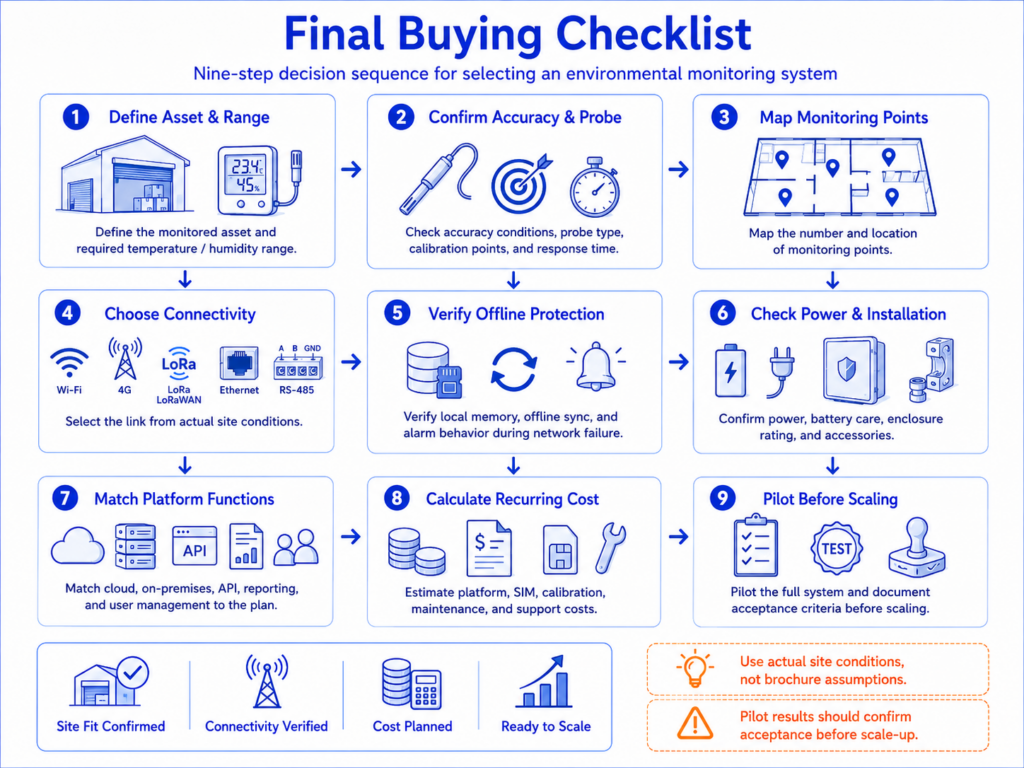
     

    Nine-step buying checklist

    17.Sources and Specification Notice

    Specifications and platform features were reviewed using publicly available manufacturer information on July 23, 2026. Product configurations, regional availability and subscription terms may change. Confirm the latest specifications with each manufacturer before purchasing.


    1. UbiBot WS1 Pro product page
    2. UbiBot WS1 Pro specifications
    3. UbiBot WS4 product page
    4. UbiBot WS4 specifications
    5. UbiBot Public IoT Platform and pricing
    6. UbiBot alert methods
    7. UbiBot external sensor connection guidance

    Related Resources

    Vaccine Refrigerator Temperature Data Loggers: Buffered Probes, Calibration, Alarms and CDC/VFC Buying Checklist
    Real-Time Cold Chain Trackers Compared: Cellular, GPS, Temperature, Humidity, Shock and Light
    Why isn’t the sensor data synced to the platform?
    Ready to Upgrade Your UbiBot? The WS1 Pro Will Be Ready Next Month!
    Amazing Smart Management Solution — Ubibot Multi-sensing Device WS1
    menu-header-svg
    Search
    • Explore Knowledge
      • Comparison & Selection
      • Industry Solution
      • Product & Device
      • Criterion & Compliance
      • Deployment & Usage
      • Technology & Principle
    • Academic Research
    • In-depth Tech

    learn

    See More >>

    How to Choose a Wireless Temperature and Humidity Data Logger: Wi-Fi, 4G, Alerts, Accuracy and Cloud Costs

    30-Second Summary

    A wireless temperature and humidity data logger measures conditions at a defined interval, stores readings locally and transfers data to a cloud or local platform through Wi-Fi, cellular, LoRa or another communication path.

    For a small room with stable internet access, a Wi-Fi logger is usually the simplest option. For remote buildings, temporary sites or locations where local Wi-Fi cannot be trusted, a cellular model reduces dependence on the customer network. LoRa is useful for many battery-powered points spread across a site, but LoRa and LoRa WAN are not interchangeable terms.

    The most important buying criteria are the complete measurement accuracy, probe suitability, offline storage, alarm workflow, battery and power strategy, network compatibility, platform functions, calibration process and recurring cost.

    UbiBot is most relevant when a project needs a choice of Wi-Fi and cellular devices, external RS-485 sensors, large local memory, multiple alarm channels, public-cloud and on-premises deployment paths, and API or data-forwarding options. Projects that require a specific validated regulatory package should review documentation and project configuration separately.

    1.Why Does Choosing the Right Wireless Data Logger Matter?

    A wireless temperature and humidity data logger is often purchased as a small piece of hardware, but the operational decision is much larger. The device determines how measurements are collected, how quickly abnormal conditions are reported, what happens when the network fails, and whether data from one room or hundreds of sites can be managed consistently. A low purchase price can become expensive if the logger requires frequent battery changes, lacks offline memory, uses a limited cloud plan, or cannot connect to the probes and business systems needed later.

    The risk is especially clear in warehouses, laboratories, museums, food storage areas, pharmaceutical facilities, greenhouses and server rooms. Manual checks provide only isolated readings. They do not show what happened between inspections, and they rarely notify staff at the moment a threshold is exceeded. A remote temperature monitoring system closes that gap by recording continuously, preserving historical trends and sending alerts when the measured environment moves outside the required range.

    The right choice therefore depends on more than temperature range and headline accuracy. Buyers should evaluate the complete monitoring chain: sensor, probe, logger electronics, communication network, local memory, alarm workflow, cloud or on-premises platform, calibration process, data export and integration costs. This guide explains how those parts fit together and compares five current configurations from UbiBot, T&D, Testo and Lascar.

    2.Who Is This Guide For?

    This guide is written for people who need to select, specify or approve a connected environmental monitoring device. A QA or validation manager will usually focus on calibration, data integrity, alarm acknowledgement and report retention. A laboratory or museum manager may care more about stable humidity measurement, multi-room visibility and simple historical analysis. Warehouse and facilities teams often prioritize coverage, battery life, offline storage and rapid alarm escalation. System integrators need APIs, data forwarding and clear protocol boundaries, while procurement teams need a realistic view of hardware, network, platform and lifecycle costs.

    3.What Is a Wireless Temperature and Humidity Data Logger?

    A wireless temperature and humidity data logger is a measurement device that samples temperature and relative humidity, timestamps each reading, stores the data and transfers it through a wireless network for remote viewing. Unlike a basic thermometer or humidity sensor, a logger creates a continuous record. Unlike a simple wireless sensor, it normally retains readings when the network is unavailable and synchronizes them after the connection returns.

    How Is a Data Logger Different from a Sensor, Transmitter or Monitoring System?

    Term Practical meaning
    Sensor The sensing element that converts temperature or humidity into an electrical signal. It may be built into the logger or located in an external probe.
    Data logger A device that measures, timestamps and stores readings. A connected logger may also upload data and evaluate alarm rules.
    Transmitter An industrial device that converts a measurement into an output such as 4-20 mA or RS-485/Modbus. Many transmitters do not provide cloud storage or local user-facing reports by themselves.
    Remote monitor A broader commercial term for a connected device and service that allow readings and alarms to be viewed away from the measurement point.
    Gateway A communication bridge that receives data from local nodes and forwards it to a server or cloud platform. LoRa systems commonly use a gateway.
    Environmental monitoring system The complete arrangement of sensors, loggers, networks, software, alarms, users, reports and integrations across one or more sites.

    4.What Problems Does a Wireless Data Logger Solve?

    The main benefit is not simply that the data can be viewed on a phone. The value comes from replacing fragmented manual checks with a continuous and reviewable process. The logger can show how long an excursion lasted, whether conditions recovered before staff arrived, and whether the same problem occurs at a particular time of day or in a particular zone.

    A connected logger also changes the response workflow. Threshold rules can trigger email, app, SMS, voice or local audible notifications depending on the platform and device. Multi-site dashboards allow a central team to compare rooms, warehouses or facilities without asking each location to send spreadsheets. Local memory protects the record during an internet outage, while exports and APIs make the information available to quality systems, building management software or internal reporting tools.

    These advantages are only reliable when the system is designed correctly. A logger installed beside an air-conditioning outlet will report a different environment from the stored goods. A humidity sensor used in condensation may drift or fail. A Wi-Fi-only device cannot upload from a vehicle with no network. A cloud account with short retention may not support the required audit period. Product selection and deployment therefore need to be considered together.

    5.What Are the Core Components of a Remote Temperature Monitoring System?

    System architecture diagram

    A complete system usually contains seven functional layers. The exact hardware varies, but the data path is similar whether the project has one logger or thousands of monitoring points.

    1. The sensor or external probe measures temperature, humidity or another parameter at the required location.
    2. The logger or monitoring terminal timestamps readings, displays local values when a screen is available and stores data in internal memory.
    3. The communication link uses Wi-Fi, 4G/LTE, LoRa, Ethernet or an industrial bus such as RS-485.
    4. A gateway is required when local nodes cannot connect directly to the internet, as in many LoRa deployments.
    5. The cloud or on-premises platform stores, visualizes and organizes data by device, room, site or customer account.
    6. The alarm workflow routes threshold, offline, low-battery or power-loss events to the responsible users.
    7. APIs, MQTT, HTTP, data forwarding or database interfaces connect the monitoring data with third-party applications.

    A standalone sensor is therefore not equivalent to a remote monitoring system. Buyers should confirm which layers are included, which require a separate license, and which need engineering work from the supplier or system integrator.

    6.Which Sensor and Specification Details Matter Most?

    The specification sheet should be read as a set of conditions, not as a list of isolated numbers. The central question is whether the complete configured system can measure the target environment with sufficient accuracy and maintain a usable record throughout the required operating period.

    Measurement Range: Can the Device Survive and Measure the Target Environment?

    The measurement range is the interval over which the sensor can report a value. The logger operating range may be narrower. For example, an external temperature probe may measure below -80°C (-112°F), while the logger body must remain outside the freezer. Humidity ranges also need context: a specification of 0 to 100% RH does not mean the device is designed for continuous condensation. The operating environment, enclosure rating, cable routing and probe installation all matter.

    For ordinary rooms, warehouses and museums, an integrated temperature and humidity sensor may be sufficient. Refrigerators, freezers, ducts, tanks and harsh outdoor locations normally require an external probe so the electronics can remain in a safer position. Ultra-low-temperature or cryogenic applications should be evaluated as a full chain that includes probe class, logger input accuracy, cable effects, calibration points, response time and installation method.

    Accuracy: Sensor Accuracy Is Not the Same as System Accuracy

    Measurement-chain diagram

    Sensor accuracy describes the expected deviation of the sensing element under stated conditions. Logger input accuracy describes the error added by the electronics that read an external probe. Probe accuracy may include the sensing element, cable and connector. Overall system performance also depends on placement, calibration, thermal response, airflow and environmental gradients. These terms should not be combined into one headline number unless the manufacturer has specified the complete assembly.

    For humidity, accuracy normally changes across the range. A device may provide its tightest tolerance around normal room conditions and a wider tolerance near very low or very high humidity. Buyers should compare the accuracy at the actual operating point, not only the best value printed in a brochure. For a museum at 45 to 55% RH, the central-range specification is more relevant. For a greenhouse close to saturation, long-term drift, condensation resistance and maintenance become more important.

    Resolution, Response Time and Drift: Why Do They Affect the Decision?

    Resolution is the smallest displayed or recorded increment. It does not prove that the measurement is accurate to that increment. A logger may display 0.01°C while its stated accuracy is much wider. Response time describes how quickly the sensor approaches a change in the environment. A protected or buffered probe responds more slowly than an exposed air sensor, which can be desirable when the goal is to represent product temperature rather than every brief door opening.

    Long-term drift is especially important for humidity sensors. Even a good initial calibration does not remove the need for periodic verification. The required interval depends on risk, environment, sensor technology, internal procedures and applicable standards. Procurement should therefore include the availability, turnaround time and cost of calibration services or replacement probes.

    Sampling Interval and Upload Interval: Are They the Same?

    The sampling or recording interval controls how often the device creates a measurement record. The upload or communication interval controls how often stored data is sent to the platform. They may be different. A logger can sample every minute and upload every hour to reduce power consumption while preserving detailed data locally. Some devices increase sampling or transmission frequency when an alarm threshold is crossed.

    A shorter interval creates more detail but consumes more battery, memory and network traffic. The correct setting should reflect how quickly the environment can change and how quickly the team must respond. A stable archive room may not need the same interval as a frequently opened cold room. The selected interval should also be included in validation or monitoring procedures, because it determines the visibility of short excursions.

    Local Memory and Offline Recovery: What Happens When the Network Fails?

    Offline storage is a critical buying criterion. The logger should continue recording when Wi-Fi, cellular service or the cloud is unavailable. When the connection returns, the platform should receive the missing records without overwriting timestamps or creating unexplained gaps. The memory capacity must be evaluated against the number of channels and the sampling interval. A statement such as 300,000 readings may represent individual sensor values, while another manufacturer may specify 30,000 data sets containing all channels.

    The alarm limitation during an outage must also be understood. Local recording can preserve evidence, but a cloud alert cannot be delivered if the device has no communication path. Projects with high loss exposure may use cellular backup, redundant gateways, local sirens or a secondary monitoring point rather than relying only on later synchronization.

    Calibration and Certificates: What Should a Buyer Ask For?

    Calibration confirms how the device or probe performed at defined points at a particular time. A certificate may be traceable to national standards, but the scope, points, uncertainty and serial-number coverage need to match the project. A generic factory test report is not equivalent to an accredited calibration certificate. The buyer should also confirm whether the complete logger and probe are calibrated together, whether a probe can be replaced independently, and how data continuity is handled during recalibration.

    For regulated or high-risk environments, calibration is only one element of the monitoring workflow. Alarm testing, user access, audit records, electronic approvals, data retention, backup, change control and system validation may also be required. A product feature should not be described as compliant with a regulation unless the complete configured system and supporting documentation have been assessed for the intended use.

    Battery Life and Power: Why Are Published Estimates Not Directly Comparable?

    Battery life changes with sampling frequency, upload interval, signal strength, display use, alarm activity, temperature and battery chemistry. A Wi-Fi device that uploads every minute will normally use more power than the same device uploading every hour. Cellular radios can consume significant energy when coverage is poor. Cold environments reduce the performance of many battery types.

    For fixed sites, external power with battery backup can reduce maintenance. Battery-only operation is useful where cabling is difficult, but the replacement process, low-battery alarms and maintenance access should be included in the design. Published battery life should be treated as a test condition, not a guarantee for every deployment.

    7.How Should You Choose Between Wi-Fi, 4G, LoRa, Ethernet and RS-485?

    Connectivity should be selected from the site conditions and the number of points, not from a general belief that one technology is always better. Wi-Fi is easy when a reliable customer network is available. Cellular is valuable when the monitoring system must operate independently of local IT. LoRa supports long-range, low-power local links to a gateway. Ethernet provides a stable wired network. RS-485 is an industrial sensor bus rather than an internet connection and normally requires a logger or gateway to move data to a platform.

    Decision matrix comparing Wi-Fi, 4G, LoRa, LoRa WAN, Ethernet and RS-485 by coverage, power, gateway need, cost and typical deployment size.

    Connection Best suited to Strengths Main limitations
    Wi-Fi Rooms, laboratories, museums, offices and warehouses with reliable coverage No SIM cost; direct cloud connection; familiar infrastructure Coverage gaps, enterprise authentication and customer IT policies can delay deployment
    4G/LTE Remote sites, temporary facilities, vehicles and projects that should not depend on local Wi-Fi Independent connection; fast deployment; useful backup path SIM, data and roaming costs; regional bands; signal quality; higher power use
    LoRa Many battery-powered points across a warehouse, farm, campus or underground area Long local range and low node power; one gateway can collect many points Requires a gateway; proprietary and standard implementations differ
    LoRa WAN Standards-based low-power networks using compatible gateways and network servers Broader ecosystem and network architecture Frequency plans, device profiles and interoperability must be verified
    Ethernet Fixed equipment rooms and industrial sites with available cabling Stable wired connection; easier to isolate and manage Installation cost and limited mobility

    LoRa describes the radio modulation and local link. LoRa WAN describes a network protocol and architecture. Do not assume that a LoRa device works with any LoRaWAN gateway unless the manufacturer confirms the protocol stack and interoperability.

    8.Which Wireless Temperature and Humidity Data Loggers Should You Compare?

    The following comparison uses specific current configurations rather than brand-level claims. UbiBot is represented by the WS1 Pro-4G and WS4-A4G1RS because they show two different approaches: a large-screen general-purpose logger and a rugged, dual-band Wi-Fi/4G model with RS-485 expansion. T&D is represented by the TR72A2-S with its supplied high-precision SHA-3151 probe. Testo is represented by the testo 162 H1 with integrated sensors. Lascar is represented by the EL-IOT-SP-TH+ with the high-accuracy hot-swappable smart probe.

    The table should be used as a shortlist tool, not as a universal ranking. Accuracy conditions, platform terms and regional availability differ. The best choice depends on the measurement point, network, calibration workflow and expected scale.

    9.Product Comparison Table

    Table 1. Measurement and hardware configuration

    Comparison point UbiBot WS1 Pro-4G UbiBot WS4-A4G1RS T&D TR72A2-S
    SHA-3151
    testo 162 H1 Lascar EL-IOT-SP-TH+
    EL-SP2-TH+
    Product type Wi-Fi / 4G logger with built-in temperature, humidity and light sensors; external probe support IP65 multi-sensor logger with dual-band Wi-Fi, 4G and RS-485 expansion Wi-Fi logger with external high-precision temperature and humidity probe Wi-Fi online logger with integrated temperature and humidity sensors Wi-Fi cloud logger with external hot-swappable high-accuracy smart probe
    Temperature range Built-in: -20 to 60°C Built-in: -20 to 60°C Probe: -25 to 70°C Integrated: -30 to 50°C Probe: -30 to 80°C
    Temperature accuracy Built-in: ±0.2°C at 0 to 60°C Built-in: ±0.2°C at 0 to 60°C ±0.3°C at 10 to 40°C; ±0.5°C outside that interval ±0.5°C ±1 digit Typical ±0.2°C in the central range; maximum ±0.8°C across the stated range. Confirm exact conditions in the current datasheet.
    Humidity range Built-in: 0 to 100% RH; operating environment 10 to 90% RH, non-condensing Built-in: 0 to 100% RH; operating environment 10 to 90% RH, non-condensing 0 to 99% RH; humidity not measurable below -20°C 0 to 100% RH, non-condensing 0 to 100% RH
    Humidity accuracy Built-in: ±2% RH at 10 to 90% RH Built-in: ±2% RH at 10 to 90% RH ±2.5% RH at 15 to 35°C and 30 to 80% RH ±2% RH in the central range; wider tolerances at higher and extreme humidity Typical ±1.8% RH at 20 to 80% RH; maximum ±4% RH across the full range
    Resolution 0.1°C and 0.1% RH 0.1°C and 0.1% RH 0.1°C and 0.1% RH 0.1°C and 0.1% RH 0.01°C and 0.1% RH
    Sensor arrangement Built-in sensor plus optional UB-DT-P1, PT100 and selected RS-485 probes Built-in sensors; selected variants accept external RS-485 environmental probes Supplied external SHA-3151 probe Integrated sensor; H1 does not provide external probe inputs External EL-SP2-TH+ smart probe with 2 m (79 in) cable
    Enclosure / operating note Logger body is not presented as IP65; optional protective case is available IP65; logger operating environment -20 to 60°C and 10 to 90% RH, non-condensing No waterproof rating stated; logger operating environment -10 to 60°C, ≤90% RH, non-condensing IP30 IP54; logger operating range depends on battery or mains power

    Measurement accuracy is conditional. The values above summarize the reviewed official specifications and should be checked against the current datasheet for the exact operating range, probe and calibration configuration.

    Table 2. Connectivity, storage, power and alarms

    Comparison point UbiBot WS1 Pro-4G UbiBot WS4-A4G1RS T&D TR72A2-S
    SHA-3151
    testo 162 H1 Lascar EL-IOT-SP-TH+
    EL-SP2-TH+
    Network 2.4 GHz Wi-Fi; region-specific 4G/LTE model 2.4/5 GHz Wi-Fi; 4G/LTE bands shown on the current specification page 2.4 GHz Wi-Fi, Bluetooth 4.2 and USB 2.4 GHz Wi-Fi; supports listed enterprise authentication methods Wi-Fi; cloud-connected
    External interfaces Two Micro-USB ports; one supports RS-485; up to two UB-DT-P1 temperature probes and one supported RS-485 probe subject to port/splitter rules Type-C serial interface; RS-485 sensor support on selected models USB for setup/download; no cellular interface Micro-USB power; no external probe interface on H1 Smart-probe interface; mains adapter option
    Local memory 300,000 sensing records 300,000 sensing records 30,000 data sets 10,000 values per channel 300,000 readings
    Recording interval Configurable in the UbiBot platform; minimum value should be confirmed for the selected firmware and account Dynamic acquisition is described on current product pages; exact configurable limits should be confirmed 1 sec to 60 min from the listed choices 1 min to 24 h 10 sec to 12 h
    Upload interval Configurable; minimum value should be confirmed for the selected device and plan Configurable; device can increase acquisition/upload activity after threshold events 1 min to 24 h from the listed choices 1 min to 24 h 1 min to 24 h
    Offline behavior Continues storing readings internally and synchronizes when connectivity returns Continues storing readings internally and synchronizes when connectivity returns Records locally; data can be uploaded to cloud or downloaded by USB/Bluetooth Local memory retains readings; exact recovery workflow should be tested in the project Continues recording and uploads stored data after Wi-Fi returns
    Power 4 AA batteries or 5 V Micro-USB; V2 supports specified Li-SOC12 cells subject to current requirements Built-in 2500 mAh lithium battery or 5 V Type-C 2 AA batteries or USB/AC power 4 AA batteries; USB power option 4 AA batteries or mains adapter
    Display 4.4-inch LCD 57 x 23 mm LCD LCD with current values, max/min and alarm icon Large display with latest values and status Local visual and audible alarm indication; display details should be confirmed by model
    Alarm methods App, email, SMS, voice call, web and audible/connected alarm options; paid credits may apply to SMS/voice Uses the UbiBot alarm platform and can support a connected RS-485 light/siren on relevant variants Email and push notification through T&D services; local ALM icon Push, email and optional SMS through testo Smart Connect Email and SMS plus local audible and visual indication

    An offline logger can preserve data but cannot deliver a remote cloud alert without a working communication path. High-risk projects should consider local alarms, redundant links or secondary monitoring points.

    Table 3. Platform, integration, calibration and buying fit

    Comparison point UbiBot WS1 Pro-4G UbiBot WS4-A4G1RS T&D TR72A2-S
    SHA-3151
    testo 162 H1 Lascar EL-IOT-SP-TH+
    EL-SP2-TH+
    Cloud platform UbiBot Public IoT Platform, web, app, dashboards, exports, reports and device sharing UbiBot Public IoT Platform, same multi-device ecosystem as other UbiBot devices T&D WebStorage Service; free cloud service testo Smart Connect; paid Data Monitoring License required EasyLog Cloud; Starter and Professional account options
    On-premises route UbiBot On-Premises Platform available separately UbiBot On-Premises Platform available separately Free T&D Data Server can receive/store data on a local PC/server and provide browser monitoring No standard on-premises route publicly specified on the reviewed H1 page No standard on-premises route publicly specified for the reviewed product
    API / integration REST APIs, MQTT feeds, HTTP and data forwarding subject to plan/service REST APIs, MQTT feeds, HTTP and data forwarding subject to plan/service T&D WebStorage Service Open API available Not publicly specified on the reviewed product page Not publicly specified for the standard EasyLog Cloud on the reviewed product page
    Calibration workflow Calibration functions and services available; exact certificate scope and selected probe configuration must be confirmed Calibration requirements depend on built-in and external sensors High-precision probe; calibration arrangements should be confirmed with supplier ISO and DAkkS certificate options are listed separately Hot-swappable pre-calibrated probe can reduce logger downtime; calibration options available
    Subscription consideration Free plan plus paid tiers. Official platform page listed $15, $30, $50 and $80 monthly tiers on the review date; features vary by tier. Same UbiBot platform plan structure; 4G also adds SIM/data costs Cloud service is described as free; local server software is also free A valid paid Data Monitoring License is required; global price not publicly fixed on the reviewed product page Starter supports up to four connected devices and limited storage; Professional adds unlimited storage, multiple users and advanced notifications. Pricing is dynamic by device count and currency.
    Best fit General-purpose rooms and multi-site projects needing cellular choice, large display and probe expansion Rugged sites needing IP65, dual-band Wi-Fi, cellular and RS-485 expansion High-precision room monitoring with free cloud, enterprise Wi-Fi support and a local server option Managed indoor environments already using Testo and requiring simple licensed cloud monitoring Projects prioritizing probe replacement/calibration workflow, local sounder and 300,000-reading memory
    Main limitations 2.4 GHz Wi-Fi only; regional 4G SKU must be selected; external TH30S-B humidity is not shown on the device LCD Cellular band support and regional availability require confirmation; exact external-sensor compatibility depends on variant No 4G; external probe cable and non-waterproof logger need suitable placement Wi-Fi only, 10,000 values per channel, paid license and no external probe on H1 Wi-Fi only; standard API/on-premises options not publicly specified; cloud account terms add recurring cost at scale

    Specifications and platform features were reviewed using publicly available manufacturer information on July 23, 2026. Product configurations, regional availability and subscription terms may change. Confirm the latest specifications with each manufacturer before purchasing.

    Five Practical Takeaways from the Comparison

    Decision priority Configuration to examine first
    Flexible Wi-Fi/4G deployment and broad probe expansion UbiBot WS1 Pro-4G
    IP65 enclosure, dual-band Wi-Fi, cellular and RS-485 expansion UbiBot WS4-A4G1RS
    High-precision room monitoring with free cloud and local-server routes T&D TR72A2-S + SHA-3151
    Managed indoor Wi-Fi monitoring within the Testo software ecosystem testo 162 H1
    Hot-swappable calibrated probe workflow with local sound and light alarms Lascar EL-IOT-SP-TH+ + EL-SP2-TH+

    This is a fit-by-priority summary, not a universal ranking. Confirm the exact probe, regional network variant, calibration scope and software plan before purchasing.

    10.How Do the Compared Models Differ in Practice?

    When Does UbiBot WS1 Pro Make Sense?

    The WS1 Pro-4G is suited to projects that need a visible local display, Wi-Fi or cellular connectivity and a broader external-sensor path than a basic room logger. Its 4.4-inch LCD allows staff to check built-in measurements at the device, while 300,000 sensing records provide substantial offline capacity. The two Micro-USB ports support external temperature probes, and the lower port includes RS-485 for selected temperature and humidity, soil, PT100 and wind-speed sensors. Current UbiBot support information notes that the TH30S-B external humidity value can be viewed in the app or console but is not displayed on the WS1 Pro screen.

    The main buying checks are network compatibility and probe configuration. The WS1 Pro specification page states that Wi-Fi is 2.4 GHz only and that WPA2-Enterprise is not supported. Cellular bands differ by regional SKU. A buyer should therefore select the North America, Latin America or Europe/other-region configuration based on the operator network rather than assuming one global 4G model works everywhere.

    When Does UbiBot WS4 Make Sense?

    The WS4 series is a more rugged option for projects that need IP65 protection, a built-in rechargeable battery, dual-band Wi-Fi and selected 4G/RS-485 combinations. The WS4-A4G1RS configuration combines built-in temperature, humidity and light sensing with cellular and RS-485 expansion. The current specification page lists 300,000 sensing records, a 2500 mAh battery and external sensor support that can extend the system to air, soil, CO2, pressure, light and other industrial parameters depending on the exact variant.

    The key limitation is regional and variant complexity. The current page lists specific LTE bands rather than a universal global radio. Buyers should verify local operator coverage, certification and the exact WS4 suffix before ordering. UbiBot marketing pages also use wording that can be read as 5G connectivity, while the detailed specification lists dual-band Wi-Fi and 4G mobile service; the cellular technology should be confirmed in the final product documentation.

    When Does T&D TR72A2-S Make Sense?

    The TR72A2-S is strong where high-precision room measurement, enterprise Wi-Fi authentication and straightforward local or cloud data management are the priorities. Its supplied SHA-3151 probe is specified at ±0.3°C from 10 to 40°C and ±2.5% RH under the stated central conditions. It stores 30,000 data sets and supports Wi-Fi, Bluetooth and USB. T&D WebStorage Service is described as free, and T&D Data Server provides a free local-server route for organizations that do not want to use the cloud.

    It is not a cellular logger and the logger body is not waterproof. The external probe and logger placement must be planned accordingly. Battery life varies substantially with the auto-upload interval, which is a useful reminder that published battery figures should always be compared at similar communication settings.

    When Does testo 162 H1 Make Sense?

    The testo 162 H1 is a focused indoor Wi-Fi logger with integrated temperature and humidity sensing, a clear local display and support for enterprise wireless authentication methods. It is well suited to organizations that already use Testo software or want a licensed, centrally managed cloud system without configuring external probes. The product records 10,000 values per channel and provides push, email and optional SMS alerts through testo Smart Connect.

    Its main constraints are the paid Data Monitoring License, Wi-Fi-only communication, IP30 enclosure and lack of external probe inputs on the H1 model. Other testo 162 variants provide external temperature or humidity inputs, so a buyer who needs a fridge, freezer or duct probe should compare the appropriate model rather than assuming the H1 covers every application.

    When Does Lascar EL-IOT-SP-TH+ Make Sense?

    The EL-IOT-SP-TH+ is attractive when calibration workflow and replaceable probe design are important. The smart probe can be exchanged without returning the logger, reducing downtime. The device provides 300,000-reading internal memory, IP54 protection, local audible and visual alarms and email/SMS notification through EasyLog Cloud. Its stated central-range accuracy is competitive for controlled rooms, and the external 2 m probe can be positioned away from the logger body.

    The system is Wi-Fi dependent for remote access. Standard API and on-premises options were not publicly specified on the reviewed product pages. EasyLog Cloud has Starter and Professional account structures; the recurring cost and data retention should be checked for the planned number of loggers and users.

    11.Which Configuration Is Best for Each Use Case?

    There is no single best wireless temperature and humidity data logger for every environment. The correct configuration starts with the measurement point and then adds the communication, platform and documentation required by the organization.

    Use case Minimum system requirements Possible UbiBot route Important boundary
    Small laboratory Integrated or external room probe; Wi-Fi; local memory; calibration certificate where required WS1 Pro Wi-Fi or WS4-A; use an external probe if the logger heat, enclosure or placement could bias the reading Confirm calibration points, alarm recipients and power-loss response.
    Pharmaceutical warehouse Multiple mapped points, calibrated probes; escalation rules; audit-ready exports; multi-user platform WS1 Pro-4G/WS4 by zone with UbiBot Public IoT Platform or an on-premises design The final system may require validation, controlled access and procedures beyond device features.
    Vaccine refrigerator Buffered temperature probe, min/max workflow, calibration and rapid alerts Use a suitable external temperature probe with a supported logger after project verification Do not treat an ordinary built-in room sensor as a vaccine DDL. Confirm applicable national program requirements.
    Cold room External probe, door/defrost context, offline memory, Wi-Fi or cellular WS1 Pro-4G with external probe or WS4 configuration selected for the site Place the logger body and probe to avoid condensation and cable damage.
    Multi-site warehouse Central dashboard, role-based access, cellular option, API and scalable reporting Mix WS1 Pro and WS4 models under one UbiBot platform account; consider on-premises for data-control requirements Model subscription, SIM, calibration and support costs across all sites.
    Museum or archive Stable humidity accuracy, trend analysis, unobtrusive installation and calibration WS1 Pro Wi-Fi for visible local data or a suitable external-probe configuration Avoid direct airflow, exterior walls, sunlight and display-case microclimates, unless intentionally measured.
    Server room / data center Temperature, humidity and potentially leak detection, Ethernet/Wi-Fi/cellular redundancy, rapid alarms WS4 or WS1 Pro plus leak and additional environmental sensors in the wider UbiBot ecosystem Use rack-level placement and do not rely on one room-average point.
    Greenhouse Air temperature/humidity plus soil, light and possibly CO2; long-range or cellular connection WS4 with supported RS-485 probes, or a LoRa architecture for many distributed nodes Outdoor enclosure, condensation, sensor shielding and local calibration are critical.
    Industrial workshop Robust enclosure, external industrial probes, RS-485 integration and local alarms WS4-A4G1RS or another WS4 RS-485 variant Confirm electromagnetic environment, wiring, grounding and protocol compatibility.
    Temporary or remote site Independent cellular connection, battery operation and offline memory WS1 Pro-4G or WS4 4G configuration with the correct regional bands Check signal, roaming, SIM plan and power budget before deployment.

    12.How Should You Calculate Deployment Scale and Total Cost of Ownership?

    Hardware price is only the first line of the budget. The more useful calculation is total cost of ownership over the planned service period. That calculation should include the logger, external probes, protective cases, gateways, SIM and data charges, cloud subscription, data retention, API access, calibration, battery replacement, installation, validation, support, replacement stock and future expansion.

    Lifecycle cost stack

    At the time of review, the UbiBot Public IoT Platform showed a free plan and paid tiers at $15, $30, $50 and $80 per month, with different report, dashboard, sub-account and API capabilities. The correct tier depends on the required functions rather than only the number of devices. SMS and voice notifications can consume paid credits. Cellular models add SIM and data costs. These terms are time-sensitive and should be confirmed before quotation.

    T&D describes its WebStorage Service and T&D Data Server as free, which can reduce recurring platform cost for a straightforward TR7 deployment. Testo requires a paid Data Monitoring License for the testo 162 system, but the global price is not fixed on the reviewed product page. EasyLog Cloud offers Starter and Professional account types; Starter is designed for up to four connected devices and limited retention, while Professional adds unlimited storage, multiple users and advanced notification features. Pricing is calculated by device count and currency.

    Deployment size Cost pattern Planning priority
    1-10 points Logger and probe price dominate. Free cloud tiers may be sufficient, but verify retention, exports and alert allowances. Installation position, calibration certificate and notification testing often matter more than advanced integration.
    10-100 points Cloud plans, calibration cycles, replacement batteries, SIM charges and user management become material. Standardize naming, zones, alarm escalation and maintenance procedures before rollout.
    100+ points / multiple sites Platform licenses, API traffic, private deployment, server redundancy, support and integration can exceed hardware cost. Run a pilot, define data ownership and retention, test offline recovery and model five-year lifecycle cost.

    13.What Are the Most Common Buying Mistakes?

    Choosing the Lowest Hardware Price

    A cheaper logger may require a paid cloud account, frequent calibration returns, more gateways or manual exports. Compare the five-year system cost, not only the initial unit price.

    Comparing the Best Accuracy Number Without Its Conditions

    Accuracy varies with temperature, humidity and probe configuration. Compare the tolerance at the expected operating point and include logger input error and placement effects.

    Using a Room Sensor for a Refrigerator or Ultra-Low-Temperature Application

    The logger body and sensor may not be suitable inside the chamber. Use a properly specified external probe and confirm calibration, cable entry, buffering and alarm delay.

    Ignoring Offline Data and Offline Alarms

    Local memory can preserve readings, but it does not guarantee a remote alert during a network failure. Define how the site will detect communication loss and whether local alarming or a backup network is required.

    Assuming LoRa and LoRa WAN Mean the Same Thing

    A proprietary LoRa node may not join a third-party LoRa WAN network. Confirm frequency, protocol, keys, gateway compatibility and network-server requirements before purchase.

    Ignoring Regional Wi-Fi and Cellular Requirements

    Check Wi-Fi frequency, enterprise authentication, LTE bands, local certification, SIM roaming and carrier shutdown schedules. A product name alone does not prove regional compatibility.

    Forgetting Calibration and Replacement Logistics

    A monitoring point can be unavailable while a probe or logger is calibrated. Consider spare devices, field-replaceable probes and how certificates are associated with serial numbers in the software.

    Buying a Cloud Feature Without Confirming the Subscription Tier

    APIs, automated reports, SMS, sub-accounts, dashboards and retention may be limited by plan. Put the required software functions into the purchase specification and quotation.

    Deploying Many Devices Without a Naming and Alarm Structure

    A multi-site platform becomes difficult to manage if devices are not organized by site, building, zone and measurement position. Alarm ownership, escalation and acknowledgement should be designed before the rollout.

    14.Where Does UbiBot Fit in the Market?

    UbiBot fits projects that need a flexible path from a small Wi-Fi deployment to a mixed network with cellular models, external probes and centralized multi-site management. The WS1 Pro emphasizes a large local display, two external interfaces and optional 4G. The WS4 series adds IP65 protection, dual-band Wi-Fi, rechargeable power and a wider set of RS-485-oriented configurations. Both can feed the same public IoT platform, which provides web and mobile access, alerts, exports, dashboards, APIs, MQTT and data-forwarding options depending on the plan.

    The availability of an on-premises platform is relevant to organizations that need local data control or private infrastructure. It also gives system integrators a migration path beyond a simple consumer cloud account. The strongest UbiBot comparison is therefore not a claim that every built-in sensor has the tightest specification. It is the combination of communication choices, external sensor expansion, 300,000-record local storage, multi-channel alarms, public-cloud and on-premises routes, and integration tools across several industries.

    The boundaries should be stated clearly. A UbiBot device does not automatically make a project compliant with GxP, 21 CFR Part 11, CDC/VFC requirements or another regulation. The monitoring workflow remains subject to calibration, validation, documentation, user controls, alarm procedures, data retention and project configuration. For specialized pharmaceutical transport, validated laboratory monitoring or a particular high-accuracy probe, a vertical-market supplier may provide a more mature documentation package. The buying decision should compare that documentation and service scope as well as the hardware.

    15.Frequently Asked Questions

    What is the difference between a wireless temperature sensor and a data logger?

    A wireless sensor measures a value and transmits it. A data logger also timestamps and stores readings, so the record can continue during a network outage and be reviewed later. Some products combine both functions in one device.

    Does a wireless temperature and humidity data logger work without Wi-Fi?

    It can continue measuring if it has local memory and battery power, but a Wi-Fi-only model cannot upload data or send cloud alerts until the network returns. A cellular or LoRa system may be more suitable where Wi-Fi is unavailable.

    Is 4G better than Wi-Fi for temperature monitoring?

    Not always. 4G is useful when the system must operate independently of local IT or at a remote site. Wi-Fi usually has lower recurring communication cost. The correct choice depends on coverage, power, security policy and the value of network independence.

    How much local memory should a logger have?

    Calculate the required records from the number of channels, sampling interval and maximum expected outage. Also confirm whether the manufacturer counts individual readings or complete multi-channel data sets.

    How often should temperature and humidity sensors be calibrated?

    The interval should be based on risk, environment, drift history, internal procedures and applicable standards. Many organizations use an annual cycle, but harsher environments or critical processes may require more frequent verification.

    Can one logger use an external temperature and humidity probe?

    Some can. The exact input and probe must be confirmed. UbiBot WS1 Pro supports selected DS18B20 and RS-485 probes, while the testo 162 H1 uses integrated sensors and the Lascar EL-IOT-SP-TH+ uses a dedicated smart probe.

    What happens to alerts if the internet connection is lost?

    Cloud alerts normally cannot be delivered until communication returns. The device may continue recording locally. High-risk sites should add offline alerts, local sounders, cellular backup or a redundant monitoring point.

    Do cloud temperature monitoring systems charge a monthly fee?

    Some do and some provide a free tier. UbiBot offers free and paid plans, T&D describes WebStorage Service as free, Testo requires a paid Data Monitoring License, and EasyLog Cloud offers Starter and Professional account structures.

    Can a wireless data logger connect to a BMS, LIMS or QMS?

    It can if the platform provides a suitable API, MQTT, HTTP, data-forwarding or database interface and the receiving system is configured to use it. Integration scope, authentication, data mapping and support should be confirmed before purchase.

    How many sensors are needed in a warehouse?

    The number should be determined by a temperature and humidity mapping study, building layout, airflow, stored products, risk zones and applicable procedures. One sensor near the door or office is rarely representative of a large warehouse.

    Is a data logger with ±0.2°C accuracy automatically suitable for pharmaceutical use?

    No. Accuracy is only one requirement. The project may also need traceable calibration, mapped placement, alarms, controlled access, audit records, validation, backup and documented response procedures.

    Should I choose a public cloud or an on-premises monitoring platform?

    Use a public cloud for fast deployment and lower IT overhead. Consider on-premises deployment when data sovereignty, isolated networks, internal authentication, custom integration or local control is more important. Compare security, backup, upgrades and total support cost for both options.

    16.How Do You Choose the Right System?

    Start with the environment, not the product list. Define the parameters, expected range, required accuracy and calibration points. Decide whether the measurement should represent room air, stored product, a refrigerator buffer, a duct or an outdoor microclimate. Estimate the number of points and the maximum distance between them.

    Next, select the communication path. Use Wi-Fi where coverage and authentication are reliable. Use cellular when independence from local IT is worth the additional power and data cost. Use LoRa for distributed low-power nodes connected to a gateway, and verify whether the implementation is proprietary LoRa or standards-based LoRaWAN. Use RS-485 for industrial sensors that need a logger or gateway to reach the platform.

    Then check local storage, offline recovery, alarm channels, power strategy, calibration workflow, cloud retention, user roles, reports and integration. Model the full lifecycle cost and test the system in a pilot before a multi-site rollout. UbiBot WS1 Pro and WS4 can be considered when the project benefits from mixed connectivity, external sensor expansion, large offline memory and a choice between public cloud, on-premises software and open interfaces. The final configuration should be confirmed against the current specification, regional SKU and project requirements.

    Final buying checklist

    1. Define the monitored asset and required temperature/humidity range.
    2. Confirm accuracy conditions, probe type, calibration points and response time.
    3. Map the number and location of monitoring points.
    4. Select Wi-Fi, 4G, LoRa/LoRaWAN, Ethernet or RS-485 from the actual site conditions.
    5. Verify local memory, offline synchronization and the alarm behavior during network failure.
    6. Confirm power, battery maintenance, enclosure rating and installation accessories.
    7. Match cloud, on-premises, API, reporting and user-management functions to the required plan.
    8. Calculate recurring platform, SIM, calibration, maintenance and support costs.
    9. Pilot the complete system and document acceptance criteria before scaling.


    Nine-step buying checklist

    17.Sources and Specification Notice

    Specifications and platform features were reviewed using publicly available manufacturer information on July 23, 2026. Product configurations, regional availability and subscription terms may change. Confirm the latest specifications with each manufacturer before purchasing.

    1. UbiBot WS1 Pro product page
    2. UbiBot WS1 Pro specifications
    3. UbiBot WS4 product page
    4. UbiBot WS4 specifications
    5. UbiBot Public IoT Platform and pricing
    6. UbiBot alert methods
    7. UbiBot external sensor connection guidance

    分享

    LinkedIn2

    Facebook2

    X

    Newsletter Signup

    Related Resources

    Vaccine Refrigerator Temperature Data Loggers: Buffered Probes, Calibration, Alarms and CDC/VFC Buying Checklist
    Real-Time Cold Chain Trackers Compared: Cellular, GPS, Temperature, Humidity, Shock and Light
    Why isn’t the sensor data synced to the platform?
    Ready to Upgrade Your UbiBot? The WS1 Pro Will Be Ready Next Month!
    Amazing Smart Management Solution — Ubibot Multi-sensing Device WS1
    menu-header-svg
    Search
    • Explore Knowledge
      • Comparison & Selection
      • Industry Solution
      • Product & Device
      • Criterion & Compliance
      • Deployment & Usage
      • Technology & Principle
    • Academic Research
    • In-depth Tech
    Enter Your Information

    Confirm

    Products

    Dashboards

    Support

    Purchase

    Company

    Smart Sensing

    UbiBot Web Console

    APP Download

    UbiBot Online Store

    News

    Smart Control

    UbiBot Space

    Product Docs & APIs

    Find Distributors

    About Us

    Smart Video

    UbiBot On-Premises

    Helpdesk & FAQ

    Volume Pricing

    Contact Us

    LoRa Products

    Agency Web Console

    Video Center

    Architecture

    Software & Platform


    Pricing


    System Status

    External Sensors


    Become a Distributor

    Accessories


    Become an Affiliate

    Global SIM


    Positioning System


    Products

    Dashboards

    Business Partners

    WS1

    UbiBot Web Console

    Volume Pricing

    WS1 Pro

    UbiBot Space

    Become a Distributor

    GS1

    UbiBot Support Desk

    Affiliates

    GS2

    Agency Web Console


    MS1


    SP1


    Accessories


    Docs

    Purchase

    Company

    Platform API

    Pricing

    News

    Q&A

    UbiBot Partners

    About us

    Privacy Policy

    Online Store

    Contact

    Terms of Service


    System Status

    Products

    Dashboards

    Smart Sensing

    UbiBot Web Console

    Smart Control

    UbiBot Space

    Smart Video

    UbiBot On-Premises

    LoRa Products

    Agency Web Console

    Software & Platform


    External Sensors


    Accessories


    Global SIM


    Positioning System


    Support

    Purchase

    APP Download

    UbiBot Online Store

    Product Docs & APIs

    Find Distributors

    Helpdesk & FAQ

    Volume Pricing

    Video Center


    Pricing


    Company

    News

    About Us

    Contact Us

    Architecture

    System Status

    Become a Distributor

    Become an Affiliate

    Language:
    English 日本語 (ベータ)  
    Language:

    English

    日本語 (ベータ)


    IoT Product Family:
    ubibotico     Wireless environmental sensing products and smart building solutions
    ubitrackico     UWB-based real-time indoor tracking solutions with 30cm accuracy

    IoT Product Family:

    ubibotico  Wireless environmental sensing products and smart building solutions
    ubitrackico  UWB-based real-time indoor tracking solutions with 30cm accuracy

    © 2013-2026 UbiBot.com. All rights reserved.

    Terms of Service | Privacy Policy | Compliance

    youtube facebook twitter